
Shell 编程中的常用工具
文件查找 find 命令
语法格式


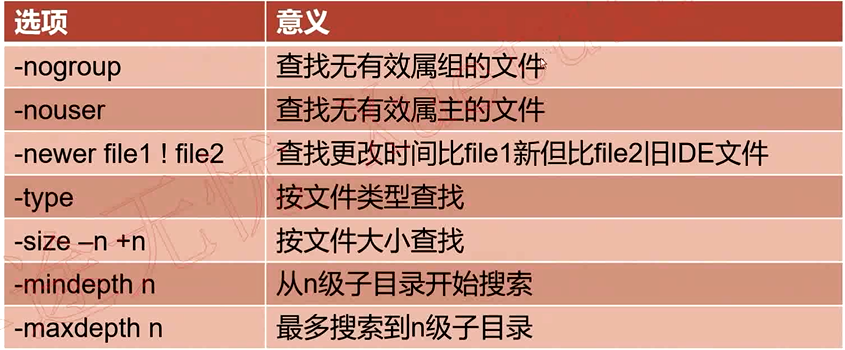
find命令总结:
常用选项:
    -name    查找/etc目录下以conf结尾的文件 find /etc -name "*.conf"

    -iname    查找当前目录下文件名为aa的文件,不区分大小写    find . -iname aa

    -user    查找文件属主为hdfs的所有文件    find . -user hdfs

    -group    查找文件属主为yarn的所有文件    find . -group yarn

    -type    查找文件属组为yarn的所有文件    find . -group yarn
        f    文件        find . -type f

        d    目录        find . -type d

        c    字符设备文件    find . -type c

        b    块设备文件    find . -type b

        l    链接文件    find . -type l

        p    管道文件    find . -type p
    -size

        -n    大小小于n的文件

        +n    大小大于n的文件

        n    大小等于n的文件(用的少)
查找/etc/目录下小于10000字节的文件
find /etc -size -10000c
查找/etc目录下大于1M的文件
find /etc/ -size +1M
-mtime
- -n n天以内修改的文件
- +n n天以外修改的文件
- n 正好等于n天修改的文件
查找/etc目录下5天以内修改且以conf结尾的文件
find /etc -mtime -5 -name '*.conf'

查找/etc目录下10天之前修改且属主为root的文件
find /etc -mtime +10 -user root
-mmin -n
- n分钟以内修改的文件
- +n n分钟以外修改的文件
查找/etc目录下30分钟之前修改的文件
find /etc -mmin +30
查找/etc目录下30分钟以内修改的目录
find /etc -mmin -30 -type d
-mindepth n 表示从n级子目录开始搜索
在/etc下的3级子目录开始搜索
find /etc -mindepth 3 -name '*.conf'
-maxdepth n 表示最多搜索到n级子目录
在/etc下搜索符号条件的文件,但最多搜索到2级子目录
find /etc -type f -name '*.conf' -size +10k -maxdepth 2
需要了解的选项:
-nouser 查找没有属主的文件
find . -type f -nouser
-nogroup 查找没有属组的文件
find . -type f -nogroup
-perm 根据文件权限查找
find . -perm 664
-prune 通常和-path一起使用,用于将特定目录排除在搜索条件之外
查找当前目录下所有普通文件,但排除test目录
find . -path /etc -prune -o -type f
查找当前目录下所有普通文件,但排除etc和opt目录
find . -path /etc -prune -o -path /opt -prune -o -type f
查找当前目录下所有普通文件,但排除etc和opt目录,但属主为hdfs
find . -path /etc -prune -o -path /opt -prune -o -type f -a -user hdfs
查找当前目录下所有普通文件,但排除etc和opt目录,但属主为hdfs,切文件大小必须大于500字节
find . -path ./etc -prune -o -path ./opt -prune -o -type f -a user hdfs -a -size +500c
-newer file1 查找比file1 新的文件
find /etc -newer a
操作:
- -print 打印输出
- -exec 对搜索到的文件执行特定的操作,格式为 -exec 'command' {} \;
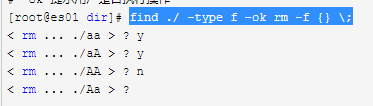
- -ok 和exec功能一样,只是每次操作都会给用户提示
例子1:搜索/etc下的文件(非目录),文件名以conf结尾,且大于10k,然后将其删除
find ./etc -type f -name "*.conf" -size +10k -exec rm -f {} \;
例子2:将/var/log目录下以log结尾的文件,且更改时间在7天以上的删除
find /var/log -name "*.log" -mtime +7 -exec rm -rf {} \;
例子3:搜索条件和例子1一样,只是不删除,而是将其拷贝到/root/conf目录下
find ./etc -size +10k -type f -name "*.conf" -exec cp {} /root/conf/ \;
逻辑运算符:
- -a 与
- -o 或
- -not|! 非
查找当前目录下,属主不是hdfs的所有文件
find . -not -user hdfs | find . ! -user hdfs
查找当前目录下,属主属于hdfs,且大小大于300字节的文件
find . -type f -a -user hdfs -a -size +300c
查找当前目录下的属主为hdfs或者以xml结尾的普通文件
find . -type f -a \( -user hdfs -o -name '*.xml' \)
示例:
查找以.conf结尾的文件
find /etc -name '*.conf'
-name 区分大小写,iname忽略大小写
find ./ -iname 'aa'

查找文件
find ./ -type f
查找/etc/目录下大于1M的文件
find /etc -size +1M
查找3天内修改的文件
find /etc/ -mtime -3
查找5天内的.conf文件
find /etc -mtime -5 -name "*.conf"
查找30分钟内被修改的文件
find /etc -mmin -30
查找2级子目录查找文件
find . -mindepth 2 -type f
最深查找1级子目录的文件
find . -maxdepth 1 -type f

查找644权限的文件
find . -perm 644
排除 test1/nginx 目录后的文件
find . -path ./test1/nginx -prune -o -type f
查找排除 test_1 和 test1 以后的文件
find . -path ./test_1 -prune -o -path ./test1 -prune -o -type f
查找当前目录下比123 新的文件
find ./ -newer 123
将etc目录拷贝到当前目录,查找etc目录中的.conf文件并删除
cp -r /etc ./

find ./etc -name '*.conf' -exec rm -f {} \;

find ./etc -name '*.conf'
将etc目录下大于1m的文件拷贝到test_5目录下
find ./etc/ -size +1M
-ok 提示用户是否执行操作
find ./ -type f -ok rm -f {} \;
find、locate、whereis和which总结及适用场景分析
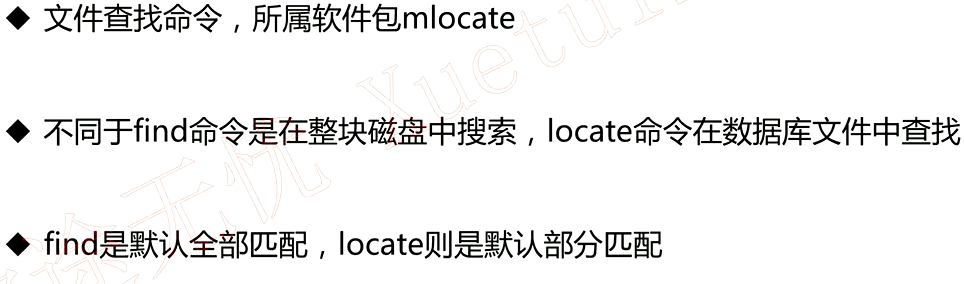
locate 命令
update db 命令
find是精确查找
find /etc -name 'my.cnf'

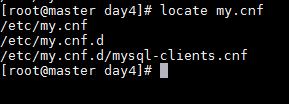
locate部分匹配
locate my.cnf
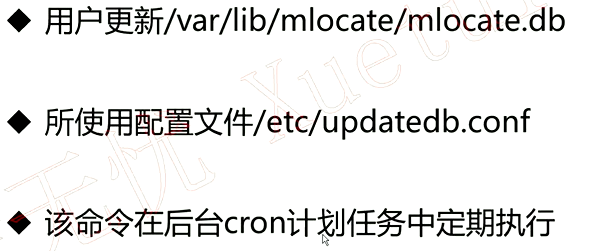
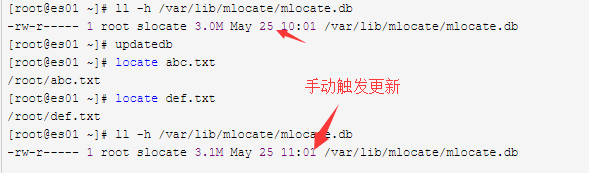
即时创建的文件用locate是查找不到的,因为系统有计划任务定时更新mlocate.db文件,如果不包含是查找不到文件的
touch abc.txt

touch def.txt

# 查询刚刚创建的发现查找不到

locate abc.txt

locate def.txt

# 更新数据库就可以查找到文件了

ll -h /var/lib/mlocate/mlocate.db

updatedb

locate abc.txt

locate def.txt
whereis命令
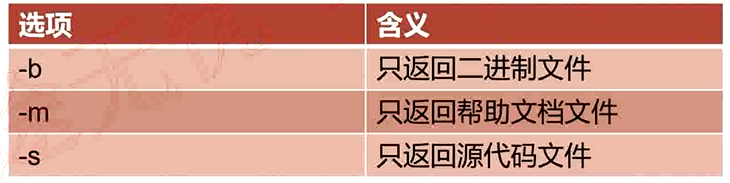
所有的文件都列出来
whereis mysql

只查找二进制文件
whereis -b mysql
只查找man文档
whereis -m mysql
which命令

which mysql
各命令使用场景推荐
- find 查找某一类文件,比如文件名部分一致 功能强大,速度慢
- locate 只能查找单个文件 功能单一,速度快
- whereis 查找程序的可执行文件、帮助文档等 不常用
- which 只查找程序的可执行文件 常用于查找程序的绝对路径
Shell 编程中的常用工具的更多相关文章
- Shell编程中while与for的区别及用法详解【转】
在shell编程中经常用到循环,常用的循环有for和while循环两种.while循环默认以行读取文件,而for循环以空格读取文件切分文件,本篇就结合现网的一些使用示例说说二者的用法和区别. 一.常用 ...
- shell编程中的if语句
if语句在任何编程中都是必不可少.至关重要的分支语句,shell也是如此,只不过各种编程中的方式和格式有点不太一样 shell编程中的if语句基本格式如下: if [ X$1 = XA ];then ...
- [ SHELL编程 ] shell编程中数值计算方法实例
SHELL编程中经常会涉及到数值计算,有时候对于这些计算命令使用场景容易忘记或者混淆,这里针对常用的命令做个总结.主要包括let.bc.expr.(())等. 1.let 使用格式:let 表达式,表 ...
- (转)轻松掌握shell编程中数组的常见用法及示例
缘起:在老男孩进行linux培训shell编程教学中,发现不少水平不错的网友及同学对数组仍然很迷糊,下面就给大家分享下数组的用法小例子,希望能给大家一点帮助.其实SHELL的数组很简单,好用.我们学习 ...
- 【Java基础】Java开发过程中的常用工具类库
目录 Java开发过程中的常用工具类库 1. Apache Commons类库 2. Guava类库 3. Spring中的常用工具类 4. 其他工具 参考 Java开发过程中的常用工具类库 1. A ...
- shell编程中星号(asterisk "*")的坑
今天分享一个有关shell编程中由通配符引起的问题. 1. 问题代码 cat test.logs 4567890 * ##*************************************## ...
- Shell编程中Shift的用法
Shell编程中Shift的用法 位置参数可以用shift命令左移.比如shift 3表示原来的$4现在变成$1,原来的$5现在变成$2等等,原来的$1.$2.$3丢弃,$0不移动.不带参数的shif ...
- socket编程中客户端常用函数
1 常用函数 1.1 connect() int connect(int sockfd, const struct sockaddr *servaddr, socklen_taddrlen); 客 ...
- Linux Shell编程中的几个特殊符号命令 & 、&& 、 ||
https://blog.csdn.net/hack8/article/details/39672145 Linux Shell编程中的几个特殊符号命令 & .&& . || ...
随机推荐
- Swift4.0复习特性、编译标志和检查API的可用性
1.Swift中的特性: @引出,后面紧跟特性名,圆括号带参数即可. @attribute(args) avaiable: 指明对象,函数,类型的可用性. @available(iOS 10.0, m ...
- -webkit-overflow-scrolling : touch 快速滚动 回弹 效果
现在很多for Mobile的HTML5网页内都有快速滚动和回弹的效果,看上去和原生app的效率都有得一拼. 要实现这个效果很简单,只需要在元素上加一行css代码即可: -webkit-overflo ...
- 【ARTS】01_44_左耳听风-201900909~201900915
ARTS: Algrothm: leetcode算法题目 Review: 阅读并且点评一篇英文技术文章 Tip/Techni: 学习一个技术技巧 Share: 分享一篇有观点和思考的技术文章 Algo ...
- IDEA中的,让光标回到上一次停留的地方
IDEA中的,光标返回到上一次停留的地方ctrl+alt+ ←IDEA中的,光标返回到下一次停留的地方ctrl+alt+ → 不过要小心,笔记本电脑,默认的翻转屏幕的快捷键和这个冲突..我的选择是关闭 ...
- 【leetcode算法-简单】7.整数反转
[题目描述] 给出一个 32 位的有符号整数,你需要将这个整数中每位上的数字进行反转. 示例 1: 输入: 123输出: 321 示例 2: 输入: -123输出: -321 示例 3: 输入: 12 ...
- LeetCode 459. 重复的子字符串(Repeated Substring Pattern)
459. 重复的子字符串 459. Repeated Substring Pattern 题目描述 给定一个非空的字符串,判断它是否可以由它的一个子串重复多次构成.给定的字符串只含有小写英文字母,并且 ...
- LeetCode 179. 最大数(Largest Number) 21
179. 最大数 179. Largest Number 题目描述 给定一组非负整数,重新排列它们的顺序使之组成一个最大的整数. 每日一算法2019/5/24Day 21LeetCode179. La ...
- u盘传输文件时提示过大
(无需格式化U盘) 1.拷贝大文件时提示目标文件系统过大,无法复制 2.查U盘,发现剩余空间足够: 3.分析原因,是由于U盘的格式问题导致的,当期的磁盘格式是FAT32类型的,无拷贝过大的文件: 4. ...
- 如何理解MVC
在面试的时候,MVC这个概念考的次数很多,有许多人只能把三个字母解释成三个单词:model,view,controller,但是如果往深处说就说不出来什么东西了,对这个概念模糊不清,今天闲来无事看了一 ...
- 多线程(11) — NIO
Java NIO是new IO的简称,是一种可以替代Java IO的一套新的IO机制.它提供了一套不同于Java标准IO的操作机制,严格来说,NIO与并发并无直接关系,但是使用NIO技术可以大大提高线 ...