
ffmpeg解码音视频过程(附代码)
0. 引言
最近一直在使用和学习ffmpeg. 工作中需要拉流解码, 获取音频和视频数据. 这些都是使用ffmpeg处理.
因为对ffmpeg接触不多, 用的不深, 在使用的过程中经常遇到不太懂的地方, 就会花费很多时间去查阅资料. 所以自己对用到的知识点总结一下, 方便自己以后再重复用到时能够方便找到.
环境: ubuntu16.04, 已安装ffmpeg依赖库. gcc编译工具.
ffmpeg解码过程中用到了两个很重要的结构体, 这两个结构体比较复杂, 用到的次数也非常多, 以后我单独写一篇进行总结.
- AVPacket 保存未解码的数据.
- AVFrame 保存解码后的数据.
1. 解码流程
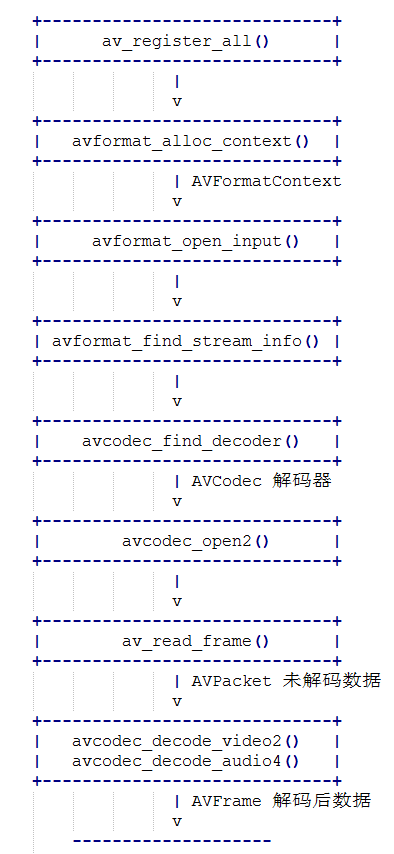
2. 代码
 //***************************************************************

 // @file:    test.c

 // @author:  dingfang

 // @date    2019-07-24 18:55:16

 //***************************************************************

 #include <stdio.h>

 #ifdef __cplusplus

 extern "C"

 {

 #endif

 #include <libavcodec/avcodec.h>

 #include <libavformat/avformat.h>

 #ifdef __cplusplus

 };

 #endif

 int openCodecContext(const AVFormatContext *pFormatCtx, int *pStreamIndex, enum AVMediaType type, AVCodecContext **ppCodecCtx)

 {

     int streamIdx = -;

     // 获取流下标

     for (int i = ; i < pFormatCtx->nb_streams; i++)

     {

         if (pFormatCtx->streams[i]->codec->codec_type == type)

         {

             streamIdx = i;

             break;

         }

     }

     if (streamIdx == -)

     {

         printf("find video stream failed!\n");

         exit(-);

     }

     // 寻找解码器

     AVCodecContext  *pCodecCtx = pFormatCtx->streams[streamIdx]->codec;

     AVCodec *pCodec = avcodec_find_decoder(pCodecCtx->codec_id);

     if (NULL == pCodec)

     {

         printf("avcode find decoder failed!\n");

         exit(-);

     }

     //打开解码器

     if (avcodec_open2(pCodecCtx, pCodec, NULL) < )

     {

         printf("avcode open failed!\n");

         exit(-);

     }

     *ppCodecCtx        = pCodecCtx;

     *pStreamIndex    = streamIdx;

     return ;

 }

 int main(void)

 {

     AVFormatContext    *pInFormatCtx    = NULL;

     AVCodecContext  *pVideoCodecCtx    = NULL;

     AVCodecContext  *pAudioCodecCtx    = NULL;

     AVPacket *pPacket    = NULL;

     AVFrame *pFrame        = NULL;

     int ret;

     /* 支持本地文件和网络url */

     const char streamUrl[] = "./test.flv";

     /* 1. 注册 */

     av_register_all();

     pInFormatCtx = avformat_alloc_context();

     /* 2. 打开流 */

     if(avformat_open_input(&pInFormatCtx, streamUrl, NULL, NULL) != )

     {

         printf("Couldn't open input stream.\n");

         return -;

     }

     /* 3. 获取流的信息 */

     if(avformat_find_stream_info(pInFormatCtx, NULL) < )

     {

         printf("Couldn't find stream information.\n");

         return -;

     }

     int videoStreamIdx = -;

     int audioStreamIdx = -;

     /* 4. 寻找并打开解码器 */

     openCodecContext(pInFormatCtx, &videoStreamIdx, AVMEDIA_TYPE_VIDEO, &pVideoCodecCtx);

     openCodecContext(pInFormatCtx, &audioStreamIdx, AVMEDIA_TYPE_AUDIO, &pAudioCodecCtx);

     pPacket    = av_packet_alloc();

     pFrame    = av_frame_alloc();

     int cnt = ;

     while (cnt--)

     {

         /* 5. 读流数据, 未解码的数据存放于pPacket */

         ret = av_read_frame(pInFormatCtx, pPacket);

         if (ret < )

         {

             printf("av_read_frame error\n");

             break;

         }

         /* 6. 解码, 解码后的数据存放于pFrame */

         /* 视频解码 */

         if (pPacket->stream_index == videoStreamIdx)

         {

             avcodec_decode_video2(pVideoCodecCtx, pFrame, &ret, pPacket);

             if (ret == )

             {

                 printf("video decodec error!\n");

                 continue;

             }

             printf("* * * * * * video * * * * * * * * *\n");

             printf("___height: [%d]\n", pFrame->height);

             printf("____width: [%d]\n", pFrame->width);

             printf("pict_type: [%d]\n", pFrame->pict_type);

             printf("___format: [%d]\n", pFrame->format);

             printf("* * * * * * * * * * * * * * * * * * *\n\n");

         }

         /* 音频解码 */

         if (pPacket->stream_index == audioStreamIdx)

         {

             avcodec_decode_audio4(pAudioCodecCtx, pFrame, &ret, pPacket);

             if (ret < )

             {

                 printf("audio decodec error!\n");

                 continue;

             }

             printf("* * * * * * audio * * * * * * * * * *\n");

             printf("____nb_samples: [%d]\n", pFrame->nb_samples);

             printf("__samples_rate: [%d]\n", pFrame->sample_rate);

             printf("channel_layout: [%lu]\n", pFrame->channel_layout);

             printf("________format: [%d]\n", pFrame->format);

             printf("* * * * * * * * * * * * * * * * * * *\n\n");

         }

         av_packet_unref(pPacket);

     }

     av_frame_free(&pFrame);

     av_packet_free(&pPacket);

     avcodec_close(pVideoCodecCtx);

     avcodec_close(pAudioCodecCtx);

     avformat_close_input(&pInFormatCtx);

     return ;

 }
该代码不能直接编译, 编译需要依赖ffmpeg库. 包含ffmpeg动态库和makefile文件的压缩包地址: 点我下载
解压后, 进入目录, 使用make命令即可编译.
3. 函数说明
这里就几个比较重要的函数简单介绍一下.
av_register_all() /* 使用ffmpeg几乎都要调用这一个函数, 注册ffmpeg各种编解码器, 复用器等. */
avformat_open_input() /* 该函数用于打开本地多媒体文件或者网络流媒体url */
avformat_find_stream_info() /* 该函数用于读取一部分音视频数据并且获得一些相关的信息 */
avcodec_find_decoder() /* 由codec_id或者解码器名称来寻找对应的解码器 */
avcodec_open2() /* 初始化解码器 */
av_read_frame() /* 读流数据, 读出来的是压缩数据, 存放于AVPacket */
avcodec_decode_video2() /* 视频解码 解码后数据为原始数据, 存放于AVFrame */
avcodec_decode_audio4() /* 音频解码 解码后数据为原始数据, 存放于AVFrame */
ffmpeg解码音视频过程(附代码)的更多相关文章
- javaCV入门指南:调用FFmpeg原生API和JavaCV是如何封装了FFmpeg的音视频操作?
通过"javaCV入门指南:序章 "大家知道了处理音视频流媒体的前置基本知识,基本知识包含了像素格式.编解码格式.封装格式.网络协议以及一些音视频专业名词,专业名词不会赘述,自行搜 ...
- FFmpeg处理音视频流程学习笔记
原文作者:一叶知秋0830 链接:https://www.jianshu.com/p/1b715966af50 FFmpeg处理音视频完整流程包括5个阶段(输入文件—>编码数据包—>解码后 ...
- FFmpeg开发实战(五):FFmpeg 抽取音视频的视频数据
如何使用FFmpeg抽取音视频的视频数据,代码如下: // FFmpegTest.cpp : 此文件包含 "main" 函数.程序执行将在此处开始并结束. // #include ...
- FFmpeg开发实战(四):FFmpeg 抽取音视频的音频数据
如何使用FFmpeg抽取音视频的音频数据,代码如下: void adts_header(char *szAdtsHeader, int dataLen); // 使用FFmpeg从视频中抽取音频 vo ...
- iPhone调用ffmpeg2.0.2解码h264视频的示例代码
iPhone调用ffmpeg2.0.2解码h264视频的示例代码 h264demo.zip 关于怎么在MAC下编译iOS下的ffmpeg请看 编译最新ffmpeg2.0.1(ffmpeg2.0.2)到 ...
- C#进程调用FFmpeg操作音视频
项目背景 因为公司需要对音视频做一些操作,比如说对系统用户的发音和背景视频进行合成,以及对多个音视频之间进行合成,还有就是在指定的源背景音频中按照对应的规则在视频的多少秒钟内插入一段客户发音等一些复杂 ...
- FFmpeg Android 学习(一):Android 如何调用 FFMPEG 编辑音视频
一.概述 在Android开发中,我们对一些音视频的处理比较无力,特别是编辑音视频这部分.而且在Android上对视频编辑方面,几乎没有任何API做支持,MediaCodec(硬编码)也没有做支持.那 ...
- ffmpeg 如何音视频同步
转自:http://blog.csdn.net/yangzhiloveyou/article/details/8832516 output_example.c 中AV同步的代码如下(我的代码有些修改) ...
- 使用X264编码yuv格式的视频帧使用ffmpeg解码h264视频帧
前面一篇博客介绍在centos上搭建点击打开链接ffmpeg及x264开发环境.以下就来问个样例: 1.利用x264库将YUV格式视频文件编码为h264格式视频文件 2.利用ffmpeh库将h264格 ...
随机推荐
- idea导入项目之后包位置报错
解决办法:
- java生成zip包兼容Linux
/* 这个方法只用在windows中用服务器为Linux就不行 */ package common.util; import java.io.File;import java.io.FileInput ...
- 微信小程序之简单记账本开发记录(六)
昨天虽然将页面成功的搭建出来 但是其中的增删改查功能没有实现,需要到逻辑页面,即js页面注册一下 效果如下图
- springboot工程打成war包
1.将pom.xml中默认的jar修改为war. <packaging>war</packaging> 2.排除SpringBoot内置的Tomcat容器. <depen ...
- fluent中隐藏模型的开启【转载】
转载自:http://blog.sina.com.cn/s/blog_5fd791530100d5ic.html fluent中设置了一些隐藏模型,普通的用户界面是没有相关选项的,必须用相关命令开启. ...
- global 和 nonlocal关键字
当内部作用域想修改外部作用域的变量时,就要用到global和nonlocal关键字了. def fun(): global num1 num1=2 print("函数内修改后num1=&qu ...
- Leetcode题目292.Nim游戏(脑筋急转弯)
题目描述: 你和你的朋友,两个人一起玩 Nim 游戏:桌子上有一堆石头,每次你们轮流拿掉 1 - 3 块石头. 拿掉最后一块石头的人就是获胜者.你作为先手. 你们是聪明人,每一步都是最优解. 编写一个 ...
- idea内存不足或过大闪退
昨天在码云找了个开源后台项目https://gitee.com/shuzheng/zheng,各种修改后终于跑起来了, 运行没多久就提示内存不足,安装目录配置虚拟机最大可用内存为512M idea弹窗 ...
- UNIX 历史问题 分布式系统的Thundering Herd效应 惊群效应
https://uwsgi-docs.readthedocs.io/en/latest/articles/SerializingAccept.html One of the historical pr ...
- LC 987. Vertical Order Traversal of a Binary Tree
Given a binary tree, return the vertical order traversal of its nodes values. For each node at posit ...