
Duilib的控件拖拽排序,支持跨容器拖拽(网易云信版本)
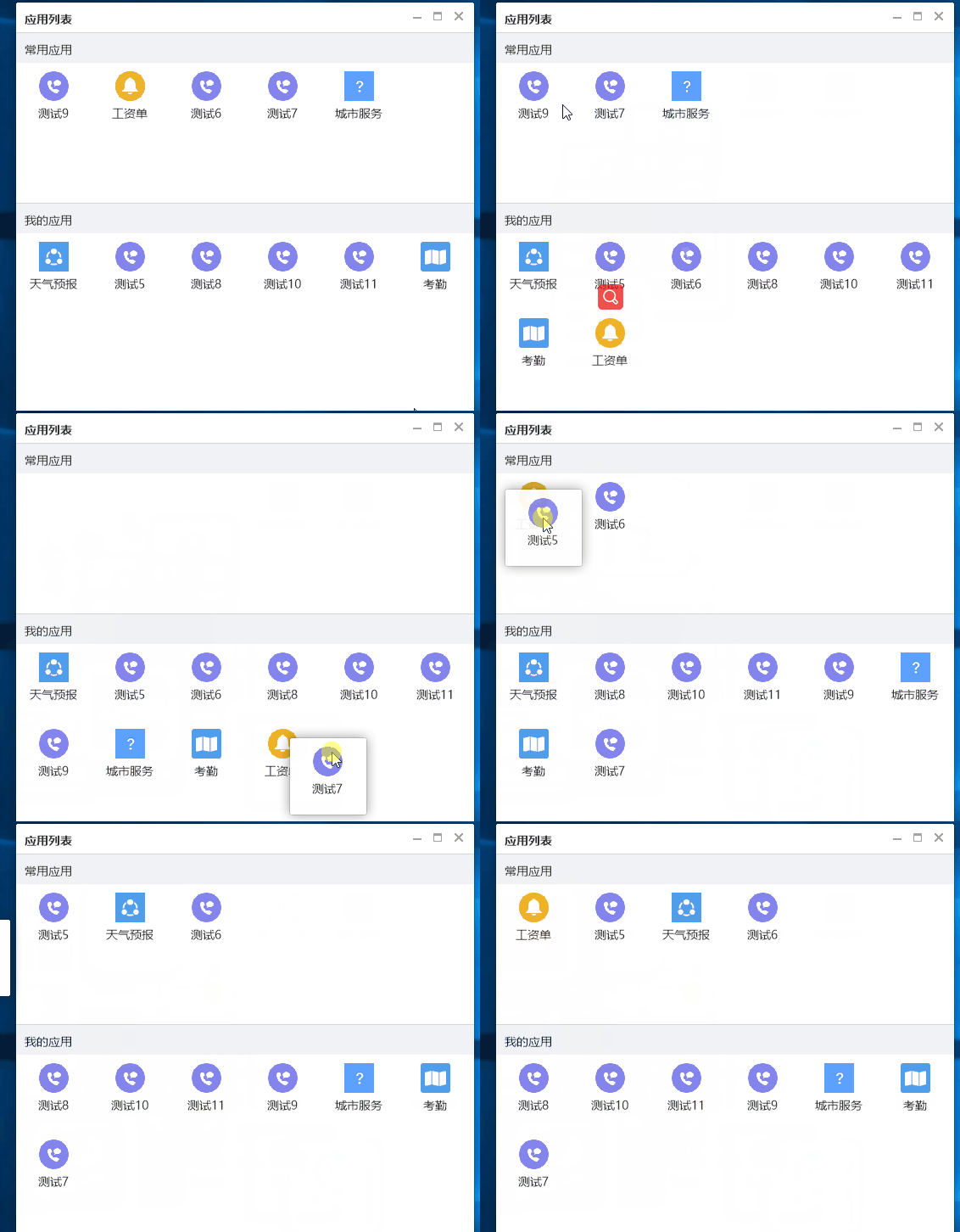
完整代码见:https://github.com/netease-im/NIM_Duilib_Framework/pull/151
核心代码(思路):
appitem.h
#pragma once

#define APP_HEIGHT 90

#define APP_WIDTH  90

#define EACH_LINE  6

#include <string>

//app的具体信息,这里假定有id,name,_icon,_isFrequent自行拓展

struct AppItem

{

    std::string _id;

    std::wstring _name;

    std::wstring _icon;

    bool _isFrequent=false;

};

//App UI类

class AppItemUi : public ui::VBox

{

public:

    static AppItemUi* Create(const AppItem& item);

    virtual void DoInit();

    void SetAppdata(const AppItem& item,bool refresh);

    void FixPos(int step,int index=-);   //前进/后退多少步  目前应该有-1 0 1

    inline int getIndex() const { return index_; }

    inline const AppItem& getAppData() const { return app_data_; }

private:

    AppItem app_data_;

    int index_ = ;    //第几个

    ui::Control* app_icon_ = nullptr;

    ui::Label* app_name_ = nullptr;

};

//AppWindow 拖动显示窗口类

//最好半透明

class AppWindow : public ui::WindowImplBase

{

public:

    AppWindow();

    ~AppWindow();

    static AppWindow* CreateAppWindow(HWND hParent, POINT pt, const AppItem& Item)

    {

        AppWindow* ret = new AppWindow;

        ret->SetBeforeCreate(Item, pt);

        ret->Create(hParent, L"", WS_POPUP, WS_EX_TOOLWINDOW);

        pThis_ = ret;

        //需要改变下pos,延后到initWindows

        return ret;

    }

    /**

    * 一下三个接口是必须要覆写的接口,父类会调用这三个接口来构建窗口

    * GetSkinFolder        接口设置你要绘制的窗口皮肤资源路径

    * GetSkinFile            接口设置你要绘制的窗口的 xml 描述文件

    * GetWindowClassName    接口设置窗口唯一的类名称

    */

    virtual std::wstring GetSkinFolder() override;

    virtual std::wstring GetSkinFile() override;

    virtual std::wstring GetWindowClassName() const override;

    /**

    * 收到 WM_CREATE 消息时该函数会被调用,通常做一些控件初始化的操作

    */

    virtual void InitWindow() override;

    /**

    * 收到 WM_CLOSE 消息时该函数会被调用

    */

    virtual LRESULT OnClose(UINT uMsg, WPARAM wParam, LPARAM lParam, BOOL& bHandled);

    //其他的功能函数

    void SetBeforeCreate(const AppItem& Item, POINT pt){ item_ = Item; pt_ = pt; }

    void AdjustPos();

    void InstallHook();

    void UnInstallHook();

    static LRESULT CALLBACK LowLevelMouseProc(int nCode, WPARAM wParam, LPARAM lParam);

private:

    AppItem item_;

    ui::Box* origin_owner = nullptr;  //

    POINT pt_;

    static HHOOK mouse_Hook_ ;

    static AppWindow* pThis_;

};
appitem.cpp
#include "stdafx.h"

#include "appitem.h"

AppItemUi* AppItemUi::Create(const AppItem& item)

{

    AppItemUi* uiItem = new AppItemUi;

    uiItem->SetAppdata(item, false);

    ui::GlobalManager::FillBoxWithCache(uiItem, L"movecontrol/app_item.xml");

    return uiItem;

}

void AppItemUi::DoInit()

{

    app_icon_ = static_cast<ui::Control*>(FindSubControl(L"app_icon"));

    if (app_icon_)

    {

        app_icon_->SetBkImage(app_data_._icon);

    }

    app_name_ = static_cast<ui::Label*>(FindSubControl(L"app_name"));

    if (app_name_)

    {

        app_name_->SetText(app_data_._name);

    }

    //绑定事件

}

void AppItemUi::SetAppdata(const AppItem& item,bool refresh)

{

    app_data_ = item;

    if (refresh)

    {

        if (app_icon_)

        {

            app_icon_->SetBkImage(app_data_._icon);

        }

        if (app_name_)

        {

            app_name_->SetText(app_data_._name);

        }

    }

}

void AppItemUi::FixPos(int step, int index)

{

    if (index != -)

    {

        index_ = index;

    }

    index_ += step;

    ui::UiRect marginRect = { (index_ % EACH_LINE)*APP_WIDTH, (index_ / EACH_LINE)*APP_HEIGHT,, };

    SetMargin(marginRect);

}

AppWindow::AppWindow()

{

}

AppWindow::~AppWindow()

{

}

std::wstring AppWindow::GetSkinFolder()

{

    return L"movecontrol";

}

std::wstring AppWindow::GetSkinFile()

{

    return L"app_window.xml";

}

std::wstring AppWindow::GetWindowClassName() const

{

    return L"movecontrol";

}

void AppWindow::InitWindow()

{

    ui::VBox* root = static_cast<ui::VBox*>(FindControl(L"root"));

    if (root)

    {

        auto app_item = AppItemUi::Create(item_);

        root->Add(app_item);

    }

    //设置消息钩子,不然无法即时移动

    InstallHook();

    //移动到合适的位置

    AdjustPos();

}

LRESULT AppWindow::OnClose(UINT uMsg, WPARAM wParam, LPARAM lParam, BOOL& bHandled)

{

    //清理hook

    UnInstallHook();

    pThis_ = nullptr;

    return ;

}

HHOOK AppWindow::mouse_Hook_;

AppWindow* AppWindow::pThis_;

void AppWindow::AdjustPos()

{

    //移动到合适位置,并接管鼠标

    //移植pos的位置,注意去掉阴影

    //

    ui::UiRect rcCorner = GetShadowCorner();

    POINT ptCursor;

    ::GetCursorPos(&ptCursor);

    //左上角的位置

    ptCursor.x -= pt_.x;

    ptCursor.y -= pt_.y;

    ::SetWindowPos(GetHWND(), NULL, ptCursor.x - rcCorner.left, ptCursor.y - rcCorner.top, -, -, SWP_NOSIZE | SWP_NOZORDER | SWP_SHOWWINDOW);

}

void AppWindow::InstallHook()

{

    if (mouse_Hook_)   UnInstallHook();

    mouse_Hook_ = SetWindowsHookEx(WH_MOUSE_LL,

        (HOOKPROC)AppWindow::LowLevelMouseProc, GetModuleHandle(NULL), NULL);

}

void AppWindow::UnInstallHook()

{

    if (mouse_Hook_) {

        UnhookWindowsHookEx(mouse_Hook_);

        mouse_Hook_ = NULL;  //set NULL

    }

}

LRESULT CALLBACK AppWindow::LowLevelMouseProc(int nCode, WPARAM wParam, LPARAM lParam)

{

    if (nCode == HC_ACTION)

    {

        if (wParam == WM_MOUSEMOVE &&::GetKeyState(VK_LBUTTON) < )

        {

            MOUSEHOOKSTRUCT *pMouseStruct = (MOUSEHOOKSTRUCT *)lParam;

            if (NULL != pMouseStruct)

            {

                if (pThis_)

                {

                    pThis_->AdjustPos();

                }

            }

        }

        else if (wParam == WM_LBUTTONUP)

        {

            //鼠标弹起,无论什么时候都需要销毁窗口

            if (pThis_)

            {

                //通知主窗口事件

                ::PostMessage(GetParent(pThis_->GetHWND()), WM_LBUTTONUP, , );

                pThis_->Close();

            }

        }

    }

    return CallNextHookEx(mouse_Hook_, nCode, wParam, lParam);

}
layouts_form.h
#pragma once

#include "AppDb.h"

enum ThreadId

{

    kThreadUI

};

class LayoutsForm : public ui::WindowImplBase

{

public:

    LayoutsForm(const std::wstring& class_name, const std::wstring& theme_directory, const std::wstring& layout_xml);

    ~LayoutsForm();

    /**

     * 一下三个接口是必须要覆写的接口,父类会调用这三个接口来构建窗口

     * GetSkinFolder        接口设置你要绘制的窗口皮肤资源路径

     * GetSkinFile            接口设置你要绘制的窗口的 xml 描述文件

     * GetWindowClassName    接口设置窗口唯一的类名称

     */

    virtual std::wstring GetSkinFolder() override;

    virtual std::wstring GetSkinFile() override;

    virtual std::wstring GetWindowClassName() const override;

    /**

     * 收到 WM_CREATE 消息时该函数会被调用,通常做一些控件初始化的操作

     */

    virtual void InitWindow() override;

    /**

     * 收到 WM_CLOSE 消息时该函数会被调用

     */

    virtual LRESULT OnClose(UINT uMsg, WPARAM wParam, LPARAM lParam, BOOL& bHandled);

    /**

    * @brief 接收到鼠标左键弹起消息时被调用

    * @param[in] uMsg 消息内容

    * @param[in] wParam 消息附加参数

    * @param[in] lParam 消息附加参数

    * @param[out] bHandled 返回 true 则继续派发该消息,否则不再派发该消息

    * @return 返回消息处理结果

    */

    virtual LRESULT OnLButtonUp(UINT uMsg, WPARAM wParam, LPARAM lParam, BOOL& bHandled);

public:

    static void ShowCustomWindow(const std::wstring& class_name, const std::wstring& theme_directory, const std::wstring& layout_xml);

private:

    //drag-drop相关

    bool OnProcessAppItemDrag(ui::EventArgs* param);

    void DoDrag(ui::Control* pAppItem, POINT pt_offset);

    void DoBeforeDrag();

    void DoDraging(POINT pt_offset);

    bool DoAfterDrag(ui::Box* check);

private:

    std::wstring class_name_;

    std::wstring theme_directory_;

    std::wstring layout_xml_;

    ui::Box* frequent_app_=nullptr;

    ui::Box* my_app_ = nullptr;

    bool is_drag_state_=false;

    POINT old_drag_point_;

    AppItemUi* current_item_ = nullptr;

};
layouts_form.cpp
#include "stdafx.h"

#include "layouts_form.h"

using namespace ui;

using namespace std;

LayoutsForm::LayoutsForm(const std::wstring& class_name, const std::wstring& theme_directory, const std::wstring& layout_xml)

    : class_name_(class_name)

    , theme_directory_(theme_directory)

    , layout_xml_(layout_xml)

{

}

LayoutsForm::~LayoutsForm()

{

}

std::wstring LayoutsForm::GetSkinFolder()

{

    return theme_directory_;

}

std::wstring LayoutsForm::GetSkinFile()

{

    return layout_xml_;

}

std::wstring LayoutsForm::GetWindowClassName() const

{

    return class_name_;

}

void LayoutsForm::InitWindow()

{

    //添加应用。应用有可能是服务器下发的,一般本地也有保存的

    //loadFromDb

    //getFromServer---->后台可以先保存到db,再post个消息出来,界面重新从db load。

    //作为demo,先写死

    std::vector<AppItem> applist;

    CAppDb::GetInstance().LoadFromDb(applist);

    frequent_app_ = static_cast<ui::Box*>(FindControl(L"frequent_app"));

    my_app_ = static_cast<ui::Box*>(FindControl(L"my_app"));

    for (const auto& item: applist)

    {

        AppItemUi* pAppUi = AppItemUi::Create(item);

        pAppUi->AttachAllEvents(nbase::Bind(&LayoutsForm::OnProcessAppItemDrag, this, std::placeholders::_1));

        if (item._isFrequent)

        {

            pAppUi->FixPos(, frequent_app_->GetCount());

            frequent_app_->Add(pAppUi);

        }

        else

        {

            pAppUi->FixPos(, my_app_->GetCount());

            my_app_->Add(pAppUi);

        }

    }

}

LRESULT LayoutsForm::OnClose(UINT uMsg, WPARAM wParam, LPARAM lParam, BOOL& bHandled)

{

    PostQuitMessage(0L);

    return __super::OnClose(uMsg, wParam, lParam, bHandled);

}

LRESULT LayoutsForm::OnLButtonUp(UINT uMsg, WPARAM wParam, LPARAM lParam, BOOL& bHandled)

{

    if (current_item_ == nullptr)

    {

        return __super::OnLButtonUp(uMsg,wParam,lParam,bHandled);

    }

    Box* pParent = current_item_->GetParent();

    pParent->SetAutoDestroy(true);

    if (!DoAfterDrag(frequent_app_) && !DoAfterDrag(my_app_))

    {

        //回滚

        pParent->AddAt(current_item_, current_item_->getIndex());

        //从index处开始补缺口

        for (int index = current_item_->getIndex()+; index < pParent->GetCount(); ++index)

        {

            AppItemUi* _pItem = dynamic_cast<AppItemUi*>(pParent->GetItemAt(index));

            if (_pItem)

            {

                _pItem->FixPos(+);

            }

        }

    }

    //更新App信息到数据库

    CAppDb::GetInstance().SaveToDb(current_item_->getAppData());

    is_drag_state_ = false;

    current_item_ = nullptr;

    SetForegroundWindow(m_hWnd);

    SetActiveWindow(m_hWnd);

    return __super::OnLButtonUp(uMsg, wParam, lParam, bHandled);

}

void LayoutsForm::ShowCustomWindow(const std::wstring& class_name, const std::wstring& theme_directory, const std::wstring& layout_xml)

{

    LayoutsForm* window = new LayoutsForm(class_name, theme_directory, layout_xml);

    window->Create(NULL, class_name.c_str(), WS_OVERLAPPEDWINDOW & ~WS_MAXIMIZEBOX, );

    window->CenterWindow();

    window->ShowWindow();

}

//得想办法抓起鼠标弹起的一刻

bool LayoutsForm::OnProcessAppItemDrag(ui::EventArgs* param)

{

    switch (param->Type)

    {

    case kEventMouseMove:

    {

        if (::GetKeyState(VK_LBUTTON) >= )

            break;

        if (!is_drag_state_)

        {

            break;

        }

        //检测位移

        LONG cx = abs(param->ptMouse.x - old_drag_point_.x);

        LONG cy = abs(param->ptMouse.y - old_drag_point_.y);

        if (cx <  && cy < )

        {

            break;

        }

        //在拖拽模式下

        //获取鼠标相对AppItem的位置

        ui::UiRect rect = param->pSender->GetPos(); //左上角有效

        POINT pt = { param->ptMouse.x - rect.left, param->ptMouse.y - rect.top };

        DoDrag(param->pSender, pt);

        is_drag_state_ = false;

    }

        break;

    case kEventMouseButtonDown:

    {

        is_drag_state_ = true;

        old_drag_point_ = param->ptMouse;

    }

        break;

    case kEventMouseButtonUp:

    {

        is_drag_state_ = false;

        //DoDrop

    }

        break;

    }

    return true;

}

void LayoutsForm::DoDrag(ui::Control* pAppItem, POINT pos)

{

    current_item_ = dynamic_cast<AppItemUi*>(pAppItem);

    if (nullptr==current_item_)

    {

        return;

    }

    DoBeforeDrag();

    DoDraging(pos);

}

void LayoutsForm::DoBeforeDrag()

{

    //抠出该项目,后面的项目全部左移

    ASSERT(current_item_);

    if (current_item_)

    {

        Box* pParent = current_item_->GetParent();

        ASSERT(pParent);

        pParent->SetAutoDestroy(false);  //子控件不销毁

        pParent->Remove(current_item_);

        //从index处开始补缺口

        for (int index = current_item_->getIndex(); index < pParent->GetCount(); ++index)

        {

            AppItemUi* _pItem = dynamic_cast<AppItemUi*>(pParent->GetItemAt(index));

            if (_pItem)

            {

                _pItem->FixPos(-);

            }

        }

    }

}

void LayoutsForm::DoDraging(POINT pos)

{

    //这里注意,如果只是父控件内部移动的话,会简单很多

    //设置下current_item_的setmargin,重新add回去,先保留在父控件的最后一个

    //index_保存之前的位置(防取消),当鼠标弹起时,再设置下合理的值,包括在父控件的位置

    //跨进程移动的话,需要借用drag-drop,也是可以实现的,这里从略

    //本Demo实现的是跨父控件移动(兼容父控件内部移动),并且可以移动出窗口范围,因此创建临时窗口

    //非常遗憾,当临时窗口创建时,临时窗口并没有即时的拖拽感,这里采取Hook方法,在mousemove消息移动。

    //这里创建新窗口 当然得确保不能重复有窗口,这里省略

    AppWindow* pWindow = AppWindow::CreateAppWindow(GetHWND(), pos, current_item_->getAppData());

    ASSERT(pWindow);

}

bool LayoutsForm::DoAfterDrag(ui::Box* check)

{

    //获取鼠标的位置

    POINT pt;

    GetCursorPos(&pt);

    ScreenToClient(m_hWnd, &pt);

    int findIndex = ;

    UiRect rectBox = check->GetPos();

    if (rectBox.IsPointIn(pt))

    {

        //最好是重合面积更大的,这里根据鼠标位置来了

        for (findIndex = ; findIndex < check->GetCount(); findIndex++)

        {

            auto control = check->GetItemAt(findIndex);

            UiRect rectCtrl = control->GetPos();

            if (rectCtrl.IsPointIn(pt))

            {

                //插入到该index

                break;

            }

        }

        //合理安排区域

        if (findIndex < check->GetCount())

        {

            current_item_->FixPos(, findIndex);

            check->AddAt(current_item_, findIndex);

            //从index处开始补缺口

            for (int index = findIndex + ; index < check->GetCount(); ++index)

            {

                AppItemUi* _pItem = dynamic_cast<AppItemUi*>(check->GetItemAt(index));

                if (_pItem)

                {

                    _pItem->FixPos(+);

                }

            }

            return true;

        }

        else

        {

            //放到最后面

            current_item_->FixPos(, findIndex);

            check->Add(current_item_);

            return true;

        }

    }

    else

    {

        return false;

    }

}
Duilib的控件拖拽排序,支持跨容器拖拽(网易云信版本)的更多相关文章
- duilib List控件,横向滚动时列表项不移动或者显示错位的bug的修复
转载请说明出处,谢谢~~:http://blog.csdn.net/zhuhongshu/article/details/42264673 关于这个bug的修复我之前写过一篇博客,连接为:http:/ ...
- android 自定义空间 组合控件中 TextView 不支持drawableLeft属性
android 自定义空间 组合控件中 TextView 不支持drawableLeft属性.会报错Caused by: android.view.InflateException: Binary X ...
- 【新功能前瞻】SpreadJS 纯前端表格控件V12.2:打印增强、拖拽填充等六大特性
新版本来袭:葡萄城 SpreadJS 纯前端表格控件的全新版本 V12.2 将于8月正式发布! 作为一款备受华为.招商银行.中国平安.苏宁易购等行业专家和前端开发者认可的纯 JavaScript 电子 ...
- duilib修复ActiveXUI控件bug,以支持flash透明动态背景
转载请说明原出处,谢谢~~ 昨天在QQ控件里和同学说起QQ2013登陆窗体的开发,从界面角度考虑,单单一个登陆界面是很容易做出来的.腾讯公司为了 防止各种盗号行为可谓煞费苦心,QQ2013采用了动态背 ...
- duilib List控件,横向滚动时列表项不移动或者移动错位的bug的修复
转载请说明出处,谢谢~~ 这篇博客已经作废,只是留作记录,新的bug修复博客地址:http://blog.csdn.net/zhuhongshu/article/details/42264673 之前 ...
- duilib combo控件,当鼠标滚动时下拉列表自动关闭的bug的修复
转载请说明出处,谢谢~~ 群里有朋友提到了使用Combo控件时,当下拉列表出现,此时鼠标滚轮滚动,下拉列表就自动消失了.我看了一下源码,这个bug的修复很简单. CComboUI控件被单击时创建CCo ...
- c++ builder TListView控件按字符串排序(根据网上代码亲测ok)
//--------------------------------------------------------------------------- /* 首先将一个列表框控件安放在Form上, ...
- 增加duilib edit控件的提示功能和多种文字颜色
转载请说明原出处,谢谢~~:http://blog.csdn.net/zhuhongshu/article/details/41786407 duilib的CEditUI控件内部使用了win32的原生 ...
- 修复duilib CEditUI控件和CWebBrowserUI控件中按Tab键无法切换焦点的bug
转载请说明原出处,谢谢~~:http://blog.csdn.net/zhuhongshu/article/details/41556615 在duilib中,按tab键会让焦点在Button一类的控 ...
随机推荐
- [人物存档]【AI少女】【捏脸数据】活泼少女
AISChaF_20191028022750507.png
- removeProp(name)
removeProp(name) 概述 用来删除由.prop()方法设置的属性集 随着一些内置属性的DOM元素或window对象,如果试图将删除该属性,浏览器可能会产生错误.jQuery第一次分配un ...
- fish-redux快速创建文件夹模板 FishReduxTemplate
推荐一款插件: 在插件plugins中搜 FishReduxTemplate
- nginx 配置文件 2019-12-20
cat /etc/nginx/nginx.conf user nginx; worker_processes ; error_log /var/log/nginx/error.log warn; p ...
- mysql 日常操作-DDL
1 修改字段类型 需求修改表字段类型 alter table 表名 modify column 修改的字段(列名) 类型(修改的类型) ALTER TABLE sys_entry_item m ...
- Mybatis 实体类使用@Accessors(chain = true)注解时,对应的mapper xml 报错
去掉这个注解就行了 应该是 mybatis 会调用实体类的 getter setter 方法, 返回值可能会有所影响
- Selenium2+python自动化-使用JS脚本处理网页滚动条
内容来自:https://www.cnblogs.com/yoyoketang/p/6128655.html JS相关知识:http://www.w3school.com.cn/js/index.as ...
- C# async await and state machine
Async Await and the Generated StateMachine https://www.codeproject.com/Articles/535635/Async-Await-a ...
- 定时任务-Quartz(热部署、冷部署)
一.配置Quartz.xml <beans xmlns="http://www.springframework.org/schema/beans" xmlns:context ...
- Mac下制作openwrt U盘启动盘
华硕路由用腻了,正好家里有老旧淘汰的电脑,那么非常适合折腾一下OpenWrt,科学上网靠自己. 什么是OpenWrt:OpenWrt是适合于嵌入式设备的一个Linux发行版. 参考资料:https:/ ...