
Centos7 Devstack [Rocky] 重启后无法联网
部署devstack-rocky版本后网络,可以 Ping 通自己的 IP,但 Ping 不同网关,ping不通同网段主机,查看网卡和ovs信息如下
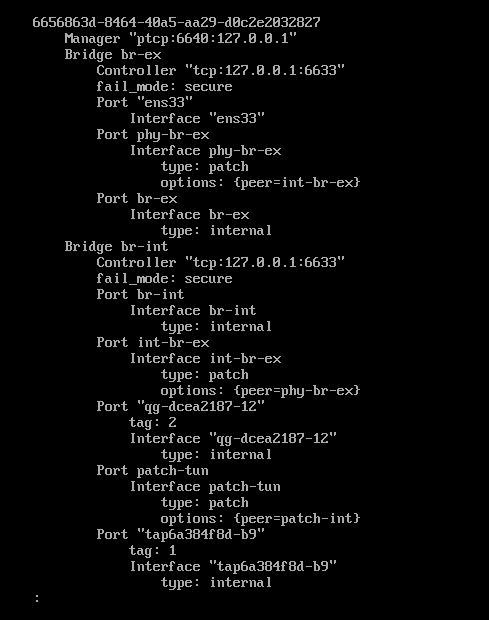
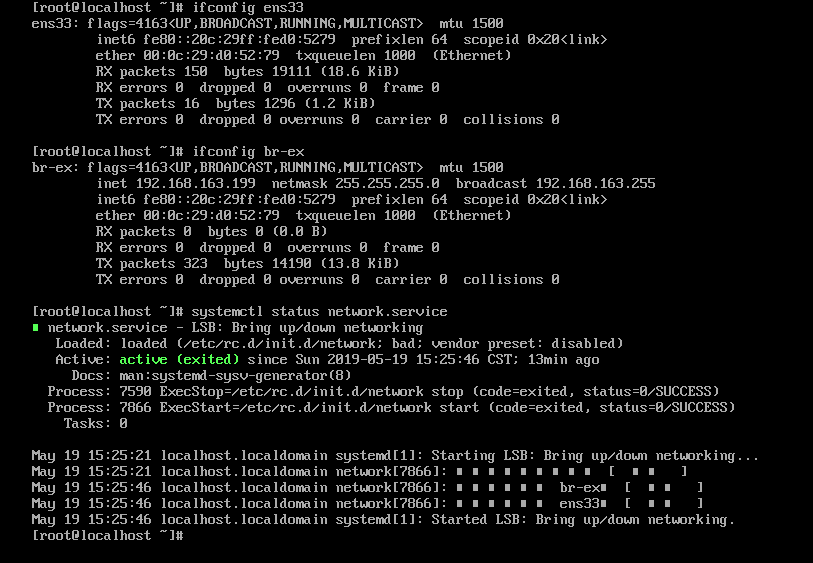
解决
第一步
按造网上教程,修改br-ex,ens33的配置文件
[root@localhost ~]# cat /etc/sysconfig/network-scripts/ifcfg-ens33

TYPE=Ethernet

PROXY_METHOD=none

BROWSER_ONLY=no

BOOTPROTO=none

DEFROUTE=yes

IPV4_FAILURE_FATAL=no

IPV6INIT=yes

IPV6_AUTOCONF=yes

IPV6_DEFROUTE=yes

IPV6_FAILURE_FATAL=no

IPV6_ADDR_GEN_MODE=stable-privacy

NAME=ens33

DEVICE=ens33

ONBOOT=yes

[root@localhost ~]#
br-ex
[root@localhost ~]# cat /etc/sysconfig/network-scripts/ifcfg-br-ex

TYPE=Ethernet

PROXY_METHOD=none

BROWSER_ONLY=no

BOOTPROTO=static

DEFROUTE=yes

IPV4_FAILURE_FATAL=no

IPV6INIT=yes

IPV6_AUTOCONF=yes

IPV6_DEFROUTE=yes

IPV6_FAILURE_FATAL=no

IPV6_ADDR_GEN_MODE=stable-privacy

NAME=br-ex

DEVICE=br-ex

ONBOOT=yes

IPADDR=192.168.163.199

NETMASK=255.255.255.0

GATEWAY=192.168.163.2
添加路由
ip route add default via 92.168.163.2/24 dev br-ex
重启网络,发现还是不行,
进行第二步排查
恢复快照,对比重启前和重启后的ovs流表信息
重启前
[root@localhost network-scripts]# ovs-ofctl dump-flows br-ex

 cookie=0x4820e7ed3fd8443a, duration=2843.818s, table=0, n_packets=14, n_bytes=1012, priority=4,in_port="phy-br-ex",dl_vlan=2 actions=strip_vlan,NORMAL

 cookie=0x4820e7ed3fd8443a, duration=2876.726s, table=0, n_packets=33, n_bytes=3710, priority=2,in_port="phy-br-ex" actions=drop

 cookie=0x4820e7ed3fd8443a, duration=2876.755s, table=0, n_packets=2221, n_bytes=257360, priority=0 actions=NORMAL
重启后
[root@localhost network-scripts]# ovs-ofctl dump-flows br-ex
发现ovs重启后流表未下发
查看ovs数据库日志
vim /var/log/openvswitch/ovsdb-server.log
2019-09-29T02:25:46.301Z|00026|socket_util|ERR|6640:127.0.0.1: bind: Permission denied

2019-09-29T02:25:46.301Z|00027|ovsdb_jsonrpc_server|ERR|Dropped 568 log messages in last 59 seconds (most recently, 1 seconds ago) due to excessive rate

2019-09-29T02:25:46.301Z|00028|ovsdb_jsonrpc_server|ERR|ptcp:6640:127.0.0.1: listen failed: Permission denied

2019-09-29T02:26:46.678Z|00029|socket_util|ERR|Dropped 582 log messages in last 61 seconds (most recently, 2 seconds ago) due to excessive rate

2019-09-29T02:26:46.679Z|00030|socket_util|ERR|6640:127.0.0.1: bind: Permission denied

2019-09-29T02:26:46.679Z|00031|ovsdb_jsonrpc_server|ERR|Dropped 582 log messages in last 61 seconds (most recently, 2 seconds ago) due to excessive rate

2019-09-29T02:26:46.679Z|00032|ovsdb_jsonrpc_server|ERR|ptcp:6640:127.0.0.1: listen failed: Permission denied

2019-09-29T02:27:47.402Z|00033|socket_util|ERR|Dropped 581 log messages in last 60 seconds (most recently, 1 seconds ago) due to excessive rate

2019-09-29T02:27:47.402Z|00034|socket_util|ERR|6640:127.0.0.1: bind: Permission denied

2019-09-29T02:27:47.402Z|00035|ovsdb_jsonrpc_server|ERR|Dropped 581 log messages in last 60 seconds (most recently, 1 seconds ago) due to excessive rate

2019-09-29T02:27:47.402Z|00036|ovsdb_jsonrpc_server|ERR|ptcp:6640:127.0.0.1: listen failed: Permission denied

2019-09-29T02:28:46.257Z|00037|socket_util|ERR|Dropped 568 log messages in last 59 seconds (most recently, 0 seconds ago) due to excessive rate

2019-09-29T02:28:46.257Z|00038|socket_util|ERR|6640:127.0.0.1: bind: Permission denied

2019-09-29T02:28:46.257Z|00039|ovsdb_jsonrpc_server|ERR|Dropped 568 log messages in last 59 seconds (most recently, 0 seconds ago) due to excessive rate

2019-09-29T02:28:46.257Z|00040|ovsdb_jsonrpc_server|ERR|ptcp:6640:127.0.0.1: listen failed: Permission denied

2019-09-29T02:29:47.173Z|00041|socket_util|ERR|Dropped 580 log messages in last 61 seconds (most recently, 1 seconds ago) due to excessive rate

2019-09-29T02:29:47.173Z|00042|socket_util|ERR|6640:127.0.0.1: bind: Permission denied
解决办法
1.编辑vim /etc/selinux/config配置文件

2.修改 SELINUX=enforcing为SELINUX=disabled

3.关闭selinux防火墙 setenforce 0

4.重启 reboot
问题解决
小结两点经验,在 OpenStack 环境中:
- 无法 Ping 通同网段 IP,则检查自身 IP 地址设置。
- 无法 Ping 通公网,则检查自身 Route 表项设置。
- 能 Ping 通网关、但无法 Ping 通公网,则检查是否存在 ARP 欺诈。
参考:https://blog.csdn.net/Jmilk/article/details/89850079
Centos7 Devstack [Rocky] 重启后无法联网的更多相关文章
- centos7配置bind重启后错误解决
最近研究centos7安装bind做DNS服务器,都配置好了后,重启后用systemctl status named 发现好多诸如以下错误:error (network unreachable) re ...
- OpenStack 节点重启后无法联网的问题
问题 五一归来,大量服务器被重启了,其中一台服务器失联了.通过远程桌面登录之后发现服务器的 IP 地址是 "正常" 的,可以 Ping 通自己的 IP,但 Ping 不同网关. 解 ...
- 解决centos7重启后出现ata bus error
昨天把centos7装在电脑上了,还把win7系统格掉了,从此电脑上只装centos,有一种弃暗投明的感觉. 装完重启后欣赏了一番成果,一个halt命令想把系统关掉,却发现屏幕没黑,机器不转了,电源灯 ...
- devstack重启后不能运行
devstack 重启后没有运行服务. 解释: “Note if you reboot your machine running devstack, you need to rerun stack.s ...
- centos7重启后/etc/resolv.conf 被还原解决办法
每次重启服务器后,/etc/resolv.conf文件就被自动还原了,最后发现是被Network Manager修改了. 查看Network Manager服务状态 systemctl status ...
- 【Debian】非法关机后无法联网 connect: network is unreachable
某一天,突然发现无法ssh登录虚拟机内的debian系统,一直认为是ssh的问题,然后无意间ping了ping百度,发现原来是debian系统没有联网....囧 首先,是虚拟机的网络设置检查. 打开V ...
- 处理ftp服务器 在重启后ftp客户端不能连接访问的问题
1:环境:centos7 2:当在重启centos7 linux服务器后,再连接ftp客户端不能链接 此时需要检查以下几点: 2-1:核查ftp服务是否启动正常: [root@localhost ~] ...
- Linux系统下/tmp目录文件重启后自动删除,不重启自动删除10天前的/TMP的文件(转)
/tmp目录文件重启后自动删除现在知道有ubuntu和solaris系统source:http://blog.chinaunix.net/uid-26212859-id-3567875.html经常会 ...
- 树莓派3B安装ubuntu mate系统后无法联网
问题描述:在安装系统的初始化操作时,可以联网,如下图所示: 但是在系统安装结束后,wifi标志处无信号,无法搜索wifi信号. 解决方法:实测有效 直接打开终端(ctrl+alt+t),执行指令:su ...
随机推荐
- current status of the installation and the internationalization of Samba 3.0
Only about 8 months from release of Samba 3.0.0, there is beginning to be the transition from 2.2.x. ...
- QTP(16)
一.QTP项目(ECShop) 1.ECShop是一个开源免费的一个B2C的电子商务系统,主要用于商家和顾客进行商品交易操作. 2.ECShop分为前台和后台两个子系统: (1)ECShop前台:顾客 ...
- D - Beautiful Graph CodeForces - 1093D (二分图染色+方案数)
D - Beautiful Graph CodeForces - 1093D You are given an undirected unweighted graph consisting of nn ...
- View相关面试问题-View绘制面试问题详解
View树的绘制流程: measure() --> layout() --> onDraw(),具体使用这个可以参考之前实现的自定义的博客:[http://www.cnblogs.co ...
- P2634 树上路径长度为3的倍数的点对数 点分治
在计算答案的时候维护一个数组num num[i]为当前所有点距离根距离%3的数量 则当前块的答案为num[0]*num[0]+2*num[1]*num[2] #include<bits/stdc ...
- Springboot整合Ehcache 解决Mybatis二级缓存数据脏读 -详细
前面有写了一篇关于这个,但是这几天又改进了一点,就单独一篇在详细说明一下 配置 application.properties ,启用Ehcache # Ehcache缓存 spring.cache.t ...
- POI读取Excel如何判断行为空
public static boolean isRowEmpty(Row row) { for (int c = row.getFirstCellNum(); c < row.getLastCe ...
- App支付宝登录授权
一.在支付宝开放平台申请App应用,并且配置后台信息 https://openhome.alipay.com/platform/appManage.htm#/apps 填写自己的申请信息 添加应用功能 ...
- printf格式输出
参考:http://www.cplusplus.com/reference/cstdio/printf/ C string that contains the text to be written t ...
- Acwing-168-生日蛋糕(搜索, 剪枝)
链接: https://www.acwing.com/problem/content/170/ 题意: 7月17日是Mr.W的生日,ACM-THU为此要制作一个体积为Nπ的M层生日蛋糕,每层都是一个圆 ...