
python实现图片隐藏信息技术
隐秘通信的3种典型方式:
①将秘密信息隐于网络通信协议中。
②将秘密信息隐于数字签名等密码协议中 。
③将秘密信息隐于数字图像中。
第三种是利用图像或音频数据对人类感官系统的冗余。
隐藏域数字图像中的代码案例(python)
from PIL import Image

def makeImageEven(image):

    """

    取得一个 PIL 图像并且更改所有值为偶数(使最低有效位为0)

    """

    # 得到一个这样的列表:[(r,g,b,t),(r,g,b,t)...]

    pixels = list(image.getdata())

    # 更改所有值为偶数(魔法般的移位)

    evenPixels = [(r >> 1 << 1, g >> 1 << 1, b >> 1 << 1, t >> 1 << 1) for [r, g, b, t] in pixels]

    # 创建一个相同大小的图片副本

    evenImage = Image.new(image.mode, image.size)

    # 把上面的像素放入到图片副本

    evenImage.putdata(evenPixels)

    return evenImage

def constLenBin(int):

    """

    内置函数bin()的替代,返回固定长度的二进制字符串

    """

    # 去掉bin()返回的二进制字符串中的'0b',并在左边补足'0'直到字符串长度为8

    binary = "0" * (8 - (len(bin(int)) - 2)) + bin(int).replace('0b', '')

    return binary

def encodeDataInImage(image, data):

    """

    将字符串编码到图片中

    """

    # 获得最低有效位为 0 的图片副本

    evenImage = makeImageEven(image)

    # 将需要被隐藏的字符串转换成二进制字符串

    binary = ''.join(map(constLenBin, bytearray(data, 'utf-8')))

    if len(binary) > len(image.getdata()) * 4:

        # 如果不可能编码全部数据,跑出异常

        raise Exception("Error: Can't encode more than" + len(evenImage.getdata()) * 4 + " bits in this image. ")

    # 将binary中的二进制字符串信息编码进像素里

    encodedPixels = [(r + int(binary[index * 4 + 0]), g + int(binary[index * 4 + 1]), b + int(binary[index * 4 + 2]),

                      t + int(binary[index * 4 + 3])) if index * 4 < len(binary) else (r, g, b, t) for

                     index, (r, g, b, t) in enumerate(list(evenImage.getdata()))]

    # 创建新图片以存放编码后的像素

    encodedImage = Image.new(evenImage.mode, evenImage.size)

    # 添加编码后的数据

    encodedImage.putdata(encodedPixels)

    return encodedImage

def binaryToString(binary):

    """

    从二进制字符串转为 UTF-8 字符串

    """

    index = 0

    string = []

    rec = lambda x, i: x[2:8] + (rec(x[8:], i - 1) if i > 1 else '') if x else ''

    fun = lambda x, i: x[i + 1:8] + rec(x[8:], i - 1)

    while index + 1 < len(binary):

        chartype = binary[index:].index('0')  # 存放字符所占字节数,一个字节的字符会存为0

        length = chartype * 8 if chartype else 8

        string.append(chr(int(fun(binary[index:index + length], chartype), 2)))

        index += length

    return ''.join(string)

def decodeImage(image):

    """

    解码隐藏数据

    """

    pixels = list(image.getdata())  # 获得像素列表

    # 提取图片中所有最低有效位中的数据

    binary = ''.join([str(int(r >> 1 << 1 != r)) + str(int(g >> 1 << 1 != g)) + str(int(b >> 1 << 1 != b)) + str(

        int(t >> 1 << 1 != t)) for (r, g, b, t) in pixels])

    # 找到数据截止处的索引

    locationDoubleNull = binary.find('0000000000000000')

    endIndex = locationDoubleNull + (

        8 - (locationDoubleNull % 8)) if locationDoubleNull % 8 != 0 else locationDoubleNull

    data = binaryToString(binary[0:endIndex])

    return data

str1 = '哆啦A梦的世界,Doraemon World!哆啦A梦的世界,Doraemon World!哆啦A梦的世界,Doraemon World!哆啦A梦的世界,Doraemon World!哆啦A梦的世界,Doraemon World!哆啦A梦的世界,Doraemon World!哆啦A梦的世界,Doraemon World!哆啦A梦的世界,Doraemon World!哆啦A梦的世界,Doraemon World!哆啦A梦的世界,Doraemon World!哆啦A梦的世界,Doraemon World!哆啦A梦的世界,Doraemon World!哆啦A梦的世界,Doraemon World!哆啦A梦的世界,Doraemon World!12345678901234567890123455678'

# 可以隐藏的数据量是有限的目前可以隐藏350个字符

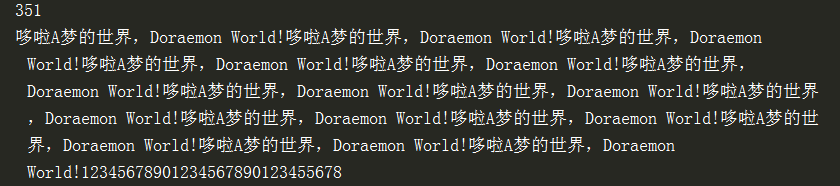
print(len(str1))

# png为不失真图片,jpg为失真图片。jpg不可隐藏信息。

encodeDataInImage(Image.open("coffee.png"), str1).save('encodeImage.png')

print(decodeImage(Image.open("encodeImage.png")))
输出:
python实现图片隐藏信息技术的更多相关文章
- Python实现图像信息隐藏
Python实现图像信息隐藏 之前学习密码学的时候老师有提到过『信息隐藏』,现在用图像的方法尝试一下.思想是:把信息藏到RGB通道中的B通道,然后利用奇偶性可以恢复过来 原理 从源图中提取文字图像信息 ...
- Python提取图片的ROI
图像处理经常需要提取图片的ROI,本文使用Python提取图片的ROI. 使用的Module是PIL (Pillow),一个图像处理库,用到的函数为类 Image 中的 crop 方法. 函数原型为: ...
- python 读取图片的尺寸、分辨率
#需要安装PIL模块 #encoding=gbk#--------------------------------------------------------------------------- ...
- python 对比图片相似度
最近appium的使用越来越广泛了,对于测试本身而言,断言同样是很重要的,没有准确的断言那么就根本就不能称之为完整的测试了.那么目前先从最简单的截图对比来看.我这里分享下python的图片相似度的代码 ...
- python在图片上画矩形
python在图片上画矩形 image_path = '' image = cv2.imread(image_path) first_point = (100, 100) last_point = ( ...
- Python读取图片尺寸、图片格式
Python读取图片尺寸.图片格式 需要用到PIL模块,使用pip安装Pillow.Pillow是从PIL fork过来的Python 图片库. from PIL import Image im = ...
- Python下图片的高斯模糊化的优化
资源下载 #本文PDF版下载 Python下图片的高斯模糊化的优化(或者单击我博客园右上角的github小标,找到lab102的W6目录下即可) #本文代码下载 高斯模糊(一维)优化代码(和本文方法集 ...
- 孤荷凌寒自学python第二十四天python类中隐藏的私有方法探秘
孤荷凌寒自学python第二十四天python类中隐藏的私有方法探秘 (完整学习过程屏幕记录视频地址在文末,手写笔记在文末) 今天发现了python的类中隐藏着一些特殊的私有方法. 这些私有方法不管我 ...
- 鼠标单击到 img行的时候图片隐藏方案
<!DOCTYPE html PUBLIC "-//W3C//DTD XHTML 1.0 Transitional//EN" "http://www.w3.org/ ...
随机推荐
- Java如何获取URL的部分?
在Java编程中,如何获取URL的一部分? 以下示例显示了如何通过net.URL类的url.getProtocol()和url.getFile()方法等获取URL的部分. package com.yi ...
- (实用)pip源
Pypi官方源网站的连接速度实在慢点出奇,可以更换为豆瓣的源 vim ~/.pip/pip.conf 添加如下内容即可: [global]index-url=http://pypi.doubam.co ...
- 弹出框插件——dialog
基于jquery和dot.js弹出框插件,兼容IE6+等其他浏览器. 思想:弹出框元素插入body节点中,并在页面垂直居中显示(fixed定位),触发确定和关闭事件绑定. 注意ie6包含两个问题:一. ...
- Java中浮点数的处理
import java.text.DecimalFormat; String addGold = String.valueOf(new DecimalFormat("0").for ...
- Android样式的开发:selector篇
上一篇详细讲了shape的用法,讲解了怎么用shape自定义矩形.圆形.线形和环形,以及有哪些需要注意的地方.不过,shape只能定义单一的形状,而实际应用中,很多地方比如按钮.Tab.ListIte ...
- 【中间件安全】Weblogic 安全加固规范
1. 适用情况 适用于使用Weblogic进行部署的Web网站. 2. 技能要求 熟悉Weblogic安装部署,熟悉Weblogic常见漏洞利用方式,并能针对站点使用Weblogic进行安全加固. 3 ...
- 淘宝Tengine 2.1.2 稳定版(nginx/1.6.2) Centos 6.5安装教程
淘宝Tengine 2.1.2 稳定版(nginx/1.6.2) Centos 6.5 安装教程 Tengine 简介: Tengine是由淘宝网发起的Web服务器项目.它在Nginx的基础上,针对大 ...
- struts2常用标签详解(申明:来源于网络)
struts2常用标签详解(申明:来源于网络) 地址:http://blessht.iteye.com/blog/1184960
- Zabbix使用grafana展示图形
系统环境查看 官网下载grafana wget https://s3-us-west-2.amazonaws.com/grafana-releases/release/grafana-5.0.1-1. ...
- MySQL介绍,下载,安装,配置
MySQL用了很多年了,今天写个总结. 一.介绍 MySQL是开源软件,后来归Oracle所有.开源便于软件的完善改进.但开源不等于滥用,也不等于完全免费.MySQL有商业版,商业用途是付费的.也有免 ...