
相册 垂直居中; 水平居中. 1)宽度 大于高度, 宽度 100%; 2) 高度 大于 宽度 , 高度100%; getimagesize , list --->line-height , text-align, vertical-align, max-height, max-width
一: 效果:
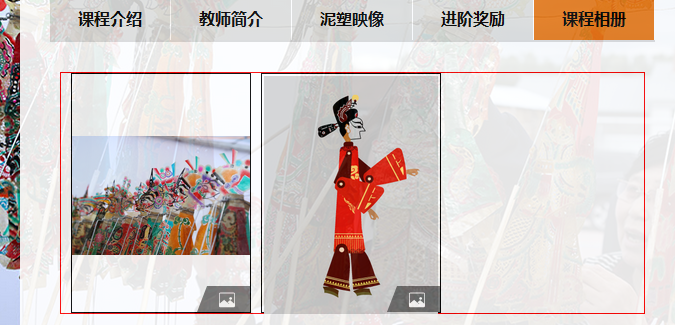
1) 黑色 部分是 相框.
2) 图片 要实现 水平居中, 垂直居中
3) 如果 宽度 大于 高度 ,那么 宽度 100% ,如图1 , 高度 自适应 ,同时不能超过黑色相框的 高度 ;
如果 高度 大于 宽度 , 那么 高度 100% , 宽度自适应 ,同时不能超过 黑色 相框的 宽度;
二:代码
所以 , 写两个样式, 对应 宽度 大于 高度; 高度 大于宽度; 然后判断图片的 宽度 和 高度;
----------------------------
css:
 /* *********课程 05***************** */

 .kecheng_05 {

     margin: 40px;

     margin-top: 0px;

     border: 1px solid red;

 }

 .kecheng_05_image {

     width: 100%;

 }

 .kecheng_05_image_cell {

     width: 180px;

     /*width: 195px;*/

     /*width: 33%;*/

     height: 240px;

     line-height: 240px;

     float: left;

     border: 1px solid black;

     margin-left: 8px;

     text-align: center;

     margin-left: 10px;

     position: relative;

 }

 /**宽度 > 高度 的 图片**/

 .wImage {

     width: 100%;

     max-height: 100%;

     vertical-align:middle;

 }

 /***高度 > 宽度 的 图片 *******/

 .hImage {

     height: 100%;

     max-width: 100%;

     vertical-align:middle;

 }

 /****右下角的图片*****/

 .rbImage {

     position: absolute;

     bottom: 0px;

     right: 0px;

 }
 /*IE6, IE7 生效*/

 .floatfix{

     *zoom:;

 }

 /*其他浏览器*/

 .floatfix:after{

     content:"";

     display:table;

     clear:both;

 }
1) wImage , hImage 对应 宽度 大于 高度, 高度 大于宽度
2) 如果图片要水平居中. 只要在 图片的 父级设置 text-align:center 就可以了.
如果图片要垂直居中;
第一: 图片的父级 ,设置 line-height = 父级的高度 , 第 21, 22 ,26行
第二: 图片本身设置: vertical-align:middle; 第42, 52行.
3) 注意 wImage中设置了 max-height; hImage 中 设置了 max-width.
php 返回的 html代码:
 <!-- <div class="kecheng ns"> -->

     <div class="kecheng_title">

         <div onclick="kechengJump('ns/ns01.php', this)" class="button ">课程介绍</div>

         <div onclick="kechengJump('ns/ns03.php', this)" class="button">教师简介</div>

         <div onclick="kechengJump('ns/ns02.php', this)" class="button ">泥塑映像</div>

         <div onclick="kechengJump('ns/ns04.php', this)" class="button">进阶奖励</div>

         <div onclick="getCourseAlbum(this)" class="button selectButton">课程相册</div>

     </div>

     <div class="kecheng_05">

         <div class="kecheng_05_image floatfix">

             <?php

                 list($width, $height) = getimagesize(PROJECT . 'Application/View/Home/Course/piying/img/tp/10.png');

                 if ($width > $height) {

                     $imgClass = 'wImage';

                 } else {

                     $imgClass = 'hImage';

                 }

              ?>

             <div class="kecheng_05_image_cell">

                 <img class="<?php echo $imgClass ?>" src="<?php echo PROJECT . 'Application/View/Home/Course/piying/img/tp/10.png';  ?>">

                 <img class="rbImage" src="<?php echo PROJECT . 'Application/View/Home/Course/images/right-bottom.png';  ?>" alt="">

             </div>

             <?php

                 list($width, $height) = getimagesize(PROJECT . 'Application/View/Home/Course/piying/img/tp/13.png');

                 if ($width > $height) {

                     $imgClass = 'wImage';

                 } else {

                     $imgClass = 'hImage';

                 }

              ?>

             <div class="kecheng_05_image_cell">

                 <img class="<?php echo $imgClass ?>" src="<?php echo PROJECT . 'Application/View/Home/Course/piying/img/tp/13.png';  ?>">

                 <img class="rbImage" src="<?php echo PROJECT . 'Application/View/Home/Course/images/right-bottom.png';  ?>" alt="">

             </div>

         </div>

     </div>

 <!-- </div> -->
上面只是一个简单的实例 : 并没有从数据库中取出数据 .随机列举的数据.
注意:
list($width, $height) = getimagesize(PROJECT . 'Application/View/Home/Course/piying/img/tp/10.png');

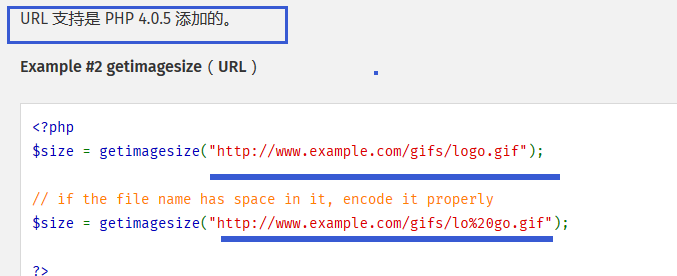
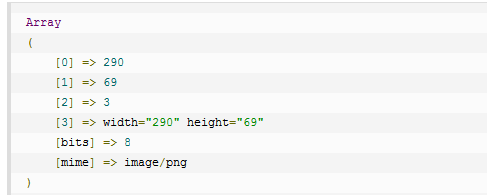
---> getimagesize() 是一个函数 ,返回图片的信息 , 是一个数组, 其中 索引 0 是 宽度, 索引 1 是 高度 .

可以用 绝对地址,相对地址, 也可以用url地址
参考链接:

php getimagesize 函数 - 获取图像信息

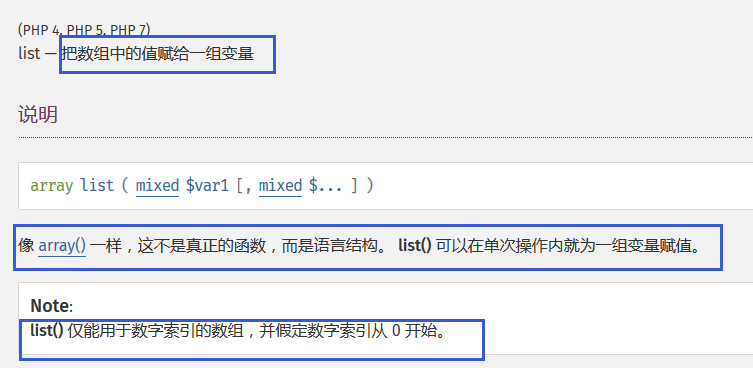
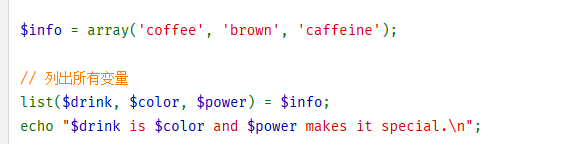
---> list() 是一个语法结构, 是将 数组中的值 ,赋给 list 中的参数.
相册 垂直居中; 水平居中. 1)宽度 大于高度, 宽度 100%; 2) 高度 大于 宽度 , 高度100%; getimagesize , list --->line-height , text-align, vertical-align, max-height, max-width的更多相关文章
- css实现div中图片高度自适应并与父级div宽度一致
需求:1.父级div不设置高度 2.图片高度自适应,并且显示为正方形: 以前遇到列表中图片高度必须和父级宽度相同,并且需要为正方形的时候,最开始的方法是定死图片高度,这样会导致不同分辨率下图片会压缩, ...
- [css]实现垂直居中水平居中的几种方式
转自博客 http://blog.csdn.net/freshlover/article/details/11579669 居中方式: 一.容器内(Within Container) 内容块的父容器设 ...
- 盘点8种CSS实现垂直居中水平居中的绝对定位居中技术
Ⅰ.绝对定位居中(Absolute Centering)技术 我们经常用margin:0 auto来实现水平居中,而一直认为margin:auto不能实现垂直居中--实际上,实现垂直居中仅需要声明元素 ...
- [转] 盘点8种CSS实现垂直居中水平居中的绝对定位居中技术
转自:http://blog.csdn.net/freshlover/article/details/11579669 Ⅰ.绝对定位居中(Absolute Centering)技术 我们经常用marg ...
- CSS3实现 垂直居中 水平居中 的技巧
1 1 1 How To Center Anything With CSS Front End posted by Code My Views 1 Recently, we took a dive i ...
- input 设置 width:100% 和padding后宽度超出父节点
input 设置 width:100% 和padding后宽度超出父节点 添加如下css即可: box-sizing: border-box; -webkit-box-sizing: border-b ...
- Aspose.Words操作Word.PDF,让图片和文本垂直居中,水平居中解决方案
x 环境 { "Aspose.Words": {"Version":"18.x"} } 需求与难题 生成试卷的时候,如果数学题目中有特殊符号 ...
- 设置UILabel可变高度(根据文本内容自动适应高度)
@property(nonatomic)UILabel *showLabel; // 计算文本所占高度,计算出来之后设置label的高度 // 第一个参数:字体大小,字体大小/样式影响计算字体的高 ...
- 关于div容器在ie6下默认高度不为0(存在默认高度)
最近做项目的时候遇到一个问题,相信很多人都遇到过,就是在测试兼容性的时候,在ie6下小于12px 的背景的高度不等于原高,或许这样说你可能不是很明白,那就举个例子吧! 如图所示: 锯齿状的背景图本来是 ...
随机推荐
- VS Code插件
VS Code下载地址: https://code.visualstudio.com/ 1.view in browser 和 Open-In-Browser 安装可在编辑器中打开html,在 ...
- 解决无法安装Microsoft .Net Framework 3.5
如果解决不了,试试我的方法吧,我也在网上找了好久,最终在本地解决了 所需工具:dism,和Net Framework 3.5,已经打包 链接:https://pan.baidu.com/s/1nKok ...
- Find the duplicate Number (鸽巢原理) leetcode java
问题描述: Given an array nums containing n + 1 integers where each integer is between 1 and n (inclusive ...
- python-Tornado 框架
概述 Tornado 是 FriendFeed 使用的可扩展的非阻塞式 web 服务器及其相关工具的开源版本.这个 Web 框架看起来有些像web.py 或者 Google 的 webapp,不过为了 ...
- 12. Integer to Roman C++
直接将各个数位上每个数所代表的罗马数字表示成字符串数组,然后提取出num的各位数,将对应的string相加 class Solution { public: string intToRoman(int ...
- [CodeForces - 614B] B - Gena's Code
B - Gena's Code It's the year 4527 and the tanks game that we all know and love still exists. There ...
- vue组件生命周期详解
Vue所有的生命周期钩子自动绑定在this上下文到实例中,因此你可以访问数据,对属性和方法进行运算.这意味着你不能使用箭头函数来定义一个生命周期方法.这是因为箭头函数绑定了父上下文,因此this与你期 ...
- PHP函数总结(个人版)
($saying[$key][, , 'utf-8'); 1.//mb_substr() string mb_substr ( string $str , int $start [, int $len ...
- Linux修改用户密码有效期
linux默认用户的密码是永不过期的,但是出于安全考虑在企业环境中一般会要求设置过期日期:但有时要求90天就过期,在这种严柯条件下我们有可能想给某个或某些用户开设后门,延长其密码有效期. 一.用户密码 ...
- linux文件权限多一个+啥意思
linux文件权限显示多了一个+,说明添加了acl权限 使用getfacl filename 能查看到 ower group other 还多了一个php 用户有rwx权限. acl详解 转: ht ...