
yarn application ID 增长达到10000后

Job, Task, and Task Attempt IDs
In Hadoop 2, MapReduce job IDs are generated from YARN application IDs that arecreated by the YARN resource manager.
The format of an application ID is composedof the time that the resource manager (not the application) started and an incrementingcounter maintained by the resource manager to uniquely identify the application to that instance of the resource manager.
So the application with this ID:
appllcation_1410450250506_0003
is the third (0003; application IDs are 1 -based) application run by the resource manager,which started at the time represented by the timestamp 1410450250506.
The counter is formatted with leading zeros to make IDs sort nicely —in directory listings, for example.
However, when the counter reaches 10000, it is not reset, resulting in longer application IDs (which don’t sort so well). The corresponding job ID is created simply by replacing the application prefix of an application ID with a job prefix:
job_1410450250506_0003
Tasks belong to a job, and their IDs are formed by replacing the job prefix of a job ID with a task prefix and adding a suffix to identify the task within the job. For example:
task_1410450250506_0003_n_000003
is the fourth (000003; task IDs are 0-based) map (n) task of the job with ID job_1410450250506_0003. The task IDs arc created for a job when it is initialized, so they do not necessarily dictate the order in which the tasks will be executed. Tasks may be executed more than once, due to failure (see MTask FailurcM on page 193) or speculative execution (see speculative Execution" on page 204), so to identify different instances of a task execution, task attempts are given unique IDs. For example:
attenpt_1410450256506_0003_n_000003_0
is the first (0; attempt IDs are O-based) attempt at running task
task_141045O250506_O003_m_000003.
Task attempts arc allocated during the job run as needed, so their ordering represents the order in which they were created to run.
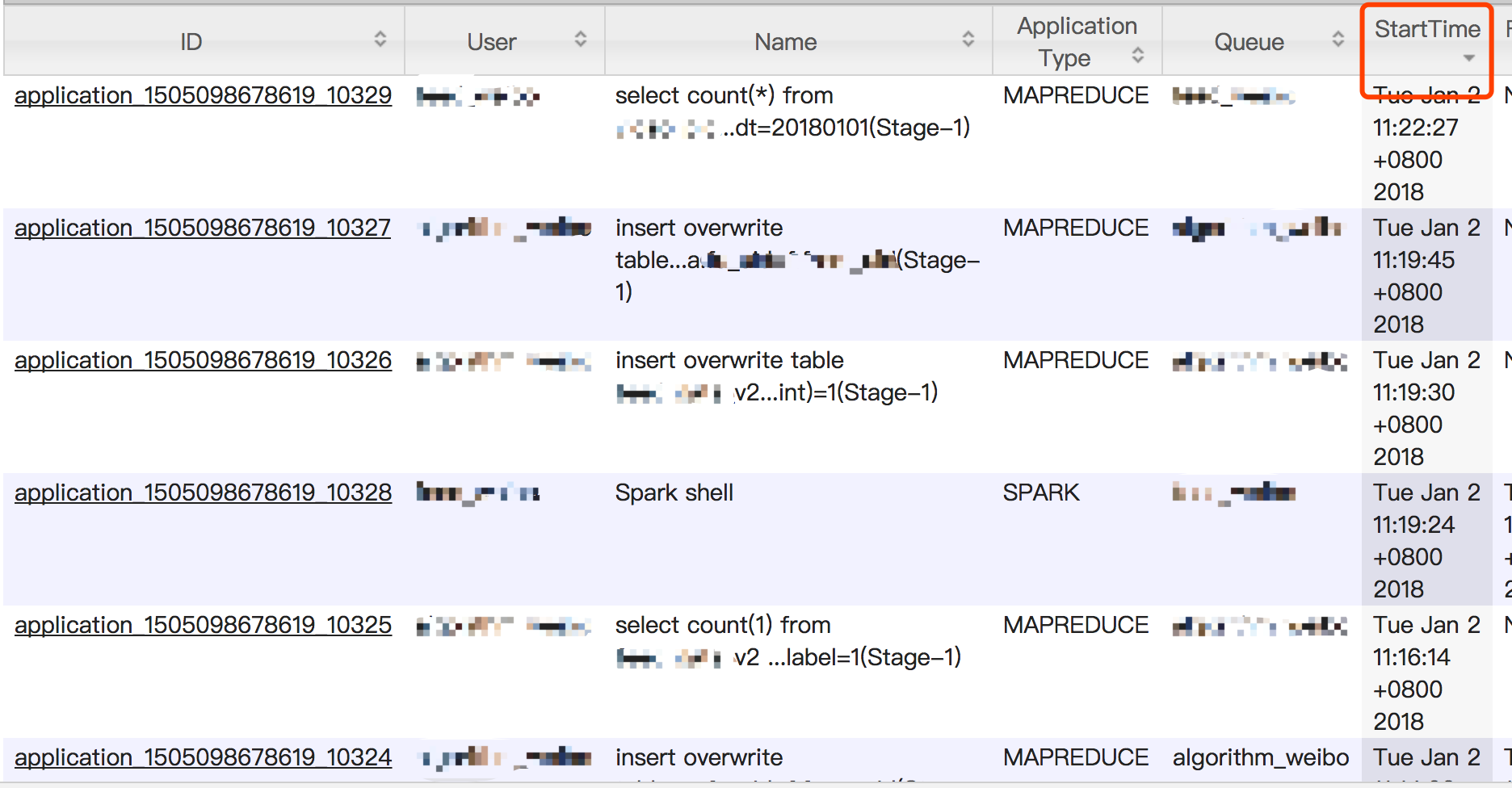
简而言之,就是当yarn application id超过了4位数的范围,也就是达到10000后,yarn直接做增加位数操作,来扩展id空间范围。同时官方承认,这会导致根据id排序结果出现偏差。
2018-01-02,实际截图补充:
按提交时间排序:
按照id排序:
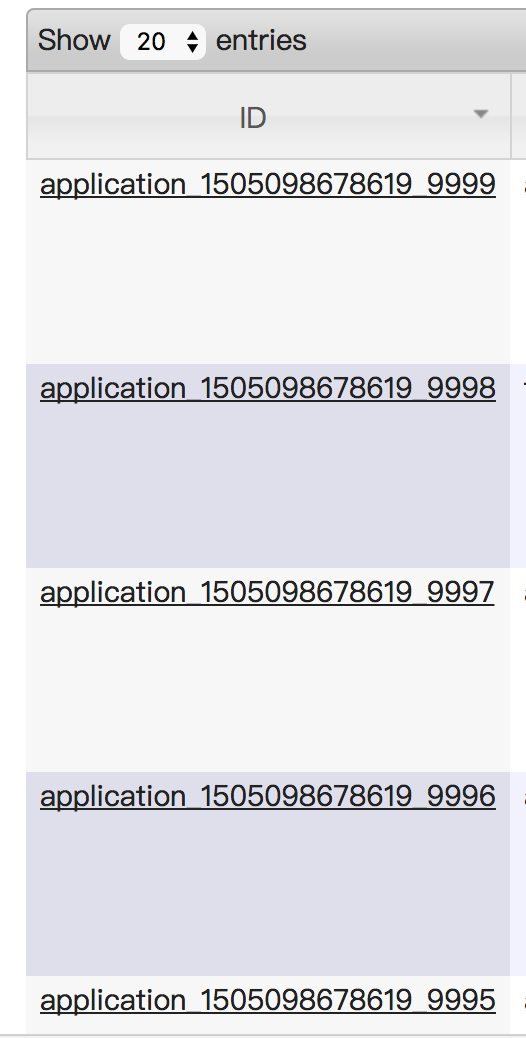
yarn application Id在到达10000后,会通过增加位数来扩展id空间容量,但这会导致页面按照ID进行排序结果出现偏差。
Hadoop: The Definitive Guide: Storage and Analysis at Internet Scale
yarn application ID 增长达到10000后的更多相关文章
- spark-shell启动报错:Yarn application has already ended! It might have been killed or unable to launch application master
spark-shell不支持yarn cluster,以yarn client方式启动 spark-shell --master=yarn --deploy-mode=client 启动日志,错误信息 ...
- yarn application -kill application_id yarn kill 超时任务脚本
需求:kill 掉yarn上超时的任务,实现不同队列不同超时时间的kill机制,并带有任务名的白名单功能 此为python脚本,可配置crontab使用 # _*_ coding=utf-8 _*_ ...
- hadoop job -kill 和 yarn application -kill 区别
hadoop job -kill 调用的是CLI.java里面的job.killJob(); 这里会分几种情况,如果是能查询到状态是RUNNING的话,是直接向AppMaster发送kill请求的.Y ...
- Eclipse插件开发_异常_01_java.lang.RuntimeException: No application id has been found.
一.异常现象 在运行RCP程序时,出现 java.lang.RuntimeException: No application id has been found. at org.eclipse.equ ...
- yarn application命令介绍
yarn application 1.-list 列出所有 application 信息 示例:yarn application -list 2.-appStates <Stat ...
- Hibernate在oracle中ID增长的方式
引用链接:http://blog.csdn.net/w183705952/article/details/7367272 Hibernate在oracle中ID增长的方式 第一种:设置ID的增长策略是 ...
- 【深入浅出 Yarn 架构与实现】3-1 Yarn Application 流程与编写方法
本篇学习 Yarn Application 编写方法,将带你更清楚的了解一个任务是如何提交到 Yarn ,在运行中的交互和任务停止的过程.通过了解整个任务的运行流程,帮你更好的理解 Yarn 运作方式 ...
- eclipse 4 rcp: java.lang.RuntimeException: No application id has been found.
错误详情: java.lang.RuntimeException: No application id has been found. at org.eclipse.equinox.internal. ...
- [JAVA][RCP]Clean project之后报错:java.lang.RuntimeException: No application id has been found.
Clean了一下Project,然后就报了如下错误 !ENTRY com.release.nattable.well_analysis 2 0 2015-11-20 17:04:44.609 !MES ...
随机推荐
- Java字符串转16 进制工具类Hex.java
Java字符串转16 进制工具类Hex.java 学习了:https://blog.csdn.net/jia635/article/details/56678086 package com.strin ...
- AI通过了艺术创作图灵测试,你根本分不出来作者是不是人
各位geek朋友们,今年不用再看画了:近年来最大的艺术成就已经发生了. 这项艺术成就的诞生地,不是北京.新加坡.柏林郊区颜料四溅的画室中,不是威尼斯双年展上.请记住它出现的地点:美国新泽西州新布朗斯维 ...
- [Python设计模式] 第8章 学习雷锋好榜样——工厂方法模式
github地址:https://github.com/cheesezh/python_design_patterns 简单工厂模式 v.s. 工厂方法模式 以简单计算器为例,对比一下简单工厂模式和工 ...
- JS代码把JSON字符串转换为对象,计算对象的长度并把它转换为数字类型,把转换的值相加减
Number(JSON.parse(rowObject.RenewalProperty).length)-1
- What is `^M` and how do I get rid of it?
When I open the file in vim, I am seeing strange ^M characters. Unfortunately, the world's favorite ...
- PC端和移动端在前端开发上的一些区别,前端里移动端到底比pc端多哪些知识
(1)———————— 前端里移动端到底比pc端多哪些知识,为啥面试时好多公司都问h5水平如何?我做过几年的web前端开发,就简单谈谈自己的感受吧.首先来看看PC端和移动端在前端开发上的一些区别: ( ...
- 【FTP】FTP服务器的搭建
记录一下FTP服务器的搭建首先打开 程序和功能>打开或关闭Windows功能 进入到Windows功能界面:勾选FTP服务器.然后再在IIS界面,新建一个网站.右键网站,选择“添加到FTP发布” ...
- 腾讯QQ会员中心g_tk32算法【C#版】
最近用C#写qq活动辅助类程序,碰到了会员签到的gtk算法不一样,后来网上找了看,发现有php版的(https://www.oschina.net/code/snippet_1378052_48831 ...
- 阿里云centos安装docker-engine实践
近日在阿里云ECS服务器(centos系统)中安装docker,参考官方指南 https://docs.docker.com/engine/installation/linux/centos/ 大概 ...
- PureFTP被动端口设置
修改Pureftp的配置文件把 # PassivePortRange 30000 50000 把前面的#删除 重启pureftpd 注意把被动端口防火墙例外 如果是阿里云主机 安全规 ...