
yarn application ID 增长达到10000后

Job, Task, and Task Attempt IDs
In Hadoop 2, MapReduce job IDs are generated from YARN application IDs that arecreated by the YARN resource manager.
The format of an application ID is composedof the time that the resource manager (not the application) started and an incrementingcounter maintained by the resource manager to uniquely identify the application to that instance of the resource manager.
So the application with this ID:
appllcation_1410450250506_0003
is the third (0003; application IDs are 1 -based) application run by the resource manager,which started at the time represented by the timestamp 1410450250506.
The counter is formatted with leading zeros to make IDs sort nicely —in directory listings, for example.
However, when the counter reaches 10000, it is not reset, resulting in longer application IDs (which don’t sort so well). The corresponding job ID is created simply by replacing the application prefix of an application ID with a job prefix:
job_1410450250506_0003
Tasks belong to a job, and their IDs are formed by replacing the job prefix of a job ID with a task prefix and adding a suffix to identify the task within the job. For example:
task_1410450250506_0003_n_000003
is the fourth (000003; task IDs are 0-based) map (n) task of the job with ID job_1410450250506_0003. The task IDs arc created for a job when it is initialized, so they do not necessarily dictate the order in which the tasks will be executed. Tasks may be executed more than once, due to failure (see MTask FailurcM on page 193) or speculative execution (see speculative Execution" on page 204), so to identify different instances of a task execution, task attempts are given unique IDs. For example:
attenpt_1410450256506_0003_n_000003_0
is the first (0; attempt IDs are O-based) attempt at running task
task_141045O250506_O003_m_000003.
Task attempts arc allocated during the job run as needed, so their ordering represents the order in which they were created to run.
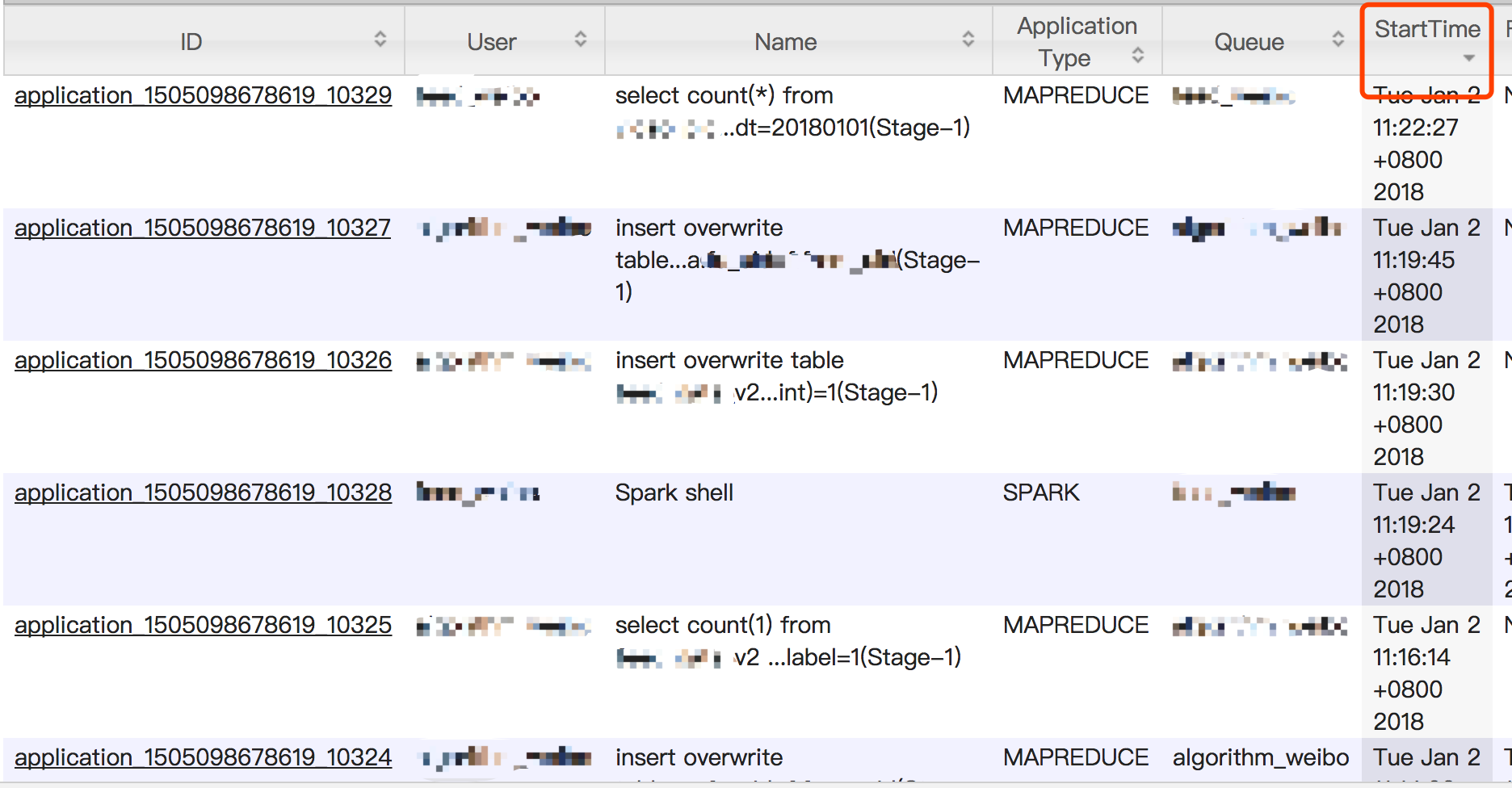
简而言之,就是当yarn application id超过了4位数的范围,也就是达到10000后,yarn直接做增加位数操作,来扩展id空间范围。同时官方承认,这会导致根据id排序结果出现偏差。
2018-01-02,实际截图补充:
按提交时间排序:
按照id排序:
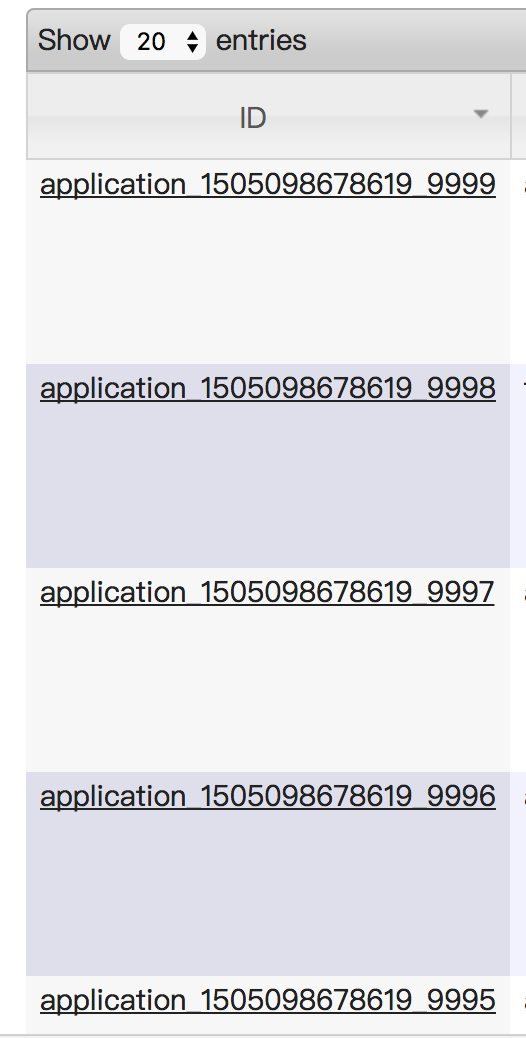
yarn application Id在到达10000后,会通过增加位数来扩展id空间容量,但这会导致页面按照ID进行排序结果出现偏差。
Hadoop: The Definitive Guide: Storage and Analysis at Internet Scale
yarn application ID 增长达到10000后的更多相关文章
- spark-shell启动报错:Yarn application has already ended! It might have been killed or unable to launch application master
spark-shell不支持yarn cluster,以yarn client方式启动 spark-shell --master=yarn --deploy-mode=client 启动日志,错误信息 ...
- yarn application -kill application_id yarn kill 超时任务脚本
需求:kill 掉yarn上超时的任务,实现不同队列不同超时时间的kill机制,并带有任务名的白名单功能 此为python脚本,可配置crontab使用 # _*_ coding=utf-8 _*_ ...
- hadoop job -kill 和 yarn application -kill 区别
hadoop job -kill 调用的是CLI.java里面的job.killJob(); 这里会分几种情况,如果是能查询到状态是RUNNING的话,是直接向AppMaster发送kill请求的.Y ...
- Eclipse插件开发_异常_01_java.lang.RuntimeException: No application id has been found.
一.异常现象 在运行RCP程序时,出现 java.lang.RuntimeException: No application id has been found. at org.eclipse.equ ...
- yarn application命令介绍
yarn application 1.-list 列出所有 application 信息 示例:yarn application -list 2.-appStates <Stat ...
- Hibernate在oracle中ID增长的方式
引用链接:http://blog.csdn.net/w183705952/article/details/7367272 Hibernate在oracle中ID增长的方式 第一种:设置ID的增长策略是 ...
- 【深入浅出 Yarn 架构与实现】3-1 Yarn Application 流程与编写方法
本篇学习 Yarn Application 编写方法,将带你更清楚的了解一个任务是如何提交到 Yarn ,在运行中的交互和任务停止的过程.通过了解整个任务的运行流程,帮你更好的理解 Yarn 运作方式 ...
- eclipse 4 rcp: java.lang.RuntimeException: No application id has been found.
错误详情: java.lang.RuntimeException: No application id has been found. at org.eclipse.equinox.internal. ...
- [JAVA][RCP]Clean project之后报错:java.lang.RuntimeException: No application id has been found.
Clean了一下Project,然后就报了如下错误 !ENTRY com.release.nattable.well_analysis 2 0 2015-11-20 17:04:44.609 !MES ...
随机推荐
- IOS 数据存储之 SQLite详解
在IOS开发中经常会需要存储数据,对于比较少量的数据可以采取文件的形式存储,比如使用plist文件.归档等,但是对于大量的数据,就需要使用数据库,在IOS开发中数据库存储可以直接通过SQL访问数据库, ...
- Nginx反向代理WebSocket
http { upstream websocket { server 192.168.1.1:8010; } server { listen 8020; location / { proxy_pass ...
- Hadoop3集群搭建之——hbase安装及简单操作
折腾了这么久,hbase终于装好了 ------------------------- 上篇: Hadoop3集群搭建之——虚拟机安装 Hadoop3集群搭建之——安装hadoop,配置环境 Hado ...
- CentOS6.9下安装python notebook
操作系统:CentOS6.9_x64 python版本 : python2.7.13 添加低权限新用户: useradd mike su mike 使用virtualenv安装python2.7环境 ...
- Matlab如何连接Oracle数据库及基本操作
语言和语法都是相通的,了解Oracle的连接和处理,对于其他的数据库也是类似的. 一 通过ODBC实现到oracle的连接 )控制面板->管理工具->ODBC数据源->在系统DSN中 ...
- WWDC 2018:Swift 更新了什么?
本文转载自:https://juejin.im/post/5b1cb5805188257d507be5d4所有权归原文所有 WWDC 2018 Session 401 What's New in Sw ...
- RabbitMQ使用技巧
一. net客户端介绍 http://www.cnblogs.com/hsyzero/p/6297644.html 二. RabbitMQ消息应答 执行一个任务可能需要花费几秒钟,你可能会担心如 ...
- 那天有个小孩教我WCF[一][2/3]
接着上次的继续讲吧 我们开始吧 9.创建数据库 use master go --创建库 if exists(select * from sysdatabases where name='NewsDB' ...
- Easyui-DataGrid 分页多选框 及 遍历所有选中项
html <table id='grid' class='easyui-datagrid' style='height:500px' url='Ajax-index.php?module=< ...
- 9.12 翻译系列:数据注解特性之ConcurrencyCheck【EF 6 Code-First系列】
原文链接:https://www.entityframeworktutorial.net/code-first/concurrencycheck-dataannotations-attribute-i ...