
snort安装使用教程(CentOS6.5)
官方文档:https://www.snort.org/documents
2.安装
2.1安装依赖
yum install flex bison -y

yum install libpcap libpcap-devel -y

wget https://nchc.dl.sourceforge.net/project/libdnet/libdnet/libdnet-1.11/libdnet-1.11.tar.gz

tar -zxf libdnet-1.11.tar.gz

cd libdnet-1.11

./configure && make && make install
如果不安装这些依赖,在后边执行configure时会有报错
2.2安装daq
wget https://www.snort.org/downloads/snort/daq-2.0.6.tar.gz

tar -zxf daq-2.0..tar.gz

cd daq-2.0.

./configure

make

make install
configure报错:configure: error: Your operating system's lex is insufficient to compile libsfbpf. You should install both bison and flex.
处理:yum install flex bison -y
configure报错: ERROR! Libpcap library version >= 1.0.0 not found.
处理: yum install libpcap libpcap-devel -y
2.3安装snort
wget https://www.snort.org/downloads/snort/snort-2.9.11.tar.gz

tar -zxf snort-2.9..tar.gz

cd snort-2.9.

./configure --enable-sourcefire

make

make install
configure报错:ERROR! dnet header not found, go get it from
处理: wget https://nchc.dl.sourceforge.net/project/libdnet/libdnet/libdnet-1.11/libdnet-1.11.tar.gz
tar -zxf libdnet-1.11.tar.gz
cd libdnet-1.11
./configure && make && make install
2.4安装规则
# 首先创建snort配置(及规则)目录

mkdir -p /etc/snort/rules

# 创建运行需要目录

mkdir /usr/local/lib/snort_dynamicrules

# 首先将2.3解压出来的etc下的默认配置文件复制到snort配置目录下

cp etc/*.conf* /etc/snort

cp etc/*.map /etc/snort

# 下载社区规则并解压到规则目录

wget https://www.snort.org/downloads/community/community-rules.tar.gz

tar -zxf community-rules.tar.gz -C /etc/snort/rules

# 注释掉所有默认要加载的规则文件

sudo sed -i 's/include \$RULE\_PATH/#include \$RULE\_PATH/' /etc/snort/snort.conf

# 启用社区规则文件

echo '' >> /etc/snort/snort.conf

echo '# enable community rule' >> /etc/snort/snort.conf

echo 'include $RULE_PATH/community-rules/community.rules' >> /etc/snort/snort.conf

# 重新设置snort.conf中的变量值

sed -i 's/var RULE_PATH ..\/rules/var RULE_PATH .\/rules/' /etc/snort/snort.conf

sed -i 's/var WHITE_LIST_PATH ..\/rules/var WHITE_LIST_PATH .\/rules/' /etc/snort/snort.conf

sed -i 's/var BLACK_LIST_PATH ..\/rules/var BLACK_LIST_PATH .\/rules/' /etc/snort/snort.conf

# 创建默认使用的白名单文件

touch /etc/snort/rules/white_list.rules

# 创建默认的黑名单文件

touch /etc/snort/rules/black_list.rules

# 创建默认自己设置的规则文件,其实我们注意了其他include只include了社区规则,所以这条根本没用这里只是意思一下

touch /etc/snort/rules/local.rules

# 测试配置文件是否有误

snort -T -c /etc/snort/snort.conf
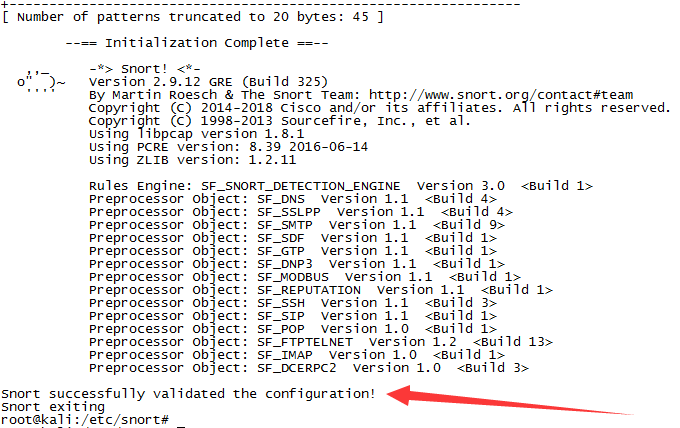
3.使用
snort有三种用法:嗅探模式、记录模式和网络入侵检测模式。
3.1嗅探模式
snort -v
该模式打印通信的双方IP及协议头部,类似tcpdump
3.2记录模式
mkdir log

snort -dev -l ./log
该模式将截获的数据包记入文件(此处是当前log目录下),重点是-l
3.3网络入侵检测模式
mkdir log

snort -dev -l ./log -h 192.168.1.0/ -c /etc/snort/snort.conf
该模式将会按指定的规则扫描通信数据包
报错:ERROR: /etc/snort/rules/community-rules/snort.conf(249) Could not stat dynamic module path "/usr/local/lib/snort_dynamicrules": No such file or directory.
处理:mkdir -p /usr/local/lib/snort_dynamicrules
报错:ERROR: /etc/snort/classification.config(0) Unable to open rules file "/etc/snort/classification.config": No such file or directory.
处理:将上边2.3解压出的snort包中的etc/classification.config复制到/etc/snort/classification.config
参考:
http://blog.csdn.net/jackywgw/article/details/51693108
https://upcloud.com/community/tutorials/install-snort-ubuntu/
snort安装使用教程(CentOS6.5)的更多相关文章
- Centos6.7安装Cacti教程
Centos6.7安装Cacti教程# link:http://docs.cacti.net/plugins/ blog地址:http://www.cnblogs.com/caoguo 一.基本环境安 ...
- Centos6.7 安装Naigos教程
Centos6.7 安装Naigos教程参考文档:https://assets.nagios.com/downloads/nagioscore/docs/nagioscore/4/en/quickst ...
- 实验 snort安装配置与规则编写
1 实验目的 在linux或windows任意一个平台下完成snort的安装,使snort工作在NIDS模式下,并编写符合相关情景要求的snort规则. 2 实验环境 物理机:windows 8.1 ...
- (转载)Centos下Elasticsearch安装详细教程
原文地址:http://www.cnblogs.com/sunny1009/articles/7874251.html Centos下Elasticsearch安装详细教程 1.Elasticsear ...
- MySQL基础环境_安装配置教程(Windows7 64或Centos7.2 64、MySQL5.7)
MySQL基础环境_安装配置教程(Windows7 64或Centos7.2 64.MySQL5.7) 安装包版本 1) VMawre-workstation版本包 地址: https://m ...
- Linux基础环境_安装配置教程(CentOS7.2 64、JDK1.8、Tomcat8)
Linux基础环境_安装配置教程 (CentOS7.2 64.JDK1.8.Tomcat8) 安装包版本 1) VMawre-workstation版本包 地址: https://my.vmw ...
- Centos下Elasticsearch安装详细教程
Centos下Elasticsearch安装详细教程 1.Elasticsearch简介 ElasticSearch是一个基于Lucene的搜索服务器.它提供了一个分布式多用户能力的全文搜索引擎,基于 ...
- IntelliJ IDEA - 热部署插件JRebel 安装使用教程
IntelliJ IDEA - JRebel 安装使用教程 JRebel 能做什么? JRebel 是一款热部署插件.当你的 Java-web 项目在 tomcat 中 run/debug 的时候 , ...
- Zabbix3.x安装图解教程
准备知识: Zabbix3.x比较之前的2.0界面有了很大的变化,但是安装部署过程与2.x基本完全一样. 1.Zabbix2.x安装图解教程 http://www.osyunwei.com/archi ...
随机推荐
- 每日质量NPM包复制_copy-to-clipboard
一.copy-to-clipboard 官方定义: Simple module exposing copy function 理解: 一个超级简单的复制功能,并且这种方法适用于通过别的事件触发复制功能 ...
- 无视编码都统一转成unicode 然后截断 例如 。“发发发发发发” 操作之后显示为 “发发发发...”
-- local function checkPlayName( str ) -- str = Utils.utf8_to_unicode(str)-- local retStr = "&q ...
- Django本地开发,引用静态文件,火狐浏览器不能访问静态文件,谷歌浏览器却能访问静态文件
查了一下是settings.py设置问题 # Static files (CSS, JavaScript, Images)# https://docs.djangoproject.com/en/1.1 ...
- Math.abs(~2020) 按位取反后的绝对值是多少 2021, 按位取反后,比正数多1
Math.abs(~2020) 按位取反后的绝对值是多少 2021, 按位取反后,比正数多1 int 值的取值 范围: -128 --- 127 之间, 0000 0000 按位取 ...
- svn上传和下载项目
上传:到项目文件的svn文件夹下——>右键——>SVN Commit...——>输入提交代码备注信息,以便同事查看时,是属于什么内容.这里可以选择哪些文件是要提交到代码仓库上, 下载 ...
- python+selenium基础之XPATH定位(第一篇)
世界上最远的距离大概就是明明看到一个页面元素矗在那里,但是我却定位不到!! selenium定位元素的方法有很多种,像是通过id.name.class_name.tag_name.link_text等 ...
- python 断言大全
参考链接:https://blog.csdn.net/qq1124794084/article/details/51668672 1. 小数位模糊等于 自动化脚本最重要的是断言,正确设置断言以后才能帮 ...
- 围棋规则 - AlphaGO
参考:4分钟了解围棋规则 看懂柯洁和AlphaGo的对决并不难 围棋规则: 1. 19X19的棋盘上有361个落子点: 2. 黑白棋子依次落子: 3. 比赛结束时,占地多者胜: 4. 上下左右相邻的棋 ...
- 20165327《Java程序设计》实验一 Java开发环境的熟悉 实验报告
20165327<Java程序设计>实验二 <Java面向对象程序设计>实验报告 实验二 <Java面向对象程序设计> 一.实验报告封面 课程:Java程序设计 班 ...
- JavaScript Transpilers: 为什么需要用它们?Babel的使用介绍。
英文原文 https://scotch.io/tutorials/javascript-transpilers-what-they-are-why-we-need-them 摘译(文章内的代码有些过期 ...