
Luncene学习 第一天 《入门程序》
整个luncene 流程
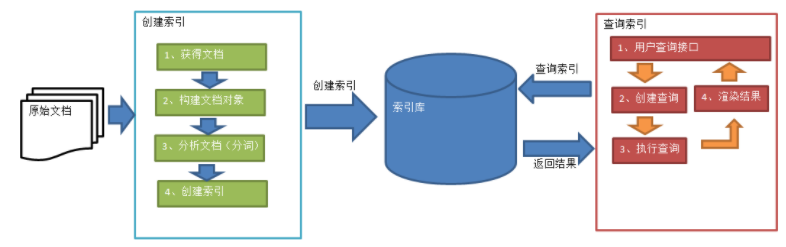
下面贴出代码
package com.zuoyan.lucene.demo;

import java.io.File;

import org.apache.commons.io.FileUtils;

import org.apache.lucene.analysis.Analyzer;

import org.apache.lucene.document.Document;

import org.apache.lucene.document.Field;

import org.apache.lucene.document.Field.Store;

import org.apache.lucene.document.LongField;

import org.apache.lucene.document.StoredField;

import org.apache.lucene.document.TextField;

import org.apache.lucene.index.IndexWriter;

import org.apache.lucene.index.IndexWriterConfig;

import org.apache.lucene.store.Directory;

import org.apache.lucene.store.FSDirectory;

import org.apache.lucene.util.Version;

import org.junit.Test;

import org.wltea.analyzer.lucene.IKAnalyzer;

/**

 * Lucene 的第一个程序

 *

 * @author zuoyan

 *

 */

public class LuceneDemo01 {

    /*

     * 创建索引 1.首先创建IndexWriter对象 他有两个参数 1.Directory 2.IndexWriterConfig

     */

    @Test

    public void testCreateIndex() throws Exception {

        String filePath = "G:\\temp\\index";

        Directory directory = FSDirectory.open(new File(filePath));

        Analyzer analyzer = new IKAnalyzer();

        IndexWriterConfig config = new IndexWriterConfig(Version.LATEST, analyzer);

        IndexWriter indexWriter = new IndexWriter(directory, config);

        // 创建field对象,将field添加到document对象中

        File f = new File("G:\\temp\\files");

        File[] listFiles = f.listFiles();

        for (File file : listFiles) {

            // 创建Document对象。

            Document document = new Document();

            // 文件名称

            String fileName = file.getName();

            Field fileNameField = new TextField("fileName", fileName, Store.YES);

            // 文件大小

            long fileSize = FileUtils.sizeOf(file);

            Field fileSizeField = new LongField("fileSize", fileSize, Store.YES);

            // 文件路径

            String file_path = file.getPath();

            Field filePathField = new StoredField("filePath", file_path);

            // 文件内容

            String file_content = FileUtils.readFileToString(file);

            Field fileContentField = new TextField("fileContent", file_content, Store.NO);

            document.add(fileNameField);

            document.add(fileSizeField);

            document.add(filePathField);

            document.add(fileContentField);

            // 第四步:使用indexwriter对象将document对象写入索引库,此过程进行索引创建。并将索引和document对象写入索引库。

            indexWriter.addDocument(document);

        }

    }

}
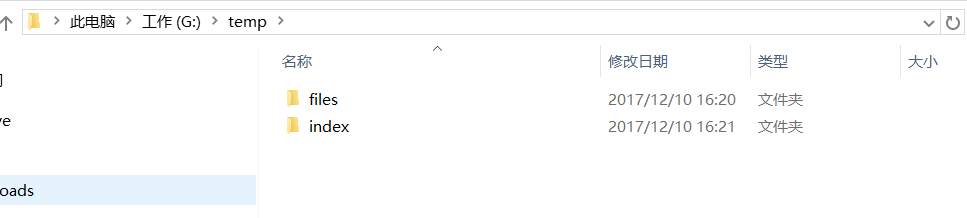
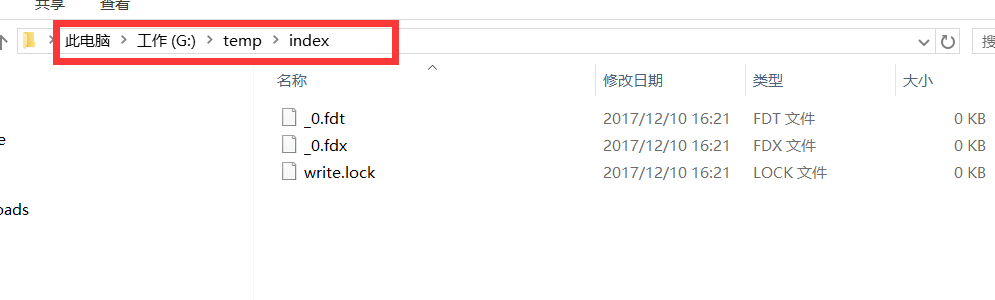
创建出来的文件索引
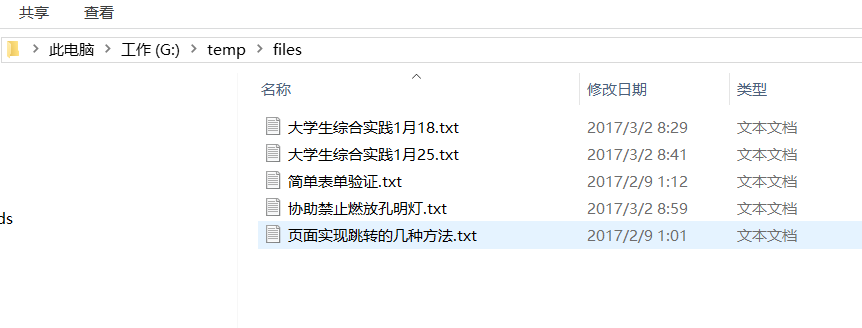
原来的文件
Luncene学习 第一天 《入门程序》的更多相关文章
- mybais学习记录一——入门程序
一.传统连接数据库和执行sql的不足 1.数据库连接,使用时就创建,不使用立即释放,对数据库进行频繁连接开启和关闭,造成数据库资源浪费,影响 数据库性能. 设想:使用数据库连接池管理数据库连接. 2. ...
- Delphi第一个入门程序——鼠标点击计数 - imsoft.cnblogs
实现的效果如下: 制作要点: 添加一个按钮Button1和一个标签Label1,并双击按钮进入编程界面在var Form1: TForm1;下面一行加上 n:integer;//定义变量. 然后在 ...
- Python第一个入门程序
#!usr/bin/env python3 #在UNIX上,当某程序在控制台中被引用时,该文件的头两个字节先被读入.如果这两个字节是ASCII字符 #!, #shell就会认为该文件将要由解释器执行, ...
- Bootstrap3.0学习第一轮(入门)
详情请查看 http://aehyok.com/Blog/Detail/7.html 个人网站地址:aehyok.com QQ 技术群号:206058845,验证码为:aehyok 本文文章链接:ht ...
- JAVAEE——Mybatis第一天:入门、jdbc存在的问题、架构介绍、入门程序、Dao的开发方法、接口的动态代理方式、SqlMapConfig.xml文件说明
1. 学习计划 第一天: 1.Mybatis的介绍 2.Mybatis的入门 a) 使用jdbc操作数据库存在的问题 b) Mybatis的架构 c) Mybatis的入门程序 3.Dao的开发方法 ...
- JAVAEE——SpringMVC第一天:介绍、入门程序、架构讲解、SpringMVC整合MyBatis、参数绑定、SpringMVC和Struts2的区别
1. 学习计划 第一天 1.SpringMVC介绍 2.入门程序 3.SpringMVC架构讲解 a) 框架结构 b) 组件说明 4.SpringMVC整合MyBatis 5.参数绑定 a) Sp ...
- C语言编程入门之--第一章初识程序
第一章 初识程序 导读:计算机程序无时不刻的影响着人类的生活,现代社会已经离不开程序,程序的作用如此巨大,那么程序到底是什么呢?本章主要讨论程序的概念,唤起读者对程序的兴趣,同时对C语言程序与其它语言 ...
- Elasticsearch7.X 入门学习第一课笔记----基本概念
原文:Elasticsearch7.X 入门学习第一课笔记----基本概念 版权声明:本文为博主原创文章,遵循CC 4.0 BY-SA版权协议,转载请附上原文出处链接和本声明. 本文链接:https: ...
- AndroidStudio学习笔记-第一个安卓程序
要带一个本科生做一部分跟安卓有点关系的项目,于是趁着机会学习一下编写安卓程序. 第一篇材料来自谷歌官方,传送门:https://developer.android.com/training/basic ...
随机推荐
- 【转】Spotlight实时监控Windows Server 2008
Windows Server 2008作为服务器平台已逐渐被推广和应用,丰富的功能和良好的稳定性为其赢得了不错的口碑.但是和Windows Server 2003相比,其系统的自我监控功能并没有多大的 ...
- 虚拟机连不上网 Xshell连不上虚拟机
以centos7 为例 1,确定network connection 为NAT 2, 打开网络连接中心 Control Panel\Network and Internet\Network Conne ...
- Linux基础命令---arch
Arch Arch指令主要用于显示当前主机的硬件结构类型,我们可以看到它输出的结果有:i386.i486.mips.alpha等.此命令的适用范围:RedHat.RHEL.Ubuntu ...
- 谷歌重磅开源强化学习框架Dopamine吊打OpenAI
谷歌重磅开源强化学习框架Dopamine吊打OpenAI 近日OpenAI在Dota 2上的表现,让强化学习又火了一把,但是 OpenAI 的强化学习训练环境 OpenAI Gym 却屡遭抱怨,比如不 ...
- windows环境下 curl 安装和使用
curl下载地址:https://curl.haxx.se/download.html,拉到页面最底下,选择红色选中的那个CAB的进行下载,如下图所示: 下载完成后,解压. 解决windows控制台c ...
- highchart 柱状图,列宽自适应(x轴是时间的特殊情况)
1.柱子列宽自适属性: pointWidth:25, //柱子宽度,如果设定该值,则下面2个属性无效 pointPadding: 0.4,//每列之间的距离值,默认此值为0.1 groupPaddin ...
- Zabbix客户端(被监控端)安装配置
1) 创建用户 groupadd zabbix useradd -g zabbix zabbix 2)zabbix软件包下载,安装 zabbix-2.2.6 http://jaist.dl.sourc ...
- ES6知识整理(8)--Promise对象
(关于promise,以前并不知道是什么,没这个概念.现在来学习总结下) promise含义 es6的异步编程解决方案.需要new新对象操作api. promise对象特点 有3中状态:pending ...
- 在idea中不出现大波浪的设置
在idea中如果有重复代码时候,就会出现大波浪 ,然后,现在可以设置 Duplicated Code 的对号去掉就可以没有大波浪
- kivy中size和pos的使用
kivy中位置和大小属性的使用: -------------------位置---------------------------- 1.pos_hint(‘x-axis-key’:value,’y- ...