
pytest十三:配置文件 pytest.ini
pytest 配置文件可以改变 pytest 的运行方式,它是一个固定的文件 pytest.ini 文件,读取配置信息,按指定的方式去运行。
ini 配置文件
pytest 里面有些文件是非 test 文件
    pytest.ini pytest 的主配置文件,可以改变 pytest 的默认行为
    conftest.py 测试用例的一些 fixture 配置
    __init__.py 识别该文件夹为 python 的 package 包
    tox.ini 不 pytest.ini 类似,用 tox 工具时候才有用
    setup.cfg 也是 ini 格式文件,影响 setup.py 的行为
ini 文件基本格式
[pytest]
addopts = -rsxX
xfail_strict = true
用 pytest —help 指令可以查看 pytest.ini 的设置选项
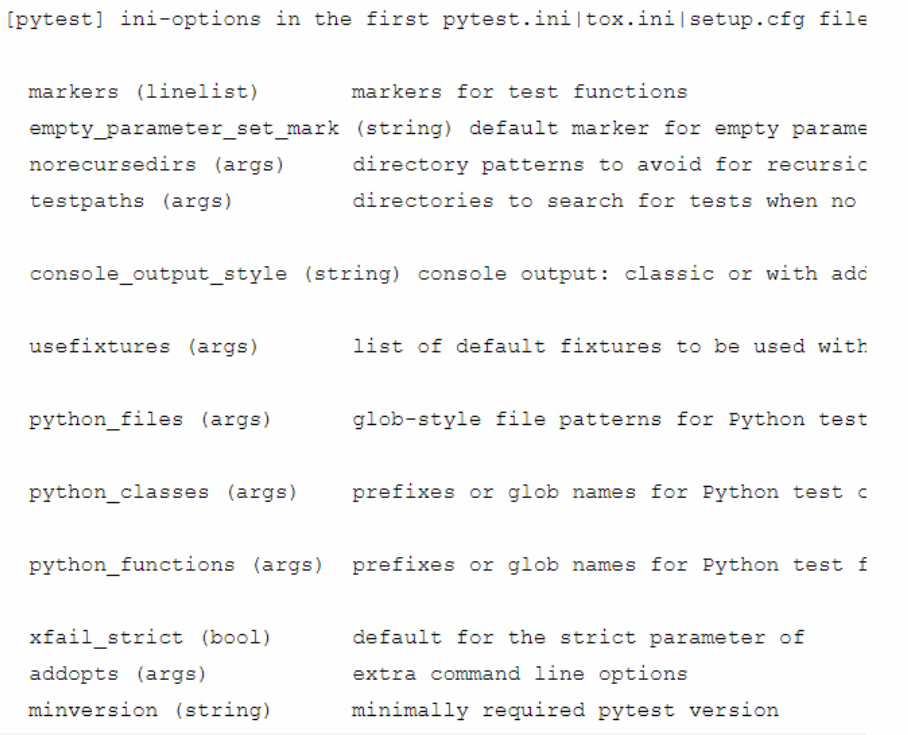
--rsxX 表示 pytest 报告所有测试用例被跳过、预计失败、预计失败但实际被通过的原因
mark 标记
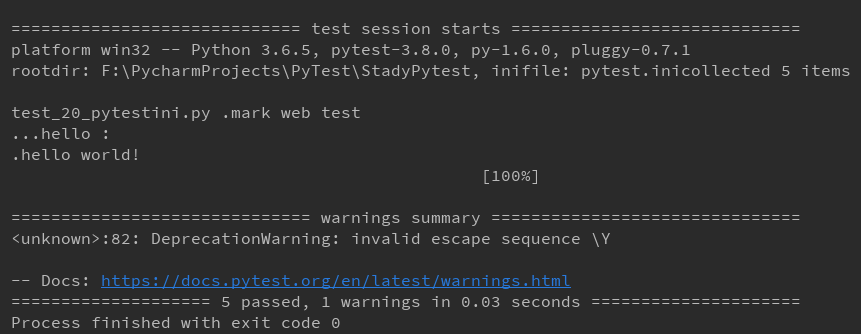
如下案例,使用了 2 个标签:webtest 和 hello,使用 mark 标记功能对于以后分类测试非常有用处
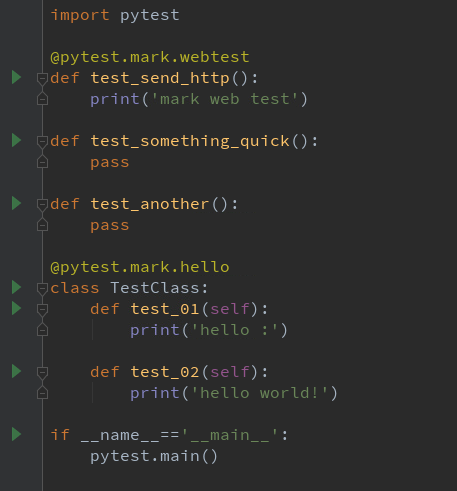
import pytest

@pytest.mark.webtest
def test_send_http():
    print('mark web test')

def test_something_quick():
    pass

def test_another():
    pass

@pytest.mark.hello
class TestClass:
    def test_01(self):
        print('hello :')

    def test_02(self):
        print('hello world!')

if __name__=='__main__':
    pytest.main()
有时候标签多了,不容易记住,为了方便后续执行指令的时候能准确使用 mark 的标签,可以写入到 pytest.ini 文件
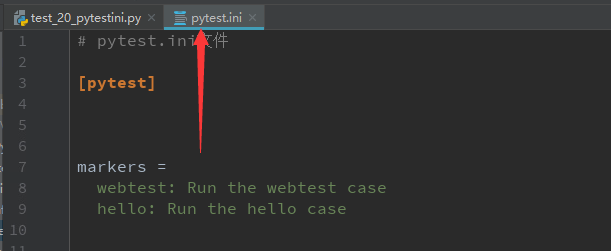
[pytest]

markers =
 webtest: Run the webtest case
 hello: Run the hello case
标记好之后,可以使用 pytest —markers 查看到
> pytest --markers

@pytest.mark.webtest: Run the webtest case
@pytest.mark.hello: Run the hello case
@pytest.mark.skip(reason=None): skip the given test function with an optional reason. Example: skip(reason="no way of currently testing this") skips the test.
@pytest.mark.skipif(condition): skip the given test function if eval(condition) results in a True value. Evaluation happens within the module global context. Example: skipif('sys.platform == "win32"') skips the test if we are on the win32 platform. see http://pytest.org/latest/skipping.html
@pytest.mark.xfail(condition, reason=None, run=True, raises=None, strict=False): mark the test function as an expected failure if eval(condition) has a True value. Optionally specify a reason for better reporting and run=False if you don't even want to execute the test function. If only specific exception(s) are expected, you can list them in raises, and if the test fails in other ways, it will be reported as a true failure. See http://pytest.org/latest/skipping.html
@pytest.mark.parametrize(argnames, argvalues): call a test function multiple times passing in different arguments in turn. argvalues generally needs to be a list of values if argnames specifies only one name or a list of tuples of values if argnames specifies multiple names. Example:
@parametrize('arg1', [1,2]) would lead to two calls of the decorated test function, one with arg1=1 and another with arg1=2.see http://pytest.org/latest/parametrize.html for more info and examples.
@pytest.mark.usefixtures(fixturename1, fixturename2, ...): mark tests as needing all of the specified fixtures. see http://pytest.org/latest/fixture.html#usefixtures
@pytest.mark.tryfirst: mark a hook implementation function such that the plugin machinery will try to call it first/as early as possible.
@pytest.mark.trylast: mark a hook implementation function such that the plugin machinery will try to call it last/as late as possible.

最上面两个就是刚才写入到 pytest.ini 的配置了
禁用 xpass
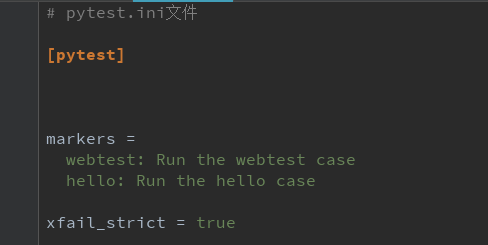
设置 xfail_strict = true 可以让那些标记为@pytest.mark.xfail 但实际通过的测试用例被报告为失败

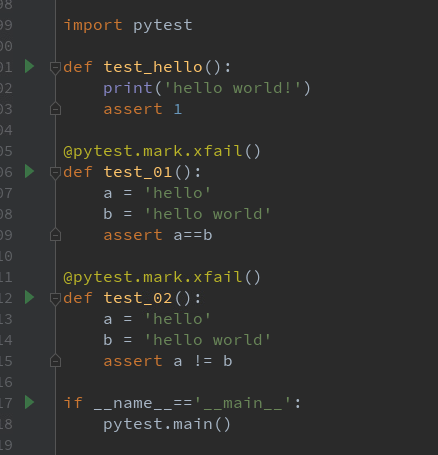
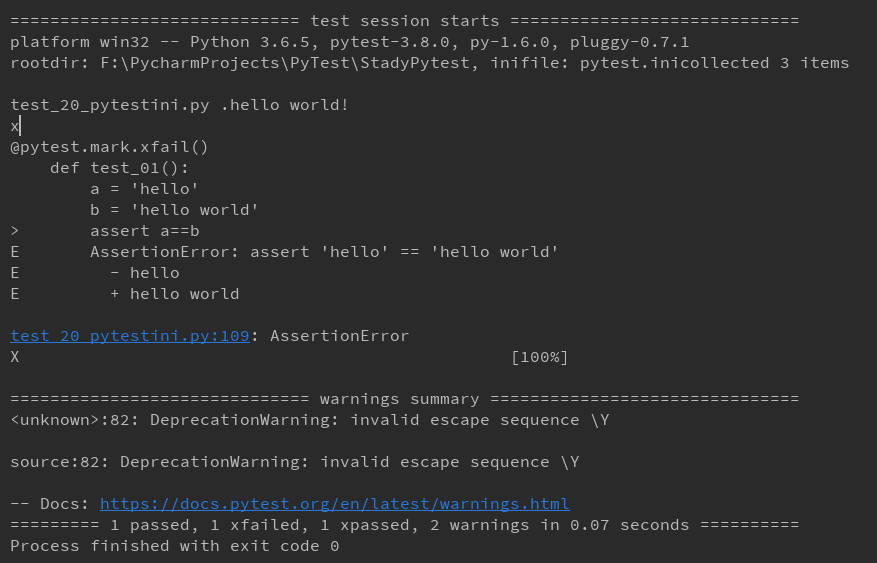
什么叫标记为@pytest.mark.xfail 但实际通过,这个比较绕脑,看以下案例
测试结果
import pytest

def test_hello():
    print('hello world!')
    assert 1

@pytest.mark.xfail()
def test_01():
    a = 'hello'
    b = 'hello world'
    assert a==b

@pytest.mark.xfail()
def test_02():
    a = 'hello'
    b = 'hello world'
    assert a != b

if __name__=='__main__':
    pytest.main()
test_01 和 test_0 这 2 个用例一个是 a == b 一个是 a != b,两个都标记失败了,我们希望两个用例不用执行全部显示 xfail。实际上最后一个却显示 xpass.为了让两个都显示 xfail,那就加个配置xfail_strict = true
这样标记为 xpass 的就被强制性变成 failed 的结果
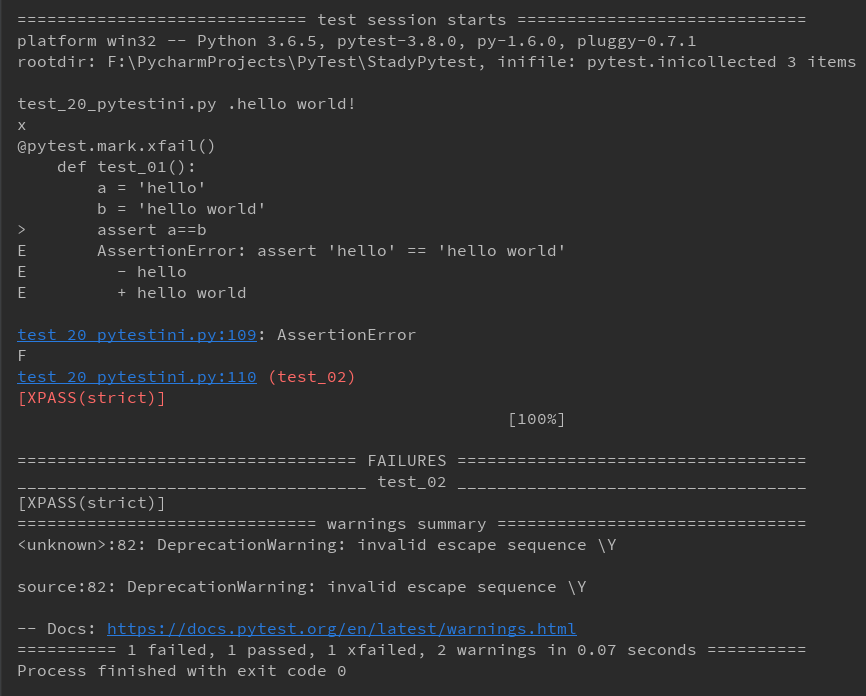
这样标记为 xpass 的就被强制性变成 failed 的结果
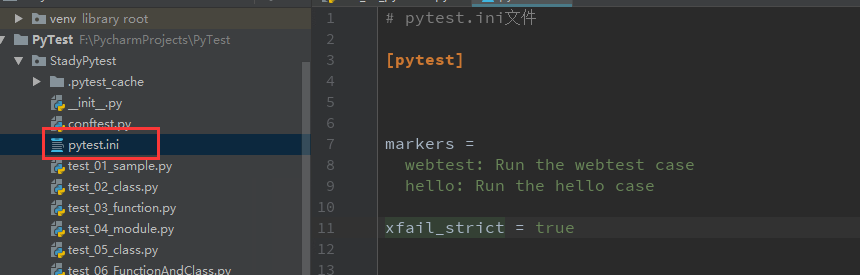
配置文件如何放
一般一个工程下方一个 pytest.ini 文件就可以了,放到顶层文件夹下
addopts
addopts 参数可以更改默认命令行选顷,这个当我们在 cmd 输入指令去执行用例的时候,会用到,比如我想测试完生成报告,指令比较长
> pytest -v --rerun 1 --html=report.html --self-contained-html
每次输入这么多,不太好记住,于是可以加到 pytest.ini 里
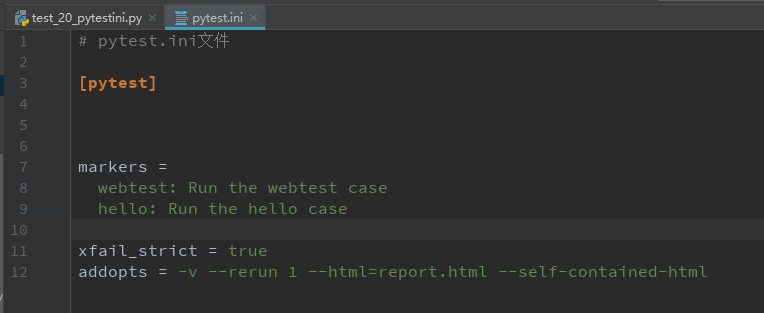
这样我下次打开 cmd,直接输入 pytest,它就能默认带上这些参数了(备注:--html=report.html 是生成 html 报告)
pytest十三:配置文件 pytest.ini的更多相关文章
- 配置文件pytest.ini
前言 pytest配置文件可以改变pytest的运行方式,它是一个固定的文件pytest.ini文件,读取配置信息,按指定的方式去运行. ini配置文件 pytest里面有些文件是非test文件 py ...
- Pytest_配置文件-pytest.ini(4)
pytest配置文件可以改变pytest的默认运行方式,它是一个固定的文件名称pytest.ini. 存放路径为项目的根目录 解决中文报错 在讲解配置文件的可用参数前,我们先解决一个高概率会遇到的问题 ...
- MySQL Cluster 配置文件(config.ini)详解
MySQL Cluster 配置文件(config.ini)详解 ################################################################### ...
- MySQL Server 5.6 配置文件my.ini 以及windows上mysql表名区分大小写
MySQL Server 5.6的配置文件my.ini的位置跟以往有所不同: 我的是在:C:\ProgramData\MySQL\MySQL Server 5.6\my.ini 前两天导sql 导完之 ...
- 关于Windows下无法在MySQL安装目录找到配置文件my.ini
目前5.7版本的MySQL的配置文件my.ini位于: C:\ProgramData\MySQL\MySQL Server 5.7
- FastAdmin 插件配置文件 info.ini 中的 state 什么意思?
FastAdmin 插件配置文件 info.ini 中的 state 什么意思? 在插件配置中有一个 state ,这是配置插件开关的.
- Mysql配置文件my.ini详解
以下是Mysql数据库服务器配置文件my.ini的详细配置.应用场合是InnoDB引擎,2核CPU, 32位SUSE. [client] #password = your_password port ...
- pytest系列(四)- pytest+allure+jenkins - 持续集成平台生成allure报告
pytest是什么 pytest是python的一款测试框架,拥有unittest的功能并比它更丰富. allure是什么 有非常多的优秀的测试框架,但却是有非常少优秀的报告工具可以展示非常清楚的用例 ...
- MySql5.7配置文件my.ini 设置 my.ini文件路径
mysql配置文件my-default.ini my.ini修改后重启无效,原来是路径错了,记录一下: windows操作系统下: 1. 由于我们使用MySql 时,需要修改mysql 的 my.i ...
随机推荐
- 设计模式---组件协作模式之策略模式(Strategy)
一:概念 Strategy模式,对一系列的算法加以封装,为所有算法定义一个抽象的算法接口,并通过继承该抽象算法接口对所有的算法加以封装和实现,具体的算法选择交由客户端决定(策略). Strategy模 ...
- python---正则中的(?P<name>group)
application=tornado.web.Application([ (r"/index/(?P<num>\d*)/(?P<nid>\d*)",hom ...
- 使用maven对项目进行junit的单元测试
Spring中的单元测试 需要引入依赖 <dependency> <groupId>junit</groupId> <artifactId>junit& ...
- quartz定时任务-job
1,首先添加对quartz组建的引用 quartz-2.2.3.jar,slf4j-api-1.7.7.jar https://files.cnblogs.com/files/renjing/quar ...
- Python3.X爬虫
1.Python很有名,但是一直没在实际项目中用过,今天花30分钟学习下.去Python官网https://www.python.org/downloads/ 2.2.X与3.X版本相差比较大,新手用 ...
- GBK-----UTF-8编码格式问题浅析
首先,想必大家在不同环境下切换写代码的时候,都会遇见乱码的时候(读取二进制的时候采用的编码和最初将字符转换成二进制时的编码不一致.),大多数人都知道,只需要把项目工程的编码格式调整一下为最初的编码就可 ...
- 如何用MoveIt快速搭建机器人运动规划平台?
MoveIt = RobotGo,翻译成中文就是“机器人,走你!”所以,MoveIt的主要就是一款致力于让机器人能够自主运动及其相关技术的软件,它的所有模块都是围绕着运动规划的实现而设计的. 两个月前 ...
- BN讲解(转载)
本文转载自:http://blog.csdn.net/shuzfan/article/details/50723877 本次所讲的内容为Batch Normalization,简称BN,来源于< ...
- Linux内核调试方法【转】
转自:http://www.cnblogs.com/shineshqw/articles/2359114.html kdb:只能在汇编代码级进行调试: 优点是不需要两台机器进行调试. gdb:在调试模 ...
- Linux Kernel 代码艺术——编译时断言【转】
转自:http://www.cnblogs.com/hazir/p/static_assert_macro.html 本系列文章主要写我在阅读Linux内核过程中,关注的比较难以理解但又设计巧妙的代码 ...