Nginx是一款开源的高性能HTTP服务器和返向代理服务器。
下载、编译、安装模块:
[root@localhost nginx-1.4.0]#wget http://nginx.org/download/nginx-1.4.0.tar.gz
[root@localhost nginx-1.4.0]#tar -xzf nginx-1.4.0.tar.gz -C /usr/src/
[root@localhost nginx-1.4.0]#yum -y install gcc pcre pcre-devel gcc openssl \
>openssl-devel gd gd-devel perl perl-ExtUtils-Embed
[root@localhost nginx-1.4.0]#cd /usr/src/nginx-1.4.0/
[root@localhost nginx-1.4.0]# ./configure --prefix=/usr/local/nginx \
> --with-ipv6 \
> --with-http_ssl_module \
> --with-http_realip_module \
> --with-http_addition_module \
> --with-http_dav_module \
> --with-http_flv_module \
> --with-http_mp4_module \
> --with-http_gzip_static_module \
> --with-http_perl_module \
> --with-mail \
> --with-mail_ssl_module
[root@localhost nginx-1.4.0]#make && make install
各模块介绍(码字太多,百度求解吧):
服务器被安装到/usr/local/nginx/目录下
Nginx常用 管理命令:
[root@localhost nginx]# /usr/local/nginx/sbin/nginx #启动主程序
[root@daqijiance xyz]# /usr/local/nginx/sbin/nginx -c \
>/usr/local/nginx/conf/nginx.conf #指定配置文件启动主程序
[root@localhost nginx]# /usr/local/nginx/sbin/nginx -s stop #关闭主程序
[root@localhost nginx]# /usr/local/nginx/sbin/nginx -s reload #重新加载设置
配置文件解析:
[root@daqijiance nginx]# cat conf/nginx.conf
#设置用户与组
user nobody;
#启动子进程数
worker_processes 1;
#error_log logs/error.log;
#error_log logs/error.log notice;
#错误日志文件,以及日志级别。
error_log logs/error.log info;
#进程号保存文件
pid logs/nginx.pid;
events {
#每个进程可以处理的连接数,受系统文件句柄的限制
worker_connections 1024;
}
http {
include mime.types;
#默认文件类型
default_type application/octet-stream;
log_format main '$remote_addr - $remote_user [$time_local] "$request" '
'$status $body_bytes_sent "$http_referer" '
'"$http_user_agent" "$http_x_forwarded_for"';
#access_log logs/access.log main;
#是否调用sendfile()进行数据复制,sendfile()复制数据是在内核级别完成的,所以会比一般的read、write更高效
sendfile on;
#开启后的服务器的响应头部信息产生独立的数据包发送,即一个响应头一个包
tcp_nopush on;
#保持连接的超时时间
keepalive_timeout 65;
#是否启用压缩功能,将页面压缩后传输更节省流量
gzip on;
#使用server定义虚拟主机
server {
#服务器监听的端口
listen 80;
#访问域名
server_name daqijiance.com *.daqijiance.com;
#编码格式,如果网页编码于此设置不同,则将被自动转码
#charset koi8-r;
#设置虚拟主机的访问日志
access_log logs/daqijiance.com..log main;
#对url进行匹配
location / {
#设置网页的根路径,使用的是相对路径,html指的是处于Nginx安装路径下
root html/daqijiance;
#首页文件,先找index.html,若没有,再找index.htm
index index.html index.htm index.aspx;
}
#error_page 404 /404.html;
# redirect server error pages to the static page /50x.html
#
error_page 500 502 503 504 /50x.html;
location = /50x.html {
root html;
}
# proxy the PHP scripts to Apache listening on 127.0.0.1:80
#
#location ~ \.php$ {
# proxy_pass http://127.0.0.1;
#}
# pass the PHP scripts to FastCGI server listening on 127.0.0.1:9000
#
#location ~ \.php$ {
# root html;
# fastcgi_pass 127.0.0.1:9000;
# fastcgi_index index.php;
# fastcgi_param SCRIPT_FILENAME /scripts$fastcgi_script_name;
# include fastcgi_params;
#}
# deny access to .htaccess files, if Apache's document root
# concurs with nginx's one
#
location ~ /\.ht {
deny all;
}
}
# another virtual host using mix of IP-, name-, and port-based configuration
#
server {
listen 80;
server_name hbgk.com *.hbgk.com hebeigankong.com *.hebeigankong.com;
location / {
root html/hebeigankong;
index index.html index.htm index.aspx;
}
}
server {
listen 80;
server_name yiyuanjiance.com *.yiyuanjiance.com;
location / {
root html/yiyuanjiance/;
index index.html index.htm index.aspx;
}
}
# HTTPS server
server {
listen 443;
server_name hbu.cn hbu.edu.cn *.hbu.cn *.hbu.edu.cn;
ssl on;
ssl_certificate cert.pem;
ssl_certificate_key cert.key;
ssl_session_timeout 5m;
ssl_protocols SSLv2 SSLv3 TLSv1;
ssl_ciphers HIGH:!aNULL:!MD5;
ssl_prefer_server_ciphers on;
location / {
root html/hbu;
index index.html index.htm index.aspx;
}
}
}
[root@localhost nginx]# mkdir /usr/local/nginx/html/{daqijiance,hebeigankong,yiyuanjiance}
[root@localhost nginx]# echo "daqijiance.com" > /usr/local/nginx/html/daqijiance/index.html
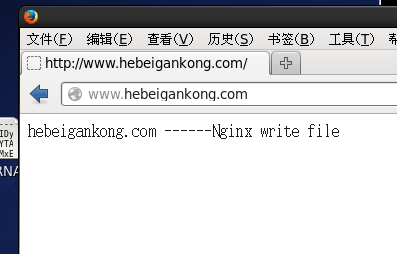
[root@localhost nginx]# echo "hebeigankong.com" > /usr/local/nginx/html/hebeigankong/index.html
[root@localhost nginx]# echo "yiyuanjiance.com" > /usr/local/nginx/html/yiyuanjiance/index.html
上面这个实例可以根据来路域名跳转到不同的网站页面,也就是多个网站绑定到了同一个IP,Nginx web服务器监听80端口实现对不同来访域名的解析,返回不同网站首页。
其实这个测试一般通过修改DNS域名解析,如果没有DNS域名解析,也可以通过修改hosts文件的方式实现。
[root@daqijiance xyz]# cat /etc/hosts
127.0.0.1 localhost localhost.localdomain localhost4 localhost4.localdomain4
::1 localhost localhost.localdomain localhost6 localhost6.localdomain6
192.168.50.157 www.daqijiance.com www.hebeigankong.com www.yiyuanjiance.com daqijiance.com hebeigankong.com yiyuanjiance.com hbgk.com hbu.cn hbu.edu.cn www.hbu.cn www.hbu.edu.cn
- CentOS7 实战源码部署nginx网站服务器
简介:实战演练nginx网站服务器的搭建 nginx 简介: Nginx是一款高性能的 HTTP 和反向代理服务器 Nginx的优点: 1.高并发量:根据官方给出的数据,能够支持高达 50,000 ...
- nodejs,node原生服务器搭建实例
nodejs,node原生服务器搭建实例
- asp.net网站服务器搭建之从零开始
asp.net网站服务器搭建之从零开始 一 IIS(Internet Information Services)安装: 1.选择"控制面板". 2.点"添加或删除程序 ...
- CentOS的SVN服务器搭建与自动部署全过程
CentOS的SVN服务器搭建与自动部署全过程 http://www.jb51.net/article/106218.htm authz-db = authz 引起的 svn 认证失败 http:// ...
- [原创]CentOS下Radius服务器搭建
一. 实现环境: 1.系统:CentOS release 6.6 (Final) 2.需要软件包: 1) freeradius-2.1.12-6.e16.x86_64 freeradius-m ...
- nginx+ftp服务器搭建简易文件服务器
在做一些小项目和学习项目过程中,学习了通过 nginx 和 FTP 搭建小型文件服务器,记录下: 1.环境 电脑:acer 操作系统:windows 10 ftp服务器 2.下载 nginx, 通过双 ...
- Win7服务器搭建实例教程:教你Win7如何搭建Web服务器【转载】
原文地址:http://www.pc841.com/article/20140607-30534.html 局域网Web服务器的主要功能是实现资源共享,同时借助于局域网服务器访问页面可有效的实现信息的 ...
- Nginx反向服务器搭建
Nginx环境搭建 下载解压Nginx源码包 可以通过已有的压缩包 这里也可以通过yum的在线下载 wget http://nginx.org/download/nginx-1.13.7.tar.gz ...
- centos 下git服务器搭建
准备 CentOS Linux release 7.0.1406 (Core) ssh 22端口 http 80端口 本文主要是ssh协议支持,http协议配置后还有问题. 摘抄的一段说明 SSH 协 ...
随机推荐
- 2016年3月4日Android实习笔记
1.让水平LinearLayout中的两个子元素分别居左和居右 在LinearLayout中有两个子元素,LinearLayout的orientation是horizontal.需要让第一个元素居左, ...
- Oracle的decode、sign、trunc函数
原文http://knowyouknowme.iteye.com/blog/574974 一.decode 在Oracle/PLSQL中, decode 具有和 IF-THEN-ELSE 一样的功能 ...
- 用Jersey构建RESTful服务1--HelloWorld
一.环境1.Eclipse Juno R22. Tomcat 73. Jersey 2.7 下载地址( https://jersey.java.net/download.html) 二.流程1.Ec ...
- javascript 原生常用api 数组方法大全
<!DOCTYPE html> <html> <head> <meta charset="UTF-8"> <title> ...
- 阿里开源项目 druid 相关资料汇总
项目发起人访谈:http://www.iteye.com/magazines/90 github主页:https://github.com/alibaba/druid druid 项目,我想我能用很短 ...
- 端口转发工具rinetd的安装与配置
端口映射和转发在实际应用中非常常见,比如一个局域网只有一台服务器可以被互联网访问到,那么如果想通过互联网访问局域网中其他的服务,最常用的方式就是在这一台机器上开放端口,然后转发至局域网中其他主机的端口 ...
- ORA-16447 Redo apply was not active at the target standby database
Cause ALTER SYSTEM FLUSH REDO TO STANDBY failed because redo apply is not active at the target datab ...
- maven 设置跳过测试
1.在执行mvn命令时增加以下参数可以跳过测试: -DskipTests,不执行测试用例,但编译测试用例类生成相应的class文件至target/test-classes下. -Dmaven.test ...
- Jenkins常用插件
Generic Webhook Trigger Plugin触发器webhook用户触发构建 Deploy to container Plugin部署到tomcat Gradle Plugin Gra ...
- ASIHttpRequest请求HTTPS
一种方法 ASIHTTPRequest *request = [ASIHTTPRequestrequestWithURL:[NSURLURLWithString:bodyString]]; [requ ...
