
react-native-echarts 解决数据刷新闪烁,不能动态连续绘制问题(转载)
最终能实现效果:动态绘制K线图,安卓,iOS正常显示
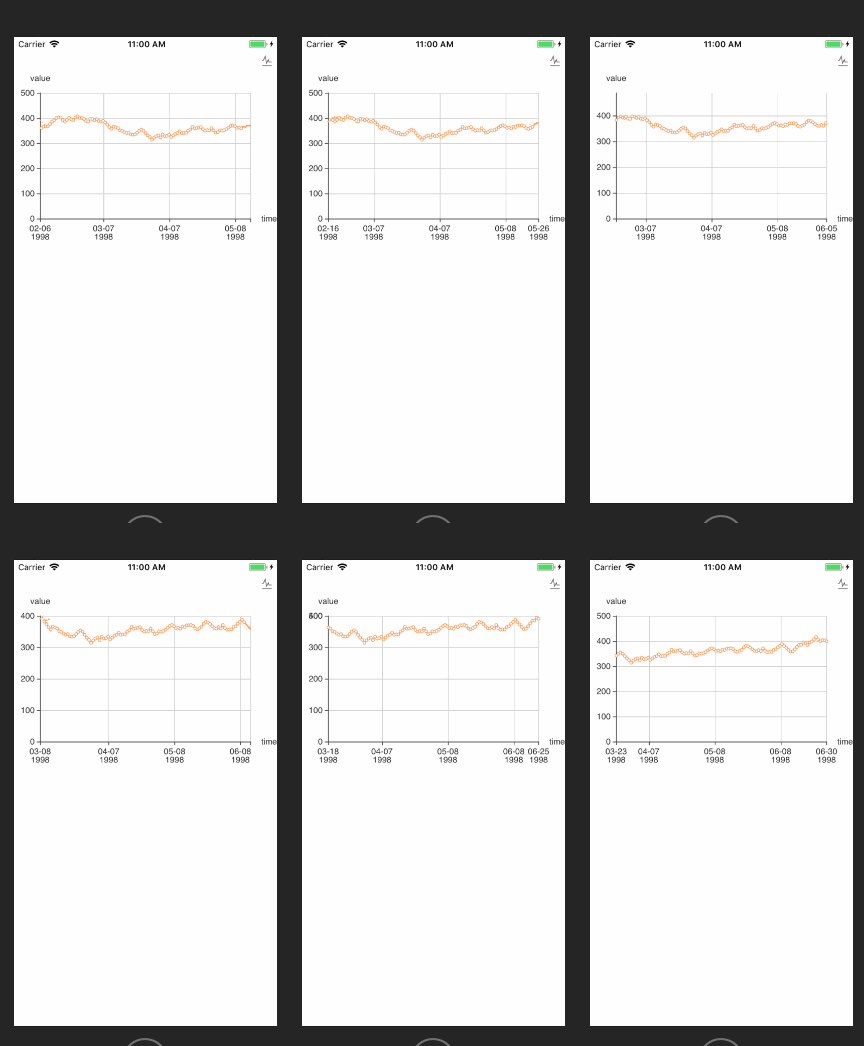
替换node_modules/native-echarts/src/components/Echarts/中的index.js和renderChart.js
index.js替换代码
import React, { Component } from 'react';

import { WebView, View, StyleSheet,Platform } from 'react-native';

import renderChart from './renderChart';

import renderChartNoFirst from './renderChart'

import echarts from './echarts.min';

export default class App extends Component {

// 预防过渡渲染

shouldComponentUpdate(nextProps, nextState) {

const thisProps = this.props || {}

nextProps = nextProps || {}

if (Object.keys(thisProps).length !== Object.keys(nextProps).length) {

return true

}

for (const key in nextProps) {

if (JSON.stringify(thisProps[key]) != JSON.stringify(nextProps[key])) {

// console.log('props', key, thisProps[key], nextProps[key])

return true

}

}

return false

}

componentWillReceiveProps(nextProps) {

if(nextProps.option !== this.props.option) {

// 解决数据改变时页面闪烁的问题

this.refs.chart.injectJavaScript(renderChart(nextProps,false))

}

}

  render() {

    if (Platform.OS == 'android'){

      return (

      <View style={{flex: 1, height: this.props.height || 400,}}>

        <WebView

          ref="chart"

          scrollEnabled = {false}

          injectedJavaScript = {renderChart(this.props,true)}

          style={{

            height: this.props.height || 400,

          }}

          //source={require('./tpl.html')}

          source={{uri: 'file:///android_asset/tpl.html'}}

        />

      </View>

    );

    }else{

      return (

      <View style={{flex: 1, height: this.props.height || 400,}}>

        <WebView

          ref="chart"

          scrollEnabled = {false}

          scalesPageToFit={false}

          injectedJavaScript = {renderChart(this.props,true)}

          style={{

            height: this.props.height || 400,

          }}

          source={require('./tpl.html')}

        />

      </View>

    );

    }

  }

}
renderChart.js替换代码
import echarts from './echarts.min';

import toString from '../../util/toString';

var myChart = null;

export default function renderChart(props,isFirst) {

  const height = props.height || 400;

    if (isFirst){

      return `

    document.getElementById('main').style.height = "${height}px";

    myChart = echarts.init(document.getElementById('main'));

    myChart.setOption(${toString(props.option)});

  `

    }else{

      return `

    document.getElementById('main').style.height = "${height}px";

    myChart.setOption(${toString(props.option)});

  `

    }

}
安卓打包echart不显示修复
1.将上述代码替换,注意备注部分
//解决安卓打包不显示问题

source={{uri: 'file:///android_asset/tpl.html'}}
2.将node_modules/native-echarts/src/components/Echarts/tpl.html拷贝一份到/android/app/src/main/assets/目录下
3.运行js打包命令
4.删除/android/app/src/main/res/drawable-mdpi/node_modules_nativeecharts_src_components_echarts_tpl.html
5.安卓打包APK
作者:LPrison
链接:https://www.jianshu.com/p/6fa9482695bf
來源:简书
react-native-echarts 解决数据刷新闪烁,不能动态连续绘制问题(转载)的更多相关文章
- React Native 获取网络数据
getMoviesFromApiAsync() { return fetch('http://facebook.github.io/react-native/movies.json') .then(( ...
- react native 完美解决启动白屏
先讲下我的RN版本0.58.5 首先安装react-native-splash-screen(目前使用的版本是3.2.0) 项目地址https://github.com/crazycodeboy/re ...
- React Native 适配Android物理返回键,实现连续两次点击退出
一直使用iPhone作为测试机开发,提交给测试同事Android版本后发现很多适配问题,其中一个非常明显的是,弹出一个modal后,点击Android的返回键,modal不会消失,直接navigati ...
- React Native 网络层分析
文:志俊(沪江Web前端) 本文原创,转载请注明作者及出处 在使用React Native开发中,我们熟练的采用JavaScript的方式发送请求的方式发送一个请求到服务端,但是处理这个请求的过程其实 ...
- React Native:使用 JavaScript 构建原生应用
[转载] 本篇为联合翻译,译者:寸志,范洪春,kmokidd,姜天意 数月前,Facebook 对外宣布了正在开发的 React Native 框架,这个框架允许你使用 JavaScript 开发原生 ...
- 深入浅出 React Native:使用 JavaScript 构建原生应用
深入浅出 React Native:使用 JavaScript 构建原生应用 链接:https://zhuanlan.zhihu.com/p/19996445 原文:Introducing React ...
- React Native:使用 JavaScript 构建原生应用 详细剖析
数月前,Facebook 对外宣布了正在开发的 React Native 框架,这个框架允许你使用 JavaScript 开发原生的 iOS 应用——就在今天,Beta 版的仓库释出了! 基于 Pho ...
- React Native 从入门到原理
React Native 是最近非常火的一个话题,介绍如何利用 React Native 进行开发的文章和书籍多如牛毛,但面向入门水平并介绍它工作原理的文章却寥寥无几. 本文分为两个部分:上半部分用通 ...
- 关于React Native 火热的话题,从入门到原理
本文授权转载,作者:bestswifter(简书) React Native 是最近非常火的一个话题,介绍如何利用 React Native 进行开发的文章和书籍多如牛毛,但面向入门水平并介绍它工作原 ...
随机推荐
- python 日期操作【转】
SQLite中的时间日期函数这是我学习SQLite时做的笔记,参考并翻译了Chris Newman写的<SQLite>中的<Working with Dates and Times& ...
- PAT 1046 Shortest Distance
1046 Shortest Distance (20 分) The task is really simple: given N exits on a highway which forms a ...
- logstash快速入门
转自 http://blog.csdn.net/wp500/article/details/41040213 原文地址:http://logstash.net/docs/1.4.2/tutorials ...
- UNIX发展史简介
1965年贝尔实验室(Bell Labs).通用电气(General Electric)和麻省理工学院(MIT)欲共同打造MULTICS(Multiplexed Information and Com ...
- 接收上传的multi-file的文件(四)
构建工程 为例创建一个springmvc工程你需要spring-boot-starter-thymeleaf和 spring-boot-starter-web的起步依赖.为例能够上传文件在服务器,你需 ...
- C# 中web如何定时同步数据
之前做定时器同步方法试过很多方法, 不过都有些问题 1)quartz + IIS 方式(web项目发布到IIS上,出现IIS应用池回收问题) 2)用线程Timer方式 (出现多个线程同步同个任务问题) ...
- linux 添加环境变量(php为例)
find / -name php vim /etc/profile 文件最后添加 export PATH=$PATH:/usr/local/php/bin source /etc/profile p ...
- Spring MVC之DispatcherServlet初始化详解
Spring作为一个优秀的web框架,其运行是基于Tomcat的.在我们前面的讲解中,Spring的驱动都是使用的ClassPathXmlApplicationContext,并且都是直接在main方 ...
- configparse 模块
config parser 用于解析配置文件的模拟 何为配置文件 包含配置程序信息的文件就是称为配置文件 什么样的数据应作为配置文件 需要该 但是不经常改的信息 例如数据文件的路径 db_pa ...
- Mybatis之trim标签的理解
最近在学Mybatis,在学到动态sql的trim标签时,很迷惑.不知所以然.看别人的博客和论坛里的解释,太宽泛,还是不能理解: trim元素的主要功能是可以在自己包含的内容前加上某些前缀,也可以在其 ...