
[Node.js] 05 - Modules and Function
一个 Node.js 文件就是一个模块,这个文件可能是JavaScript 代码、JSON 或者编译过的C/C++ 扩展。
模块是Node.js 应用程序的基本组成部分,文件和模块是一一对应的。
Node.js 工具模块
在 Node.js 模块库中几种常用模块的使用:
| 序号 | 模块名 & 描述 |
|---|---|
| 1 | OS 模块 提供基本的系统操作函数。 |
| 2 | Path 模块 提供了处理和转换文件路径的工具。 |
| 3 | Net 模块 用于底层的网络通信。提供了服务端和客户端的的操作。 |
| 4 | DNS 模块 用于解析域名。 |
| 5 | Domain 模块 简化异步代码的异常处理,可以捕捉处理try catch无法捕捉的。 |
创建模块
调用函数
- 形式一:
定义一个对外的world功能:定义一个对外的函数。
// hello.js

exports.world = function() {  // world() 成为 exports 对象的成员函数

  console.log('Hello World');

}
在 main.js 中通过 require('./hello') 加载这个模块,然后就可以直接访 问 hello.js 中 exports 对象的成员函数了。
var hello = require('./hello');  // var hello 代表了一个模块,也就是./hello这个文件代表的东西

hello.world();
- 形式二:【更流行】
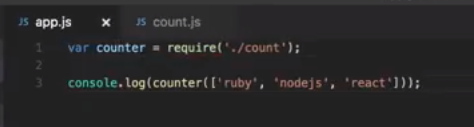
定义一个对外的counter功能:定义一个函数,之后再使其对外。
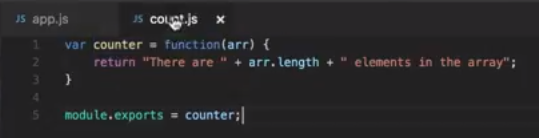
Use this api (counter) here.
调用类
//main.js

var Hello = require('./hello');

hello = new Hello();

hello.setName('BYVoid');

hello.sayHello();
模块定义方法:
//hello.js

function Hello() {

    var name;

    this.setName = function(thyName) {

        name = thyName;

    };

    this.sayHello = function() {

        console.log('Hello ' + name);

    };

};

module.exports= Hello;
(1) 其实也是开放多个对外函数的一个tricky方法:
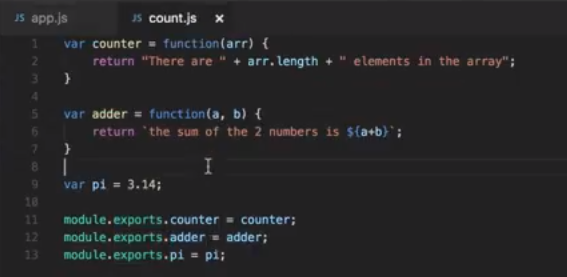
(2) 以上较为麻烦。我们用类包裹多个函数,然后再导出该类,这样岂不是会轻便些。

模块加载
var http = require("http");
当文件模块缓存中不存在,
而且不是原生模块的时候,
Node.js 会解析 require 方法传入的参数,并从文件系统中加载实际的文件
- require方法接受以下几种参数的传递:
| 1 | http、fs、path等 | 原生模块 |
| 2 | ./mod 或 ../mod | 相对路径的文件模块 |
| 3 | /pathtomodule/mod | 绝对路径的文件模块 |
| 4 | mod | 非原生模块的文件模块 |
在路径 Y 下执行 require(X) 语句执行顺序,参见链接。
函数作为参数
两种写法,推荐后者。
function sayHI() { ... }

var Bye = function ([args]) { ... }
这么用的意义在于什么?
将"做什么"和"谁去做"分离开来,也就是将‘不变的事物’和‘可变的事物’分离开来。
比如:有这么一个类,它是功能和参数的粘合剂!
function execute(someFunction, value) {

  someFunction(value);

}

function say(word) {
  console.log(word);
}
execute(say, "Hello");
或者,匿名函数方式,看起来简洁一些。
function execute(someFunction, value) {

  someFunction(value);

}

execute(function(word){ console.log(word) }, "Hello");
Node.js 全局对象
全局对象(Global Object),它及其所有属性都可以在程序的任何地方访问,即全局变量。
- 在浏览器 JavaScript 中,通常 window 是全局对象,
- 在 Node.js 中的全局对象是 global,所有全局变量(除了 global 本身以外)都是 global 对象的属性。
在 Node.js 我们可以直接访问到 global 的属性,而不需要在应用中包含它。
- global 的属性
global 最根本的作用是作为全局变量的宿主。按照 ECMAScript 的定义,满足以下条 件的变量是全局变量:
- 在最外层定义的变量;
- 全局对象的属性;
- 隐式定义的变量(未定义直接赋值的变量)。
当你定义一个全局变量时,这个变量同时也会成为全局对象的属性,反之亦然。
需要注意的是,在 Node.js 中你不可能在最外层定义变量,因为所有用户代码都是属于当前模块的, 而模块本身不是最外层上下文。
- 若干常用属性
// 输出全局变量 __filename 的值
console.log( __filename );
--------------------------------------
// 输出全局变量 __dirname 的值
console.log( __dirname );
--------------------------------------
function printHello(){

   console.log( "Hello, World!");

}

// 两秒后执行以上函数

setTimeout(printHello, 2000);
--------------------------------------
function printHello(){

   console.log( "Hello, World!");

}

// 两秒后执行以上函数

var t = setTimeout(printHello, 2000);

// 清除定时器

clearTimeout(t);
--------------------------------------
function printHello(){

   console.log( "Hello, World!");

}

// 两秒后执行以上函数

setInterval(printHello, 2000);
console 方法
console 用于提供控制台标准输出,它是由 Internet Explorer 的 JScript 引擎提供的调试工具,后来逐渐成为浏览器的实施标准。
Node.js 沿用了这个标准,提供与习惯行为一致的 console 对象,用于向标准输出流(stdout)或 标准错误流(stderr)输出字符。
console.log('byvoid%diovyb');

console.log('byvoid%diovyb', 1991);   // 有%d就看有没有匹配的变量,有则“替换”,无则“失效”
console.error():与console.log() 用法相同,只是向标准错误流输出。
console.exception() 是 console.error() 的别名;它们功能相同。
console.trace();

Trace:

at Object.<anonymous> (/home/byvoid/consoletrace.js:1:71)

at Module._compile (module.js:441:26)

at Object..js (module.js:459:10)

at Module.load (module.js:348:31)

at Function._load (module.js:308:12)

at Array.0 (module.js:479:10)

at EventEmitter._tickCallback (node.js:192:40)
console.info("程序开始执行:");

console.time("获取数据");    // 表示计时开始

console.timeEnd('获取数据');  // 表示计时结束

console.info("程序执行完毕。")
- process方法
参见:[Node.js] 06 - Multi-thread and process module
Node.js 常用工具
util 是一个Node.js 核心模块,提供常用函数的集合,用于弥补核心JavaScript 的功能 过于精简的不足。
- util.inherits
util.inherits(constructor, superConstructor)是一个实现 对象间原型继承 的函数。
JavaScript 的面向对象特性是基于原型的,与常见的基于类的不同。JavaScript 没有 提供对象继承的语言级别特性,而是通过原型复制来实现的。
在这里我们只介绍util.inherits 的用法,示例如下:
var util = require('util');

function Base() {

    this.name = 'base';

    this.base = 1991;

    this.sayHello = function() {

    console.log('Hello ' + this.name);

    };

}

Base.prototype.showName = function() {

    console.log(this.name);

};

function Sub() {

    this.name = 'sub';

}

util.inherits(Sub, Base);   // 继承的实现:继承自Base的Sub

var objBase = new Base();

objBase.showName();

objBase.sayHello();

console.log(objBase);

var objSub = new Sub();

objSub.showName();

//objSub.sayHello();

console.log(objSub);
Jeff: 关于js的类的设计问题,需要专题讲解。
- util.inspect
将任意对象转换 为字符串的方法,通常用于调试和错误输出。
var util = require('util');

function Person() {

    this.name = 'byvoid';

    this.toString = function() {

    return this.name;

    };

}

var obj = new Person();

console.log(util.inspect(obj));

console.log(util.inspect(obj, true));
Result:
Person { name: 'byvoid', toString: [Function] }

Person {

  name: 'byvoid',

  toString:

   { [Function]

     [length]: 0,

     [name]: '',

     [arguments]: null,

     [caller]: null,

     [prototype]: { [constructor]: [Circular] } } }
- util.isArray(object)
如果给定的参数 "object" 是一个数组返回true,否则返回false。
var util = require('util');

util.isArray([])

  // true

util.isArray(new Array)

  // true

util.isArray({})

  // false
- util.isRegExp(object)
如果给定的参数 "object" 是一个正则表达式返回true,否则返回false。
var util = require('util');

util.isRegExp(/some regexp/)

  // true

util.isRegExp(new RegExp('another regexp'))

  // true

util.isRegExp({})

  // false
- util.isDate(object)
如果给定的参数 "object" 是一个日期返回true,否则返回false。
var util = require('util');

util.isDate(new Date())

  // true

util.isDate(Date())

  // false (without 'new' returns a String)

util.isDate({})

  // false
- util.isError(object)
如果给定的参数 "object" 是一个错误对象返回true,否则返回false。
var util = require('util');

util.isError(new Error())

  // true

util.isError(new TypeError())

  // true

util.isError({ name: 'Error', message: 'an error occurred' })

  // false
[Node.js] 05 - Modules and Function的更多相关文章
- node --experimental-modules & node.js ES Modules
node --experimental-modules & node.js ES Modules how to run esm modules in node.js cli $ node -v ...
- Node.js & ES Modules & Jest
Node.js & ES Modules & Jest CJS & ESM CommonJS https://en.wikipedia.org/wiki/CommonJS ht ...
- Node.js & ES modules & .mjs
Node.js & ES modules & .mjs Node.js v13.9.0 https://nodejs.org/api/esm.html https://nodejs.o ...
- [Node.js] 4. Modules
4.2 Missing Exports Notice the two different files: high_five.js on the left side andapp.js on the r ...
- [Node.js] Exporting Modules in Node
In this lesson, you will learn the difference between the exports statement and module.exports. Two ...
- [Node.js] CommonJS Modules
CoomonJS modules provide a clean syntax for importing dependencies. This lesson will take a look at ...
- Node.js学习 - Modules
创建模块 当前目录:hello.js, main.js // hello.js exports.world = function() { // exports 对象把 world 作为模块的访问接口 ...
- Node.js module export async function
一.Demo 1.首先定义 module 文件:bbb.js const fs = require("fs"); function readFileSync() { let res ...
- Node.js require 模块加载原理 All In One
Node.js require 模块加载原理 All In One require 加载模块,搜索路径 "use strict"; /** * * @author xgqfrms ...
随机推荐
- zookeepercli - Command Line Interface for ZooKeeper
简介 ZooKeeper命令行界面(CLI)用于与ZooKeeper进行交互以用于开发目的.它对于调试很有用. 要执行ZooKeeper CLI操作,首先打开你的ZooKeeper服务器(“bin / ...
- libreoffice.在Centos中使用时碰到X11 error的解决办法
先安装 libreoffice yum install libreoffice -y 尝试DOC转PDF是碰到报错 解决办法, 要安装多一个东西 yum install libreoffice-hea ...
- Java中的ReentrantLock和synchronized两种锁定
原文:http://www.ibm.com/developerworks/cn/java/j-jtp10264/index.html 多线程和并发性并不是什么新内容,但是 Java 语言设计中的创新之 ...
- VS2008中捕获内存泄露(转)
内存泄露十分讨厌,捕获内存泄露更加令人厌烦…… 其实,VS本身就有内存泄露的检测机制.只需做以下操作即可开启.(同时必须在debug模式 下运行程序并且以 正常流程退出 ) // 在入口函数cpp中添 ...
- Android导入第三方静态库.a编译成动态库.so
http://ikinglai.blog.51cto.com/6220785/1324985 在Android开发的时候,经常会使用到用c或c++编写的第三方的静态库.如果有源码的话,可以直接跟你自己 ...
- vs2010编译错误(报错:LINK : fatal error LNK1123: 转换到 COFF 期间失败: 文件无效或损坏)
报错:LINK : fatal error LNK1123: 转换到 COFF 期间失败: 文件无效或损坏 1> 这段时间忙于看文献,没用过VS了. 今天用着用着就报错了: LINK : fat ...
- python新建txt文件,并逐行写入数据
#coding=utf-8 txtName = "codingWord.txt"f=file(txtName, "a+")for i in range(1,10 ...
- 为Docker容器设置http代理
以下内容复制自:传送门 ,可以直接去该地址查看. HTTP/HTTPS proxy The Docker daemon uses the HTTP_PROXY, HTTPS_PROXY, and NO ...
- nginx https 配置样例
站点nginx https 配置模板 第一章 nginx 支持https 配置样例 其他 相关链接地址 第一章 nginx 支持https 配置样例 说明:https 段配置参数说明 Server 段 ...
- Jexus 网站服务器和 ASP.NET 跨平台开发
微软的跨平台战略 微软在过去的一年多中时间中发生了令整个 IT 行业感到惊叹的变化.这一切始于 Ballmer 的退位和 Nadella 的决心,更始于早已在微软各个基层部门蠢蠢欲动的二次创业. 以开 ...