
day4 java消息中间件服务
关于ActiveMQ、RocketMQ、RabbitMQ、Kafka一些总结和区别

ActiveMQ之消息服务器平台(发邮件)!!!!
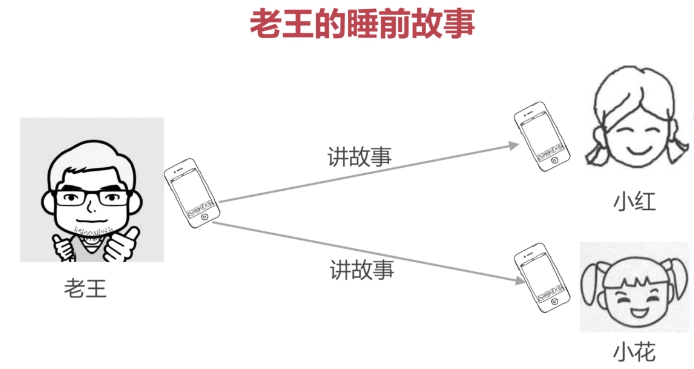
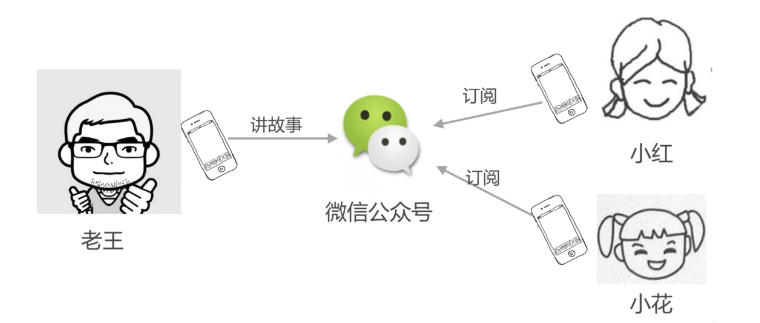
PS: 讲个故事,老王要给他的两个女儿讲故事,他要一个一个讲很费劲,后来他使用了微信公众号,让订阅微信公众号的人关注就减轻了负担。
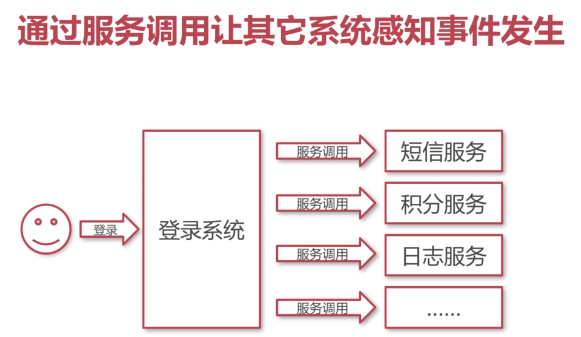
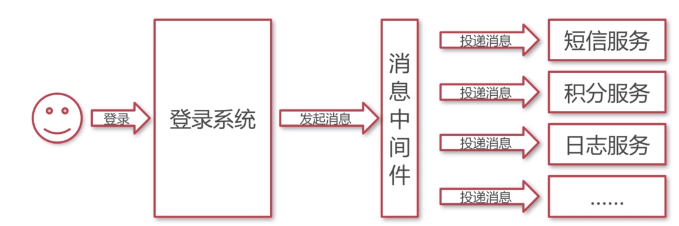
PS: 传统的如果一个用户进行登录,会调用分多的服务,如果没有消息中间件等待的时间就会很长(这样同步的效率很低),有了消息中间件首先
能有异步的保证登录,然后还能保证服务不会被一个一个执行
PS:生活中的应用


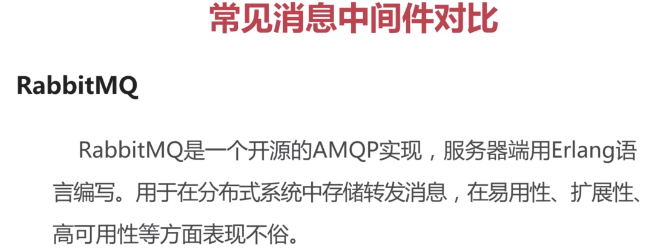
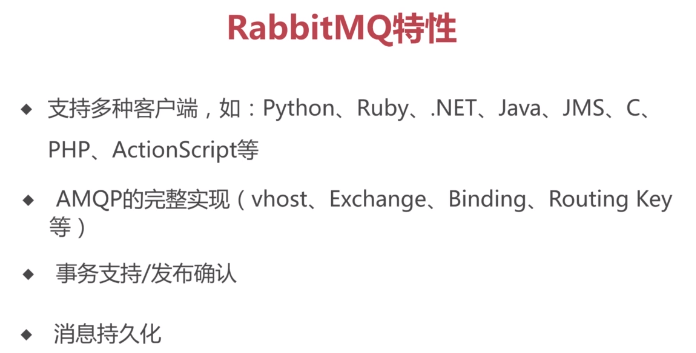
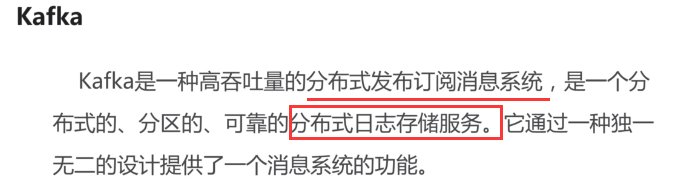
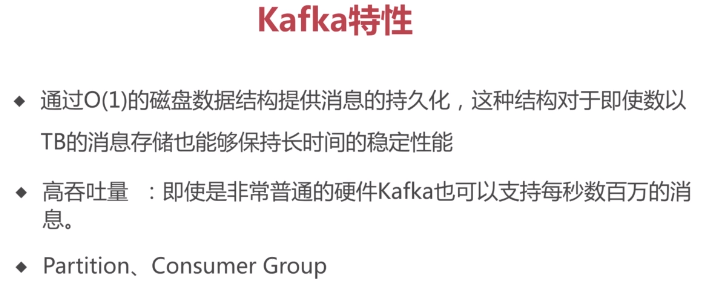
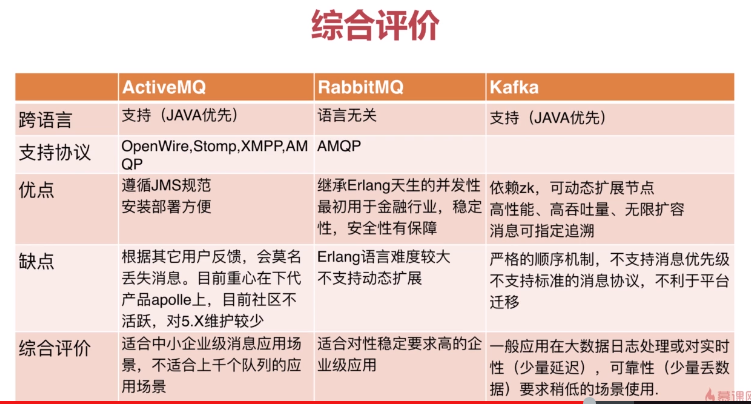
PS: kafka性能高,但是数据会丢失
rabbitmp保证数据不丢失,性能比activemq强
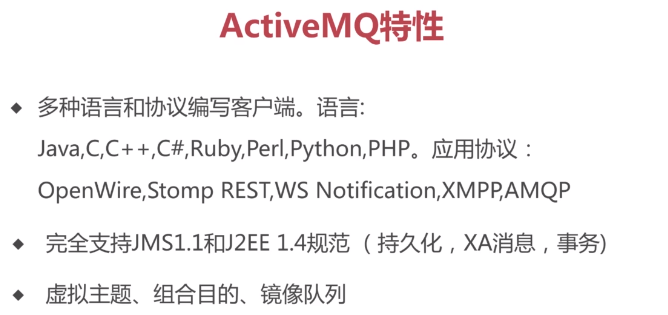
activeMq满足80%以上的业务场景
关于消息队列的介绍----ActiveMQ,RabbitMQ,ZeroMQ,Kafka,MetaMQ,RocketMQ
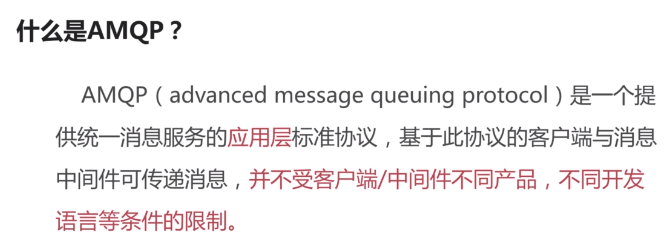
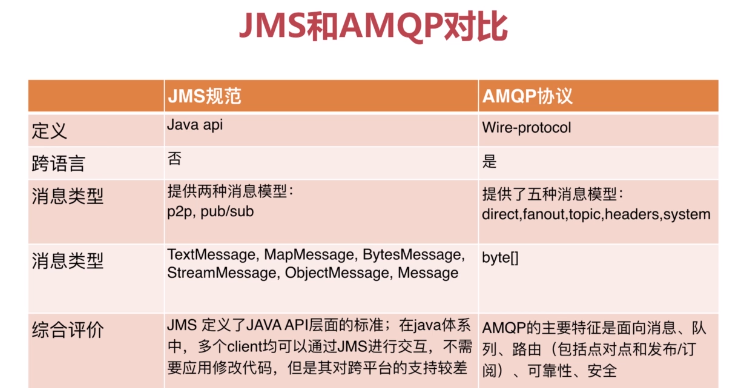
PS: JMS是一种规范,不同的公司有不同的实现,其中最常用的是ActiveMQ, 类似于JDBC感觉
队列是一两万,消息流量几十万条也是可以使用的
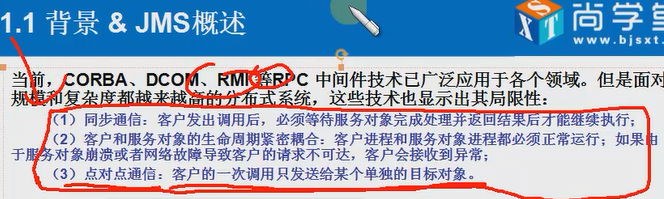

PS: 也就是对方不在的时候也可以发送


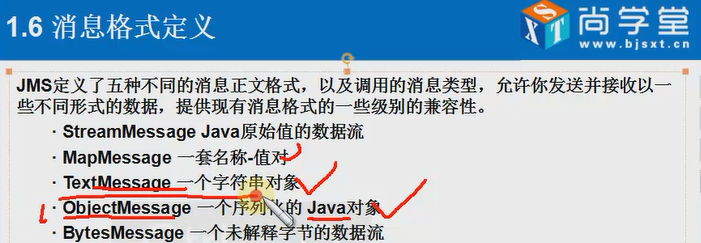
PS: JMS规定点对点 和 发布和订阅模式,  如果是点对点的模式就把数据扔到 Queue中,如果是 发布订阅就发送到topic中;
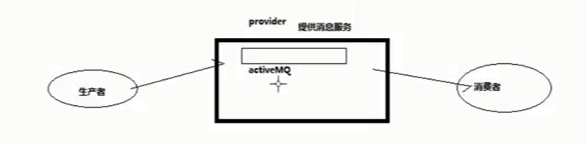
    消息中间件可以理解为  数据库,通过ConnecttionFactory连接,从而获得一个Connecttion,然后把消息发送到指定的目的地
--------------------------------------------------------------------------------------------
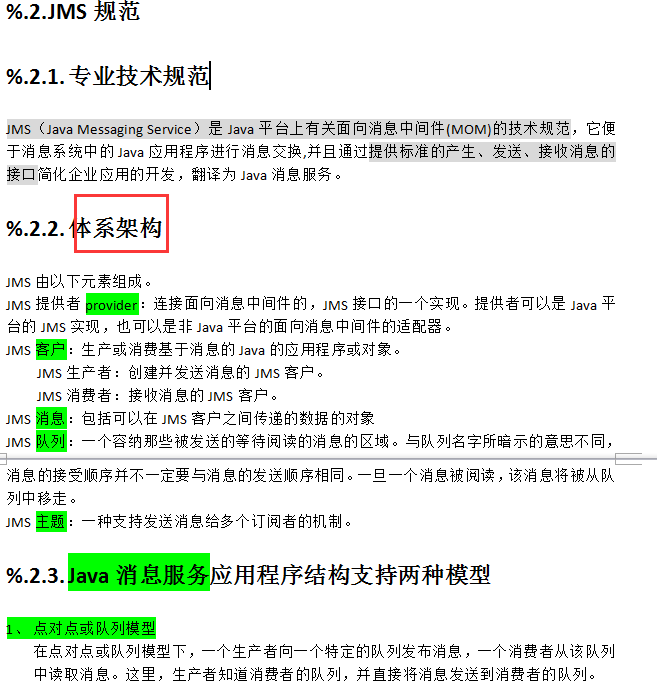

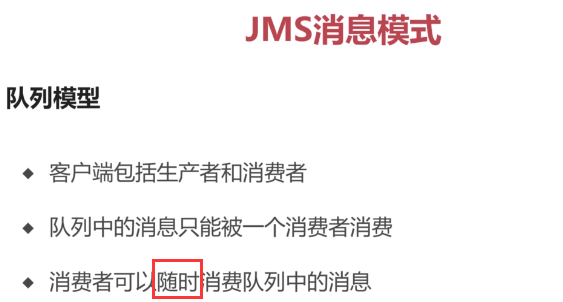


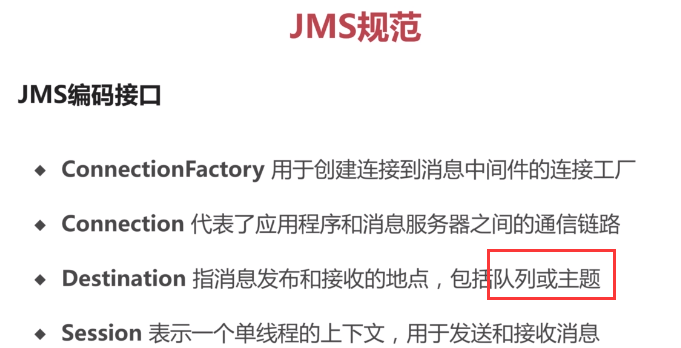
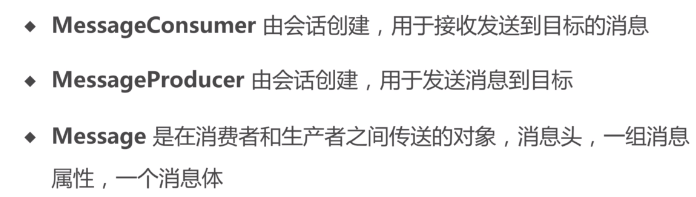
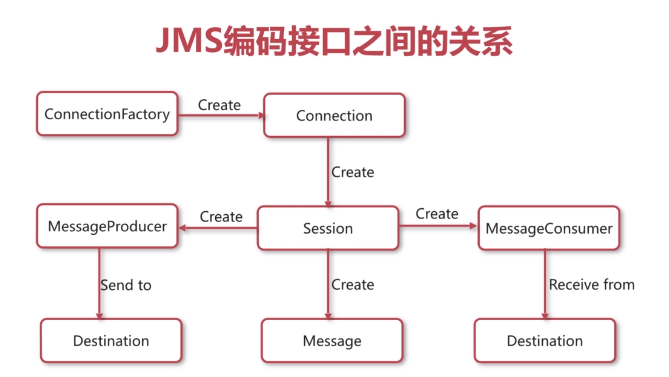
PS:这是Java Message Service的体系。
PS:体系架构是重点,分为消费者和发送者两者。统称为客户
PS: 消息的两种模式  :  队列和话题

1.下载ActiveMQ
去官方网站下载:http://activemq.apache.org/
2.运行ActiveMQ
解压缩apache-activemq-5.5.1-bin.zip,
PS :要用这个老版本的; 后来学习的时候使用5.11.1

修改配置文件activeMQ.xml,将0.0.0.0修改为localhost
|
<transportConnectors> <transportConnector name="openwire" uri="tcp://localhost:61616"/> <transportConnector name="ssl" uri="ssl://localhost:61617"/> <transportConnector name="stomp" uri="stomp://localhost:61613"/> <transportConnector uri="http://localhost:8081"/> <transportConnector uri="udp://localhost:61618"/> |

然后双击apache-activemq-5.5.1\bin\activemq.bat运行ActiveMQ程序。



启动ActiveMQ以后,登陆:http://localhost:8161/admin/,创建一个Queue,命名为FirstQueue。
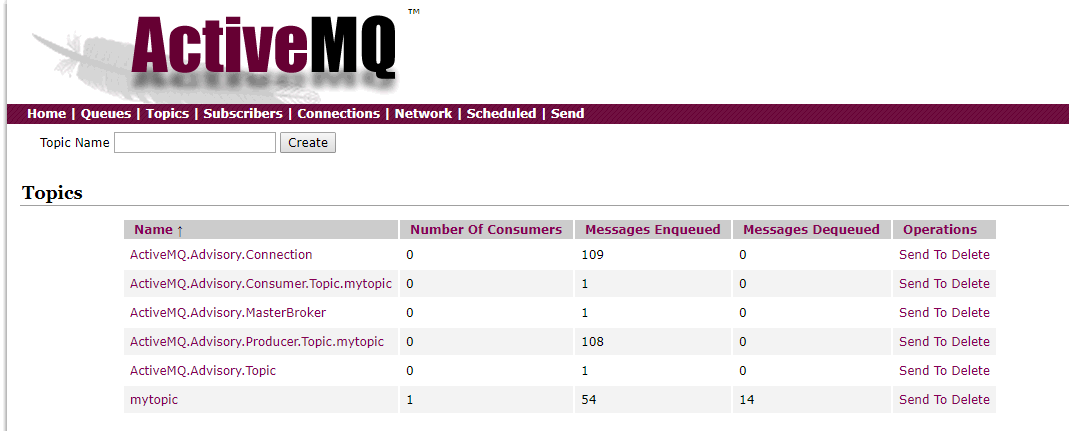
PS:不会的话,直接看百度怎么配置JMS
1.安装包2.修改配置 3.bat启动 4.执行代码看业务流程

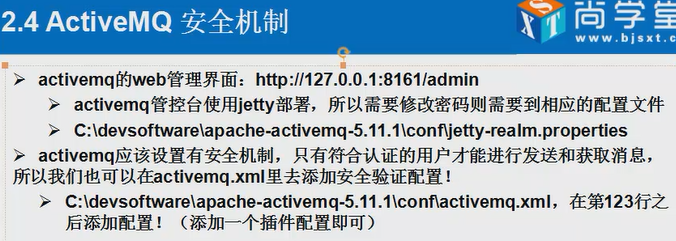
PS :安全机制主要是配置用户


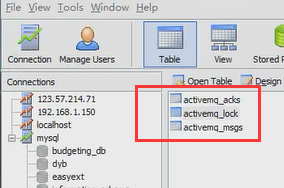
PS: 配置好的话,会自动创建三个表,处理完数据以后自动会清空
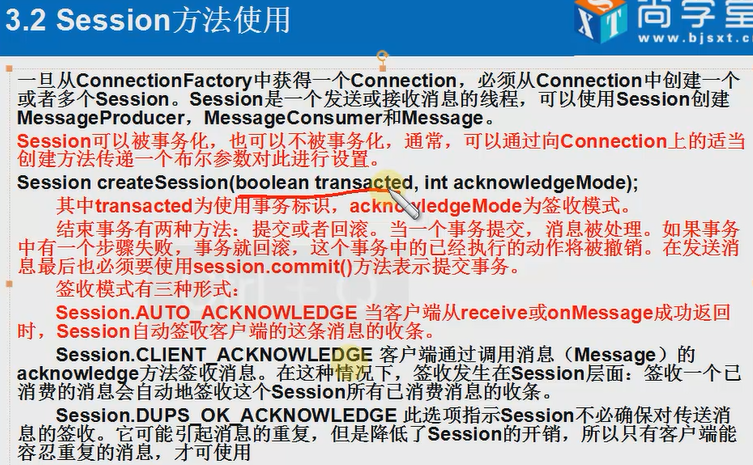
PS: 事物的设置主要在发送端, 最后一种提交方式用的比较少
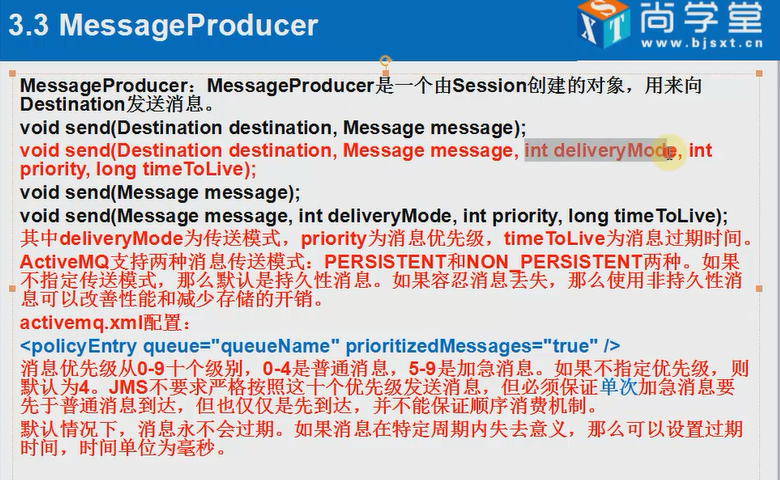
------------------------------------------------------------------------------------------------------------------------------------------------------

PS:JMS用在J2EE生产环境中,kafka用在大数据开发环境中 。 都是消息队列的处理。。。。
PS:比如上图,在web系统接收数据,然后会生成相应的日志文件,应用kafka读取数据,然后再执行相应的业务处理。
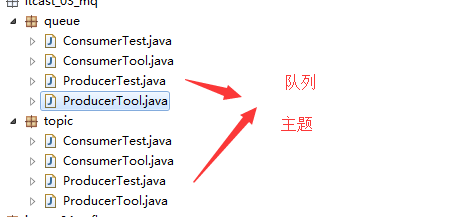
package cn.itcast_03_mq.topic;

import javax.jms.Connection;

import javax.jms.DeliveryMode;

import javax.jms.Destination;

import javax.jms.JMSException;

import javax.jms.MessageProducer;

import javax.jms.Session;

import javax.jms.TextMessage;

import org.apache.activemq.ActiveMQConnection;

import org.apache.activemq.ActiveMQConnectionFactory;

public class ProducerTool {

    private String user = ActiveMQConnection.DEFAULT_USER;

    private String password = ActiveMQConnection.DEFAULT_PASSWORD;

    private String url = ActiveMQConnection.DEFAULT_BROKER_URL;

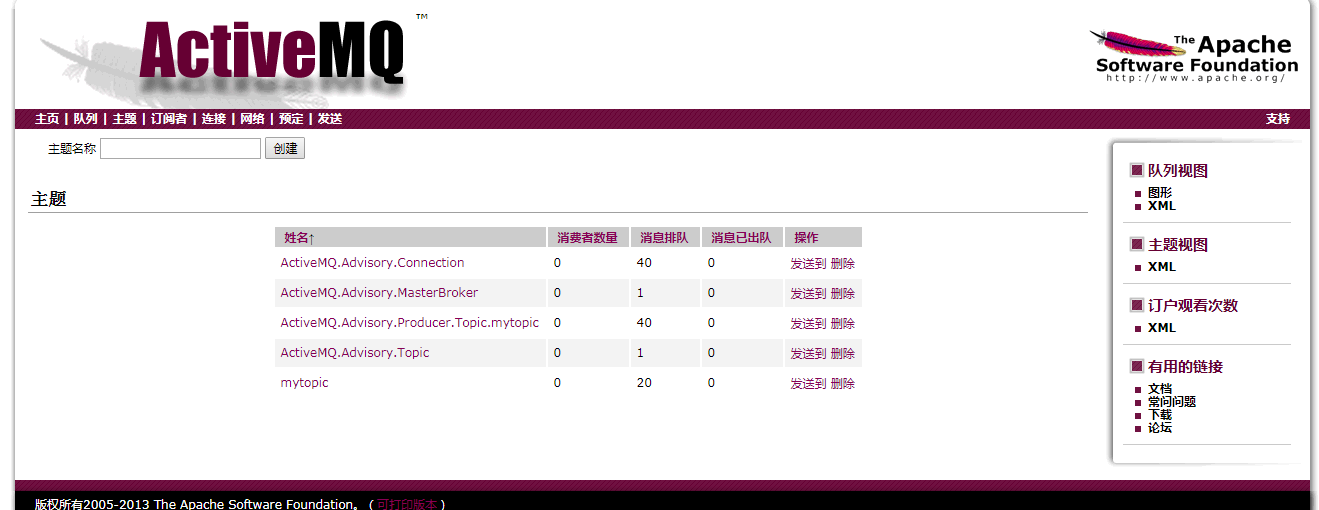
    private String subject = "mytopic";

    private Destination destination = null;

    private Connection connection = null;

    private Session session = null;

    private MessageProducer producer = null;

    // 初始化

    private void initialize() throws JMSException, Exception {

        ActiveMQConnectionFactory connectionFactory = new ActiveMQConnectionFactory(

                user, password, url);

        connection = connectionFactory.createConnection();

        session = connection.createSession(false, Session.AUTO_ACKNOWLEDGE);

        destination = session.createTopic(subject);

        producer = session.createProducer(destination);

        producer.setDeliveryMode(DeliveryMode.NON_PERSISTENT);

    }

    // 发送消息

    public void produceMessage(String message) throws JMSException, Exception {

        initialize();

        TextMessage msg = session.createTextMessage(message);

        connection.start();

        System.out.println("Producer:->Sending message: " + message);

        producer.send(msg);

        System.out.println("Producer:->Message sent complete!");

    }

    // 关闭连接

    public void close() throws JMSException {

        System.out.println("Producer:->Closing connection");

        if (producer != null)

            producer.close();

        if (session != null)

            session.close();

        if (connection != null)

            connection.close();

    }

}
package cn.itcast_03_mq.topic;

import java.util.Random;

import javax.jms.JMSException;

public class ProducerTest {

    /**

     * @param args

     */

    public static void main(String[] args) throws JMSException, Exception {

        ProducerTool producer = new ProducerTool();

        Random random = new Random();

        for(int i=0;i<20;i++){

            Thread.sleep(random.nextInt(10)*1000);

            producer.produceMessage("Hello, world!--"+i);

            producer.close();

        }

    }

}
package cn.itcast_03_mq.topic;

import javax.jms.Connection;

import javax.jms.Destination;

import javax.jms.ExceptionListener;

import javax.jms.JMSException;

import javax.jms.MessageConsumer;

import javax.jms.Session;

import javax.jms.MessageListener;

import javax.jms.Message;

import javax.jms.TextMessage;

import org.apache.activemq.ActiveMQConnection;

import org.apache.activemq.ActiveMQConnectionFactory;

public class ConsumerTool implements MessageListener,ExceptionListener {
    //这些都是体系架构的东西

    private String user = ActiveMQConnection.DEFAULT_USER;

    private String password = ActiveMQConnection.DEFAULT_PASSWORD;

    private String url =ActiveMQConnection.DEFAULT_BROKER_URL;

    private String subject = "mytopic";

    private Destination destination = null;

    private Connection connection = null;

    private Session session = null;

    private MessageConsumer consumer = null;

    public static Boolean isconnection=false;

    // 初始化

    private void initialize() throws JMSException, Exception {

        ActiveMQConnectionFactory connectionFactory = new ActiveMQConnectionFactory(

                user, password, url);      //创建工厂

        connection = connectionFactory.createConnection();      //创建链接

        session = connection.createSession(false, Session.AUTO_ACKNOWLEDGE);

        destination = session.createTopic(subject);

        consumer = session.createConsumer(destination);

    }

    // 消费消息

    public void consumeMessage() throws JMSException, Exception {

        initialize();

        connection.start();

        consumer.setMessageListener(this);    //监听消息

        connection.setExceptionListener(this);//异常监听

        isconnection=true;

        System.out.println("Consumer:->Begin listening...");

        // 开始监听

        // Message message = consumer.receive();

    }

    // 关闭连接

    public void close() throws JMSException {

        System.out.println("Consumer:->Closing connection");

        if (consumer != null)

            consumer.close();

        if (session != null)

            session.close();

        if (connection != null)

            connection.close();

    }

    // 消息处理函数

    public void onMessage(Message message) {

        try {

            if (message instanceof TextMessage) {

                TextMessage txtMsg = (TextMessage) message;

                String msg = txtMsg.getText();

                System.out.println("Consumer:->Received: " + msg);

            } else {

                System.out.println("Consumer:->Received: " + message);

            }

        } catch (JMSException e) {

            // TODO Auto-generated catch block

            e.printStackTrace();

        }

    }

    public void onException(JMSException arg0) {

        isconnection=false;

    }

}
package cn.itcast_03_mq.topic;

import javax.jms.JMSException;

public class ConsumerTest implements Runnable {

    static Thread t1 = null;

    /**

     * @param args

     * @throws InterruptedException

     * @throws InterruptedException

     * @throws JMSException

     * @throws InterruptedException

     */

    public static void main(String[] args) throws InterruptedException {

        t1 = new Thread(new ConsumerTest());

        t1.setDaemon(false);

        t1.start();

        /**

         * 如果发生异常,则重启consumer

         */

        /*while (true) {

            System.out.println(t1.isAlive());

            if (!t1.isAlive()) {

                t1 = new Thread(new ConsumerTest());

                t1.start();

                System.out.println("重新启动");

            }

            Thread.sleep(5000);

        }*/

        // 延时500毫秒之后停止接受消息

        // Thread.sleep(500);

        // consumer.close();

    }

    public void run() {

        try {

            ConsumerTool consumer = new ConsumerTool();

            consumer.consumeMessage();

            while (ConsumerTool.isconnection) {

            }

        } catch (Exception e) {

        }

    }

}
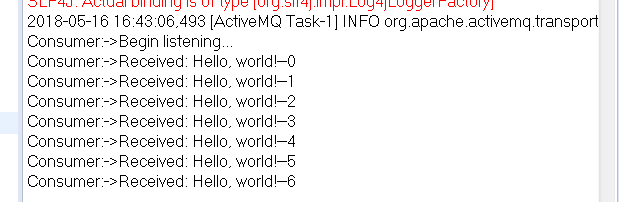
PS:此为程序启动以后监听的效果
SLF4J: Class path contains multiple SLF4J bindings.

SLF4J: Found binding in [jar:file:/D:/All_Downloads/BaiduYunDownload/chuanzhiboke%e5%a4%a7%e6%95%b0%e6%8d%ae/%e8%a7%86%e9%a2%91/day04%e5%b9%b6%e5%8f%91/day04/%e4%bb%a3%e7%a0%81/1-cloudDay04/lib/activemq-all-5.9.0.jar!/org/slf4j/impl/StaticLoggerBinder.class]

SLF4J: Found binding in [jar:file:/D:/All_Downloads/BaiduYunDownload/chuanzhiboke%e5%a4%a7%e6%95%b0%e6%8d%ae/%e8%a7%86%e9%a2%91/day04%e5%b9%b6%e5%8f%91/day04/%e4%bb%a3%e7%a0%81/1-cloudDay04/lib/slf4j-simple-1.6.4.jar!/org/slf4j/impl/StaticLoggerBinder.class]

SLF4J: See http://www.slf4j.org/codes.html#multiple_bindings for an explanation.

SLF4J: Actual binding is of type [org.slf4j.impl.Log4jLoggerFactory]

2017-11-16 19:12:57,790 [ActiveMQ Task-1] INFO org.apache.activemq.transport.failover.FailoverTransport.doReconnect(FailoverTransport.java:1040) method:doReconnect Successfully connected to tcp://localhost:61616

Consumer:->Begin listening...

Consumer:->Received: Hello, world!--0

Consumer:->Received: Hello, world!--1

Consumer:->Received: Hello, world!--2

Consumer:->Received: Hello, world!--3

Consumer:->Received: Hello, world!--4

Consumer:->Received: Hello, world!--5

Consumer:->Received: Hello, world!--6

Consumer:->Received: Hello, world!--7

Consumer:->Received: Hello, world!--8

Consumer:->Received: Hello, world!--9

Consumer:->Received: Hello, world!--10

Consumer:->Received: Hello, world!--11

Consumer:->Received: Hello, world!--12

Consumer:->Received: Hello, world!--13

Consumer:->Received: Hello, world!--14

Consumer:->Received: Hello, world!--15

Consumer:->Received: Hello, world!--16

Consumer:->Received: Hello, world!--17

Consumer:->Received: Hello, world!--18

Consumer:->Received: Hello, world!--19
PS :总结
PS: activemp只是用在javaee中,在现实生产中目前都用kafka了
PS:JMS用在J2EE生产环境中,kafka用在大数据开发环境中 。 都是消息队列的处理。。。。
PS:比如上图,在web系统接收数据,然后会生成相应的日志文件,应用kafka读取数据,然后再执行相应的业务处理。
下面介绍spring Jms理论
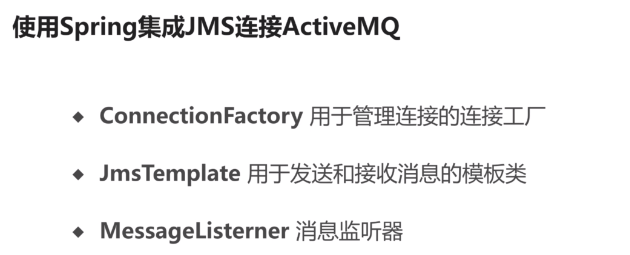

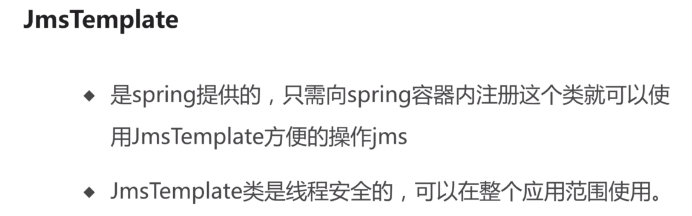

步骤
1.配置spring application.xml
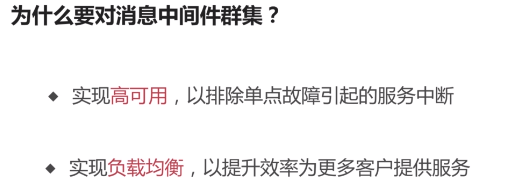

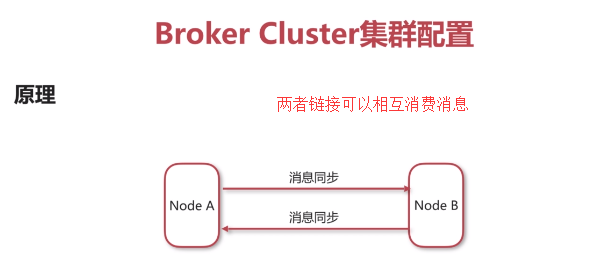
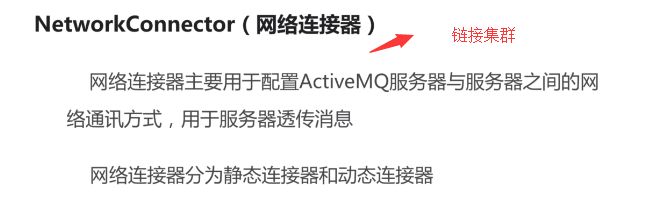
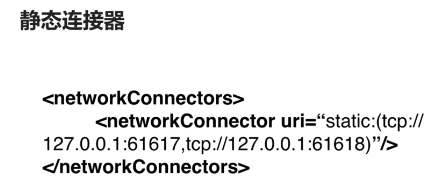
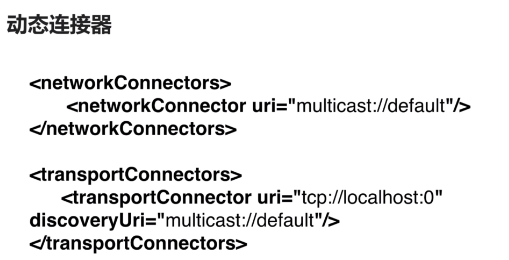
PS :动态可以拓展
day4 java消息中间件服务的更多相关文章
- JMS(Java消息服务)与消息队列ActiveMQ基本使用(一)
最近的项目中用到了mq,之前自己一直在码农一样的照葫芦画瓢.最近几天研究了下,把自己所有看下来的文档和了解总结一下. 一. 认识JMS 1.概述 对于JMS,百度百科,是这样介绍的:JMS即Java消 ...
- java消息服务学习之JMS概念
JMS即Java消息服务(Java Message Service)应用程序接口是一个Java平台中关于面向消息中间件(MOM)的API,用于在两个应用程序之间,或分布式系统中发送消息,进行异步通信. ...
- Java消息中间件入门笔记 - ActiveMQ篇
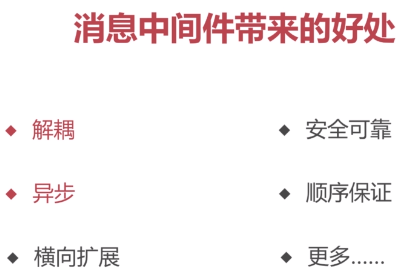
入门 消息中间件带来的好处: 1)解耦:系统解耦 2)异步:异步执行 3)横向扩展 4)安全可靠 5)顺序保证 栗子: 通过服务调用让其它系统感知事件发生 系统之间高耦合 程序执行效率低 通过消息中间 ...
- 以ActiveMQ为例JAVA消息中间件学习【1】
前言 在慢慢的接触大型的javaweb的项目就会接触到很多的中间件系统. 其中消息中间件在很多场景下会被运用. 这里主要就对最近所学习到的消息中间件知识做一个笔记,为以后的实际运用打下一个良好的基础. ...
- 【转载】JAVA消息服务JMS规范及原理详解
转载:https://www.cnblogs.com/molao-doing/articles/6557305.html 作者: moyun- 一.简介 JMS即Java消息服务(Java Messa ...
- JAVA消息服务JMS规范及原理详解
JAVA消息服务JMS规范及原理详解 一.简介 JMS即Java消息服务(Java Message Service)应用程序接口,是一个Java平台中关于面向消息中间件(MOM)的API,用于在两个应 ...
- JMS(Java消息服务)
JMS即Java消息服务(Java Message Service)应用程序接口是一个Java平台中关于面向消息中间件(MOM:指的是利用高效可靠的消息传递机制进行平台无关的数据交流,并基于数据通信来 ...
- java消息中间件的使用与简介
一.为什么要使用消息中间件 消息中间件就是可以省去繁琐的步骤,直达目的,怎么讲呢,就是比如你想很多人,知道你的动态,而知道的人可能手机没电,可能手机信号不好,可能手机不在服务区,或者看的人比较忙,看的 ...
- java消息中间件入门
消息中间件来解耦服务调用 比如1个登录系统,登录的话需要调用很多系统的其他服务,如果中间调用失败,可能会导致登录信息一致无法返回,同时也增加了系统的耦合度.而用消息中间件的话,则是不发送服务到其他系统 ...
随机推荐
- 【原创】<Debug> QT头文件
[Error] No such file or directory [Solution] 参考: http://blog.csdn.net/donglynn/article/details/21804 ...
- sqlalchemy 模型中添加根据身份证号计算性别和年龄
class Users(Base, BaseMixin): username = Column(String(24)) id_Num = Column(String(18) ) # 身份证号码 @pr ...
- 《Python》re模块补充、异常处理
一.re模块 1.match方法 import re # match 验证用户输入的内容 ret = re.match('\d+', 'hhoi2342ho12ioh11') print(ret) # ...
- relativeURL 相对URL的坑
我正在尝试实现一个使用RestKit的iOS应用程序.在我迄今为止看到的所有示例中,以下代码用于创建URL: NSURL *baseURL = [NSURL URLWithString:@" ...
- leetcode python 003
## 给定一个字符串,求其最长无重复的子字符串##给定“abcabcbb”,答案是“abc”,长度为3.##给定“bbbbb”,答案是“b”,长度为1.##鉴于“pwwkew”,答案是“wke”,长度 ...
- 深入理解java虚拟机----java技术体系(一)
1.java技术体系 举例: class文件格式:如下图所示,java源代码可以根据不同的编译器可以编译成不同的代码.即可以自定义语言规范比如beanshell,并编写代码; 然后自己编写java编译 ...
- Java 将图片转成base64,传到前台展示
后台代码: public String getBase64(SysFile sysFile){ String imgStr = ""; try { File file = new ...
- leetcode第27题:移除指定元素
给定一个数组 nums 和一个值 val,你需要原地移除所有数值等于 val 的元素,返回移除后数组的新长度. 不要使用额外的数组空间,你必须在原地修改输入数组并在使用 O(1) 额外空间的条件下完成 ...
- shell日常实战防dos攻击
根据web日志或者或者网络连接数,监控当某个IP并发连接数或者短时内PV达到100,即调用防火墙命令封掉对应的IP,监控频率每隔3分钟.防火墙命令为:iptables -I INPUT -s 10.0 ...
- php优秀框架codeigniter学习系列——CI_Utf8类
CI_Utf8类用来对Utf8编码环境提供支持.(Provides support for UTF-8 environments). 从构造函数看,只有当开启了PCRE模式,加载了iconv或者mbs ...