
Spring cloud Greenwich Eureka
1、父工程POM文件中:
    <dependencyManagement>

        <dependencies>

            <!--spring cloud-->

            <dependency>

                <groupId>org.springframework.cloud</groupId>

                <artifactId>spring-cloud-dependencies</artifactId>

                <version>Greenwich.RELEASE</version>

                <type>pom</type>

                <scope>import</scope>

            </dependency>

        </dependencies>

    </dependencyManagement>

    <repositories>

        <repository>

            <id>spring-milestones</id>

            <name>Spring Milestones</name>

            <url>https://repo.spring.io/milestone</url>

            <snapshots>

                <enabled>false</enabled>

            </snapshots>

        </repository>

    </repositories>
这里需要注意的是,一般的依赖都可以从Maven Repository中导入,但是spring cloud dependencies现在在里面是找不到的了。
所以,在pom文件内,自己指定了远程仓库(通过代码中repositroy配置),远程仓库地址:https://repo.spring.io/milestone/,在这个里面你是可以找到最新的springcloud的各个依赖的,这里截取部分:
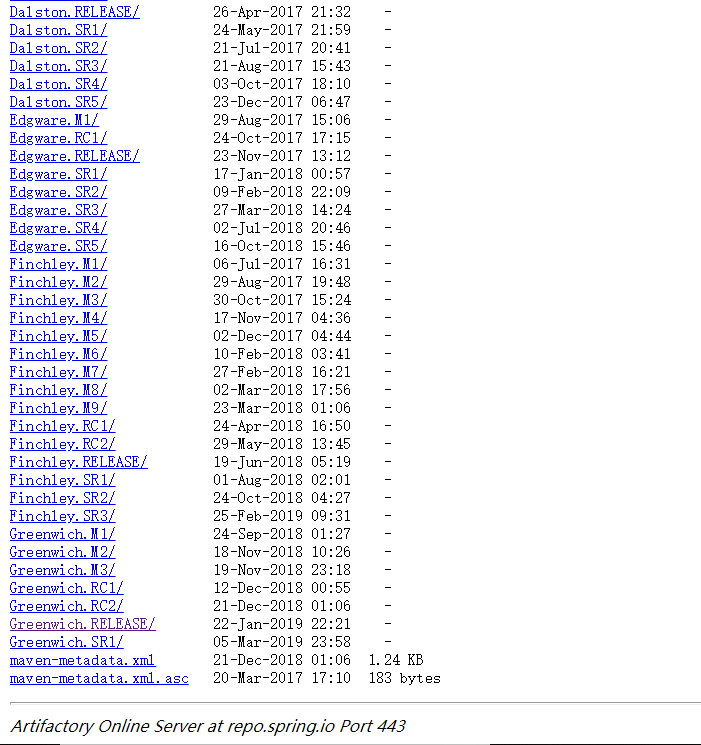
可以看到,当前最新的版本是Greewich.SR1,今年1月22日更新的。我选择的是之前一点的版本也是现在spring官网的最新推荐版本Greewich.RELEASE,各取所需吧。
2、导入依赖之后,新建子模块Eureka-server,pom文件:
<dependencies>

        <dependency>

            <groupId>org.springframework.boot</groupId>

            <artifactId>spring-boot-starter-web</artifactId>

        </dependency>

        <!--Netflix Eureka服务端-->

        <dependency>

            <groupId>org.springframework.cloud</groupId>

            <artifactId>spring-cloud-starter-netflix-eureka-server</artifactId>

        </dependency>

</dependencies>
3、配置文件application.yml:
spring:

  application:

    name: eureka-server

# 自己设置一个端口号,方便之后访问

server:

  port: 6543

# Eureka-server的简单配置

eureka:

  instance:

    hostname: 127.0.0.1

  client:

    register-with-eureka: false

    fetch-registry: false
  service-url:
    defaultZone: http://${eureka.instance.hostname}:${server.port}/eureka/
4、新建启动类Application并配置开启服务:
@EnableEurekaServer

@SpringBootApplication

public class Application {

    public static void main(String[] args) {

        SpringApplication.run(Application.class, args);

    }

}
5、启动服务查看服务:
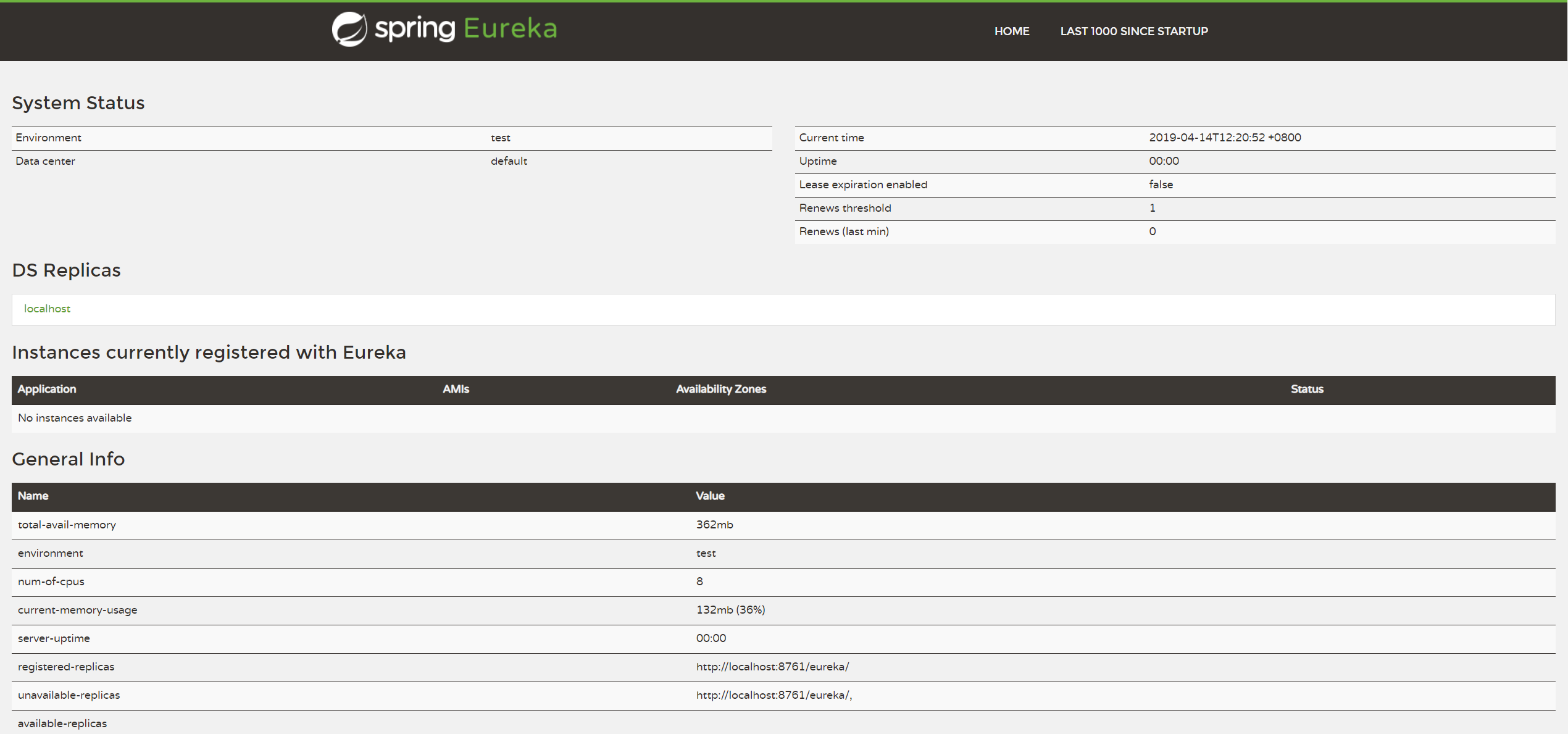
Eureka的服务端配置完成。
6、新建一个微服务Test:
pom文件
<dependency>
    <groupId>org.springframework.boot</groupId>
    <artifactId>spring-boot-starter-web</artifactId>
</dependency>
<dependency>

    <groupId>org.springframework.cloud</groupId>

    <artifactId>spring-cloud-starter-netflix-eureka-client</artifactId>

</dependency>
application.yml
spring:

  application:

    name: test

server:

  port: 8002

eureka:

  instance:

    hostname: 127.0.0.1

  client:
   # 配置为true,注册进服务中心(Eureka server)

    register-with-eureka: true
   # 配置Eureka server的服务URL
    service-url:
      defaultZone: http://${eureka.instance.hostname}:7001/eureka/
Application:
@EnableEurekaClient

@SpringBootApplication

public class Application {

    public static void main(String[] args) {

        SpringApplication.run(Application.class, args);

    }

}
7、开启Test微服务,刷新Eureka Server的页面,就会发现有一个微服务已经注册进了服务中心了。
个人能力有限,欢迎交流学习,帮助指明错误,希望转载注明出处,谢谢。
Spring cloud Greenwich Eureka的更多相关文章
- Spring Cloud Security&Eureka安全认证(Greenwich版本)
Spring Cloud Security&Eureka安全认证(Greenwich版本) 一·安全 Spring Cloud支持多种安全认证方式,比如OAuth等.而默认是可以直接添加spr ...
- Spring Cloud Greenwich 正式发布,Hystrix 即将寿终正寝。。
Spring Cloud Greenwich 正式版在 01/23/2019 这天正式发布了,下面我们来看下有哪些更新内容. 生命周期终止提醒 Spring Cloud Edgware Edgware ...
- Spring Cloud Greenwich.SR4 发布了,跟不上了……
前几天 Spring Cloud Greenwich.SR4 发布了: https://spring.io/blog/2019/11/19/spring-cloud-greenwich-sr4-rel ...
- Spring Cloud Greenwich 新特性和F升级分享
2019.01.23 期待已久的Spring Cloud Greenwich 发布了release版本,作为我们团队也第一时间把RC版本替换为release,以下为总结,希望对你使用Spring Cl ...
- spring cloud之eureka简介
最近线上的接口出了一些问题,有一些可能不是代码的问题,但是由于是测试和其他方面的同事爆出来的,所以感觉对接口的监控应该提上日程. 经过搜索发现,spring cloud的eureka就是专门做这方面工 ...
- Spring cloud系列教程第十篇- Spring cloud整合Eureka总结篇
Spring cloud系列教程第十篇- Spring cloud整合Eureka总结篇 本文主要内容: 1:spring cloud整合Eureka总结 本文是由凯哥(凯哥Java:kagejava ...
- Spring Cloud与Eureka
Spring Cloud与Eureka 一.使用SpringCloud注册中心Eureka 1.1 Eureka和Zookeeper对比 1.1.1 Zookeeper保证CP 1.1.2 Eurek ...
- Spring Boot,Spring Cloud,Eureka,Actuator,Spring Boot Admin,Stream,Hystrix
Spring Boot,Spring Cloud,Eureka,Actuator,Spring Boot Admin,Stream,Hystrix 一.Spring Cloud 之 Eureka. 1 ...
- 1. Spring Cloud Greenwich SR2 概览
Spring Cloud provides tools for developers to quickly build some of the common patterns in distribut ...
随机推荐
- 20175303 2018-2019-2 《Java程序设计》第7周学习总结
20175303 2018-2019-2 <Java程序设计>第7周学习总结 教材学习内容总结 1.String类: Java专门提供了用来处理字符序列的String类 构造String对 ...
- Python+Selenium+PageObject
一.安装page_objects测试库 二.目录介绍 1.pages包:用于各界面元素定位,如BaseLoginPage.py 2.testcases包:用于编写各功能测试用例,如Login.py 3 ...
- Get WMS Static GoodLocation By Dynamic SQL
Dynamic SQL Store Procedure: Note: use variable,you need convert varchar and as a variable,not direc ...
- Pycharm 自定义文件模板
Pycharm 自定义文件模板 每次新建文件都有相同的代码框架,每次重复敲浪费了程序员的寿命啊 按照下面方式自定义自己的模板:
- [vue--开发记录]使用location.href修改地址跳转页面在ie上遇到的坑
管理后台项目上在用vue2.0开发,因为刚转vue2.0,不是太熟悉.在跳转页面的时候直接用location.href来修改地址跳转,在chrome和火狐上展现都是正常的.后面因为说要兼容到IE9,就 ...
- hibernate学习(缓存)
缓存,介于应用程序和永久数据存储源之间,作用是为了降低应用程序对物理数据源访问的频率,从而提高应用的运行性能. 例如我们cpu执行效率每秒处理的数据高达上千兆,而我们的硬盘读取速度却没那么高,读取几百 ...
- Java学习--抽象类和接口
https://www.cnblogs.com/dolphin0520/p/3811437.html 抽象类 先了解一下[抽象方法]—一种特殊的方法,只有声明,没有具体的实现 abstract vo ...
- #20175201 实验二:Java面向对象程序设计
20175201 实验二:Java面向对象程序设计 实验二 Java面向对象程序设计 实验内容 初步掌握单元测试和TDD 理解并掌握面向对象三要素:封装.继承.多态 初步掌握UML建模 熟悉S.O.L ...
- ThinkPhp3.2.3 使用phpExcel导入数据
public function uploadExcel(){ if (!empty($_FILES)){ $upload = new \Think\Upload(); // 实例化上传类 $uploa ...
- 流程控制:顺序结构: 代码默认从上到下依次执行 分支结构: 细分在分为如下 循环结构: while .. for ..
# ### 流程控制: ''' 流程: 代码执行的过程 流程控制: 对代码执行的过程进行管控 顺序结构: 代码默认从上到下依次执行 分支结构: 细分在分为如下 循环结构: while .. for . ...