
Web of science数据下载以数据处理
目标网站分析
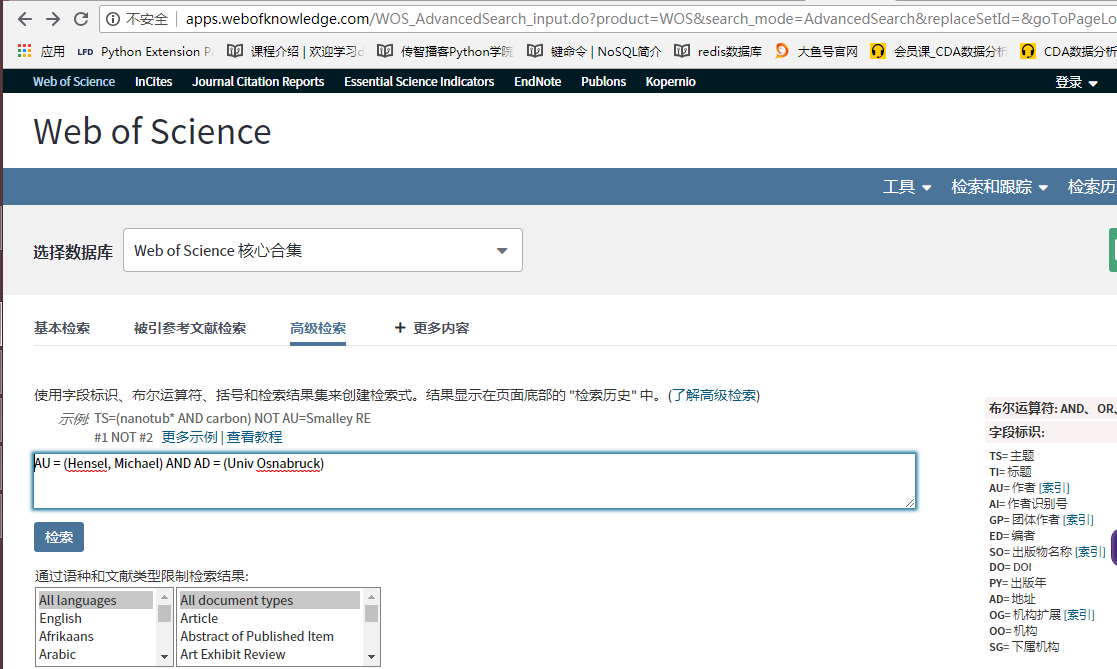
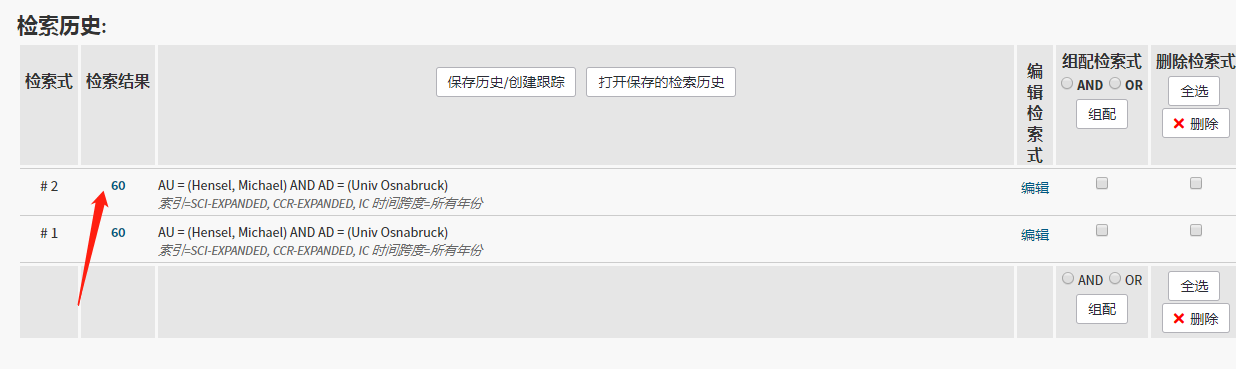
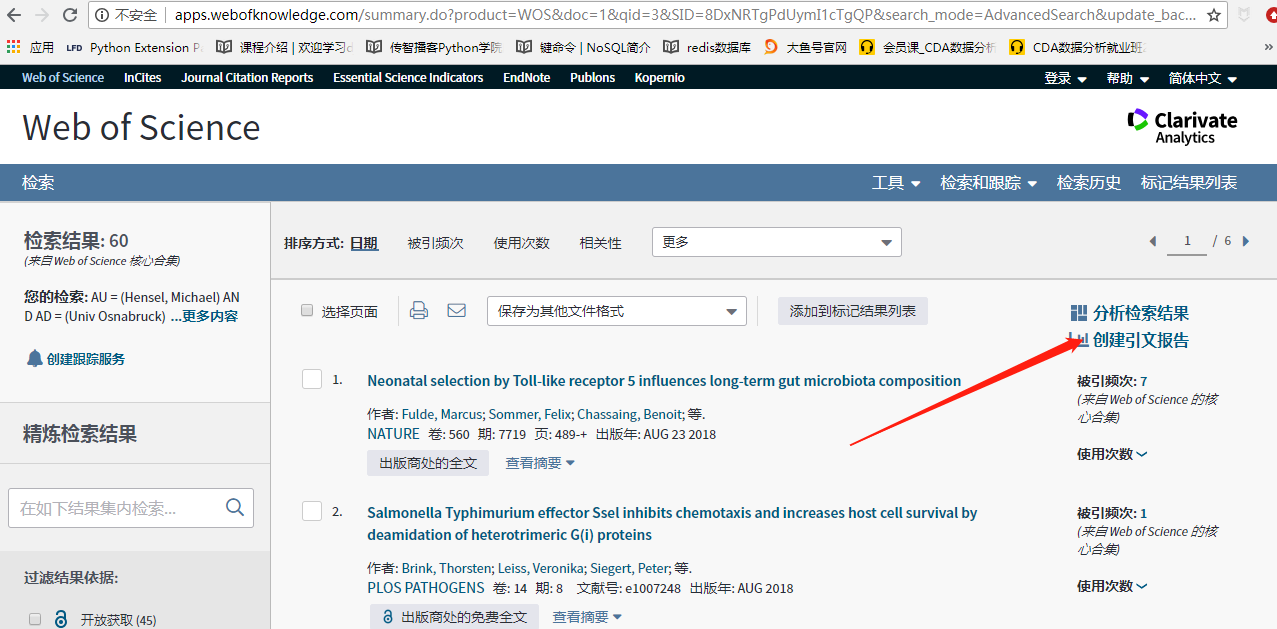

我们要获取的就是这几个数值
程序实现
# -*- coding: utf-8 -*-

"""

@Datetime: 2019/2/28

@Author: Zhang Yafei

"""

# pip install -i https://pypi.tuna.tsinghua.edu.cn/simple xlrd selenium numpy pandas

import os

import random

import re

import time

from concurrent.futures import ThreadPoolExecutor

import numpy as np

import pandas as pd

import xlrd

from selenium import webdriver

# file_name = 'first_author.csv'

file_name = 'corr_author.csv'

def filter_rule(has_rule_list, author_type):

    if author_type == 'first':

        df = pd.read_csv('first.csv')

    elif author_type == 'corr':

        df = pd.read_csv('corr.csv')

    rules = df.rules.tolist()

    print('总共:{}\t下载完成: {}'.format(len(set(rules)), len(set(has_rule_list))))

    result_rule = set(rules) - set(has_rule_list)

    print('还剩:{}'.format(len(result_rule)))

    return list(result_rule)

class WebOfScience(object):

    """ web od science 被引信息下载 """

    def __init__(self):

        self.driver = webdriver.Chrome()

        self.num = 0

        self.root_url = 'http://apps.webofknowledge.com'

    def get_h_index(self, rule):

        self.num += 1

        try:

            wait_time = random.randint(3, 10)

            time.sleep(wait_time)

            select_id = '#set_{}_div a'.format(self.num)

            self.driver.get(self.root_url)

            self.driver.find_element_by_xpath('/html/body/div[9]/div/ul/li[3]/a').click()

            self.driver.find_element_by_id('value(input1)').clear()

            self.driver.find_element_by_id('value(input1)').send_keys(rule)

            self.driver.find_element_by_css_selector('#search-button').click()

            self.driver.find_element_by_css_selector(select_id).click()

            self.driver.find_element_by_css_selector(

                '#view_citation_report_image_placeholder > div > div > a > span').click()

            chuban_sum = self.driver.find_element_by_xpath('//*[@id="piChart-container"]/div/div[1]/div[1]/em').text

            h_index = self.driver.find_element_by_id('H_INDEX').text

            beiyin_sum = self.driver.find_element_by_xpath(

                '//*[@id="citation-report-display"]/table/tbody/tr[2]/td[3]/div/em[1]').text

            shiyin_wenxian = self.driver.find_element_by_css_selector(

                '#citation-report-display > table > tbody > tr:nth-child(2) > td:nth-child(4) > div > div:nth-child(2) > a.linkadjuster.snowplow-cited-rep-total-citing-articles > em').text

            meixiang_yinyong = self.driver.find_element_by_xpath(

                '//*[@id="citation-report-display"]/table/tbody/tr[2]/td[2]/div/em[2]').text

            quchu_ziyin = self.driver.find_element_by_xpath(

                '//*[@id="citation-report-display"]/table/tbody/tr[2]/td[3]/div/em[2]').text

            quchu_ziyin_fenxi = self.driver.find_element_by_xpath(

                '//*[@id="citation-report-display"]/table/tbody/tr[2]/td[4]/div/div[2]/a[1]/em').text

            data_dict = {'rules': [rule], 'chuban_sum': [chuban_sum], 'h_index': [h_index], 'beiyin_sum': [beiyin_sum],

                         'shiyin_wenxian': [shiyin_wenxian], 'meixiang_yinyong': [meixiang_yinyong],

                         'quchu_ziyin': [quchu_ziyin], 'quchu_ziyin_fenxi': [quchu_ziyin_fenxi]}

            # data_list = [{'rule': rule,'chuban_sum': chuban_sum,'h_index': h_index,'beiyin_sum': beiyin_sum,'shiyin_wenxian': shiyin_wenxian,'meixiang_yinyong': meixiang_yinyong,'quchu_ziyin': quchu_ziyin,'quchu_ziyin_fenxi': quchu_ziyin_fenxi}]

            df = pd.DataFrame(data=data_dict)

            df.to_csv(file_name, index=False, header=False, mode='a+')

            print('{0}\t{1}\t{2}\t{3}\t{4}\t{5}\t{6}\t{7}\t下载完成'.format(rule, chuban_sum, h_index, beiyin_sum,

                                                                        shiyin_wenxian, meixiang_yinyong, quchu_ziyin,

                                                                        quchu_ziyin_fenxi))

        except Exception as e:

            print(e)

            print(rule, '异常,正在重新下载')

            wait_time = random.randint(3, 20)

            time.sleep(wait_time)

            self.get_h_index()

def read_example_data():

    data = xlrd.open_workbook('example.xlsx')

    table = data.sheets()[0]

    nrows = table.nrows

    ncols = table.ncols

    search_rules = []

    for row in range(nrows):

        name = table.cell(row, 0).value

        org = table.cell(row, 1).value

        search_rule = 'AU = ({0}) AND AD = ({1})'.format(name, org)

        search_rules.append(search_rule)

    return search_rules

def extract_first_author(row):

    try:

        authors = re.match('\[(.*?)\]', row.作者机构).group(1)

        first_author = authors.split(';')[0]

        first_author_org = re.findall('\](.*?),', row.作者机构)[0]

        # print(first_author, '-', first_author_org)

    except AttributeError:

        first_author = np.NAN

        first_author_org = np.NAN

    first_author_rule = 'AU = ({0}) AND AD = ({1})'.format(first_author, first_author_org)

    return first_author_rule

def extract_reprint_author(row):

    try:

        reprint_authors = row['通讯作者/机构']

        reprint_author = re.findall('(.*?) \(reprint author\), (.*?),', reprint_authors)[0][0]

        reprint_author_org = re.findall('(.*?) \(reprint author\), (.*?),', reprint_authors)[0][1]

        # print(reprint_author, '-', reprint_author_org)

    except TypeError:

        reprint_author = np.NAN

        reprint_author_org = np.NAN

    reprint_author_rule = 'AU = ({0}) AND AD = ({1})'.format(reprint_author, reprint_author_org)

    return reprint_author_rule

def run(rule):

    web = WebOfScience()

    web.get_h_index(rule)

    web.driver.close()

if __name__ == '__main__':

    # 0. 读取作者和机构信息,组成检索式

    def make_rule(row):

        """

        根据作者和机构构造检索式

        :param row:

        :return: rule  检索式

        """

        words = set(row.orgs.split(';'))

        AD = ' OR '.join(words)

        rule = 'AU = ({0}) AND AD = ({1})'.format(row.author, AD)

        return rule

    # df_first = pd.read_csv('firstauthor.txt', sep='\t', names=['DOI','author','orgs'])

    # df_corr = pd.read_csv('corresponding.txt', sep='\t', names=['DOI','author','orgs'])

    # rules = df_first.apply(make_rule, axis=1)

    # rules = df_corr.apply(make_rule, axis=1).tolist()

    # df_first['rules'] = rules

    # df_corr['rules'] = rules

    # if not os.path.exists('first.csv'):

    #     df_first.to_csv('first.csv')

    # if not os.path.exists('corr.csv'):

    #     df_corr.to_csv('corr.csv')

    # 2.根据检索式下载数据,并在每次运行之前过滤数据

    # first_author = pd.read_csv(file_name)

    # rule_list = first_author.rules.tolist()

    corr_author = pd.read_csv(file_name)

    rule_list = corr_author.rules.tolist()

    if os.path.exists(file_name):

        rule_list = filter_rule(has_rule_list=rule_list, author_type='corr')

    # columns = ['rules', 'chuban_sum', 'h_index', 'beiyin_sum', 'shiyin_wenxian', 'meixiang_yinyong', 'quchu_ziyin', 'quchu_ziyin_fenxi']

    # if not os.path.exists(file_name):

    #     data = pd.DataFrame(columns=columns)

    #     data.to_csv(file_name, index=False, mode='a')

    # 3. 多线程下载

    pool = ThreadPoolExecutor(5)

    pool.map(run, rule_list)

    pool.shutdown()

    # 4. 合并第一作者数据表

    # first = pd.read_csv('first.csv')

    #

    # data1 = pd.read_csv('data/first_0_1500.csv', encoding='utf-8')

    # data2 = pd.read_csv('data/first_1500_3000.csv', encoding='utf-8')

    # data3 = pd.read_csv('data/first_3000_4500.csv', encoding='utf-8')

    # data4 = pd.read_csv('data/first_4500_8200.csv', encoding='utf-8')

    #

    # first_concat = pd.concat([data1, data2, data3, data4], ignore_index=True)

    #

    # rule_list = first.rules.tolist()

    # not_rules = set(first.rules.tolist()) - set(first_concat.rules.tolist())

    #

    # def judge_rule(row):

    #     return row.rules in rule_list

    #

    # has_bool = first_concat.apply(judge_rule, axis=1)

    #

    # has_first = first_concat.loc[has_bool, :]

    #

    # has_first.to_csv('first_author.csv', index=False)

    # 5. 合并通讯作者数据表

    # corr = pd.read_csv('corr.csv')

    #

    # data1 = pd.read_csv('data/corr_data1.csv', encoding='utf-8')

    # data2 = pd.read_csv('data/corr_data2.csv', encoding='utf-8')

    # data3 = pd.read_csv('data/corr_data3.csv', encoding='utf-8')

    # data4 = pd.read_csv('data/corr_data4.csv', encoding='utf-8')

    #

    # hash_columns = {'rules':'beiyin_sum', 'beiyin_sum': 'meixiang_yinyong', 'shiyin_wenxian': 'quchu_ziyin','meixiang_yinyong':'quchu_ziyin_fenxi', 'quchu_ziyin': 'rules', 'quchu_ziyin_fenxi': 'shiyin_wenxian'}

    # data2.rename(columns=hash_columns, inplace=True)

    # data3.rename(columns=hash_columns, inplace=True)

    #

    # corr_concat = pd.concat([data1, data2, data3, data4], ignore_index=True)

    #

    # rule_list = corr.rules.tolist()

    # not_rules = set(corr.rules.tolist()) - set(corr_concat.rules.tolist())

    #

    # 过滤出已经下载的检索式

    # has_bool = corr_concat.apply(lambda row: row.rules in rule_list, axis=1)

    # has_corr = corr_concat.loc[has_bool, :]

    #

    # columns = ['rules', 'chuban_sum', 'h_index', 'beiyin_sum', 'shiyin_wenxian', 'meixiang_yinyong', 'quchu_ziyin', 'quchu_ziyin_fenxi']

    # has_corr = has_corr.loc[:, columns]

    #

    # has_corr.to_csv('corr_author.csv', index=False)

    # 6. 将下载的数据信息(第一作者)合并到数据表

    # first_data = pd.read_csv('first.csv')

    #

    # result_data = pd.read_csv('first_author.csv')

    #

    # first_data['出版物总数'] = np.NAN

    # first_data['被引频次总计'] = np.NAN

    # first_data['施引文献'] = np.NAN

    # first_data['第一作者H指数'] = np.NAN

    # first_data['每项平均引用次数'] = np.NAN

    # first_data['去除自引'] = np.NAN

    # first_data['去除自引(分析)'] = np.NAN

    #

    #

    # def merge_data(row):

    #     """

    #     合并数据表

    #     :param row:

    #     :return:

    #     """

    #     first_data.loc[first_data.rules == row.rules, '出版物总数'] = row.chuban_sum

    #     first_data.loc[first_data.rules == row.rules, '第一作者H指数'] = row.h_index

    #     first_data.loc[first_data.rules == row.rules, '被引频次总计'] = row.beiyin_sum

    #     first_data.loc[first_data.rules == row.rules, '施引文献'] = row.shiyin_wenxian

    #     first_data.loc[first_data.rules == row.rules, '每项平均引用次数'] = row.meixiang_yinyong

    #     first_data.loc[first_data.rules == row.rules, '去除自引'] = row.quchu_ziyin

    #     first_data.loc[first_data.rules == row.rules, '去除自引(分析)'] = row.quchu_ziyin_fenxi

    #

    #

    # result_data.apply(merge_data, axis=1)

    #

    # # 删除多列

    # # del_columns = ['Unnamed: 0', '出版物总数', '被引频次总计', '施引文献', '每项平均引用次数', '去除自引', '去除自引(分析)']

    # # first_data = first_data.drop(del_columns, axis=1)

    #

    # columns = ['DOI', 'author', 'orgs', 'rules', '第一作者H指数', '出版物总数', '被引频次总计', '施引文献', '每项平均引用次数', '去除自引', '去除自引(分析)']

    # first_data.columns = columns

    #

    # writer = pd.ExcelWriter('first_author_result.xlsx')

    # first_data.to_excel(writer, 'table', index=False)

    # writer.save()

    # 7. 将下载的数据信息(通讯作者)合并到数据表

    corr_data = pd.read_csv('corr.csv')

    result_data = pd.read_csv('corr_author.csv')

    corr_data['出版物总数'] = np.NAN

    corr_data['被引频次总计'] = np.NAN

    corr_data['施引文献'] = np.NAN

    corr_data['第一作者H指数'] = np.NAN

    corr_data['每项平均引用次数'] = np.NAN

    corr_data['去除自引'] = np.NAN

    corr_data['去除自引(分析)'] = np.NAN

    def merge_data(row):

        """

        合并数据表

        :param row:

        :return:

        """

        corr_data.loc[corr_data.rules == row.rules, '出版物总数'] = row.chuban_sum

        corr_data.loc[corr_data.rules == row.rules, '第一作者H指数'] = row.h_index

        corr_data.loc[corr_data.rules == row.rules, '被引频次总计'] = row.beiyin_sum

        corr_data.loc[corr_data.rules == row.rules, '施引文献'] = row.shiyin_wenxian

        corr_data.loc[corr_data.rules == row.rules, '每项平均引用次数'] = row.meixiang_yinyong

        corr_data.loc[corr_data.rules == row.rules, '去除自引'] = row.quchu_ziyin

        corr_data.loc[corr_data.rules == row.rules, '去除自引(分析)'] = row.quchu_ziyin_fenxi

    result_data.apply(merge_data, axis=1)

    # 保存到excel中

    writer = pd.ExcelWriter('corr_author_result.xlsx')

    corr_data.to_excel(writer, 'table', index=False)

    writer.save()

    # 8. 以DOI号为标识将多个通讯作者合并到一行

    corr_result = corr_data.drop_duplicates('DOI', keep='first', inplace=False)

    corr_result.drop(labels=['第一作者H指数', '出版物总数', '被引频次总计', '施引文献', '每项平均引用次数', '去除自引', '去除自引(分析)'], axis=1,

                     inplace=True)

    # 重置索引

    corr_result.reset_index(inplace=True)

    corr_result_DOI = corr_result.loc[:, 'DOI']

    def merge_corr(row):

        """

        合并多个通讯作者H指数 修改corr_result 将每一个通讯作者指数添加新的一列

        :param row:

        :return:

        """

        h_index = corr_data.loc[corr_data.DOI == row.DOI, '第一作者H指数'].tolist()

        print(len(h_index))

        if len(h_index) == 1:

            try:

                corr_result.loc[corr_result.DOI == row.DOI, 'h1_index'] = int(h_index[0])

            except ValueError as e:

                corr_result.loc[corr_result.DOI == row.DOI, 'h1_index'] = h_index[0]

        else:

            for i in range(len(h_index)):

                try:

                    corr_result.loc[corr_result.DOI == row.DOI, 'h{}_index'.format(i + 1)] = int(h_index[i])

                except ValueError as e:

                    corr_result.loc[corr_result.DOI == row.DOI, 'h{}_index'.format(i + 1)] = h_index[i]

    corr_result_DOI.apply(merge_corr, axis=1)

    # 列数据迁移

    def reset_h1(row):

        if np.isnan(row.h1_index) or not row.h1_index:

            corr_result.loc[corr_result.DOI == row.DOI, 'h1_index'] = row.h1_inrex

    corr_result.apply(reset_h1, axis=1)

    corr_result.drop('h1_inrex', axis=1, inplace=True)

    # 重命名列

    columns = {'h2_inrex': 'h2_index', 'h3_inrex': 'h3_index', 'h4_inrex': 'h4_index',

               'h5_inrex': 'h5_index', 'h6_inrex': 'h6_index', 'h7_inrex': 'h7_index',

               'h8_inrex': 'h8_index'}

    corr_result.rename(columns=columns)

    # 9. 计算多个通讯作者的h指数的最大值, 平均值, 和

    def add_max_sum_mean(row):

        """

        求出多个通讯作者h指数的和、最大值, 平均值

        :param row:

        :return:

        """

        h_index = list(row)[5:]

        h_index = list(filter(lambda x: not np.isnan(x), h_index))

        print(h_index)

        if h_index:

            corr_result.loc[corr_result.DOI == row.DOI, 'max'] = np.max(h_index)

            corr_result.loc[corr_result.DOI == row.DOI, 'sum'] = sum(h_index)

            corr_result.loc[corr_result.DOI == row.DOI, 'mean'] = np.mean(h_index)

    corr_result.apply(add_max_sum_mean, axis=1)

    corr_result.drop('index', axis=1, inplace=True)

    corr_result.drop(['author','orgs','rules'], axis=1, inplace=True)

    writer = pd.ExcelWriter('corr_author_sum_max_mean_result.xlsx')

    corr_result.to_excel(writer, 'table', index=False)

    writer.save()

    # 10. 只保留h指数最大值

    def keep_max(row):

        h_max = corr_result.loc[corr_result.DOI == row.DOI, 'max'].values[0]

        return row['第一作者H指数'] == h_max

    corr_max_bool = corr_data.apply(keep_max, axis=1)

    corr_max_result = corr_data.loc[corr_max_bool, :]

    # corr_max_result.rename(columns={'第一作者H指数':'通讯作者H指数'}, inplace=True)

    writer = pd.ExcelWriter('corr_author_max_result.xlsx')

    corr_max_result.to_excel(writer, 'table', index=False)

    writer.save()
Web of science数据下载以数据处理的更多相关文章
- Web of Science数据库中文献相关信息下载与保存
1. Web of Science 数据库(https://apps.webofknowledge.com/): a. 所在网络必须由访问 该网站的权限. b.建议使用web of Science的核 ...
- 兼容javascript和C#的RSA加密解密算法,对web提交的数据进行加密传输
Web应用中往往涉及到敏感的数据,由于HTTP协议以明文的形式与服务器进行交互,因此可以通过截获请求的数据包进行分析来盗取有用的信息.虽然https可以对传输的数据进行加密,但是必须要申请证书(一般都 ...
- kpvalidate开辟验证组件,通用Java Web请求服务器端数据验证组件
小菜利用工作之余编写了一款Java小插件,主要是用来验证Web请求的数据,是在服务器端进行验证,不是简单的浏览器端验证. 小菜编写的仅仅是一款非常初级的组件而已,但小菜为它写了详细的说明文档. 简单介 ...
- 2017年最好的6个WEB前端开发手册下载
php中文网为你推荐6个web前端开发相关手册下载,适合web开发人员和php web开发人员进行下载参考学习! 一. html5中文手册 通过制定如何处理所有 HTML 元素以及如何从错误中恢复的精 ...
- Asp.Net MVC 实现将Easy-UI展示数据下载为Excel 文件
在一个项目中,需要做一个将Easy-UI界面展示数据下载为Excel文件的功能,经过一段时间努力,完成了一个小Demo.界面如下: 但按下导出Excel后,Excel文件将会下载到本地,在office ...
- Web of Science API
Web of Science API是通过Web Service获取Web of Science在线数据的应用程序接口,供各种编程语言调用.简单说,就是你能根据API实时.动态得到网页版Web of ...
- java web service 上传下载文件
1.新建动态web工程youmeFileServer,新建包com,里面新建类FileProgress package com; import java.io.FileInputStream; imp ...
- zabbix web端有数据但是没有图形
zabbix web端有数据但是没有图形 我遇到的情况是,在配置 zabbix 网站目录时,修改了zabbix 目录的所有者和所属组,以使得 zabbix/conf/zabbix.conf.php 文 ...
- Landsat数据下载与介绍
1 数据下载 根据时间选择不同的Landsat卫星传感器 根据经纬度选择对应的条带: Lansdat Analysis Ready Data (ARD) Tile Conversion Tool: 把 ...
随机推荐
- anaconda --包管理和环境管理器
前言: 以下所有的命令都Win10环境的 Anaconda Prompt 中 环境管理 创建虚拟环境 conda create --name env_name python 也可以指定 Python ...
- .net向文件写入字符串流内存溢出的问题
字符串过大导致抛出异常: exceptopm of type 'system.outOfmemoryexception' was thrown 解决方法:逐块写入可以避免这个问题
- 启动期间的内存管理之引导分配器bootmem--Linux内存管理(十)
在内存管理的上下文中, 初始化(initialization)可以有多种含义. 在许多CPU上, 必须显式设置适用于Linux内核的内存模型. 例如在x86_32上需要切换到保护模式, 然后内核才能检 ...
- MVC Remote 服务器验证
用此验证必须在Controller中编写返回值为JsonResult的Action public JsonResult CheckUserName(string UserName) { EFHelpe ...
- 一致性哈希算法----nginx负载均衡器配置之一
一直性Hash算法在很多场景下都有应用,尤其是在分布式缓存系统中,经常用其来进行缓存的访问的负载均衡,比如:redis等<k,v>非关系数据库作为缓存系统.我们首先来看一下采用取模方式进行 ...
- LeetCode算法题-Employee Importance(Java实现)
这是悦乐书的第291次更新,第309篇原创 01 看题和准备 今天介绍的是LeetCode算法题中Easy级别的第159题(顺位题号是690).定义员工信息的数据结构,其中包括员工的唯一ID,他的重要 ...
- Angular安装及创建第一个项目
Angular简介 AngularJS 诞生于2009年,由Misko Hevery 等人创建,后为Google所收购.是一款优秀的前端JS框架,已经被用于Google的多款产品当中.AngularJ ...
- 我超级推荐的Navicat Premium 12的下载,破解方法
今天给大家推荐一款炒鸡好用的数据库管理工具,使用它,可以很方便的连接各种主流数据库软件----Navicat Premium 12 但是,它是要钱的,不过我们可以使用破解机来破解它,步骤稍有些复杂,简 ...
- Nginx健康检查模块
在本小节我们介绍一个用于Nginx对后端UpStream集群节点健康状态检查的第三方模块:nginx_upstream_check_module(https://github.com/yaoweibi ...
- supervisor管理nginx
command = /usr/local/bin/nginx 这个命令默认是后台启动,但是supervisor不能监控后台程序,所以supervisor就一直执行这个命令. 加上-g 'daemon ...