
Knockoutjs 响应式计算研究
reactive programming
https://en.wikipedia.org/wiki/Reactive_programming
In computing, reactive programming is a declarative programming paradigm concerned with data streams and the propagation of change. With this paradigm it is possible to express static (e.g., arrays) or dynamic (e.g., event emitters) data streams with ease, and also communicate that an inferred dependency within the associated execution model exists, which facilitates the automatic propagation of the changed data flow.[citation needed]
a := b + c {\displaystyle a:=b+c}
would mean that a {\displaystyle a}
is being assigned the result of b + c {\displaystyle b+c}
in the instant the expression is evaluated, and later, the values of b {\displaystyle b}
and c {\displaystyle c}
can be changed with no effect on the value of a {\displaystyle a}
[citation needed]
Reactive programming has been proposed as a way to simplify the creation of interactive user interfaces and near-real-time system animation.[citation needed]
For example, in a model–view–controller (MVC) architecture, reactive programming can facilitate changes in an underlying model that are reflected automatically in an associated view.[1]
knockoutjs reactive
https://knockoutjs.com/documentation/observables.html
第一,定义 基础的 可观察对象:
var myViewModel = {

    personName: ko.observable('Bob'),

    personAge: ko.observable(123)

};
第二, 定义存在依赖其他可观察对象的 计算对象
function AppViewModel() {

    // ... leave firstName and lastName unchanged ...

    this.fullName = ko.computed(function() {

        return this.firstName() + " " + this.lastName();

    }, this);

}
第三、绑定到视图
The name is <span data-bind="text: fullName"></span>
如果基础的 可观察对象 改变, 则视图会自动跟着改变。
实现原理
https://github.com/fanqingsong/knockout-prototype
knockout模块实现, 包括 observale 和 computed 接口实现, 以及内部依赖管理实现。
let ko = {}

ko.say = () => console.log("hello world")

ko.dependency = (() => {

    let callerstack = []

    let currentCaller

    return {

        currentCaller,

        callerstack

    }

})();

ko.observable = (initVal) => {

    // for record caller, ie observer

    let observerCache = [];

    // store current observable value

    let currentVal = "";

    if(initVal !== undefined){

        console.log("initVal 0=", initVal)

        currentVal = initVal;

    }

    let observable = (newVal) => {

        // for read, subscribe to caller

        if( newVal === undefined ) {

            if (ko.dependency.currentCaller) {

                observerCache.push(ko.dependency.currentCaller)

            }

            return currentVal;

        // for write

        } else {

            currentVal = newVal;

            console.log("===",observerCache.length)

            for (const index in observerCache) {

                console.log("-----------3-", observerCache[index]);

                observerCache[index].callEvalWithDeps();

            }

        }

    }

    return observable

}

ko.computed = (evalFunc) => {

    // store current observable value

    let currentVal = "";

    let unValuated = true;

    let computedObservable = () => {

        if (unValuated){

            computedObservable.callEvalWithDeps();

            unValuated = false;

        }

        return currentVal;

    }

    computedObservable.callEvalWithDeps = () => {

        if (ko.dependency.currentCaller) {

            ko.dependency.callerstack.push(ko.dependency.currentCaller)

        }

        ko.dependency.currentCaller = computedObservable;

        currentVal = evalFunc();

        let parent = ko.dependency.callerstack.pop();

        ko.dependency.currentCaller = parent;

    }

    return computedObservable

}

module.exports = ko
调用
import ko from "./knockout.js"

ko.say();

let aObservable = ko.observable("a");

console.log("aObservable=", aObservable());

let bComputed = ko.computed(() => {

  let result = aObservable() + "b";

  console.log("result=", result);

  return result;

})

// bind subscription to aObservable

let bVal = bComputed();

console.log("bVal=", bVal);

// trigger reactive effect

aObservable("c");

console.log("bComputed=", bComputed())
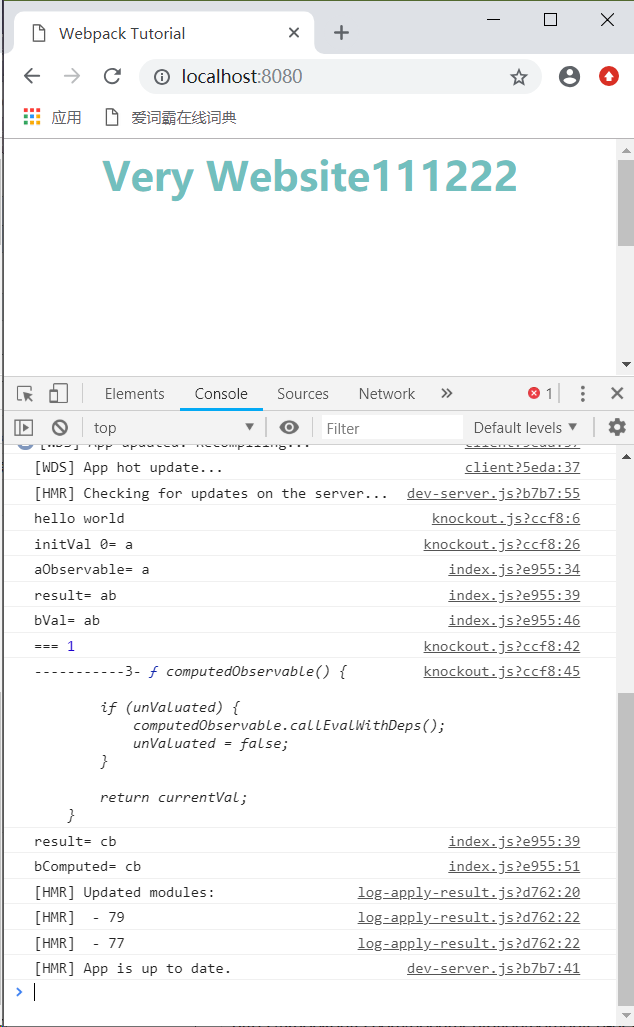
运行
参考:
https://knockoutjs.com/documentation/computed-dependency-tracking.html
https://www.reactivemanifesto.org/
Knockoutjs 响应式计算研究的更多相关文章
- 理解rem实现响应式布局原理及js动态计算rem
前言 移动端布局中,童鞋们会使用到rem作为css单位进行不同手机屏幕大小上的适配.那么来讲讲rem在其中起的作用和如何动态设置rem的值. 1.什么是rem rem是相对于根元素(html标签)的字 ...
- Vue 2.0 v-for 响应式key, index及item.id参数对v-bind:key值造成差异研究
Vue 2.0 v-for 响应式key, index及item.id参数对v-bind:key值造成差异研究 在github上阅览README.md以获得最佳阅读体验,点这里 v-for响应式key ...
- 响应式疑惑? CSS单位研究
各种单位要搞清楚,自己试一试,实践出真知! 2.屏幕分辨率 响应式 哦,电脑的分辨率:1440x900表示水平有1440个像素点哦! 垂直有900个像素点. 而网页在浏览器中,所以宽度是电脑的分 ...
- Bootstrap响应式栅格系统的设计原理
1.历史背景 Bootstrap是Twitter的工程师Mark Otto和Jacob Thornton开发的一套供内部使用的UI框架,于2011年开源.2012年发布的第二版中新增了12列栅格系统和 ...
- html5 getComputedStyle + resize 实现动态宽高度等比响应式页面设计
序:通常我们只能控制div的宽度 而不能控制高度,在响应式页面里 如果要这个div是正方形那么必须的用媒体查询在不同的分辨率下写死宽高度 今天突发奇想研究了个 用百分比来动态控制div的高度让其与宽度 ...
- JGUI源码:响应式布局简单实现(13)
首先自我检讨下,一直没有认真研究过响应式布局,有个大致概念响应式就是屏幕缩小了就自动换行或者隐藏显示,就先按自己的理解来闭门造车思考实现过程吧. 1.首先把显示区域分成12等分,bootstrap是这 ...
- (转)Spring Boot 2 (十):Spring Boot 中的响应式编程和 WebFlux 入门
http://www.ityouknow.com/springboot/2019/02/12/spring-boot-webflux.html Spring 5.0 中发布了重量级组件 Webflux ...
- Spring Boot 2 (十):Spring Boot 中的响应式编程和 WebFlux 入门
Spring 5.0 中发布了重量级组件 Webflux,拉起了响应式编程的规模使用序幕. WebFlux 使用的场景是异步非阻塞的,使用 Webflux 作为系统解决方案,在大多数场景下可以提高系统 ...
- 函数响应式编程(FRP)从入门到”放弃”——基础概念篇
前言 研究ReactiveCocoa一段时间了,是时候总结一下学到的一些知识了. 一.函数响应式编程 说道函数响应式编程,就不得不提到函数式编程,它们俩到底有什么关系呢?今天我们就详细的解析一下他们的 ...
随机推荐
- SQL Server 事务日志文件已满,收缩日志文件(9002)
错误如下图: 1.数据库 → 属性 → 选项 → 恢复模式 → 选择‘简单’:如下图: 2.任务 → 收缩 → 文件类型‘文件’ → 收缩模式‘在释放未使用的空间前重新组织页’,将文件收缩到K,大小填 ...
- w3wp.exe进程占用内存过高解决方法
解决CPU占用过多: 1.在IIS中对每个网站进行单独的应用程序池配置.即互相之间不影响. 2.设置应用程序池的CPU监视,不超过25%(服务器为4CPU),每分钟刷新,超过限制时关闭. 根据w3wp ...
- Java基础系列--09_集合2
昨天介绍了集合的主要架构体系,今天主要的目的是学习集合的迭代器的遍历和List的特有功能. 迭代器: 概述:由于多种集合的数据结构不同,所以存储方式不同,取出方式也不同.但是他们都是有判断和获 ...
- [LeetCode] 19. 删除链表的倒数第N个节点
题目链接:https://leetcode-cn.com/problems/remove-nth-node-from-end-of-list/ 题目描述: 给定一个链表,删除链表的倒数第 n 个节点, ...
- .NET Core开源快速开发框架Colder发布 (NET Core2.1+AdminLTE版)
引言 上星期发布的.NET452+AdminLTE版框架得到了大家的大力支持,目前GitHub已获近100星,鄙人十分高兴能够帮助大家.其中有不少关心.NET Core的支持情况,因为未来的.NET平 ...
- Day9 轨道角动量
转自中山大学电子与信息工程 http://seit.sysu.edu.cn/node/1004 能量.动量(角动量和线动量)光子的基本属性,其中光子角动量包括自旋角动量和轨道角动量(Orbital a ...
- Python_if
if if c语言中的if语句格式如下: if (条件) { 结果} python的格式与其不同,定义了自己的格式,更加的简明: if 条件 : 结果 print(111) if 3 > 2: ...
- MVC和MVVM
MVC和MVVM的qu'bie 1. Mvvm定义MVVM是Model-View-ViewModel的简写.即模型-视图-视图模型.[模型]指的是后端传递的数据.[视图]指的是所看到的页面.[视图模型 ...
- Python之操作HBASE数据库
目前有两个库可以操作HBASE:hbase-thrift 和 happybase happybase使用起来比较简单方便,因此重点学习该库,hbase-thrift只做简要介绍. (一)hbase- ...
- jdk自带的监测cpu/内存、线程等信息的工具
Jvisualvm:jdk自带的监控工具(JDK1.6+) 在终端中输入Jvisualvm回车出现如下界面: