
XFire+Spring构建Web Service经验总结
使用工具 MyEclipse:6.5 ,tomcat6.x.
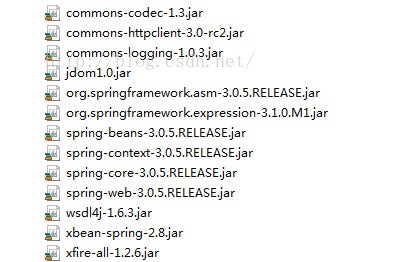
1.新建web项目,要导入用的包:
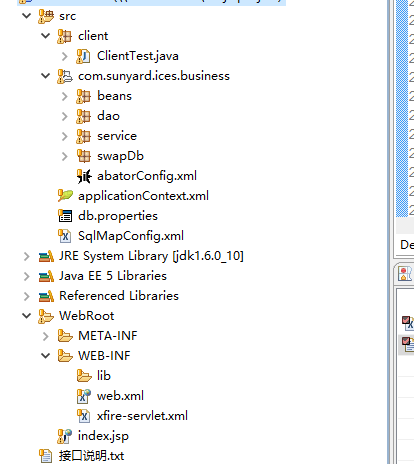
2程序结构:
3 web.xml配置文件
<?xml version="1.0" encoding="UTF-8"?>

<web-app version="2.4" xmlns="http://java.sun.com/xml/ns/j2ee"

	xmlns:xsi="http://www.w3.org/2001/XMLSchema-instance"

	xsi:schemaLocation="http://java.sun.com/xml/ns/j2ee

	http://java.sun.com/xml/ns/j2ee/web-app_2_4.xsd">

	<display-name>webtest2</display-name>

	<welcome-file-list>

		<welcome-file>index.html</welcome-file>

		<welcome-file>index.htm</welcome-file>

		<welcome-file>index.jsp</welcome-file>

		<welcome-file>default.html</welcome-file>

		<welcome-file>default.htm</welcome-file>

		<welcome-file>default.jsp</welcome-file>

	</welcome-file-list>

	<context-param>

  		<param-name>contextConfigLocation</param-name>

  		<param-value>classpath*:applicationContext*.xml,/WEB-INF/xfire-servlet.xml</param-value>

  	</context-param>

  	<listener>

  		<listener-class>org.springframework.web.context.ContextLoaderListener</listener-class>

  	</listener>

  	<session-config>

  		<session-timeout>30</session-timeout>

  	</session-config>

	<servlet>

		<servlet-name>xfire</servlet-name>

		<servlet-class>

			org.springframework.web.servlet.DispatcherServlet

		</servlet-class>

	</servlet>
    /*主要部分*/

	<servlet-mapping>

		<servlet-name>xfire</servlet-name>

		<url-pattern>/service/*</url-pattern>

	</servlet-mapping>

</web-app>
4接口及其实现类
public interface IHelloWorld {

 public String getHello();

 public User getUser(User user);

}
public class HelloWorld implements IHelloWorld {

 public String getHello() {

  return "Hello";

 }

 public User getUser(User user) {

  User helloUser = new User();

  helloUser.setName("hello," + user.getName());

  return helloUser;

 }

}
5 在spring配置文件中的配置
<bean id="posVouch"class="com.sunyard.ices.business.service.impl.HelloWorld"> </bean>
6xfire-servlet.xml文件的配置
<?xml version="1.0" encoding="UTF-8"?>

<!DOCTYPE beans PUBLIC "-//SPRING//DTD BEAN 2.0//EN" "http://www.springframework.org/dtd/spring-beans-2.0.dtd">

<beans default-lazy-init="true">

	<import resource="classpath:org/codehaus/xfire/spring/xfire.xml" />

	<bean

		class="org.springframework.web.servlet.handler.SimpleUrlHandlerMapping">

		<property name="urlMap">

			<map>

				<!--同步 -->

				<entry key="/posVouch">

					<ref bean="posvouch"/>

				</entry>

			</map>

		</property>

	</bean>

	<bean id="baseWebService"

		class="org.codehaus.xfire.spring.remoting.XFireExporter"

		lazy-init="false" abstract="true">

		<property name="serviceFactory" ref="xfire.serviceFactory" />

		<property name="xfire" ref="xfire" />

	</bean>

	<!--  web Service 方法 -->

	<bean id="posvouch" parent="baseWebService">

		<property name="serviceBean" ref="posVouch" />

		<property name="serviceClass"

			value="com.sunyard.ices.business.service.IHelloWorld " />
    </bean>
</beans>
以上相信大家在别的博客那边也能找到类似代码,下面我要说的我在构建Web Service时遇到的一个问题:
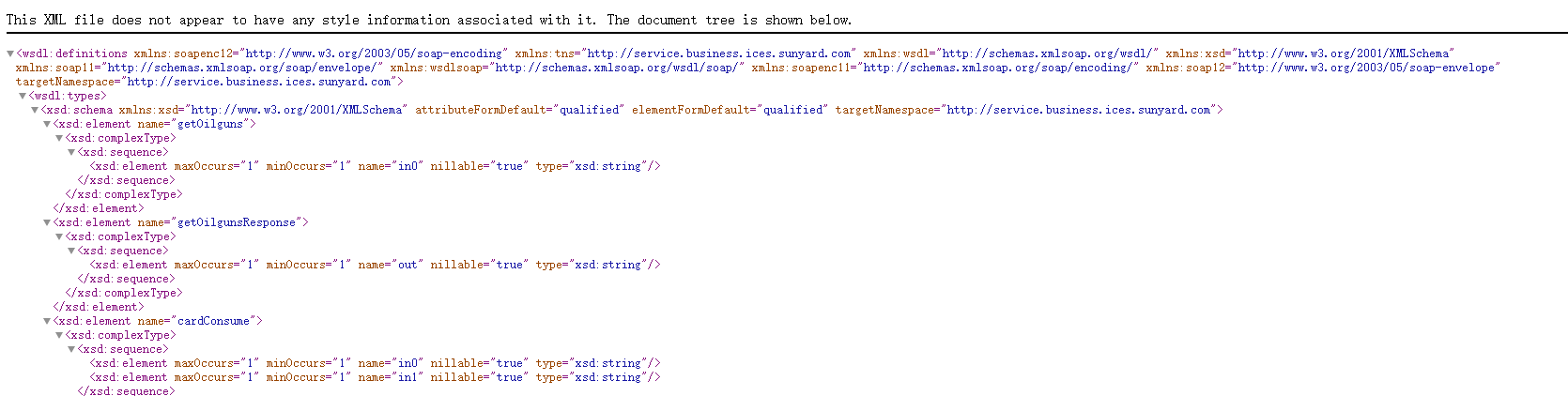
上面的都写好就要启动测试Webservice,但我在这上面却翻了个很大的跟头,究其原因就是URL错误导致的。后来我成功后,
我总结了访问wsdl文件的url的公式:
具体的根据web.xml文件中url-pattern来,这是我的,
<url-pattern>/service/*</url-pattern>
以及xfire-servlet.xml文件中的同步配置中的key
<map>

				<!--同步 -->

				<entry key="/posVouch">

					<ref bean="posvouch"/>

				</entry>

</map>
那么正确的URL= 访问项目路径/service/posVouch?wsdl
XFire+Spring构建Web Service经验总结的更多相关文章
- 使用XFire+Spring构建Web Service(一)——helloWorld篇
转自:http://www.blogjava.net/amigoxie/archive/2007/09/26/148207.html原文出处:http://tech.it168.com/j/2007- ...
- 使用XFire+Spring构建Web Service
XFire是与Axis 2并列的新一代Web Service框架,通过提供简单的API支持Web Service各项标准协议,帮助你方便快速地开发Web Service应用. 相 对于Axis来说,目 ...
- XFire构建web service客户端的五种方式
这里并未涉及到JSR 181 Annotations 的相关应用,具体的三种方式如下 ① 通过WSDL地址来创建动态客户端 ② 通过服务端提供的接口来创建客户端 ③ 使用Ant通过WSDL文件来生成客 ...
- MyEclipse构建Web Service(Xfire框架)
以下是本人原创,如若转载和使用请注明转载地址.本博客信息切勿用于商业,可以个人使用,若喜欢我的博客,请关注我,谢谢!博客地址 任务要求: 使用Xfire实现一个简单的CalculatorWebServ ...
- Spring实战5-基于Spring构建Web应用
主要内容 将web请求映射到Spring控制器 绑定form参数 验证表单提交的参数 写在前面:关于Java Web,首先推荐一篇文章——写给java web一年左右工作经验的人,这篇文章的作者用精练 ...
- Spring实战5:基于Spring构建Web应用
主要内容 将web请求映射到Spring控制器 绑定form参数 验证表单提交的参数 对于很多Java程序员来说,他们的主要工作就是开发Web应用,如果你也在做这样的工作,那么你一定会了解到构建这类系 ...
- 2.3 Apache Axis2 快速学习手册之 ADB 构建Web Service
使用ADB生成服务(根据ADB 命令将wsdl 文件还原成Java代码) 要使用Axis2数据绑定框架(ADB)生成和部署服务,请执行以下步骤. 通过在Axis2_HOME / samples / q ...
- 2.1 Apache Axis2 快速学习手册之 POJO 构建Web Service
1. 准备:创建一个Maven Web App 项目 这里让我们使用Maven 模板创建一个Web App 项目 1. New------> Maven Project 2. 使用默认配置,点击 ...
- Eclipse利用Axis2插件构建Web Service并测试
在学习Web Service的时候,从网上找到前辈的博客http://www.cnblogs.com/hexinlin/p/3358558.html,并依此文的方法按部就班:编写欲发布的java类He ...
随机推荐
- 关于Mac 系统mysql 乱码问题
这是由于客户端和服务端的编码没有同一 首先我们先在终端连接mysql 连接方法 mysql -u 用户名 -p 即可 然后输入你的密码 这里就不多说了 然后我们输入 show variabl ...
- I2C(四)linux3.4(写代码)
title: I2C(四)linux3.4(写代码) date: 2019/1/29 17:18:42 toc: true --- I2C(四)linux3.4(写代码) 老师的参考代码 https: ...
- ElasticSearch query_string vs multi_match cross_fields query
ElasticSearch query_string vs multi_match cross_fields query 本文记录以字段为中心的查询和以词为中心的查询这两种查询方式的区别以及在Elas ...
- 前端DES加密
/** * DES加密/解密 * @Copyright Copyright (c) 2018 * @author mrDu * @see DESCore */ /* * encrypt the str ...
- JMM以及并发三大特性介绍(包括解决方案)
JMM结构图: JMM对同步的8种操作: JMM的同步规则: Countdownlatch介绍: 该类功能是可以阻塞线程,并在保证线程满足特定条件下,继续执行.如上图,Countdownlatch的c ...
- bat实现固定时间循环抓取设备log
背景:测试时需要实时抓取android设备log,但是一份log抓取过来非常庞大(有时超过500M+,编辑器都打不开,还得找工具进行分割,甚是蛋疼),查看也非常不方便. 解决:基于上述情况,与其之后进 ...
- 十 LVS 负载均衡
回顾nginx 反向代理负载均衡 负载均衡的妙用 负载均衡(Load Balance)集群提供了一种廉价.有效.透明的方法, 来扩展网络设备和服务器的负载.带宽.增加吞吐量.加强网络数据处理能力. 提 ...
- Typescript---01 数据类型
Typescript数据类型 1. 布尔值boolean let isDone: boolean = false; 注意: 使用构造函数Boolean创造的对象不是布尔值,它是一个对象.所以下边的示例 ...
- Python base64编码,转图片
我在做火车票抢票器的时候遇到一个问题,就是验证码提取的:一般验证码都是一些http请求的url,但是火车票网站遇到了我没有见过的以data:image/jpg;base64开头的字符串.现在我们就用P ...
- mongodb基本的配置和使用
一.连接配置,使用自动配置方式,在applicaiton.properties中配置连接信息即可 spring.data.mongodb.host=127.0.0.1 //连接地址 spring.da ...