
jQuery each、节点操作、动画演示、尺寸操作、扩展方法
一、each
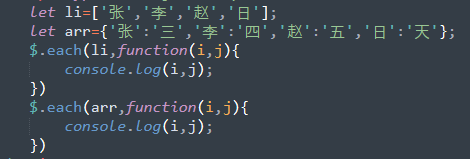
1、方式一:$.each(数组或者自定义对象,function(i,j){console.log(i,j)})
$.each(li,function(i,j){

    console.log(i,j)

});
2、方式二:
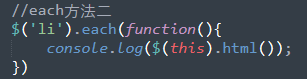
$('选择器').each(function(){

  执行相应的代码;

})
3、each的中的退出循环
return  ---->continue

return false --->break

<!DOCTYPE html>

<html lang="en">

<head>

    <meta charset="UTF-8">

    <title>Document</title>

    <script src='https://cdn.bootcss.com/jquery/3.3.1/jquery.js'></script>

<body>

    <div class='container'>

        <ul>

            <li>111</li>

            <li>222</li>

            <li>333</li>

            <li>444</li>

        </ul>

    </div>

    <script type="text/javascript">

        //each方法一

        // let li=['张','李','赵','日'];

        // let arr={'张':'三','李':'四','赵':'五','日':'天'};

        // $.each(li,function(i,j){

        //     console.log(i,j);

        // })

        // $.each(arr,function(i,j){

        //     console.log(i,j);

        // })

        // //each方法二

        // $('li').each(function(){

        //     console.log($(this).html());

        // })

        //each的退出循环

        $('li').each(function(){

            if ($(this).html()==='222') {

                // return; //相当于continue,跳过当前循环

                return false; //相当于break,终止循环

            }

            console.log($(this).html());

        })

    </script>

</body>

</html>
each演示代码
二、节点操作(********)
1、创建标签
$("<p>") ;创建p标签:<p></p>
2、添加节点
(1)内部插入
父节点在最后添加一个子节点 :

    $("父节点").append('子节点')      ----->$("p").append("<b>Hello</b>");

一个子节点插入到父节点的末尾:

    $("子节点").appendTo('定位到父节点')       ----->$("p").appendTo("div");

父节点下第一个位置添加一个节点

    $("父节点").prepend('子节点')     ----->$("p").prepend("<b>Hello</b>");

一个新节点添加的父节点的第一个位置:

    $("子节点").prependTo('定位到父节点')      ----->$("p").prependTo("#foo");
(2)外部插入
 $("").after(content|fn)       ----->$("p").after("<b>Hello</b>");

 $("").before(content|fn)      ----->$("p").before("<b>Hello</b>");

 $("").insertAfter(content)    ----->$("p").insertAfter("#foo");

 $("").insertBefore(content)   ----->$("p").insertBefore("#foo");
3、删除节点:定位到需要删除的节点后面直接.remove()
    $("").empty() ; //清空标签,标签还保留;

    $("").remove([expr]);//删除标签,无残留
4、替换节点
$("旧节点").replaceWith('新节点') ----->$("p").replaceWith("<b>Paragraph. </b>");
5、节点克隆(clone)
$("").clone([Even[,deepEven]])
三、动画演示
<!DOCTYPE html>

<html lang="en">

<head>

    <meta charset="UTF-8">

    <title>Title</title>

    <script src="jquery-2.1.4.min.js"></script>

    <script>

$(document).ready(function() {

    $("#hide").click(function () {

        $("p").hide(1000);

    });

    $("#show").click(function () {

        $("p").show(1000);

    });

//用于切换被选元素的 hide() 与 show() 方法。

    $("#toggle").click(function () {

        $("p").toggle();

    });

})

    </script>

    <link type="text/css" rel="stylesheet" href="style.css">

</head>

<body>

    <p>hello</p>

    <button id="hide">隐藏</button>

    <button id="show">显示</button>

    <button id="toggle">切换</button>

</body>

</html>
显示隐藏
<!DOCTYPE html>

<html lang="en">

<head>

    <meta charset="UTF-8">

    <title>Title</title>

    <script src="jquery-2.1.4.min.js"></script>

    <script>

    $(document).ready(function(){

   $("#in").click(function(){

       $("#id1").fadeIn(1000);

   });

    $("#out").click(function(){

       $("#id1").fadeOut(1000);

   });

    $("#toggle").click(function(){

       $("#id1").fadeToggle(1000);

   });

    $("#fadeto").click(function(){

       $("#id1").fadeTo(1000,0.4);

   });

});

    </script>

</head>

<body>

      <button id="in">fadein</button>

      <button id="out">fadeout</button>

      <button id="toggle">fadetoggle</button>

      <button id="fadeto">fadeto</button>

      <div id="id1" style="display:none; width: 80px;height: 80px;background-color: blueviolet"></div>

</body>

</html>
淡入淡出
四、尺寸操作
$("").height([val|fn]) 内容高度

$("").width([val|fn])内容宽度

$("").innerHeight() 内边框的高度

$("").innerWidth() 内边框的宽度

$("").outerHeight([soptions]) 外边框高度(+border);option=ture 表示包括margin

$("").outerWidth([options]) 外边框宽度(+border);option=ture 表示包括margin
五、扩展方法
扩展方式一:
扩展jQuery对象本身。
用来在jQuery命名空间上增加新函数。
在jQuery命名空间上增加两个函数:
<script>

    jQuery.extend({

      min: function(a, b) { return a < b ? a : b; },

      max: function(a, b) { return a > b ? a : b; }

});

    jQuery.min(2,3); // => 2

    jQuery.max(4,5); // => 5

</script>
扩展方式二:
扩展 jQuery 元素集来提供新的方法(通常用来制作插件)
增加两个插件方法:
<body>

<input type="checkbox">

<input type="checkbox">

<input type="checkbox">

<script src="jquery.min.js"></script>

<script>

    jQuery.fn.extend({

      check: function() {

         $(this).attr("checked",true);

      },

      uncheck: function() {

         $(this).attr("checked",false);

      }

    });

    $(":checkbox:gt(0)").check()

</script>

</body>
jQuery each、节点操作、动画演示、尺寸操作、扩展方法的更多相关文章
- 【动画】JQuery实现冒泡排序算法动画演示
1 前言 冒泡排序是大家最熟悉的算法,也是最简单的排序算法,因其排序过程很象气泡逐渐向上漂浮而得名.为了更好的理解其基本的思想,毛三胖利用JQuery实现了冒泡排序的动画演示,并计划陆续实现其它排序算 ...
- 免费的精品: Productivity Power Tools 动画演示
Productivity Power Tools 是微软官方推出的 Visual Studio 扩展,被用以提高开发人员生产率.它的出现一定程度上弥补和完善了 Visual Studio 自身的不足, ...
- Productivity Power Tools 动画演示(转)
Productivity Power Tools 是微软官方推出的 Visual Studio 扩展,被用以提高开发人员生产率.它的出现一定程度上弥补和完善了 Visual Studio 自身的不足, ...
- Productivity Power Tools 动画演示--给力的插件工具
免费的精品: Productivity Power Tools 动画演示 Productivity Power Tools 是微软官方推出的 Visual Studio 扩展,被用以提高开发人员生产率 ...
- Query节点操作,jQuery插入节点,jQuery删除节点,jQuery Dom操作
一.创建节点 var box = $('<div>节点</div>'); //创建一个节点,或者var box = "<div>节点</div> ...
- jQuery节点操作,jQuery插入节点,jQuery删除节点,jQuery Dom操作
一.创建节点 1 var box = $('<div>节点</div>'); //创建一个节点,或者var box = "<div>节点</div& ...
- jQuery自学笔记(四):jQuery DOM节点操作
获得和设置内容:text( ).html( ) 以及 val( ) text( ) - 设置或返回所选元素的文本内容 html( ) - 设置或返回所选元素的内容(包括 HTML 标记) val( ) ...
- js、jquery对节点的操作(增、删)
js对节点的操作方法 一.获取 1.父节点的获取 某节点的parentNode属性值即为该节点的父节点.示例: var parent = document.getElementById("o ...
- Javascript及Jquery获取元素节点以及添加和删除操作
用了javascript和jquery很久,把所有元素节点的操作总结了下,放在博客上作为记录. Javascript获取元素的主要方式有三种 1.document.getElementById('ma ...
随机推荐
- 【Zara原创】SqlSugar4轻量级ORM框架的使用指南
前言:sqlSugar出生已经有3年之久了,从1.0到现在的4.x的版本,为了以后方便使用SqlSugar,所以特意花了2个小时来叙述它. 关于SqlSugar 性能:性能最好的ORM之一,具有超越D ...
- Python爬虫入门教程 34-100 掘金网全站用户爬虫 scrapy
爬前叨叨 已经编写了33篇爬虫文章了,如果你按着一个个的实现,你的爬虫技术已经入门,从今天开始慢慢的就要写一些有分析价值的数据了,今天我选了一个<掘金网>,我们去爬取一下他的全站用户数据. ...
- JS 中 原生方法 (二) --- 数组 (修---添加ES6新增)
const arr = [1, 2, 3, 5, 'a', 'b'] /** * * length * 这个只能被 称之为 数组的原生属性, 返回 一个 number * arr.length */ ...
- [十九]JavaIO之PipedReader 和 PipedWriter
功能简介 还记得PipedInputStream 和 PipedOutputStream么 我们之前是这么说的: p, li { white-space: pre-wrap; } 使用管道通信时,必 ...
- Python3+Selenium2完整的自动化测试实现之旅(六):Python单元测试模块Unittest运用
一.Unittest单元测试框架简介 Unitest是Python下的一个单元测试模块,是Python标准库模块之一,安装完Python后就可以直接import该模块,能在单元测试下编写具体的测试用例 ...
- 使用kubeadm部署Kubernetes集群
一.环境架构与部署准备 1.集群节点架构与各节点所需安装的服务如下图: 2.安装环境与软件版本: Master: 所需软件:docker-ce 17.03.kubelet1.11.1.kubeadm1 ...
- SSH学习
简介 SSH或Secure Shell是一种远程管理协议,允许用户通过Internet控制和修改远程服务器.该服务是作为未加密Telnet的安全替代品创建的,它使用加密技术确保与远程服务器之间的所有通 ...
- List<T>常用操作函数
1.Add():添加单个元素2.AddRange():添加一个集合4.Insert():插入一个元素5.InsertRange():插入一个集合6.Remove():移除指定的元素7.RemoveAt ...
- GUID获取16位19位22位的唯一字符串
/// <summary> /// 根据GUID获取16位的唯一字符串 /// </summary> /// <param name=\"guid\" ...
- IOC,DIP,DI,IoC容器
定义 IOC(Inversion of Control 控制反转),DIP(Dependency Inverson Principle 依懒倒置)都属于设计程序时指导原则,并没有具体的实现.比较常用 ...