
Gathering Fingerprinting
1、 Banner grabbing with Netcat
Netcat is multipurpose networking tool that can be used to perform multiple information gathering an d scanning tasks with kali linux ,this specific recipe will demonstrate how to use Netcat to acquire service banners in order to identify the service banners eto indetify the service association with open ports on a target system .
To use the Netcat to grab service banners , on must establish a socket connection to the intended port on the remote system .to quickly understand the usage of the Netcat an how it can be used for thhis purpose ,one can call upon the usage output, we can use the command nc -h option :
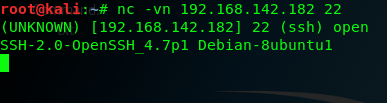
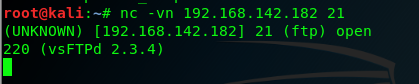
2、the -v opton was used to provide verbose output and the the -n option was used to connnect with the the ip address without DNS resolution , we can see the banner returned by the remote host identifies the service as SSH ,the vendor as openSSH,besides , we can use the siminal scan on port 21 of the same the system ,we can easily acqurie service and the version information ot the running TFP service .
2、Banner grabbing with Python sockets
the sockets mouule in python can be used to connect to network services running on remote ports . Once can interact directly with remote network service using the python interactive interpreter ,you can begin use the python interpreter by calling it driectly m in this here ,we can import any specific modules tha you wish to use , the specific is as follows :

the AF_INET arguments is used to indicate that the socket will employed an IPV4 address and the SOCK_STREAM argument is used to indicate that TCP transport will be used ,if an attempt is made to connect to TCP port 443 on the Metasploitable2 system ,an error will be returned indiciate taht the connection was refused , because there is no service running on this remote system
3、 use the python script to connect
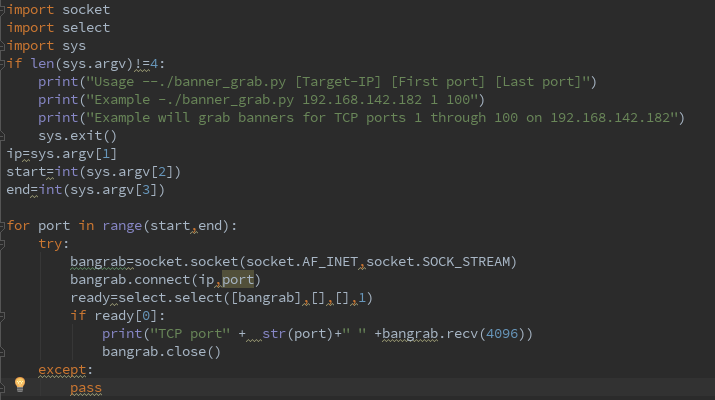
the python script what just i note by utilizing the socket library ,the script loops through each of the specified target port address an attempts to initialize a TCP connection with that pratical port ,if a connection is established and a banner is recived from the target service , the banner will then be printed in the output of the script ,of course ,if a connection cannot be established with the remote port ,the script will then move to the next port address value in the loop.
4、Banner grabbing with Dmitry
Dmitry is a simple yet streamlined tool that can be used to connect to network services running on remote ports .Dmitry can be used to run a quick TCP ports scan on 150 of the remote commonly used services , this can be done using the -p option:
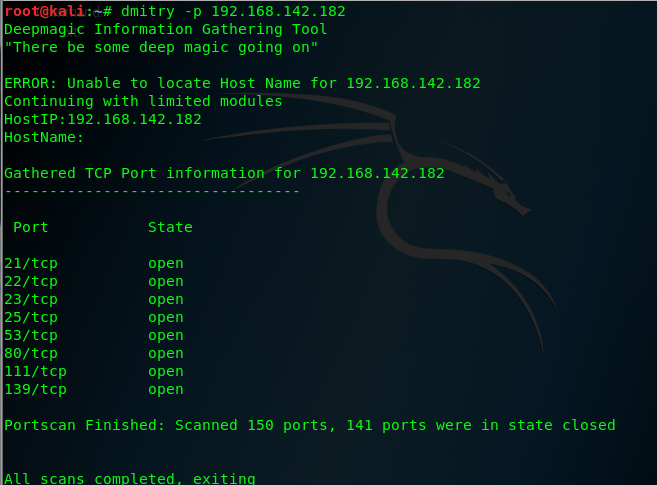
Dmitry is a simple command-line tool that can perform the task of banner grabbing with minimal overhead .Dmitry can streanline the process by only attempting banner grabbing on a small selection of predefined an dcommonly used ports, banners recived from services running on those port address are then returned in the terminal output of the script
5、Banner grabbing with Nmap NES
nmap has an intergateed Nmap Script Engrine script that can be used to read banners from network services running on remote ports , we can use the script ,use command --script option in Nmap and then specifiying the name of the descried script , for this particular script a -sT full-connect scan shjould be used as service banners can only be collected when a full TCP conection is established , the script will be applied to the same ports that are scanned by te fellows requests:
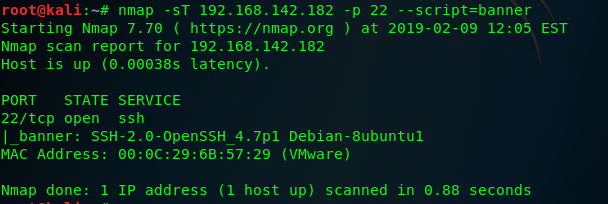
Nmap used the banner script to collect the service banner associated with the port , this same technical can be replied to a sequential range of the ports suing the --notation
the example command : nmap -sT 192.168.142.182 -p 1-100 --script=banner
6、Banner grabbing with Amap
Amap is an application-mapping tool that can be used read banners from network services running on remote ports , The -B option in Amap can be used to run the application in banner mode , this will have it collect banners for the specific IP address and service ports ,Amap can be used to collect the banner from a single service by specifying the remote IP address and service number :
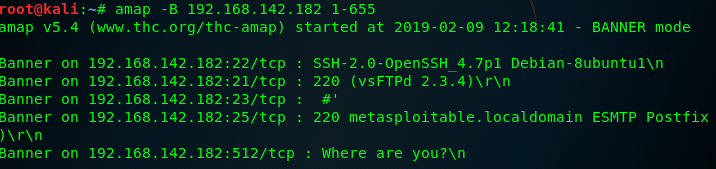
to remove the scan metadata ,we can use grep the optput for a phrase that is unique to specific output entries and does not exist in the scan's metadata . we can use the command : amap -B 192.168.142.182 1-65535 | grep "on"
7、service identification with Nmap
first we can connect with the Metasploitable2 system by TCP : nc -nv 192.168.142.182 80 then to execute an Nmap service scan on the same port ,we can use the -sV option in conjunction eith the IP and Port specification : nmap 192.168.142.182 -p 80 -sV

this service identification function can also be used against a specific sequential series of ports ,if no port specificed ,the 1000 common ports will be scanned and identification attempts will be made for all listening services that are identified .
8、Service identification with Amap
to perform service identification on a single port , run Amap, with the ip address and port number specifications : amap 192.168.142.182 80

amap can also be used to scan a senquential servies of port numbers using dash notation . amap 192.168.142.182 20-90 To supress the information about unidentified ports , the -q option can be used : amap 192.168.142.182 1-100 -q and the banners can be appended to the output associated with each port using -n option :
amap 192.168.142.182 1-100 -qb
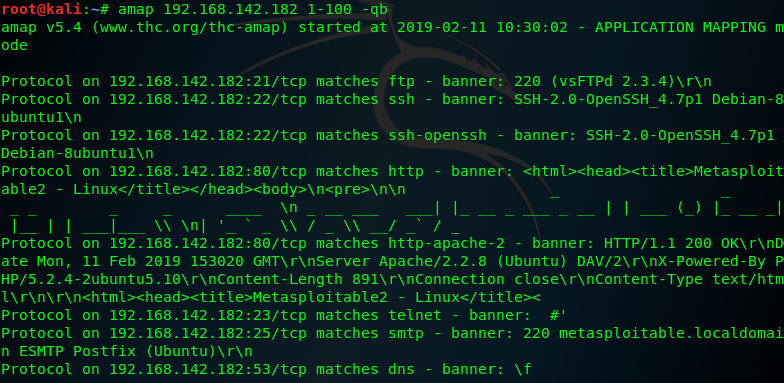
but amap is not updated and well-maintained in the same way that Nmap is ,as such, Aamp is less likely to produce reliable results
9、Operating system identification with Scapy
we know windows and linux/Unix operating systems have different TTL starting values that are used by default ,this factor can be used to attempt to fingerprint the type of operating system:
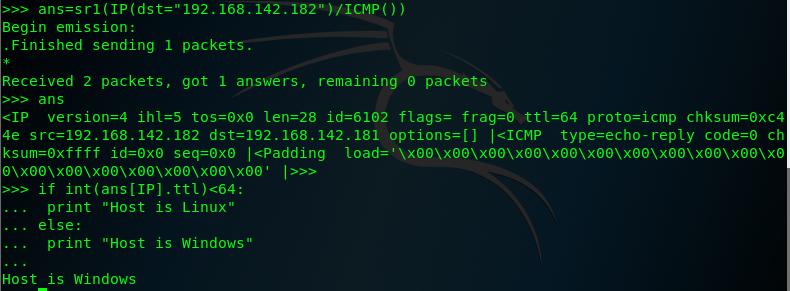
generally speaking the Windows TTL=128 and the Linux/Unix OS TTL=64 but TTL valus can modify .
and then we create both IP and ICMP layer , we need to construct the request by stacking those layse:
first construct the IP layer : linux= "192.168.142.182"
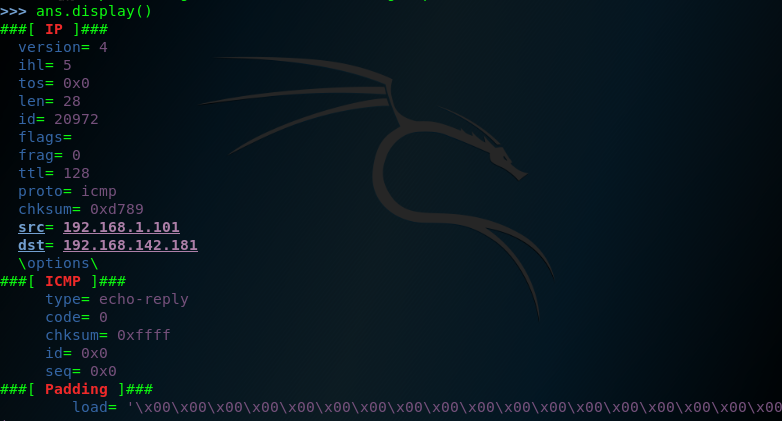
windows= "192.168.1.101"
i=IP()
i.dst=linux
ping=ICMP()
request=(i/ping)
ans=sr1(request)
the follow figure is Linux TTL
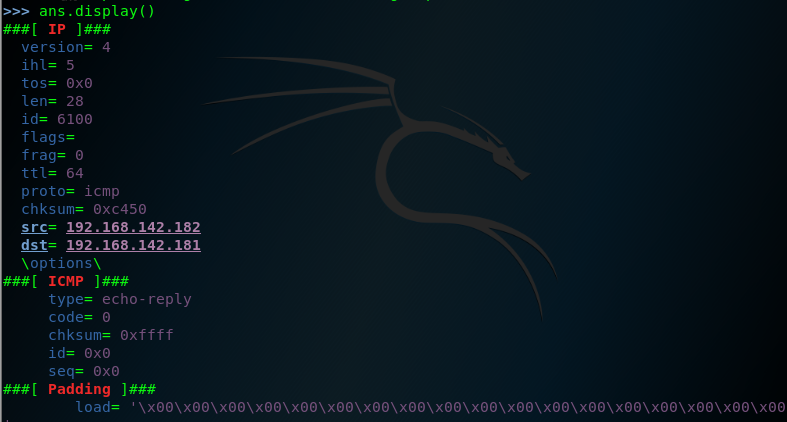
the follow figure is Windows TTL
addination , we can use the python test the TTL values
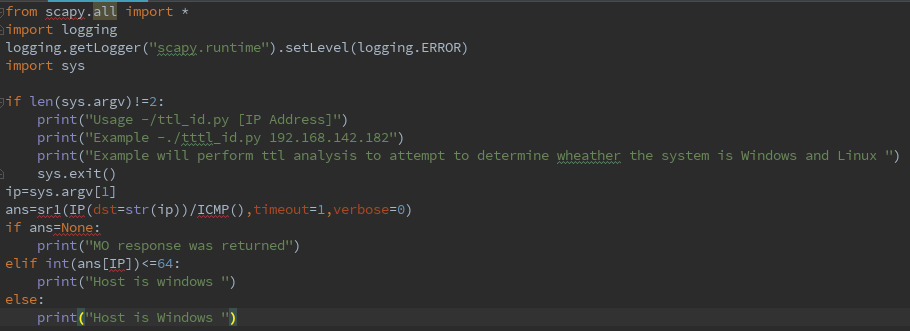
note the Scapy must use Python Version is 2.7
10、Operating system identification with Nmap
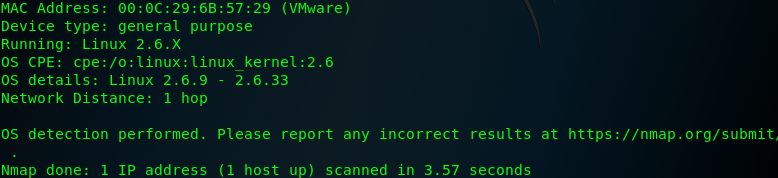
to perform an Nmap operating system identificatio scan , Nmap should be called with the IP adddress specificatio adn the -O option : nmap 192.168.142.182 -O
the Nmap operating system identification sends a comprehensive series of probing requests and analyzes the responses to those quests in attempt to identify the undering operating system based on Os-specific signature and expected behavior,
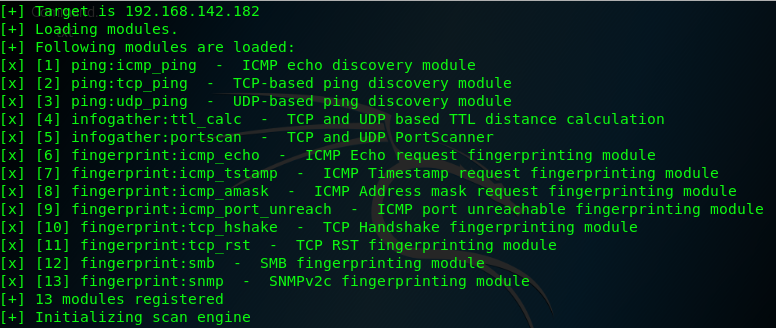
11、Operating System identificatio with xProbe2
the progrm needs to be passed a single argument that consists of the IP address of the system to be scanned
11、Passive operating system identificatio with p0f
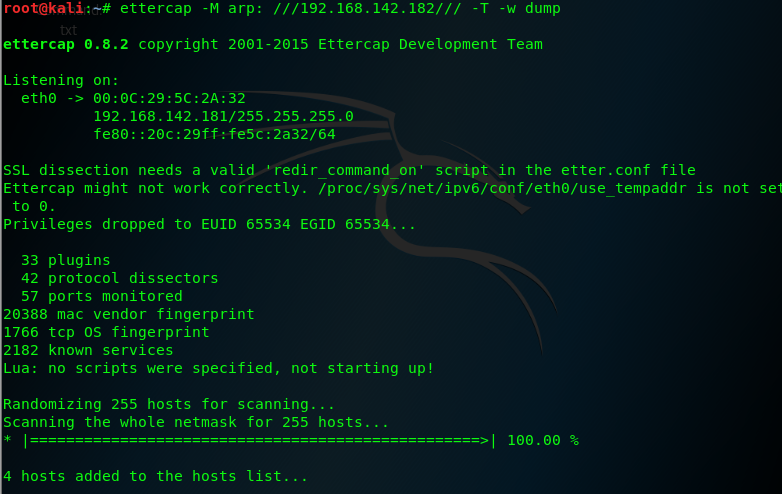
the tool perform operating system identification passively and without drectly intercacting with the target system

12、Snmp analysis with Onesixtyone
Onesixtyone is an Snmap tool that is named for the UDP port upon with SNMP operate it is a very simple SNMP scanner that only requests the system description value for any specific IP address , SNMP is a protocol that can be used to manage netwoeked device and facilitate the sharing of information across those device , the usage of this protocol is often necessary in enterprise network environment.
additional we can use the SNMPwalk analysis the remote system device . SNmpwalk cycle througha series of request to gather as much informationas possible from the service .
13、 Firewall identification with Scapy
to perform an Nmap SCK scan ,Nmap shjould be called with the ip address sepcification , the destination port ,and the -sA option :
nmap -sA 192.168.142.182 -p 22

notice that when we scanning a range of ports , the output only includes unfiltered ports:
nmap -sA 83.166.169.228
13、 to use Metasploit ACK scan module to perform firewall and filtering identification. for more systems , 25 threads is a fast and reasonably safe number of concurrent processes .


Metasploit offers auxiliary module that perform firewall identification through many of teh some techniques that have been discussed in the previous recipe ,however, metasploit also offers the capbility to perform this analysis with the context of a farmework that can be used for other information gathering and even exploitation ,as well .
Gathering Fingerprinting的更多相关文章
- 帆布指纹识别(canvas fingerprinting)
广告联盟或许网站运营者都希望能够精准定位并标识每一个个体,通过对用户行为的分析(浏览了哪些页面?搜索了哪些关键字?对什么感兴趣?点了哪些按钮?用了哪些功能?看了哪些商品?把哪些放入了购物车等等),为用 ...
- ACM ICPC 2015 Moscow Subregional Russia, Moscow, Dolgoprudny, October, 18, 2015 G. Garden Gathering
Problem G. Garden Gathering Input file: standard input Output file: standard output Time limit: 3 se ...
- Requirements Gathering
Requirements gathering is an essential part of any project and project management. Understanding ful ...
- Gathering Initial Troubleshooting Information for Analysis of ORA-4031 Errors on the Shared Pool
In this Document Purpose Troubleshooting Steps References APPLIES TO: Oracle Database - Enterp ...
- Family Gathering at Christmas(思维题)
Family Gathering at Christmas 时间限制: 1 Sec 内存限制: 128 MB提交: 13 解决: 4[提交] [状态] [讨论版] [命题人:admin] 题目描述 ...
- codechef May Challenge 2016 FORESTGA: Forest Gathering 二分
Description All submissions for this problem are available. Read problems statements in Mandarin Chi ...
- MaLoc: a practical magnetic fingerprinting approach to indoor localization using smartphones
https://www.indooratlas.com/ MaLoc: a practical magnetic fingerprinting approach to indoor localizat ...
- Magnetic Fingerprinting Approach to Indoor Localization
Magnetic Fingerprinting Approach to Indoor Localization
- HDU - 5887 2016青岛网络赛 Herbs Gathering(形似01背包的搜索)
Herbs Gathering 10.76% 1000ms 32768K Collecting one's own plants for use as herbal medicines is pe ...
随机推荐
- vue数组变异方法
Vue数组变异方法,会改变被这些方法调用的原始数组,将会触发视图更新 push() 接收任意数量的参数,把它们逐个添加到数组末尾,并返回修改后数组的长度 pop() 从数组末尾移除最后一项,减少数组的 ...
- Powershell同时使用可选强制参数
支持所有PS版本 在下面脚本函数中让可选参数和强制参数必须同时使用. 下面演示当可选参数出现,也必须使用这个强制参数. function Connect-Somewhere { [CmdletBind ...
- javascript高级排序算法之快速排序(快排)
javascript高级排序算法之快速排序(快排)我们之前讨论了javascript基本排序算法 冒泡排序 选择排序 插入排序 简单复习: 冒泡排序: 比较相邻的两个元素,如果前一个比后一个大,则交换 ...
- P1836 【数页码_NOI导刊2011提高(04)】
P1836 数页码_NOI导刊2011提高(04) 题目描述 一本书的页码是从1—n编号的连续整数:1,2,3,…,n.请你求出全部页码中所有单个数字的和,例如第123页,它的和就是1+2+3=6. ...
- 内存管理中提到的hot cold page
所谓冷热是针对处理器cache来说的,冷就是页不大可能在cache中,热就是有很大几率在cache中. cold page和hot page的概念可以参考LWN的一片文章http://lwn.net/ ...
- H5的段落标签、图片标签、列表标签与链接标签
段落标签 (1)<p>段落标签</p> (2)<nobr>强制不换行标签,会出现滚动条</nobr> (3)<pre>保留原始排版标签< ...
- 开篇python
测试代码 #!/usr/bin/env python # -*- coding: UTF-8 -*- import os import sys print(os.getcwd) print(sys.v ...
- for循环里使用查询如何优化(代码库)
for循环里的查询,只是为了赋值对象中的一个字段,如果每一个都重新查一下数据库,影响效率 应该先进行查询,然后再循环里组装自己需要的业务数据 如下代码:list1 查询出对象的一部分内容,list2 ...
- bash 字符串处理
bash 字符串处理 字符串切片:${var:offset:length}示例:[root@localhost ~]#mypath="/etc/sysconfig/network-scrip ...
- Codeforces 1082B Vova and Trophies(前缀+后缀)
题目链接:Vova and Trophies 题意:给定长度为n的字符串s,字符串中只有G和S,只允许最多一次操作:任意位置的两个字符互换.求连续G的最长长度. 题解:维护pre和pr,nxt和nx. ...