
vue中跳转页面逻辑
跳转详情页面具体代码
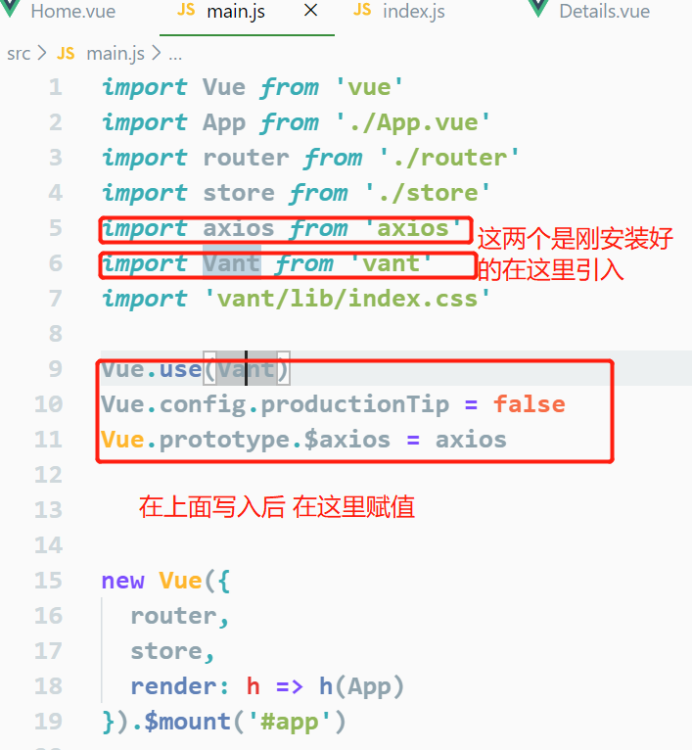
写这个页面需要安装两个
1.安装axios命令
Cnpm install axios --save
2.安装vant
Cnpm install vant --save
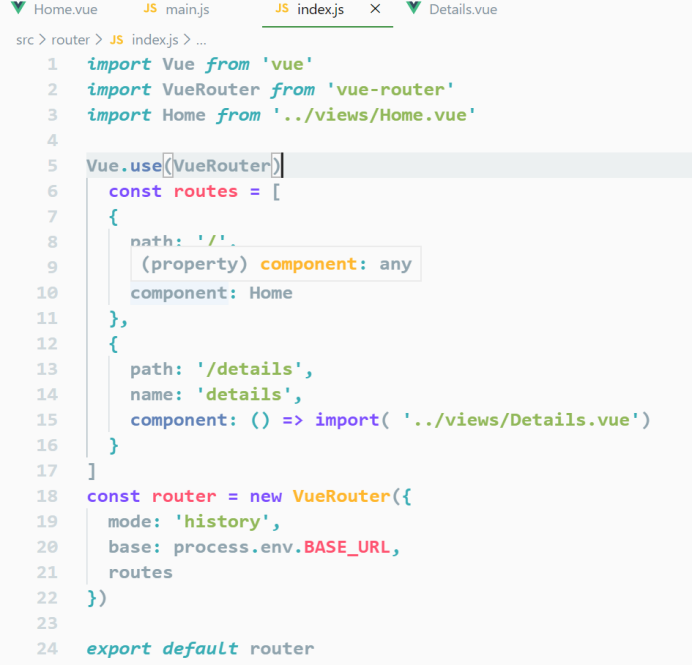
在index.Js里面配置要跳转页面的路由
在main.js里面用vue引入刚安装上的两个插件
这个是home.vue里的内容
<template>
<div>
//下面那个正在加载时给它个判断
<div v-if="isShow">正在加载......</div>
<div class="div1">
<div v-for="(item,index) in goods" :key="index"
@click="gotoDetails(item.id)">
<img :src="item.mainPic" width="150px" />
<p>{{item.title}}</p>
<p>
<span style="color:red">{{item.actualPrice}}</span>
<s style="font-size:12px">{{item.originalPrice}}</s>
</p>
<p>销售:{{item.monthSales}}</p>
</div>
<div v-for="(item,index) in goods" :key="index"
@click="gotoDetails(item.id)">
<img :src="item.mainPic" width="150px" />
<p>{{item.title}}</p>
<p>
<span style="color:red">{{item.actualPrice}}</span>
<s style="font-size:12px">{{item.originalPrice}}</s>
</p>
<p>销售:{{item.monthSales}}</p>
</div>
</div>
</div>
</template>
<script>
export default {
data() {
return {
goods: [],
isShow: true
};
},
mounted() {
this.$axios
//下面那个是在官网中引入的Apl接口
.get(" http://api.kudesoft.cn/tdk/goods", {
params: {
pageId: 2,
cids: 6
}
})
.then(res => {
let goods = res.data.data.data.list;
this.goods = goods;
this.isShow = false;
})
.catch(err => {
console.log(err);
});
},
methods: {
gotoDetails(id) {
this.$router.push({
path: "/details",
query: {
id
}
});
}
}
};
</script>
<style>
.div1{
width: 100%;
display: flex;
justify-content: space-between;
}
</style>
这个是在跳转页面是要创建的跳转到的页面 details.vue
<template>
<div>
<button @click="back">返回</button>
<van-swipe :autoplay="3000" indicator-color="white" style="width:200px">
<van-swipe-item v-for="(img,index) in goodItem.imgs" :key="index">
<img :src="img" alt width="200px" />
</van-swipe-item>
</van-swipe>
<div>{{goodItem.title}}</div>
<div>
<a :href="goodItem.couponLink">领劵</a>
</div>
<h1>商品详情:</h1>
<div>
<img v-for="(url,index) in goodItem.detailPics" :key="index" :src="url" width="600px" />
</div>
</div>
</template>
<script>
export default {
data() {
return {
goodItem: {}
};
},
mounted() {
let id = this.$route.query.id;
this.$axios
.get("http://api.kudesoft.cn/tdk/details", {
params: {
id
}
})
.then(res => {
this.goodItem = res.data.data.data;
this.goodItem.imgs = this.goodItem.imgs.split(",");
this.goodItem.detailPics = this.goodItem.detailPics.split(",");
})
.catch(err => {
console.log(err);
});
},
methods: {
back() {
window.history.back();
}
}
};
</script>
<style>
</style>
vue中跳转页面逻辑的更多相关文章
- 修改vue中的挂载页面(index.html)的路径
修改vue中的挂载页面(index.html)的路径 2019年03月30日 12:07:12 VegasLemon 阅读数 501 版权声明:本文为博主原创文章,未经博主允许不得转载. htt ...
- vue中如何刷新页面
vue中刷新页面的方法 1. 不能使用 this.$router.go(0) 或者 window.reload() 不起作用还特别恶心 这个才是有效果的刷新页面,只要照图敲,就能有效果 我们在 app ...
- 简述在Js或Vue中监听页面的刷新、关闭操作
1.背景 大家是否经常遇到在关闭网页的时候,会看到一个确定是否离开当前页面的提示框?想一些在线测试系统.信息录入系统等就经常会有这一些提示,避免用户有意或者无意中关掉了页面,导致数据丢失.而最近在做项 ...
- vue中监听页面滚动和监听某元素滚动
①监听页面滚动 在生命周期mounted中进行监听滚动: mounted () { window.addEventListener('scroll', this.scrollToTop) }, 在方法 ...
- vue 项目 跳转 页面 不刷新 问题
vue项目中需要导出下载客户数据,因为数据太多,响应太慢.后台直接上传给七牛 然后返回一个下载链接 前端通过跳转链接 来下载 riskManagementApi.friendExprotAll(t ...
- laravel中的登录页面逻辑
<?php namespace App\Http\Controllers; use Illuminate\Http\Request; use Illuminate\Support\Facades ...
- 在taro中跳转页面的时候执行两遍componentDidMount周期的原因和解决方法
在做taro跳转的时候,发现在跳转后的页面会走两遍componentDidMount周期,查看了github上的issues,发现是跳转路由带参为中文引起的,只要把中文参数进行urlencode解决 ...
- vue中如果在页面中v-model的是字典,那么在定义字典的时候,需要明确定义键值为''或者[],否则给字典的键值赋值后页面不显示
如题 在template模板中 {{}} {{form_temp.blOwnerMemberList}} #是字典的形式哦 {{}} 在return的属性中 form_temp: { blOwnerM ...
- vue 中监听页面滚动
监听页面滚动 在methods中定义一个方法 handleScroll() { //获取滚动时的高度 let scrollTop = window.pageYOffset || document.do ...
随机推荐
- PJzhang:vulnhub靶机sunset系列SUNSET:TWILIGHT
猫宁~~~ 地址:https://www.vulnhub.com/entry/sunset-twilight,512/ 关注工具和思路. nmap 192.168.43.0/24靶机IP192.168 ...
- matlab中的多项式计算
在做多项式加法的时候需要做多项式扩展.这里将g1扩展到与f等长 多项式的乘积,是两个多项式之和减1, 多项式求导函数:ployder() 先建立两个多项式,再求a的导函数 在计算两个多项式乘积的导函数 ...
- Prometheus之Exporter开发
Prometheus开发Exporter简介 Exporter 本身是一个http 服务,其指标结果只要符合 Prometheus 规范就可以被 Prometheus 使用. Prometheus中m ...
- 解Bug之路-记一次对端机器宕机后的tcp行为
解Bug之路-记一次对端机器宕机后的tcp行为 前言 机器一般过质保之后,就会因为各种各样的问题而宕机.而这一次的宕机,让笔者观察到了平常观察不到的tcp在对端宕机情况下的行为.经过详细跟踪分析原因之 ...
- ansible-doc到底有多好用,助你玩转各种模块
#使用ansible-doc:查看各种模块的帮助 #命令格式: ansible-doc -l #列出所有的模块列表 ansible-doc -s 模块名 #查看指定模块的参数 ansible-doc ...
- Shell学习(四)Shell运算符
一.基础运算 原生bash不支持简单的数学运算,但是可以通过其他命令来实现,例如 awk 和 expr,expr 最常用. expr 是一款表达式计算工具,使用它能完成表达式的求值操作. #计算两个数 ...
- 获取NX装配结构信息
最近在做一个项目,需要获取NX装配结构信息,这里把代码分享给大家,希望对各位有帮助,注意以下几点: 1)代码获取了PART的属性.表达式等,因此一些细节可能需要您根据实际情况修改. 2)读写XML用的 ...
- 浅谈Prufer序列
\(\text{Prufer}\)序列,是树与序列的一种双射. 构建过程: 每次找到一个编号最小的叶子节点\(Leaf\),将它删掉,并将它所连接的点的度数\(-1\),且加入\(\text{Pruf ...
- 从实体框架核心开始:构建一个ASP。NET Core应用程序与Web API和代码优先开发
下载StudentApplication.Web.zip - 599.5 KB 下载StudentApplication.API.zip - 11.5 KB 介绍 在上一篇文章中,我们了解了实体框架的 ...
- Axure实现vcg官网首页原型图
W240第二天第三天 Axure的简单使用: 作业实现:vcg官网首页原型图 帮助文档基础篇:原型图基础之axure线框图设计 导航栏设计: 添加通用母版header 导航栏设计注意: 鼠标移动到下面 ...