
vue中跳转页面逻辑
跳转详情页面具体代码
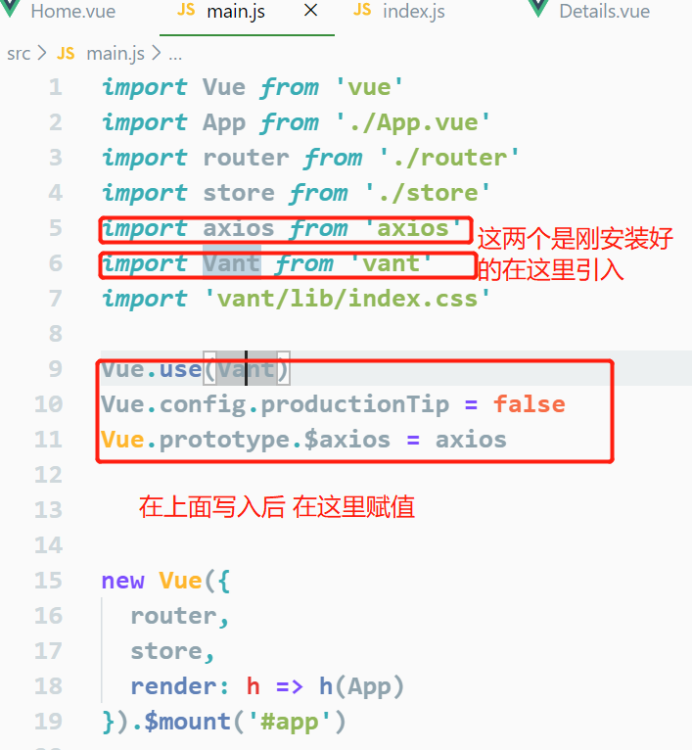
写这个页面需要安装两个
1.安装axios命令
Cnpm install axios --save
2.安装vant
Cnpm install vant --save
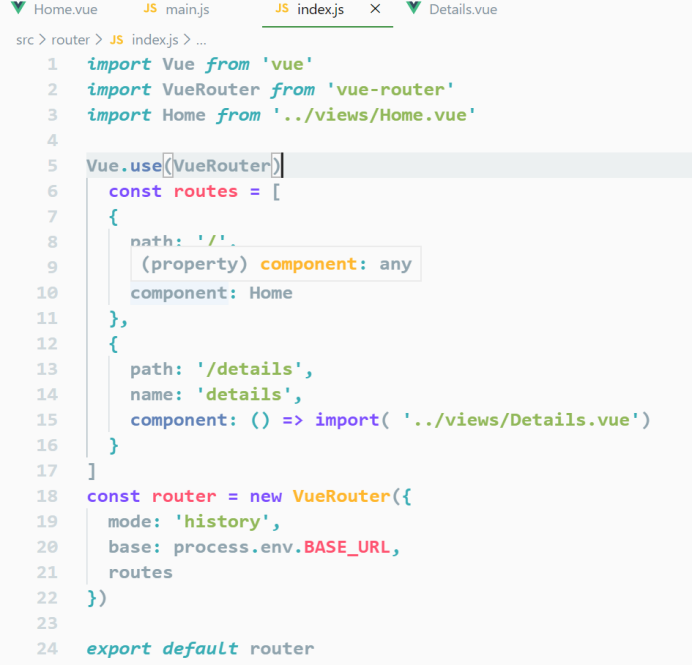
在index.Js里面配置要跳转页面的路由
在main.js里面用vue引入刚安装上的两个插件
这个是home.vue里的内容
<template>
<div>
//下面那个正在加载时给它个判断
<div v-if="isShow">正在加载......</div>
<div class="div1">
<div v-for="(item,index) in goods" :key="index"
@click="gotoDetails(item.id)">
<img :src="item.mainPic" width="150px" />
<p>{{item.title}}</p>
<p>
<span style="color:red">{{item.actualPrice}}</span>
<s style="font-size:12px">{{item.originalPrice}}</s>
</p>
<p>销售:{{item.monthSales}}</p>
</div>
<div v-for="(item,index) in goods" :key="index"
@click="gotoDetails(item.id)">
<img :src="item.mainPic" width="150px" />
<p>{{item.title}}</p>
<p>
<span style="color:red">{{item.actualPrice}}</span>
<s style="font-size:12px">{{item.originalPrice}}</s>
</p>
<p>销售:{{item.monthSales}}</p>
</div>
</div>
</div>
</template>
<script>
export default {
data() {
return {
goods: [],
isShow: true
};
},
mounted() {
this.$axios
//下面那个是在官网中引入的Apl接口
.get(" http://api.kudesoft.cn/tdk/goods", {
params: {
pageId: 2,
cids: 6
}
})
.then(res => {
let goods = res.data.data.data.list;
this.goods = goods;
this.isShow = false;
})
.catch(err => {
console.log(err);
});
},
methods: {
gotoDetails(id) {
this.$router.push({
path: "/details",
query: {
id
}
});
}
}
};
</script>
<style>
.div1{
width: 100%;
display: flex;
justify-content: space-between;
}
</style>
这个是在跳转页面是要创建的跳转到的页面 details.vue
<template>
<div>
<button @click="back">返回</button>
<van-swipe :autoplay="3000" indicator-color="white" style="width:200px">
<van-swipe-item v-for="(img,index) in goodItem.imgs" :key="index">
<img :src="img" alt width="200px" />
</van-swipe-item>
</van-swipe>
<div>{{goodItem.title}}</div>
<div>
<a :href="goodItem.couponLink">领劵</a>
</div>
<h1>商品详情:</h1>
<div>
<img v-for="(url,index) in goodItem.detailPics" :key="index" :src="url" width="600px" />
</div>
</div>
</template>
<script>
export default {
data() {
return {
goodItem: {}
};
},
mounted() {
let id = this.$route.query.id;
this.$axios
.get("http://api.kudesoft.cn/tdk/details", {
params: {
id
}
})
.then(res => {
this.goodItem = res.data.data.data;
this.goodItem.imgs = this.goodItem.imgs.split(",");
this.goodItem.detailPics = this.goodItem.detailPics.split(",");
})
.catch(err => {
console.log(err);
});
},
methods: {
back() {
window.history.back();
}
}
};
</script>
<style>
</style>
vue中跳转页面逻辑的更多相关文章
- 修改vue中的挂载页面(index.html)的路径
修改vue中的挂载页面(index.html)的路径 2019年03月30日 12:07:12 VegasLemon 阅读数 501 版权声明:本文为博主原创文章,未经博主允许不得转载. htt ...
- vue中如何刷新页面
vue中刷新页面的方法 1. 不能使用 this.$router.go(0) 或者 window.reload() 不起作用还特别恶心 这个才是有效果的刷新页面,只要照图敲,就能有效果 我们在 app ...
- 简述在Js或Vue中监听页面的刷新、关闭操作
1.背景 大家是否经常遇到在关闭网页的时候,会看到一个确定是否离开当前页面的提示框?想一些在线测试系统.信息录入系统等就经常会有这一些提示,避免用户有意或者无意中关掉了页面,导致数据丢失.而最近在做项 ...
- vue中监听页面滚动和监听某元素滚动
①监听页面滚动 在生命周期mounted中进行监听滚动: mounted () { window.addEventListener('scroll', this.scrollToTop) }, 在方法 ...
- vue 项目 跳转 页面 不刷新 问题
vue项目中需要导出下载客户数据,因为数据太多,响应太慢.后台直接上传给七牛 然后返回一个下载链接 前端通过跳转链接 来下载 riskManagementApi.friendExprotAll(t ...
- laravel中的登录页面逻辑
<?php namespace App\Http\Controllers; use Illuminate\Http\Request; use Illuminate\Support\Facades ...
- 在taro中跳转页面的时候执行两遍componentDidMount周期的原因和解决方法
在做taro跳转的时候,发现在跳转后的页面会走两遍componentDidMount周期,查看了github上的issues,发现是跳转路由带参为中文引起的,只要把中文参数进行urlencode解决 ...
- vue中如果在页面中v-model的是字典,那么在定义字典的时候,需要明确定义键值为''或者[],否则给字典的键值赋值后页面不显示
如题 在template模板中 {{}} {{form_temp.blOwnerMemberList}} #是字典的形式哦 {{}} 在return的属性中 form_temp: { blOwnerM ...
- vue 中监听页面滚动
监听页面滚动 在methods中定义一个方法 handleScroll() { //获取滚动时的高度 let scrollTop = window.pageYOffset || document.do ...
随机推荐
- JVM直接内存(Direct Memory)
直接内存 1.直接内存不是虚拟机运行时数据区的一部分,也不是<Java虚拟机规范>中定义的内存区域. 2.直接内存是Java堆外的.直接向系统申请的内存区间. 3.简单理解: java p ...
- python中random库的使用
基本随机函数 计算机产生随机数是需要随机数种子的,例如 给定一个随机数种子,就能利用梅森旋转算法产生一系列随机序列 每一个数都是随机数,只要随机种子相同,产生的随机数和数之间的关系都是确定的 随机种子 ...
- powershell中使用Get-FileHash计算文件的hash值
今天在公司一台windows服务器上.需要对两个文件进行比对,笔者首先就想到了可以使用md5校验 但是公司服务器上又不可以随意安装软件,于是笔者想到了可以试试windows自带的powershell中 ...
- JVM学习(八)指令重排序
一.数据依赖性 在学习JVM的指令重排序之前,我们先了解一下什么是数据依赖性: 编译器和处理器在处理具体的指令时,可能会对操作进行重排序来提高执行性能[多条指令并行执行,所以提升性能的同时也可能会导致 ...
- 双向最大匹配算法——基于词典规则的中文分词(Java实现)
目录 一.中文分词理论描述 二.算法描述 1.正向最大匹配算法 2.反向最大匹配算法 3.双剑合璧 三.案例描述 四.JAVA实现完整代码 五.组装UI 六.总结 前言 这篇将使用Java实现基于规则 ...
- 创建Maven项目中的几个问题
一.用eclipse创建maven的web项目,需手动添加WEB-INF文件夹及其web.xml配置文件 二.设置编译版本1.8 在pom.xml中设置 1 <build> 2 <! ...
- 大话Python函数底层逻辑
函数 叫 子过程或子程序 描叙的更为贴近实际应用场景 这和数学中的函数实现上不同但语义上相识,如 f(x) = expressiom, 给定一个确定的输入必然返回一个确定的输出 数学中函数的关系是通过 ...
- Python-joypy和 R-ggridges 峰峦图制作
本文的文字及图片来源于网络,仅供学习.交流使用,不具有任何商业用途,版权归原作者所有,如有问题请及时联系我们以作处理. 以下文章来源于DataCharm,作者 宁海涛 转载地址 https://www ...
- 06 C语言变量
C语言变量 变量的本质 变量的本质其实是程序可操作的存储区的名称. C 中每个变量都有特定的类型,类型决定了变量存储的大小的范围,在范围内的值都可以存储在内存中,运算符可应用于变量上. 变量的名称可以 ...
- C语言中time_t数据类型详细介绍
包含文件:<time.h> #ifndef __TIME_T #define __TIME_T /* 避免重复定义 time_t */ typedef long time_ ...