
序列化 serialize
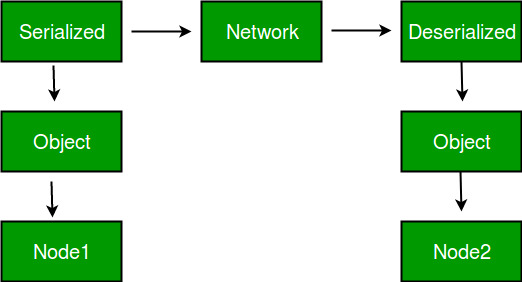
Serializable 序列化 The byte stream created is platform independent. So, the object serialized on one platform can be deserialized on a different platform.
Java 序列化接口Serializable详解 - 火星猿类 - 博客园 http://www.cnblogs.com/tomtiantao/p/6866083.html
深入理解JAVA序列化 - 简单爱_wxg - 博客园 https://www.cnblogs.com/wxgblogs/p/5849951.html
一个对象序列化的接口,一个类只有实现了Serializable搜索接口,它的对象才是可序列化的。因此如果要序列化某些类的对象,这些类就必须实现Serializable接口。而实际上,Serializable是一个空接口,没有什么具体内容,它的目的只是简单的标识一个类的对象可以被序列化。
什么情况下需要序列化?
a)当你想把的内存中的对象写入到硬盘的时候;
b)当你想用套接字在网络上传送对象的时候;
c)当你想通过RMI传输对象的时候;
具体解释:
a)比如说你的内存不够用了,那计算机就要将内存里面的一部分对象暂时的保存到硬盘中,等到要用的时候再读入到内存中,硬盘的那部分存储空间就是所谓的虚拟内存。在比如过你要将某个特定的对象保存到文件中,我隔几天在把它拿出来用,那么这时候就要实现Serializable接口;
b)在进行java的Socket编程的时候,你有时候可能要传输某一类的对象,那么也就要实现Serializable接口;最常见的你传输一个字符串,它是JDK里面的类,也实现了Serializable接口,所以可以在网络上传输。
c)如果要通过远程的方法调用(RMI)去调用一个远程对象的方法,如在计算机A中调用另一台计算机B的对象的方法,那么你需要通过JNDI服务获取计算机B目标对象的引用,将对象从B传送到A,就需要实现序列化接口。
jdk工具生成了序列化id
[root@hadoop1 MyBgJavaLan]# ll -as /usr/local/jdk1.8.0_144/bin

总用量 776

  4 drwxr-xr-x. 2 10 143   4096 7月  22 2017 .

  0 drwxr-xr-x. 8 10 143    255 7月  22 2017 ..

  8 -rwxr-xr-x. 1 10 143   7965 7月  22 2017 appletviewer

  0 lrwxrwxrwx. 1 10 143      8 7月  22 2017 ControlPanel -> jcontrol

  8 -rwxr-xr-x. 1 10 143   7941 7月  22 2017 extcheck

  8 -rwxr-xr-x. 1 10 143   7973 7月  22 2017 idlj

  8 -rwxr-xr-x. 1 10 143   7925 7月  22 2017 jar

  8 -rwxr-xr-x. 1 10 143   7957 7月  22 2017 jarsigner

  8 -rwxr-xr-x. 1 10 143   7734 7月  22 2017 java

  8 -rwxr-xr-x. 1 10 143   7941 7月  22 2017 javac

  8 -rwxr-xr-x. 1 10 143   7941 7月  22 2017 javadoc

  4 -rwxr-xr-x. 1 10 143   2293 6月  27 2017 javafxpackager

  8 -rwxr-xr-x. 1 10 143   7941 7月  22 2017 javah

  8 -rwxr-xr-x. 1 10 143   7941 7月  22 2017 javap

  4 -rwxr-xr-x. 1 10 143   2293 6月  27 2017 javapackager

  4 -rwxr-xr-x. 1 10 143   1809 7月  22 2017 java-rmi.cgi

128 -rwxr-xr-x. 1 10 143 129139 7月  22 2017 javaws

  8 -rwxr-xr-x. 1 10 143   7925 7月  22 2017 jcmd

  8 -rwxr-xr-x. 1 10 143   8013 7月  22 2017 jconsole

  8 -rwxr-xr-x. 1 10 143   6264 7月  22 2017 jcontrol

  8 -rwxr-xr-x. 1 10 143   7981 7月  22 2017 jdb

  8 -rwxr-xr-x. 1 10 143   7941 7月  22 2017 jdeps

  8 -rwxr-xr-x. 1 10 143   7941 7月  22 2017 jhat

  8 -rwxr-xr-x. 1 10 143   8109 7月  22 2017 jinfo

  8 -rwxr-xr-x. 1 10 143   7941 7月  22 2017 jjs

  8 -rwxr-xr-x. 1 10 143   8109 7月  22 2017 jmap

 76 -rwxr-xr-x. 1 10 143  74675 11月 25 2016 jmc

  4 -rwxr-xr-x. 1 10 143    402 11月 25 2016 jmc.ini

  8 -rwxr-xr-x. 1 10 143   7925 7月  22 2017 jps

  8 -rwxr-xr-x. 1 10 143   7949 7月  22 2017 jrunscript

  8 -rwxr-xr-x. 1 10 143   7981 7月  22 2017 jsadebugd

  8 -rwxr-xr-x. 1 10 143   8109 7月  22 2017 jstack

  8 -rwxr-xr-x. 1 10 143   7941 7月  22 2017 jstat

  8 -rwxr-xr-x. 1 10 143   7941 7月  22 2017 jstatd

  8 -rwxr-xr-x. 1 10 143   5110 1月  15 2017 jvisualvm

  8 -rwxr-xr-x. 1 10 143   7941 7月  22 2017 keytool

  8 -rwxr-xr-x. 1 10 143   7949 7月  22 2017 native2ascii

  8 -rwxr-xr-x. 1 10 143   8149 7月  22 2017 orbd

  8 -rwxr-xr-x. 1 10 143   7957 7月  22 2017 pack200

  8 -rwxr-xr-x. 1 10 143   7997 7月  22 2017 policytool

  8 -rwxr-xr-x. 1 10 143   7925 7月  22 2017 rmic

  8 -rwxr-xr-x. 1 10 143   7941 7月  22 2017 rmid

  8 -rwxr-xr-x. 1 10 143   7949 7月  22 2017 rmiregistry

  8 -rwxr-xr-x. 1 10 143   7957 7月  22 2017 schemagen

  8 -rwxr-xr-x. 1 10 143   7941 7月  22 2017 serialver

  8 -rwxr-xr-x. 1 10 143   7965 7月  22 2017 servertool

  8 -rwxr-xr-x. 1 10 143   8181 7月  22 2017 tnameserv

224 -rwxr-xr-x. 1 10 143 228933 7月  22 2017 unpack200

  8 -rwxr-xr-x. 1 10 143   7941 7月  22 2017 wsgen

  8 -rwxr-xr-x. 1 10 143   7957 7月  22 2017 wsimport

  8 -rwxr-xr-x. 1 10 143   7957 7月  22 2017 xjc

[root@hadoop1 MyBgJavaLan]# pwd

/home/MyBgJavaLan

[root@hadoop1 MyBgJavaLan]# serialver

用法: serialver [-classpath 类路径] [-show] [类名称...]

[root@hadoop1 MyBgJavaLan]#
Serialization and Deserialization in Java with Example - GeeksforGeeks https://www.geeksforgeeks.org/serialization-in-java/
The byte stream created is platform independent. So, the object serialized on one platform can be deserialized on a different platform.

package com.mycom;

import java.io.Serializable;

import java.io.FileOutputStream;

import java.io.ObjectOutputStream;

import java.io.IOException;

import java.io.FileInputStream;

import java.io.ObjectInputStream;

public class SerializationDemo implements Serializable {

    public int a;

    public String b;

    //Default constructor

    public SerializationDemo(int a, String b) {

        this.a = a;

        this.b = b;

    }

}

class SerializationTest {

    public static void main(String[] args) {

        SerializationDemo object = new SerializationDemo(1, "geeksforgeeks");

        String filename = "file.ser";

        //Serialization

        try {

            //Saving of object in a file

            FileOutputStream file = new FileOutputStream(filename);

            ObjectOutputStream out = new ObjectOutputStream(file);

            //Method for serialization of object

            out.writeObject(object);

            out.close();

            file.close();

            System.out.println("Object has been serialized");

        } catch (IOException ex) {

            System.out.println(ex);

        }

        SerializationDemo object1 = null;

        //Deserialization

        try {

            //Reading the object from a file

            FileInputStream file = new FileInputStream(filename);

            ObjectInputStream in = new ObjectInputStream(file);

            //Method for deserialization of object

            object1 = (SerializationDemo) in.readObject();

            in.close();

            file.close();

            System.out.println("Object has been deserialized");

            System.out.println("a= " + object1.a);

            System.out.println("b= " + object1.b);

        } catch (IOException ex) {

            System.out.println(ex);

        } catch (ClassNotFoundException ex) {

            System.out.println(ex);

        }

    }

}
Serialization (C#) | Microsoft Docs https://docs.microsoft.com/en-us/dotnet/csharp/programming-guide/concepts/serialization/
Serialization (C#)
- 01/02/2020
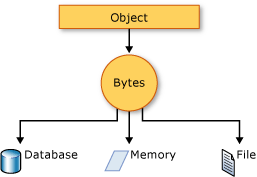
Serialization is the process of converting an object into a stream of bytes to store the object or transmit it to memory, a database, or a file. Its main purpose is to save the state of an object in order to be able to recreate it when needed. The reverse process is called deserialization.
How serialization works
This illustration shows the overall process of serialization:

The object is serialized to a stream that carries the data. The stream may also have information about the object's type, such as its version, culture, and assembly name. From that stream, the object can be stored in a database, a file, or memory.
Uses for serialization
Serialization allows the developer to save the state of an object and re-create it as needed, providing storage of objects as well as data exchange. Through serialization, a developer can perform actions such as:
- Sending the object to a remote application by using a web service
- Passing an object from one domain to another
- Passing an object through a firewall as a JSON or XML string
- Maintaining security or user-specific information across applications
JSON serialization
The System.Text.Json namespace contains classes for JavaScript Object Notation (JSON) serialization and deserialization. JSON is an open standard that is commonly used for sharing data across the web.
JSON serialization serializes the public properties of an object into a string, byte array, or stream that conforms to the RFC 8259 JSON specification. To control the way JsonSerializer serializes or deserializes an instance of the class:
- Use a JsonSerializerOptions object
- Apply attributes from the System.Text.Json.Serialization namespace to classes or properties
- Implement custom converters
Binary and XML serialization
The System.Runtime.Serialization namespace contains classes for binary and XML serialization and deserialization.
Binary serialization uses binary encoding to produce compact serialization for uses such as storage or socket-based network streams. In binary serialization, all members, even members that are read-only, are serialized, and performance is enhanced.
Warning
Binary serialization can be dangerous. For more information, see BinaryFormatter security guide.
XML serialization serializes the public fields and properties of an object, or the parameters and return values of methods, into an XML stream that conforms to a specific XML Schema definition language (XSD) document. XML serialization results in strongly typed classes with public properties and fields that are converted to XML. System.Xml.Serialization contains classes for serializing and deserializing XML. You apply attributes to classes and class members to control the way the XmlSerializer serializes or deserializes an instance of the class.
Making an object serializable
For binary or XML serialization, you need:
- The object to be serialized
- A stream to contain the serialized object
- A System.Runtime.Serialization.Formatter instance
Apply the SerializableAttribute attribute to a type to indicate that instances of the type can be serialized. An exception is thrown if you attempt to serialize but the type doesn't have the SerializableAttribute attribute.
To prevent a field from being serialized, apply the NonSerializedAttribute attribute. If a field of a serializable type contains a pointer, a handle, or some other data structure that is specific to a particular environment, and the field cannot be meaningfully reconstituted in a different environment, then you may want to make it nonserializable.
If a serialized class contains references to objects of other classes that are marked SerializableAttribute, those objects will also be serialized.
Basic and custom serialization
Binary and XML serialization can be performed in two ways, basic and custom.
Basic serialization uses .NET to automatically serialize the object. The only requirement is that the class has the SerializableAttributeattribute applied. The NonSerializedAttribute can be used to keep specific fields from being serialized.
When you use basic serialization, the versioning of objects may create problems. You would use custom serialization when versioning issues are important. Basic serialization is the easiest way to perform serialization, but it does not provide much control over the process.
In custom serialization, you can specify exactly which objects will be serialized and how it will be done. The class must be marked SerializableAttribute and implement the ISerializable interface. If you want your object to be deserialized in a custom manner as well, use a custom constructor.
Designer serialization
Designer serialization is a special form of serialization that involves the kind of object persistence associated with development tools. Designer serialization is the process of converting an object graph into a source file that can later be used to recover the object graph. A source file can contain code, markup, or even SQL table information.
Related Topics and Examples
System.Text.Json overview Shows how to get the System.Text.Json library.
How to serialize and deserialize JSON in .NET. Shows how to read and write object data to and from JSON using the JsonSerializerclass.
Walkthrough: Persisting an Object in Visual Studio (C#)
Demonstrates how serialization can be used to persist an object's data between instances, allowing you to store values and retrieve them the next time the object is instantiated.
How to read object data from an XML file (C#)
Shows how to read object data that was previously written to an XML file using the XmlSerializer class.
How to write object data to an XML file (C#)
Shows how to write the object from a class to an XML file using the XmlSerializer class.
序列化:对象怎么在网络中传输?
https://time.geekbang.org/column/article/202779
03 | 序列化:对象怎么在网络中传输?
网络传输的数据必须是二进制数据,但调用方请求的出入参数都是对象。对象是不能直接在网络中传输的,所以我们需要提前把它转成可传输的二进制,并且要求转换算法是可逆的,这个过程我们一般叫做“序列化”。 这时,服务提供方就可以正确地从二进制数据中分割出不同的请求,同时根据请求类型和序列化类型,把二进制的消息体逆向还原成请求对象,这个过程我们称之为“反序列化”。
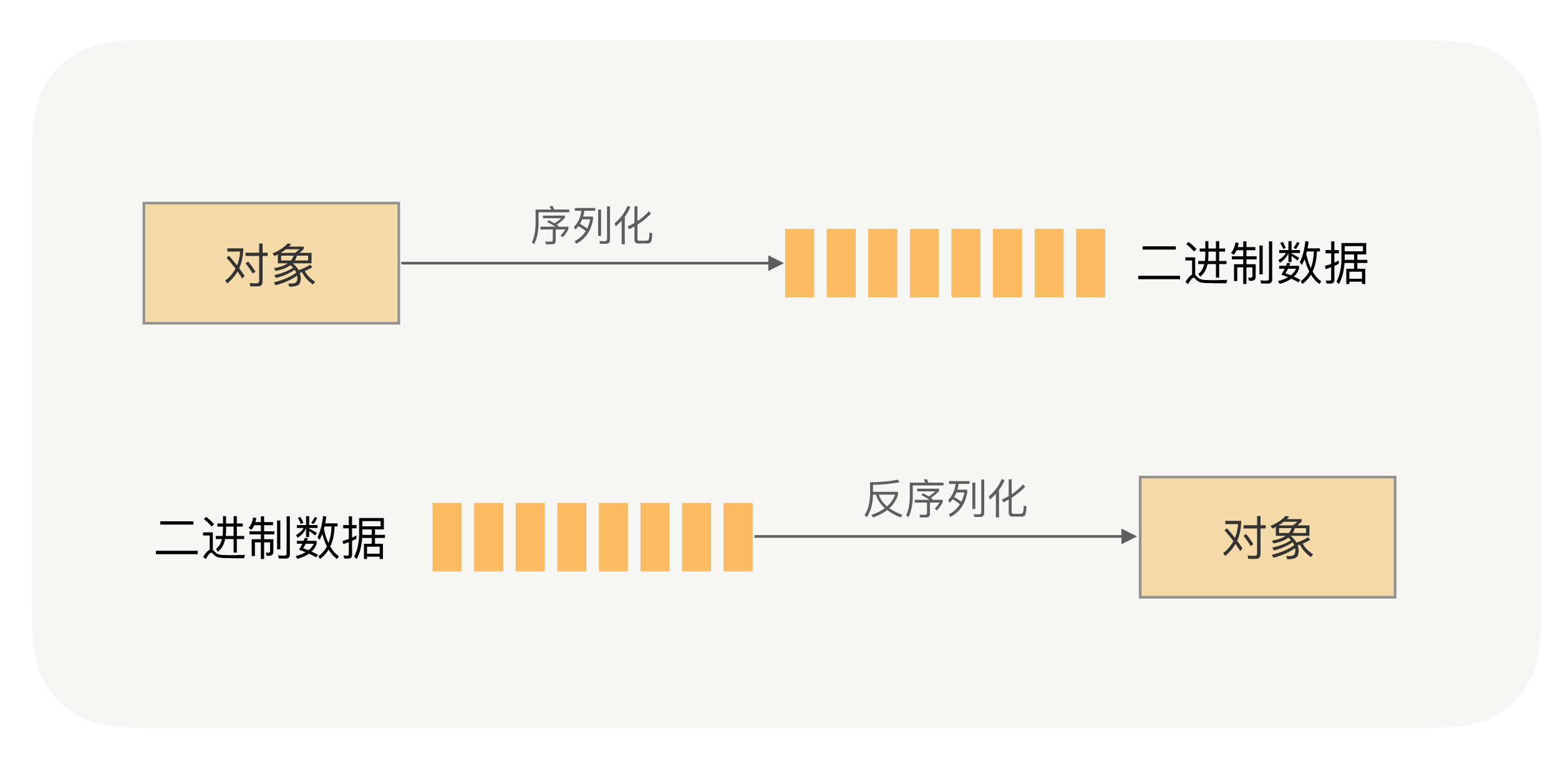
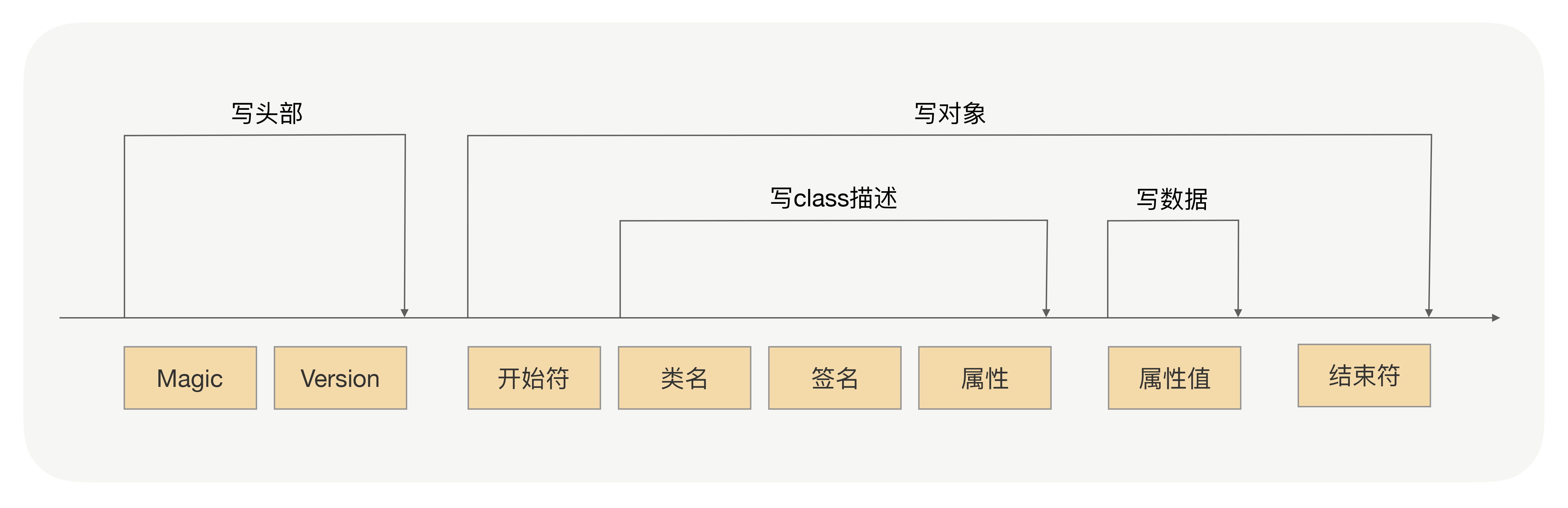
总结来说,序列化就是将对象转换成二进制数据的过程,而反序列就是反过来将二进制转换为对象的过程。那么 RPC 框架为什么需要序列化呢?还是请你回想下 RPC 的通信流程:

序列化 serialize的更多相关文章
- 序列化serialize()与反序列化unserialize()的实例
在写序列化serialize与反序列化unserialize()时,我们先来看看: serialize - 产生一个可存储的值的表示 描述 string serialize ( mixed $valu ...
- 【PHP基础】序列化serialize()与反序列化unserialize()
序列化serialize()与反序列化unserialize(): 序列化serialize():就是将一个变量所代表的 “内存数据”转换为“字符串”的形式,并持久保存在硬盘(写入文件中保存)上的一种 ...
- 文件读取的时候要留意 -- 序列化serialize()与反序列化unserialize():
原文:https://blog.csdn.net/little_rabbit_baby/article/details/53840543 序列化serialize()与反序列化unserialize( ...
- php数组序列化serialize与unserialize
$arr=array('1','2','3');echo serialize($arr); //序列化 a:3:{i:0;s:1:"1";i:1;s:1:"2" ...
- 【MFC】序列化(Serialize)、反序列化(Deserialize)
1.首先在头文件里面声明 DECLARE_SERIAL(CSelectionSerial) 2.重写CObject的Serialize函数 virtual void Serialize(CArchiv ...
- 【转】【C#】序列化(Serialize)、反序列化(Deserialize)
序列化又称串行化,是.NET运行时环境用来支持用户定义类型的流化的机制.其目的是以某种存储形成使自定义对象持久化,或者将这种对象从一个地方传输到另一个地方. .NET框架提供了两种串行化的方式: 1. ...
- C# 序列化 Serialize 的应用
using System; using System.Collections.Generic; using System.Linq; using System.Text; using System.I ...
- jquery序列化serialize()方法空格变为+问题解决参考方法
$("#sendNoticeData-form").serialize();会在value中存在空格的地方转化为+符合.比如:name:tiwax aaa序列化后为tiwax+aa ...
- 原生JS实现表单序列化serialize()
有一个form表单,要用AJAX后台提交,原来想拼接json,但是数据多了麻烦,不灵活. 用HTML5的FormData来初始化表单 var formdata=new FormData(documen ...
- 序列化serialize与反序列化unserialize
有利于存储和传递value(除了resource类型外),却不会丢失其原有类型和结构. serialize序列化时会调用魔术方法__sleep(); unserialize反序列化时会调用魔术方法__ ...
随机推荐
- mysql提权神器
java -jar udf.jar 127.0.0.1 root 123456 [32/64]
- Turtlebot3新手教程:OpenCR软件设置(shell)
*本文针对如何利用脚本来更新固件进行讲解 具体步骤如下: burger的固件更新 $ export OPENCR_PORT=/dev/ttyACM0 $ export OPENCR_MODEL=bur ...
- 七、Elasticsearch+elasticsearch-head的安装+Kibana环境搭建+ik分词器安装
一.安装JDK1.8 二.安装ES 三个节点:master.slave01.slave02 1.这里下载的是elasticsearch-6.3.1.rpm版本包 https://www.elastic ...
- case when then else end用法
case具有两种格式,简单case函数和case搜索函数 case函数只返回第一个符合条件的值,剩下的case部分将会被自动忽略 1.简单函数 CASE sex WHEN '1 ...
- Command1
命令 [-参数][操作对象] ls -la /etc -l 以长格式显示详细信息 -a 显示目录下全部文件(包括隐藏文件) ls 执行权限:所有用户 功能:显示目录下的文件 ls -ald -d 查看 ...
- web元素定位和appium-app元素定位
一.web页面元素定位工具介绍 1.打开google浏览器,按F12进入开发者模式,如下图: 2.用鼠标点击下图红色框中的箭头--然后鼠标移动到web页面的元素上(此处为百度框),会自动定位到对应的h ...
- kafka 异步双活方案 mirror maker2 深度解析
mirror maker2背景 通常情况下,我们都是使用一套kafka集群处理业务.但有些情况需要使用另一套kafka集群来进行数据同步和备份.在kafka早先版本的时候,kafka针对这种场景就有推 ...
- 图像质量评估论文 | Deep-IQA | IEEETIP2018
主题列表:juejin, github, smartblue, cyanosis, channing-cyan, fancy, hydrogen, condensed-night-purple, gr ...
- 【Flutter】容器类组件之Scaffold、TabBar、底部导航
前言 一个完整的路由页可能会包含导航栏.抽屉菜单(Drawer)以及底部Tab导航菜单等.Flutter Material组件库提供了一些现成的组件来减少开发任务.Scaffold是一个路由页的骨架, ...
- 【Flutter】可滚动组件之ListView
前言 它可以沿一个方向线性排布所有子组件,并且它也可以支持基于Sliver的延迟构建模型. 接口描述 ListView({ Key key, // 可滚动widget公共参数 Axis scrollD ...