
【Android初级】如何实现一个比相册更高大上的左右滑动特效(附源码)
在Android里面,想要实现一个类似相册的左右滑动效果,我们除了可以用Gallery、HorizontalScrollView、ViewPager等控件,还可以用一个叫做 ViewFlipper 的类来代替实现,它继承于 ViewAnimator。如见其名,这个类是跟动画有关,会将添加到它里面的两个或者多个View做一个动画,然后每次只显示一个子View,通过在 View 之间切换时执行动画,最终达到一个类似相册能左右滑动的效果。
本次功能要实现的两个基本效果
- 最基本的左右滑动效果
- 从屏幕的45度方向进入和退出的效果
实现思路
- 按照 ViewFlipper 的源码说明,它是将两个或多个View用动画展示出来。那么我就在 ViewFlipper 内放入两个布局,每个布局都包含一个 TextView 和 ImageView,分别用于显示文字和图片
- 既然要有动画效果,我准备使用Android的位移动画类 TranslateAnimation,设置起始的横纵坐标值
- 为了让效果明显,我会设置 ViewFlipper 的进入和退出屏幕的动画,并且在左滑时呈现一个动画、右滑时呈现另一个动画(需要判断是左滑还是右滑:重写 onTouchEvent 方法,比较横坐标X的值的变化)
源码如下:
1、主Activity
// import语句省略

public class ViewFlipperDemo extends Activity {

    private static final String TAG = "ViewFlipperDemo";

    private ViewFlipper mViewFlipper;

    private float mOldTouchValue;

    @Override

    protected void onCreate(Bundle onSavedInstance) {

        super.onCreate(onSavedInstance);

        // 设置为全屏

        getWindow().setFlags(WindowManager.LayoutParams.FLAG_FULLSCREEN, WindowManager.LayoutParams.FLAG_FULLSCREEN);

        requestWindowFeature(Window.FEATURE_NO_TITLE);

        setContentView(R.layout.view_flipper_demo);

        mViewFlipper = findViewById(R.id.viewFlipper1);

    }

    @Override

    public boolean onTouchEvent(MotionEvent event) {

        switch (event.getAction()) {

            case MotionEvent.ACTION_DOWN:

                mOldTouchValue = event.getX();

                break;

                case MotionEvent.ACTION_UP:

                    float currentX = event.getX();

                    // 手指向右滑动: 手指向右滑动时横坐标 X 的值会变大,因此 currentX 的值更大

                    if (mOldTouchValue < currentX) {

                        // 进入屏幕的动效

                        mViewFlipper.setInAnimation(AnimationHelper.inFromLeftAnimation());

                        // 退出屏幕的动效

                        mViewFlipper.setOutAnimation(AnimationHelper.outToRightAnimation());

                        mViewFlipper.showNext();

                    }

                    // 横坐标的值变小,说明是左滑

                    if (mOldTouchValue > currentX) {

                        // 进入屏幕的动效

                        mViewFlipper.setInAnimation(AnimationHelper.inFromRightAnimation());

                        // 退出屏幕的动效

                        mViewFlipper.setOutAnimation(AnimationHelper.outToLeftAnimation());

                        mViewFlipper.showPrevious();

                    }

                    break;

                default:

                    break;

        }

        return super.onTouchEvent(event);

    }

}
2、对应的布局文件 view_flipper_demo.xml
<LinearLayout xmlns:android="http://schemas.android.com/apk/res/android"

              android:layout_width="match_parent"

              android:layout_height="match_parent"

              android:orientation="vertical">

    <TextView android:layout_width="match_parent"

              android:layout_height="wrap_content"

              android:textColor="@color/colorBlack"

              android:gravity="center"

              android:text="这是一个ViewFlipper样例"

              android:paddingTop="20dp"/>

    <ViewFlipper android:layout_width="match_parent"

                 android:layout_height="match_parent"

                 android:id="@+id/viewFlipper1">

        <LinearLayout android:layout_width="match_parent"

                      android:layout_height="match_parent"

                      android:orientation="vertical"

                      android:gravity="center">

            <TextView android:layout_width="match_parent"

                      android:layout_height="wrap_content"

                      android:textColor="@color/colorBlue"

                      android:gravity="center"

                      android:text="这是第一个ViewFlipper页面"/>

            <ImageView android:layout_width="wrap_content"

                       android:layout_height="wrap_content"

                       android:src="@drawable/avasterdr"/>

        </LinearLayout>

        <LinearLayout android:layout_width="match_parent"

                      android:layout_height="match_parent"

                      android:orientation="vertical"

                      android:gravity="center" >

            <TextView android:layout_width="match_parent"

                      android:layout_height="wrap_content"

                      android:textColor="@color/colorBlue"

                      android:gravity="center"

                      android:text="这是第二个ViewFlipper页面"/>

            <ImageView android:layout_width="wrap_content"

                       android:layout_height="wrap_content"

                       android:src="@drawable/avastertony"/>

        </LinearLayout>

    </ViewFlipper>

</LinearLayout>
3、动画辅助类 AnimationHelper.java
public class AnimationHelper {

    // 左滑的进入动画

    public static Animation inFromRightAnimation() {

        Animation inFromRight = new TranslateAnimation(

                Animation.RELATIVE_TO_PARENT,

                1.0f,

                Animation.RELATIVE_TO_PARENT,

                0.0f,

                Animation.RELATIVE_TO_PARENT,

                0.0f,

                Animation.RELATIVE_TO_PARENT,

                0.0f);

        inFromRight.setDuration(500);

        inFromRight.setInterpolator(new AccelerateInterpolator());

        return inFromRight;

    }

    // 左滑的退出动画

    public static Animation outToLeftAnimation() {

        Animation outToLeft = new TranslateAnimation(

                Animation.RELATIVE_TO_PARENT,

                0.0f,

                Animation.RELATIVE_TO_PARENT,

                -1.0f,

                Animation.RELATIVE_TO_PARENT,

                0.0f,

                Animation.RELATIVE_TO_PARENT,

                0.0f);

        outToLeft.setDuration(500);

        outToLeft.setInterpolator(new AccelerateInterpolator());

        return outToLeft;

    }

    // 右滑的进入动画

    public static Animation inFromLeftAnimation() {

        Animation inFromLeft = new TranslateAnimation(

                Animation.RELATIVE_TO_PARENT,

                -1.0f,

                Animation.RELATIVE_TO_PARENT,

                0.0f,

                Animation.RELATIVE_TO_PARENT,

                0.0f,

                Animation.RELATIVE_TO_PARENT,

                0.0f);

        inFromLeft.setDuration(500);

        inFromLeft.setInterpolator(new AccelerateInterpolator());

        return inFromLeft;

    }

    // 右滑的退出动画

    public static Animation outToRightAnimation() {

        Animation outToRight = new TranslateAnimation(

                Animation.RELATIVE_TO_PARENT,

                0.0f,

                Animation.RELATIVE_TO_PARENT,

                1.0f,

                Animation.RELATIVE_TO_PARENT,

                0.0f,

                Animation.RELATIVE_TO_PARENT,

                0.0f);

        outToRight.setDuration(500);

        outToRight.setInterpolator(new AccelerateInterpolator());

        return outToRight;

    }

}
4、对应的效果图如下
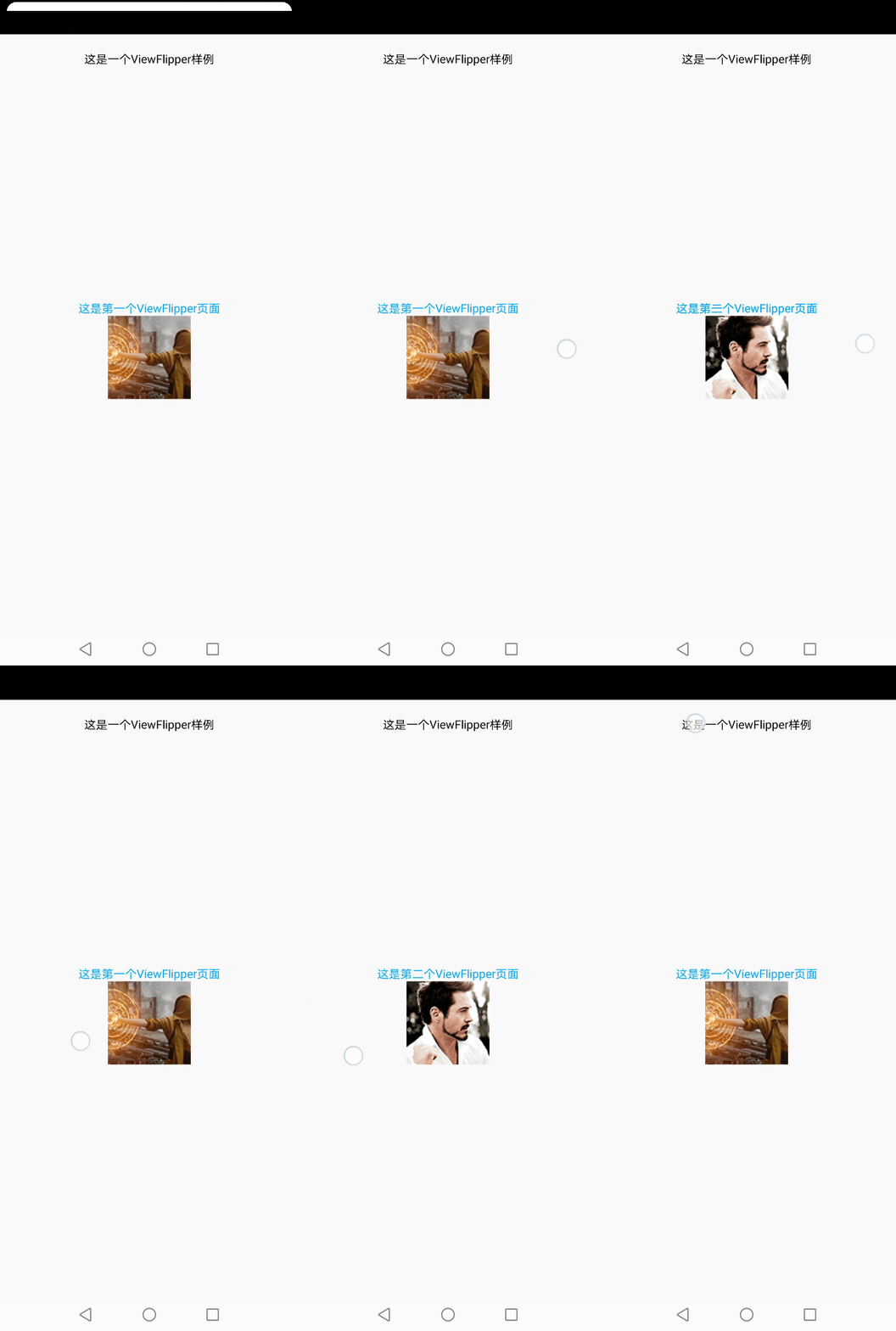
可以看到,这个左右滑动效果没有任何酷炫的地方。我们不妨先来看看跟动画相关的几个重点地方:
(1)函数 setInAnimation:是指 View 进入屏幕的动效
(2)函数 setOutAnimation:是指 View 退出屏幕的动效
(3)TranslateAnimation的构造函数的参数解释:
1、fromXType/toXType/fromYType/toYType,取值共有三个:
- Animation.ABSOLUTE
- Animation.RELATIVE_TO_SELF
- Animation.RELATIVE_TO_PARENT
我这里用的是 Animation.RELATIVE_TO_PARENT,当传入该参数时,其余几个坐标值需要传入百分比参数(1.0表示100%);如果传入 Animation.ABSOLUTE,坐标值需要传入屏幕上的绝对位置(比如1000,1000)
2、fromXValue:起点的横坐标值
3、toXValue:终点的横坐标值
4、fromYValue:起点的纵坐标值
5、toYValue:终点的纵坐标值
如果我们想让这个效果变成45度从屏幕的四个角进入和退出,那代码就应该这么写(注意代码中传入的 4 个横纵坐标值):
// 左滑的进入动画

public static Animation inFromRightAnimation() {

    Animation inFromRight = new TranslateAnimation(

            Animation.RELATIVE_TO_PARENT,

            1.0f,

            Animation.RELATIVE_TO_PARENT,

            0.0f,

            Animation.RELATIVE_TO_PARENT,

            -1.0f,

            Animation.RELATIVE_TO_PARENT,

            0.0f);

    inFromRight.setDuration(500);

    inFromRight.setInterpolator(new AccelerateInterpolator());

    return inFromRight;

}

// 左滑的退出动画

public static Animation outToLeftAnimation() {

    Animation outToLeft = new TranslateAnimation(

            Animation.RELATIVE_TO_PARENT,

            0.0f,

            Animation.RELATIVE_TO_PARENT,

            -1.0f,

            Animation.RELATIVE_TO_PARENT,

            0.0f,

            Animation.RELATIVE_TO_PARENT,

            1.0f);

    outToLeft.setDuration(500);

    outToLeft.setInterpolator(new AccelerateInterpolator());

    return outToLeft;

}

// 右滑的进入动画

public static Animation inFromLeftAnimation() {

    Animation inFromLeft = new TranslateAnimation(

            Animation.RELATIVE_TO_PARENT,

            -1.0f,

            Animation.RELATIVE_TO_PARENT,

            0.0f,

            Animation.RELATIVE_TO_PARENT,

            -1.0f,

            Animation.RELATIVE_TO_PARENT,

            0.0f);

    inFromLeft.setDuration(500);

    inFromLeft.setInterpolator(new AccelerateInterpolator());

    return inFromLeft;

}

// 右滑的退出动画

public static Animation outToRightAnimation() {

    Animation outToRight = new TranslateAnimation(

            Animation.RELATIVE_TO_PARENT,

            0.0f,

            Animation.RELATIVE_TO_PARENT,

            1.0f,

            Animation.RELATIVE_TO_PARENT,

            0.0f,

            Animation.RELATIVE_TO_PARENT,

            1.0f);

    outToRight.setDuration(500);

    outToRight.setInterpolator(new AccelerateInterpolator());

    return outToRight;

}
对应的效果如下:

之所以有 -1.0f 这个值,是因为屏幕上的横纵坐标值的分布可以用如下象限来表示:
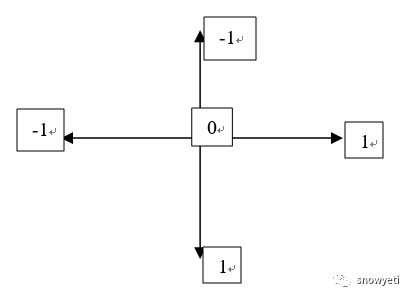
ViewFlipper中的 View 就位于象限的中心位置。因此,如果动画从左上角进入,那么它的起始横纵坐标就是(-1,-1)。大家可以按照这个思路去实现自己想要的动效。
欢迎交流~
【Android初级】如何实现一个比相册更高大上的左右滑动特效(附源码)的更多相关文章
- 【Android初级】如何实现一个“模拟后台下载”的加载效果(附源码)
在Android里面,后台的任务下载功能是非常常用的,比如在APP Store里面下载应用,下载应用时,需要跟用户进行交互,告诉用户当前正在下载以及下载完成等. 今天我将通过使用Android的原生控 ...
- .Net 转战 Android 4.4 日常笔记(9)--常用组件的使用方法[附源码]
经过两天的学习,把常用的组件都学习了一遍,并做成了App 学习可能真没有捷径,跟学习html有点类似,都是一个控件一个控件学习并使用,最后拼凑成一个系统 链接:http://pan.baidu.com ...
- Android 音视频深入 十八 FFmpeg播放视频,有声音(附源码下载)
项目地址https://github.com/979451341/AudioVideoStudyCodeTwo/tree/master/FFmpegv%E6%92%AD%E6%94%BE%E8%A7% ...
- Android 音视频深入 十七 FFmpeg 获取RTMP流保存为flv (附源码下载)
项目地址https://github.com/979451341/RtmpSave 这个项目主要代码我是从雷神那弄过来的,不愧是雷神,我就配个环境搞个界面就可以用代码了. 这一次说的是将RTMP流媒体 ...
- Android中Canvas绘图基础详解(附源码下载) (转)
Android中Canvas绘图基础详解(附源码下载) 原文链接 http://blog.csdn.net/iispring/article/details/49770651 AndroidCa ...
- 适合新手:从零开发一个IM服务端(基于Netty,有完整源码)
本文由“yuanrw”分享,博客:juejin.im/user/5cefab8451882510eb758606,收录时内容有改动和修订. 0.引言 站长提示:本文适合IM新手阅读,但最好有一定的网络 ...
- 【Android初级】如何实现一个具有选择功能的对话框效果(附源码)
我们去餐厅吃饭时,服务员都会拿菜单给我们选择点什么菜.今天就分享一个具有选择功能的简易对话框,给用户展示一个选择列表.实现思路如下: 既然有选择列表,那么这个列表的内容肯定保存在某个地方 用户选择某一 ...
- Android应用系列:手把手教你做一个小米通讯录(附图附源码)
前言 最近心血来潮,突然想搞点仿制品玩玩,很不幸小米成为我苦逼的第一个试验品.既然雷布斯的MIUI挺受欢迎的(本人就是其的屌丝用户),所以就拿其中的一些小功能做一些小demo来玩玩.小米的通讯录大家估 ...
- Android Studio 一个完整的APP实例(附源码和数据库)
前言: 这是我独立做的第一个APP,是一个记账本APP. This is the first APP, I've ever done on my own. It's a accountbook APP ...
随机推荐
- Java内存模型精讲
1.JAVA 的并发模型 共享内存模型 在共享内存的并发模型里面,线程之间共享程序的公共状态,线程之间通过读写内存中公共状态来进行隐式通信 该内存指的是主内存,实际上是物理内存的一小部分 2.JAVA ...
- k8s之HTTP请求负载分发
一.导读 对于基于HTTP的服务来说,不同的URL地址经常对应不同的后端服务或者虚拟服务器,通常的做法是在应用前添加一个反向代理服务器Nginx,进行请求的负载转发,在Spring Cloud这个微服 ...
- Ubuntu/Liinux睡眠无法唤醒解决方法:ACPI设置
最近给笔记本换了一个固态,顺便就重装了一下系统,版本是Ubuntu 20.10.装完之后各种功能基本都是正常的,触摸板轻触单击.双指右键等功能开箱即用.但是在安装完最新的Nvidia驱动之后就出现了问 ...
- 【环境搭建】SSM 整合使用
SSM 整合使用 文章源码 搭建整合环境 整合说明 SSM 整合可以使用多种方式,但是选择 XML + 注解 的方式最为合适. 整合思路 搭建整合环境 Spring 环境搭建并测试 Spring 整合 ...
- 【译】Async/Await(一)——多任务
原文标题:Async/Await 原文链接:https://os.phil-opp.com/async-await/#multitasking 公众号: Rust 碎碎念 翻译 by: Praying ...
- Hbase 手动执行MajorCompation
说明: Major Compaction 的作用: 1.将一个Region下的所有StoreFile合并成一个StoreFile文件 2.对于删除.过期.多余版本的数据进行清除 由于MajorComp ...
- ps 2020 下载
一款极具实用价值的作图软件--ps,由于正版价格昂贵,所以这里分享破解版的资源.b话少说,下面是下载链接和安装步骤: 下载链接: 百度网盘链接:https://pan.baidu.com/s/1XPf ...
- fileinput模块用法
fileinput模块功能: 提供拼接一个或多个文本文件的功能,可以通过使用for循环来读取一个或多个文本文件的所有行,从而进行逐行处理(如进行显示.替换.添加行号等). 其功能类似于linux命令的 ...
- 环境配置-Java-01-安装
本文使用JDK1.8在windows64位系统下举例,其他版本在windows下的安装过程类似 0.百度云盘链接 考虑到官网下载需要登陆,这里给大家提供百度云盘链接(就是官网安装包),不过下载速度会比 ...
- windows_myql 安装与卸载详细讲解,
windows_myql 安装 注意: 安装前把 所有杀毒软件,安全卫士等关闭. 打开下载的mysql安装文件双击解压缩,运行"mysql-5.5.40-win64.msi". 注 ...