
Autofac的基本使用---4、使用Config配置
准备
使用的表是Student,创建相关的IDAL、DAL、IBLL、BLL层。
使用EF,创建一个Model层,存放edmx文件。
创建一个Infrastructure层,基础设施项目,使用泛型类型。

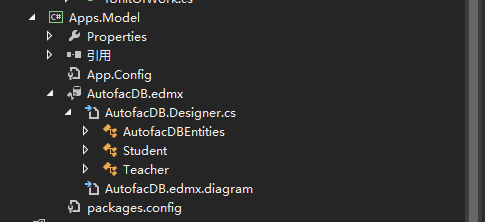
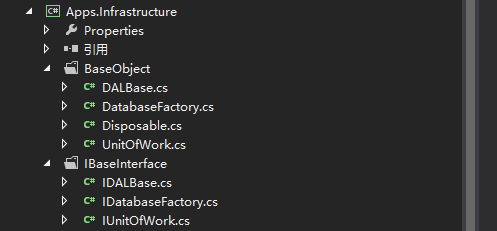
普通类型的使用
1.APP.Config 配置信息
此处有个需要注意的地方:configSections节点必须要放在configuration节点的最上面,否则运行会报错。这个在MSDN上有说明。
<?xml version="1.0" encoding="utf-8"?>
<configuration>
<configSections>
<section name="autofac" type="Autofac.Configuration.SectionHandler,Autofac.Configuration"></section>
</configSections>
<autofac configSource="XmlConfig\autofac.config" />
<connectionStrings>
<add name="AutofacDBEntities" connectionString="metadata=res://*/AutofacDB.csdl|res://*/AutofacDB.ssdl|res://*/AutofacDB.msl;provider=System.Data.SqlClient;provider connection string="data source=.;initial catalog=AutofacDB;user id=sa;password=123456;MultipleActiveResultSets=True;App=EntityFramework"" providerName="System.Data.EntityClient" />
</connectionStrings>
<startup>
<supportedRuntime version="v4.0" sku=".NETFramework,Version=v4.5" />
</startup>
<runtime>
<assemblyBinding xmlns="urn:schemas-microsoft-com:asm.v1">
<dependentAssembly>
<assemblyIdentity name="Autofac" publicKeyToken="17863af14b0044da" culture="neutral" />
<bindingRedirect oldVersion="0.0.0.0-3.5.0.0" newVersion="3.5.0.0" />
</dependentAssembly>
</assemblyBinding>
</runtime>
</configuration>
2.Autofac.config配置信息
<?xml version="1.0" encoding="utf-8"?>

<autofac>

  <components>

    <!--普通类型Student-->

    <component type="Apps.DAL.StudentDAL,Apps.DAL" service="Apps.IDAL.IStudentDAL,Apps.IDAL" />

    <component type="Apps.BLL.StudentBLL,Apps.BLL" service="Apps.IBLL.IStudentBLL,Apps.IBLL" />

  </components>

</autofac>
3.控制台程序代码
using System;

using System.Collections.Generic;

using System.Linq;

using System.Text;

using System.Threading.Tasks;

using Apps.BLL;

using Apps.DAL;

using Apps.IBLL;

using Apps.IDAL;

using Apps.Infrastructure.BaseObject;

using Apps.Infrastructure.IBaseInterface;

using Apps.Model;

using Autofac;

using Autofac.Configuration;

namespace Apps.Con

{

    class Program

    {

        static void Main(string[] args)

        {

            #region 普通类型---Student---Config获取配置

            var builder = new ContainerBuilder();

            builder.RegisterModule(new ConfigurationSettingsReader("autofac"));

            // 编译容器完成注册且准备对象解析

            var container = builder.Build();

            // 现在你可以使用 Autofac 解析服务. 例如,这行将执行注册的lambda表达式对于 IConfigReader 服务.

            //但是我们不推荐直接操作容器,这会导致内存泄漏。

            //当我们解析出一个组件时,依赖于我们定义的lifetime scope,一个新的对象实例会被创建。

            using (var scope = container.BeginLifetimeScope())

            {

                //从容器中解析需要使用的组件

                var iStudentBLL = scope.Resolve<IStudentBLL>();

                //调用解析后的组件中的方法

                List<Student> list = iStudentBLL.GetList().ToList();

                Console.WriteLine("List中的数据行:" + list.Count);

            }

            #endregion

            Console.ReadKey();

        }

    }

}
(1)使用流程
a.参见Autofac管理注册类的容器实例
var builder = new ContainerBuilder();
b.下面就需要为这个容器注册它可以管理的类型
builder.RegisterType<StudentDAL>().As<IStudentDAL>();
c.注册泛型,这个地方需要把泛型进行注册,否则无法正常执行
builder.RegisterGeneric(typeof(UnitOfWork<>)).As(typeof(IUnitOfWork<>)).SingleInstance();
或
builder.RegisterType<UnitOfWork<AutofacDBEntities>>().As<IUnitOfWork<AutofacDBEntities>>().SingleInstance();
d.生成具体的实例
var container = builder.Build();
e.在应用运行期间,你需要从容器生命周期域中解析出组件实例来使用它们。
using (var scope = container.BeginLifetimeScope()) { }
f.从容器中解析需要使用的组件
var iStudentBLL = scope.Resolve<IStudentBLL>();
g.调用解析出来的组件的方法
List<Student> list = iStudentBLL.GetList().ToList();
(2)中间碰到的问题。
在官方文档,http://docs.autofac.org/en/latest/configuration/xml.html#configuring-with-application-configuration-legacy-pre-4-0
其中的配置示例,component节点中。
type属性,是 类完整命名空间(包括类名),类的命名空间(不包括类名)
service属性,是 类完整命名空间(包括类名)
与示例中的区别就是,示例中的service属性值 与type保持一致,均有","逗号 后加类的命名空间。而官方文档中却没有。
当示例也这么编写时,运行就报错了。
<autofac defaultAssembly="Autofac.Example.Calculator.Api">

    <components>

        <component

            type="Autofac.Example.Calculator.Addition.Add, Autofac.Example.Calculator.Addition"

            service="Autofac.Example.Calculator.Api.IOperation" />

        <component

            type="Autofac.Example.Calculator.Division.Divide, Autofac.Example.Calculator.Division"

            service="Autofac.Example.Calculator.Api.IOperation" >

            <parameters>

                <parameter name="places" value="4" />

            </parameters>

        </component>

  </components>

</autofac>
泛型类型的使用
当在autofac.config配置文件中,如此配置。
泛型类型的配置失败,无法正常运行,随之放弃。
不知道如何进行泛型类型的配置设置。
<?xml version="1.0" encoding="utf-8"?>

<autofac>

  <components>

    <!--普通类型Student-->

    <!--<component type="Apps.DAL.StudentDAL,Apps.DAL" service="Apps.IDAL.IStudentDAL,Apps.IDAL" />

    <component type="Apps.BLL.StudentBLL,Apps.BLL" service="Apps.IBLL.IStudentBLL,Apps.IBLL" />-->

    <!--泛型类型Teacher-->

    <component

      type="Apps.Infrastructure.BaseObject.UnitOfWork,Apps.Infrastructure.BaseObject"

      service="Apps.Infrastructure.IBaseObject.IUnitOfWork,Apps.Infrastructure.IBaseObject" />

    <component

      type="Apps.Infrastructure.BaseObject.DatabaseFactory, Apps.Infrastructure.BaseObject"

      service="Apps.Infrastructure.IBaseObject.IDatabaseFactory,Apps.Infrastructure.IBaseObject" />

    <component type="Apps.DAL.TeacherDAL,Apps.DAL" service="Apps.IDAL.ITeacherDAL" />

    <component type="Apps.BLL.TeacherBLL,Apps.BLL" service="Apps.IBLL.ITeacherBLL" />

  </components>

</autofac>
Autofac的基本使用---4、使用Config配置的更多相关文章
- Web.config配置数据库连接
web.config配置数据库连接 第一种:取连接字符串 string connString = System.Web.Configuration.WebConfigurationManager. ...
- Asp.net Web.Config - 配置元素 caching
Asp.net Web.Config - 配置元素 caching 记得之前在写缓存DEMO的时候,好像配置过这个元素,好像这个元素还有点常用. 一.caching元素列表 元素 说明 cache ...
- asp.net中web.config配置节点大全详解
最近网上找了一些关于Web.config配置节点的文章,发现很多都写的都比较零散,而且很少有说明各个配置节点的作用和用法.搜索了一下发现有一篇写的不错,这里引用一下 原文地址 http://www.c ...
- 十五天精通WCF——第二天 告别烦恼的config配置
经常搞wcf的基友们肯定会知道,当你的应用程序有很多的“服务引用”的时候,是不是有一种疯狂的感觉...从一个环境迁移到另外一个环境,你需要改变的 endpoint会超级tmd的多,简直就是搞死了人.. ...
- web.config配置详细说明
(一).Web.Config是以XML文件规范存储,配置文件分为以下格式 1.配置节处理程序声明 特点:位于配置文件的顶部,包含在<configSections>标志中. 2.特定应 ...
- EF连接MySQL数据Web.Config配置
EF连接MySQL数据Web.Config配置 <?xml version="1.0" encoding="utf-8"?> <configu ...
- app.config 配置多项 配置集合 自定义配置(3)
再说说利用app.config配置多个自定义的方法.先看这个例子:美国家庭Simpson的家里有父亲母亲和三个儿女,而中国的老王只有独生子女.结构如下: <?xml version=" ...
- springcloud之config配置中心-Finchley.SR2版
本篇和大家分享的是springcloud-config配置中心搭建,写到这里突然想起自己曾今开源过基于Redis发布订阅编写的一个配置中心,刚看了git星数有点少哈哈,这里顺势发个连接欢迎大侠们点赞: ...
- iis设置默认文档,提示web.config配置xml格式不正确
网站上传后,配置默认文档,提示web.config配置xml格式不正确,几经尝试,发现是sqlserver密码中的“&”符号惹的祸,web.config文件中不能使用该字符.分享出来,大家遇到 ...
随机推荐
- python基础之操作列表
遍历元素 magicians = ['alice','david','carolina'] for magician in magicians: print(magician) magicians = ...
- php进阶学习-单例设计模式
什么是单例模式(singleton)? 在整个应用程序的生命周期中,任何一个时刻,单例类的实例都只存在一个,同时这个类还必须提供一个访问该类的全局访问点. 单例模式的特点 一个类只有一个实例 私有克隆 ...
- Eclipse改字体大小
Windows ->Perferences ->General ->Appearance ->Colors and Fonts ->Basic ->Text Fon ...
- VisualStudio 编写汇编代码相关设置
VS编写汇编代码方法 新建空项目,不创建解决方案 项目右键,Build Customizations,选择masm 新建源文件,后缀为.ASM 编写代码 .386 ; Tells MASM to us ...
- 03-Python里字符串的常用操作方法二
1.lstrip():删除左侧空白字符 实例: my_str = ' hello world and my and test and python ' # 原始字符串 print(my_str) # ...
- LeetCode 032 Longest Valid Parentheses
题目描述:Longest Valid Parentheses Given a string containing just the characters '(' and ')', find the l ...
- rest-framework:权限组件
一 权限简介 只用超级用户才能访问指定的数据,普通用户不能访问,所以就要有权限组件对其限制 二 局部使用 from rest_framework.permissions import BasePerm ...
- 浅尝 Elastic Stack (二) Logstash
一.安装与启动 Logstash 依赖 Java 8 或者 Java 11,需要先安装 JDK 1.1 下载 curl -L -O https://artifacts.elastic.co/downl ...
- DRF的限流配置
在settings.py中添加配置 REST_FRAMEWORK = { #3.限流(防爬虫) 'DEFAULT_THROTTLE_CLASSES': [ 'rest_framework.thrott ...
- 第4.8节 三目运算、del和pass语句
一.三目运算 Python的三目运算与C语言的三目运算非常类似,具体语法如下: 条件为真的赋值表达式 if 条件 else 条件为假的表达式 三目运算实际上就是一种表达式计算,当对应if后面 ...