
利用 esp8266 搭建简单物联网项目
接上一篇博客,这次还是关于 esp8266 --> 物联网
一、云端数据监控:DHT11 + NodeMcu +Dweet.io
- 接上一篇博客的接线及相关配置不变( DHT11 + NodeMcu )
- 配置 Dweet.io
Dweet.io 是一个可以通过非常简易的方式为物联网设备提供通信服务(包括报警等)的云端平台。它不需要任何的设置或注册步骤,只要终端设备连接上互联网,即可直接发布或订阅数据。
通过 Dweet.io 提供的云端服务,可以很方便的将传感器数据发布到在线平台并实时地进行远程监控。
Dweeting(发送数据到云端)
- 调用URL:
https://dweet.io/dweet/for/my-thing-name?hello=world&foo=bar
- 调用URL:
Get Dweeting
- 获取最新发布的 dweet :
https://dweet.io/get/latest/dweet/for/my-thing-name - 获取某个名字下所有的 dweets :
https://dweet.io/get/dweets/for/my-thing-name
- 获取最新发布的 dweet :
$ http -b "https://dweet.io/get/dweets/for/rollingstarky"

{

    "by": "getting",

    "the": "dweets",

    "this": "succeeded",

    "with": [

        {

            "content": {

                "foo": "bar",

                "hello": "world"

            },

            "created": "2020-09-25T16:30:34.524Z",

            "thing": "rollingstarky"

        },

        {

            "content": {

                "foo": "bar",

                "hello": "world"

            },

            "created": "2020-09-25T16:10:46.694Z",

            "thing": "rollingstarky"

        }

    ]

}
- 项目代码
把上篇博客的数据传送到 Dweet.io 云端平台
#include <ESP8266WiFi.h>

#include "DHT.h"

// WiFi parameters

const char* ssid = "wifi-name";

const char* password = "wifi-password";

#define DHTPIN 5

#define DHTTYPE DHT11

// Initialize DHT sensor

DHT dht(DHTPIN, DHTTYPE, 15);

const char* host = "dweet.io";

void setup() {

  Serial.begin(115200);

  delay(10);

  dht.begin();

  // Connecting to a WiFi network

  Serial.println();

  Serial.println();

  Serial.print("Connecting to ");

  Serial.println(ssid);

  WiFi.begin(ssid, password);

  while (WiFi.status() != WL_CONNECTED) {

    delay(500);

    Serial.print(".");

  }

  Serial.println("");

  Serial.println("WiFi connected");

  Serial.println("IP address: ");

  Serial.println(WiFi.localIP());

}

void loop() {

  Serial.print("Connecting to ");

  Serial.println(host);

  // Use WiFiClient class to create TCP connections

  WiFiClient client;

  const int httpPort = 80;

  if (!client.connect(host, httpPort)) {

    Serial.println("connection failed");

    return;

  }

  // Reading temperature and humidity

  float h = dht.readHumidity();

  float t = dht.readTemperature();

  while (isnan(h) || isnan(t)) {

    Serial.println("Failed to read from DHT sensor!");

    delay(2000);

    // Get the measurements once more

    h = dht.readHumidity();

    t = dht.readTemperature();

  }

    Serial.println();

    Serial.println("The temperature and humidity are:");

    Serial.println(t);

    Serial.println(h);

    // Send the request to the server

    client.print(String("GET /dweet/for/rollingstarkyesp8266?temperature=") + String(t) + "&humidity=" + String(h) + " HTTP/1.1\r\n" +

                 "Host: " + host + "\r\n" +

                 "Connection: close\r\n\r\n");

    unsigned long timeout = millis();

    while (client.available() == 0) {

      if (millis() - timeout > 5000) {

        Serial.println(">>> Client Timeout !");

        client.stop();

        return;

    }

  }

    // Read all the lines of the reply from server and print them to Serial

    while(client.available()){

      String line = client.readStringUntil('\r');

      Serial.print(line);

    }

    Serial.println();

    Serial.println("closing connection");

    Serial.println();

  // Repeat every 10 seconds

  delay(10000);

}
- 访问最新更新的数据:
https://dweet.io/get/latest/dweet/for/rollingstarkyesp8266
{"this":"succeeded","by":"getting","the":"dweets","with":[{"thing":"rollingstarkyesp8266","created":"2020-09-25T09:27:22.823Z","content":{"temperature":28,"humidity":61}}]}
- 访问全部数据:
https://dweet.io/get/dweets/for/rollingstarkyesp8266
{"this":"succeeded","by":"getting","the":"dweets","with":[{"thing":"rollingstarkyesp8266","created":"2020-09-25T09:17:04.292Z","content":{"temperature":27.9,"humidity":58}},{"thing":"rollingstarkyesp8266","created":"2020-09-25T09:15:08.961Z","content":{"temperature":27.9,"humidity":59}},{"thing":"rollingstarkyesp8266","created":"2020-09-25T09:13:16.383Z","content":{"temperature":27.9,"humidity":58}},{"thing":"rollingstarkyesp8266","created":"2020-09-25T09:11:30.363Z","content":{"temperature":27.9,"humidity":57}},{"thing":"rollingstarkyesp8266","created":"2020-09-25T09:09:43.309Z","content":{"temperature":27.9,"humidity":57}}]}
- 访问可视化图表:
http://dweet.io/follow/rollingstarkyesp8266- 这里有点见鬼,出不来,单数据应该是都到云端了,可以查到 Json 数据(假装有图有真相)
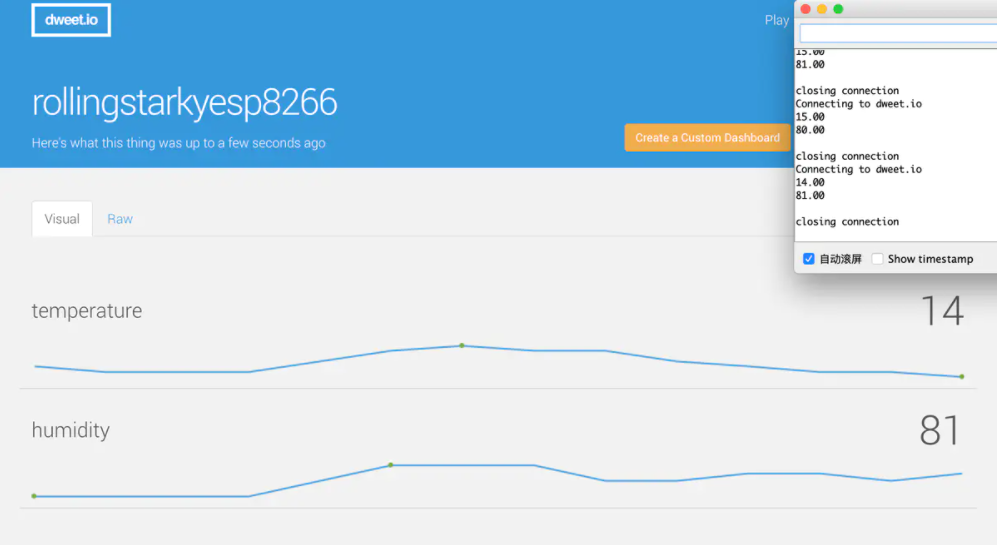
- 这里有点见鬼,出不来,单数据应该是都到云端了,可以查到 Json 数据(假装有图有真相)
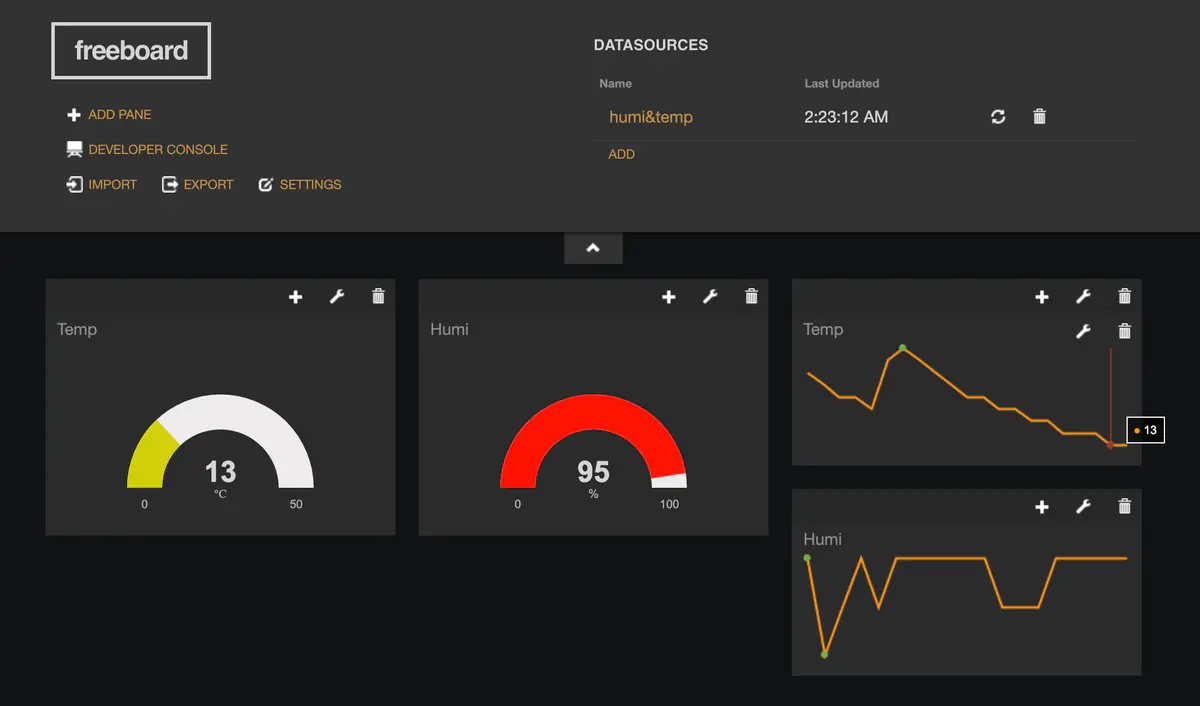
- 链接 freeboard 平台(仪表盘)
- 注册
- 懂点英语,稍微摸索一下
二、远程控制物联网设备:NodeMcu + PubSubClient + aREST
1.准备工具
- aREST 库
aREST 框架可以为一些常见的嵌入式开发板提供 RESTful 接口,支持通过串口、Wi-Fi、以太网、蓝牙等硬件发送命令至开发板,激发特定的操作,并将数据以 JSON 的格式返回给控制端用户
- PubSubClient 库
- 源代码
// Import required libraries

#include <ESP8266WiFi.h>

#include <PubSubClient.h>

#include <aREST.h>

// Clients

WiFiClient espClient;

PubSubClient client(espClient);

// Create aREST instance

aREST rest = aREST(client);

// Unique ID to identify the device for cloud.arest.io

char* device_id = "wuwu380";

// WiFi parameters

const char* ssid = "wifi-name";

const char* password = "wifi-password";

// Callback functions

void callback(char* topic, byte* payload, unsigned int length);

void setup(void)

{

  // Start Serial

  Serial.begin(115200);

  // Set callback

  client.setCallback(callback);

  // Give name and ID to device

  rest.set_id(device_id);

  rest.set_name("devices_control");

  // Connect to WiFi

  WiFi.begin(ssid, password);

  while (WiFi.status() != WL_CONNECTED) {

    delay(500);

    Serial.print(".");

  }

  Serial.println("");

  Serial.println("WiFi connected");

  // Set output topic

  char* out_topic = rest.get_topic();

}

void loop() {

  // Connect to the cloud

  rest.handle(client);

}

// Handles message arrived on subscribed topic(s)

void callback(char* topic, byte* payload, unsigned int length) {

  rest.handle_callback(client, topic, payload, length);

}
- 运行结果
$ http -b https://cloud.arest.io/wuwu380/name
{
"connected": true,
"hardware": "esp8266",
"id": "wuwu380",
"name": "devices_control",
"variables": {}
}
$ http -b https://cloud.arest.io/wuwu380/mode/5/o
{
"connected": true,
"hardware": "esp8266",
"id": "wuwu380",
"message": "Pin D5 set to output",
"name": "devices_control"
}
$ http -b https://cloud.arest.io/wuwu380/digital/5/1
{
"connected": true,
"hardware": "esp8266",
"id": "wuwu380",
"message": "Pin D5 set to 1",
"name": "devices_control"
}
三、 esp8266 连接 OLED 屏,制作天气时钟
我一开始就想做这个了,一开始当成终极目标,现在看看,九折水瓶
- 必要组件
- U8G2 屏幕驱动库
- 可以去 Ardunio 下载,也可以把 U8g2.rar 解压到 libraries 文件夹
- 接线
| OLED | NodeMcu |
| : - : | : - : |
| GND | GND |
| VCC | 3V3/5V |
| SCL | D1 |
| SDA | D2 |
- 载入程序
文件 - 示例 - U8G2 - full_buffer - 任意打开一个,去除下行代码的注释
U8G2_SSD1306_128X64_NONAME_F_SW_I2C u8g2(U8G2_R0, /* clock=*/ SCL, /* data=*/ SDA, /* reset=*/ U8X8_PIN_NONE); // All Boards without Reset of the Display
写入程序
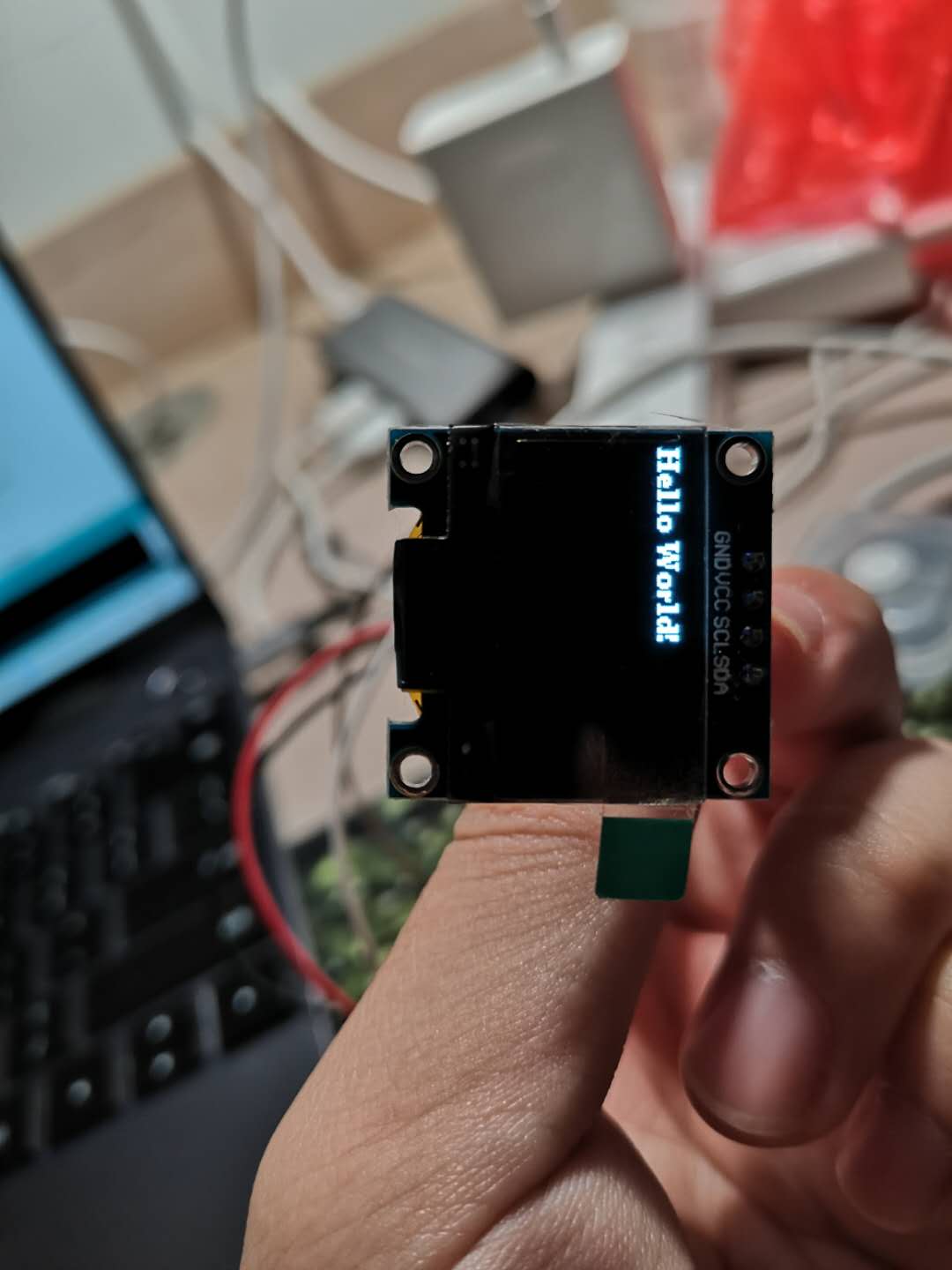
一切的学习,都是从 hello world 开始的[Doge]
利用 esp8266 搭建简单物联网项目的更多相关文章
- Angular01 利用grunt搭建自动web前端开发环境、利用angular-cli搭建web前端项目
搭建angular开发环境 一.下载并安装node 官网地址:点击前往 二.利用npm安装cnpm 安装好node后就可以使用npm命令啦 查看版本:npm -v 安装cnpm:npm install ...
- 从零开始利用vue-cli搭建简单音乐网站(一)
最近在学习vue框架,练习了一些例子之后,想着搭建一个vue项目,了解到官方有提供一个vue-cli工具来搭建项目脚手架,尝试了一下,写下博客来记录一下. 一.工具环境 1.node.js 6.10. ...
- django搭建简单开发项目流程(一)
1 搭建环境 sudo apt-get install python3-pip 安装pip3 sudo pip3 install virtualenv 安装虚拟环境 virtualenv -p pyt ...
- java maven、springmvc、mybatis 搭建简单Web项目学习笔记
前言: 空余的时间,学学 Java,没准哪天用的到: 环境搭建折腾了好几天,总算搞顺了,也做个学习笔记,以防后面会忘记: 一.安装文件及介绍 JDK:jdk1.8.0 77 eclipse-maven ...
- 从零开始利用vue-cli搭建简单音乐网站(八)
这是完成了预想中的最后两个功能:歌曲评论以及歌曲搜索. 1.评论效果: 用户点击评论按钮,评论框获取焦点. 输入之后点击提交,下方显示评论,用户名称以及日期.相应的用户也可以删除自己评论. 当然只能删 ...
- 从零开始利用vue-cli搭建简单音乐网站(六)
上一篇遗漏了一个简单的效果没写,见下图: 主页面点击热门推荐和更多之后跳转到歌曲列表页面,现在的页面只是简单的把所有歌曲列出来,没有进行排序.实现起来也很简单,在MainPage的两个链接上添加: & ...
- 从零开始利用vue-cli搭建简单音乐网站(五)
上一篇文章讲到的是如何利用mongoose从数据库读取数据然后更新页面,接下来要实现的就是用户注册登录功能,这个功能涉及到的东西太多了,今天只实现了登录功能,登陆之后更新导航条界面,最后效果如下: 登 ...
- 从零开始利用vue-cli搭建简单音乐网站(四)
上一篇文章中说到这一篇博客会实现音乐播放功能,只是令我意外的是,如果利用h5的audio标签,几行代码就实现了......先来看一下最终效果吧. 这里直接用了audio标签,样式没有怎么管,能获得音乐 ...
- 从零开始利用vue-cli搭建简单音乐网站(二)
1.利用vue-router实现页面跳转 程序可以正常运行之后,下面我们需要配置路由实现页面的局部刷新,这一功能将用来实现网站页面的跳转. 打开程序目录,进入"src\router\inde ...
随机推荐
- 接口测试 Mock 实战 | 结合 jq 完成批量化的手工 Mock
本文霍格沃兹测试学院学员学习实践笔记. 一.应用背景 因为本章的内容是使用jq工具配合完成,因此在开始部分会先花一定的篇幅介绍jq机器使用,如果读者已经熟悉jq,可以直接跳过这部分. 先来看应用场景, ...
- 抗疫复产,CDN助企业破局发展
摘要:CDN的任务就是要确保这条“互联网信息高速公路”的顺畅通行,避免因为拥塞而导致出行效率的降低. 在抗疫复产的过程中,云计算大放异彩.作为数字经济的流量底座,CDN为互联网海量汹涌的数据内容分发保 ...
- vue-cli根据不同的命令自动切换不同环境地址
前言 我们再使用vue脚手架开发项目时,不可避免的涉及到多个环境来回切换接口调用地址的问题,在开发环境中可能会通过 ip 来访问后台接口,但是当项目上线后就要把对用的接口地址换成生产环境的地址,肯定不 ...
- linux字符串转数字
方法一: [root@ffcs211 test_dir]# echo "96.56"| awk '{print int($0)}' 输出结果 96 方法二: A="2&q ...
- Python3网络爬虫之requests动态爬虫:拉钩网
操作环境: Windows10.Python3.6.Pycharm.谷歌浏览器目标网址: https://www.lagou.com/jobs/list_Python/p-city_0?px=defa ...
- CRMEB小程序商城v4.0二次开发对接集成阿里云短信
作者:廖飞 - CRMEB小程序商城研发项目组长 前言 cremb小程序商城v4.0版本支持短信平台为云信,但有部分用户有需求对接阿里云短信,这篇文章将对阿里云短信平台如何对接方以及对接流程详细说明. ...
- chromevue扩展 vue-devtools-master 谷歌vue的扩展程序
1,在百度网盘中下载压缩包,网盘地址:https://pan.baidu.com/s/1BnwWHANHNyJzG3Krpy7S8A ,密码:xm6s 2,将压缩包解压到F盘,F:\chromeVue ...
- 遇到doxygen生成的chm文档目录如果有中文是乱码?
原因不在于doxygen,它没有问题,问题出在微软的HTML Help Workshop的hhc.exe不支持utf8.所以要解决这个问题,需要做两个额外的步骤: 1.将html/index.hhp中 ...
- Hadoop Windows IDEA
java jdk1.8都可以了 注意jdk的路径要拷贝到一个没有空格的路径改掉JAVA_HOME系统环境变量 在etc/hadoop/hadoop_env.cmd里有设置%JAVA_HOME%了不用管 ...
- Tomact的中文乱码设置
在使用Tomact时,有时候使用中文时,窗口会把中文部分显示为乱码,这时需要修改相关配置,让其正常显示. 1.修改server.xml的配置,解决显示窗口的乱码 打开Tomcat下/bin/serve ...