
C#根据反射动态创建ShowDoc接口文本信息
我目前每天主要工作以开发api为主,这都离不开接口文档。如果远程对接的话前端总说Swagger不清晰,只能重新找一下新的接口文档。ShowDoc就是一个不错的选择,简洁、大方、灵活部署。
但是话说回来,既然是文档每个接口你都得写。总感觉这样效率太慢了,能不能自己生成一下,自己只要Ctrl+C、Ctrl+V就万事大吉了。
早就想写一下,今天抽空做了一下(后期我会继续完善,时间、精力有限)。提前说好,我只写了一个查询的。而且也不可能说是生成了就不用改了,里面的文本信息全都符合各位同学的预期。但至少百分之八十的接口只要已生成直接copy就ok,还有一些个别接口... ...
一般来说,分页查询的响应信息结构都是一样的。不同的接口数据不同而已,所以返回的那个实体对象就反射那个对象。我是在属性上标注特性以获得相应注释信息。
首先新建一个Api项目

定义一个实体类和要返回的信息类。
public class Products

{

    [DescriptionAttribute("数据id")]

    public int id { get; set; }

    [DescriptionAttribute("商品名称")]

    public string productNams { get; set; }

    [DescriptionAttribute("商品价格")]

    public float price { get; set; }

}

/// <summary>

/// 通用返回信息类

/// </summary>

public class MessageModel<T> where T : class

{

    [DescriptionAttribute("状态码")]

    public int code { get; set; } = ;

    /// <summary>

    /// 操作是否成功

    /// </summary>

    [DescriptionAttribute("操作是否成功")]

    public bool success { get; set; } = false;

    /// <summary>

    /// 返回信息

    /// </summary>

    [DescriptionAttribute("返回信息")]

    public string msg { get; set; } = "服务器异常";

    /// <summary>

    /// 返回数据集合

    /// </summary>

    [DescriptionAttribute("返回数据集合")]

    public T response { get; set; }

}

/// <summary>

/// 通用分页信息类

/// </summary>

public class PageModel<T>

{

    /// <summary>

    /// 当前页标

    /// </summary>

    [DescriptionAttribute("当前页标")]

    public int pageIndex { get; set; };

    /// <summary>

    /// 总页数

    /// </summary>

    [DescriptionAttribute("总页数")]

    public int pageCount { get; set; };

    /// <summary>

    /// 数据总数

    /// </summary>

    [DescriptionAttribute("数据总数")]

    public int dataCount { get; set; };

    /// <summary>

    /// 每页大小

    /// </summary>

    [DescriptionAttribute("每页大小")]

    public int PageSize { set; get; }

    /// <summary>

    /// 返回数据

    /// </summary>

    [DescriptionAttribute("返回的数据集合")]

    public T[] data { get; set; }

}
写两个特性,一个用来标注属性信息,一个用来标注search查询对象中的参数(我这边分页查询,查询参数传json对象字符串,pageIndex和pageSize除外)。
//类和类中的属性信息用这个特性
public class DescriptionAttribute : Attribute

{

    public string _details = string.Empty;

    public DescriptionAttribute(string details)

    {

        this._details = details;

    }

}


//接口方法中的search参数用这个特性

public class SearchAttribute : Attribute

{

    public string _details = string.Empty;

    public SearchAttribute(string details)

    {

        this._details = details;

    }

}
将要请求的ip地址写入appsettings.json中
{

  "Logging": {

    "LogLevel": {

      "Default": "Information",

      "Microsoft": "Warning",

      "Microsoft.Hosting.Lifetime": "Information"

    }

  },

  "AllowedHosts": "*",

  "requestUrl": {

    "ip": "http://127.0.0.1:5001"

  }

}
写好要查询的接口,待会儿生成这个接口的接口文档信息
[Route("api/[controller]/[action]")]

[ApiController]

public class InstanceController : Controller

{

    public InstanceController()

    {

    }

    [HttpGet]

    [DescriptionAttribute("获取所有商品数据")]

    [SearchAttribute("{\"eId\": \"设备id\",\"startTime\": \"2020-06-05\",\"endTime\": \"2020-06-06\"}")]

    public async Task<MessageModel<PageModel<Products>>> GetAllDatas(string search = "", int pageIndex = , int pageSize = 24)

    {

        var list = new List<Products>()

        {

            new Products{ id=,productNams="商品1",price=13.6f},

            new Products{ id=,productNams="商品2",price=14.6f},

            new Products{ id=,productNams="商品3",price=15.6f}

        }.ToArray();

        return new MessageModel<PageModel<Products>>()

        {

            success = true,

            msg = "数据获取成功",

            response = new PageModel<Products>()

            {

                pageIndex = pageIndex,

                pageCount = Convert.ToInt32(Math.Ceiling(Convert.ToDecimal(list.Length) / pageSize)),

                dataCount = list.Length,

                PageSize = pageSize,

                data = list

            }

        };

    }

}
再写一个接口,专门用来查询指定接口的信息。两个参数controlleName(控制器名称)、apiMethodsName(接口名称)
[Route("api/[controller]/[action]")]

[ApiController]

public class ShowDocFileControlle : Controller

{

    private readonly IHostingEnvironment _hostingEnvironment;

    private IConfiguration _configuration;

    public ShowDocFileControlle(IHostingEnvironment hostingEnvironment,

        IConfiguration configuration)

    {

        _hostingEnvironment = hostingEnvironment;

        _configuration = configuration;

    }/// <summary>

    /// 反射获取指定接口的信息

    /// </summary>

    /// <returns></returns>

    [HttpGet("{controlleName}/{apiMethodsName}")]

    public async Task<IActionResult> GetShowDocApiFiles(string controlleName, string apiMethodsName)

    {

        #region 首先拿到要操作的文件

        //获取文件 路径

        string webRootPath = _hostingEnvironment.WebRootPath + @"\ApiInfo.txt";

        //得到文件流

        FileStream stream = new FileStream(webRootPath, FileMode.Create, FileAccess.Write);

        //创建写入的文件流对象

        StreamWriter writer = new StreamWriter(stream);

        #endregion

        try

        {

            #region 根据参数反射操作对应的对象

            writer.WriteLine("**简要描述:** ");

            writer.WriteLine("");

            //根据参数controlleName得到类型

            Type type = Type.GetType($"ReflectionShowDoc.Controllers.{controlleName}");

            //根据类型创建该对象的实例

            object instance = Activator.CreateInstance(type);

            //再根据参数apiMethodsName得到对应的方法

            MethodInfo method = type.GetMethod($"{apiMethodsName}");

            #endregion

            #region 判断Api方法上是否有DescriptionAttribute这个特性,有就获取值

            if (method.IsDefined(typeof(DescriptionAttribute), true))

            {

                //实例化得到一个DescriptionAttribute类型

                //通过反射创建对象

                DescriptionAttribute attribute = (DescriptionAttribute)method.GetCustomAttribute(typeof(DescriptionAttribute), true);

                writer.WriteLine($"{attribute._details}");

            }

            else

                writer.WriteLine($"接口未标明注释");

            #endregion

            #region 根据参数controlleName与apiMethodsName得到请求的url,ip建议写到配置文件中,读也只读配置文件

            writer.WriteLine("");

            writer.WriteLine($"**请求URL:**");

            writer.WriteLine("");

            StringBuilder builder = new StringBuilder(@$"- `{_configuration["requestUrl:ip"]}/api/");

            builder.Append($"{controlleName}/{apiMethodsName}`");

            writer.WriteLine(builder.ToString());

            writer.WriteLine("");

            writer.WriteLine($"**请求方式:**");

            writer.WriteLine("");

            #endregion

            #region 根据抽象父类HttpMethodAttribute得到接口的请求类型

            if (method.IsDefined(typeof(HttpMethodAttribute), true))

            {

                //通过反射创建对象

                HttpMethodAttribute attribute = (HttpMethodAttribute)method.GetCustomAttribute(typeof(HttpMethodAttribute), true);

                writer.WriteLine($"- {attribute.HttpMethods.ToArray()[0]}");

            }

            #endregion

            #region 一般分页查询这些参数都是定好的,基本不会变

            writer.WriteLine("");

            writer.WriteLine($"**参数:** ");

            writer.WriteLine("");

            writer.WriteLine($"|参数名|必选|类型|说明|");

            writer.WriteLine($"|:----    |:---|:----- |----- |");

            writer.WriteLine($"|search |否  |string |查询的对象|");

            writer.WriteLine($"|pageIndex |是  |int | 页码    |");

            writer.WriteLine($"|pageSize     |是  |int | 页面展示的数据量 |");

            #endregion

            #region 参数search是一个json字符串,这里也通过特性标注,在实例化的时候获取

            writer.WriteLine($"**参数search所需参数及传参示例**");

            writer.WriteLine("``` ");

            if (method.IsDefined(typeof(SearchAttribute), true))

            {

                //实例化得到一个SearchAttribute类型

                //通过反射创建对象

                SearchAttribute attribute = (SearchAttribute)method.GetCustomAttribute(typeof(SearchAttribute), true);

                writer.WriteLine($"{attribute._details}");

                writer.WriteLine("");

            }

            writer.WriteLine("将查询的search对象序列化之后传过来");

            writer.WriteLine($"`{builder.ToString().Replace("-", string.Empty).Replace("`", string.Empty)}" + "?pageIndex=1&pageSize=30&search=serializeObject`");

            writer.WriteLine("``` ");

            writer.WriteLine("");

            #endregion

            #region 因为要拿到响应的返回参数,所以这里动态调用一下方法,取得第一页的数据作为返回的数据示例

            writer.WriteLine($" **返回示例**");

            //这三个参数基本不会变

            Type[] paramsType = new Type[];

            paramsType[] = Type.GetType("System.String");

            paramsType[] = Type.GetType("System.Int32");

            paramsType[] = Type.GetType("System.Int32");

            //设置方法中的参数值,如有多个参数可以追加多个

            object[] paramsObj = new object[];

            paramsObj[] = "parameter";

            paramsObj[] = ;

            paramsObj[] = ;

            //执行方法

            dynamic queryData = type.GetMethod($"{apiMethodsName}", paramsType)

                            .Invoke(instance, paramsObj);

            //得到Result对象

            object value = queryData.GetType()

                            .GetProperty("Result")

                            .GetValue(queryData);

            //将数据序列化

            var methodResult = JsonConvert.SerializeObject(queryData.Result);

            writer.WriteLine("``` ");

            //将数据写入到文本中

            writer.WriteLine($"{methodResult}");

            writer.WriteLine("``` ");

            #endregion

            #region 返回(响应)的参数字段说明

            writer.WriteLine("");

            writer.WriteLine(" **返回参数说明** ");

            writer.WriteLine("");

            writer.WriteLine("|参数名|类型|说明|");

            writer.WriteLine("|:-----  |:-----|-----|");

            //根据查询到的Result对象获取类型

            Type messageModelType = Type.GetType(value.GetType().ToString());

            //便利Result对象中的各个属性信息

            foreach (var itemmessageModelProp in messageModelType.GetProperties())

            {

                //这个response对象里面就是数据

                if (itemmessageModelProp.Name.Equals("response"))

                {

                    //根据value中的response属性得到其类型

                    Type typeReturnData = Type.GetType(value.GetType().GetProperty("response").GetValue(value).ToString());

                    //遍历response对象中的属性

                    foreach (var item in typeReturnData.GetProperties())

                    {

                        //data中是实体对象

                        if (item.Name.Equals("data"))

                        {

                            //有可能是数组,将中括号剔除掉

                            var dataType = item.PropertyType.ToString().Replace("[]", string.Empty);

                            Type propertyType = Type.GetType(dataType);//加载类型

                            foreach (PropertyInfo propertyInfo in propertyType.GetProperties())

                            {

                                if (propertyInfo.IsDefined(typeof(DescriptionAttribute), true))

                                {

                                    //通过反射创建对象

                                    DescriptionAttribute attribute = (DescriptionAttribute)propertyInfo.GetCustomAttribute(typeof(DescriptionAttribute), true);

                                    writer.WriteLine($"|{propertyInfo.Name} |{propertyInfo.PropertyType}   |{attribute._details}  |");

                                }

                            }

                        }

                        else

                        {

                            //拿到与data对象平级的参数,看有没有DescriptionAttribute特性

                            if (item.IsDefined(typeof(DescriptionAttribute), true))

                            {

                                //通过反射创建对象

                                DescriptionAttribute attribute = (DescriptionAttribute)item.GetCustomAttribute(typeof(DescriptionAttribute), true);

                                writer.WriteLine($"|{item.Name} |{item.PropertyType}   |{attribute._details}  |");

                            }

                        }

                    }

                }

                else

                {

                    //拿到与response对象平级的参数,看有没有DescriptionAttribute特性

                    if (itemmessageModelProp.IsDefined(typeof(DescriptionAttribute), true))

                    {

                        //通过反射创建对象

                        DescriptionAttribute attribute = (DescriptionAttribute)itemmessageModelProp.GetCustomAttribute(typeof(DescriptionAttribute), true);

                        writer.WriteLine($"|{itemmessageModelProp.Name} |{itemmessageModelProp.PropertyType}   |{attribute._details}  |");

                    }

                }

            }

            #endregion

            #region 错误信息一般也是定好的

            writer.WriteLine(" **错误描述** ");

            writer.WriteLine(" **(错误)返回示例**");

            writer.WriteLine("");

            writer.WriteLine("``` ");

            writer.WriteLine("  {");

            writer.WriteLine($"    {"msg"}: {"服务器异常"},");

            writer.WriteLine($"    {"success"}: {true},");

            writer.WriteLine($"    {"exception"}:{""},");

            writer.WriteLine($"    {"code"}: {500}");

            writer.WriteLine(@"  }");

            writer.WriteLine($"```");

            writer.WriteLine($" **(错误)返回参数说明** ");

            writer.WriteLine($"");

            writer.WriteLine($"|参数名|类型|说明|");

            writer.WriteLine($"|:-----  |:-----|-----|");

            writer.WriteLine($"|msg |string   |消息  |");

            writer.WriteLine($"|success |bool   |操作是否成功  |");

            writer.WriteLine($"|exception |string   |具体的错误描述  |");

            writer.WriteLine($"|code |string   |状态码  |");

            #endregion

            #region GC

            writer.Close();//释放内存

            stream.Close();//释放内存

            #endregion

            #region 输出文件流

            FileStream streamFile = new FileStream(webRootPath, FileMode.Open, FileAccess.Read);

            return File(streamFile, "application/vnd.android.package-archive", webRootPath);

            #endregion

        }

        catch (Exception ex)

        {

            writer.Close();//释放内存

            stream.Close();//释放内存

            throw new Exception(ex.Message);

        }

    }

}
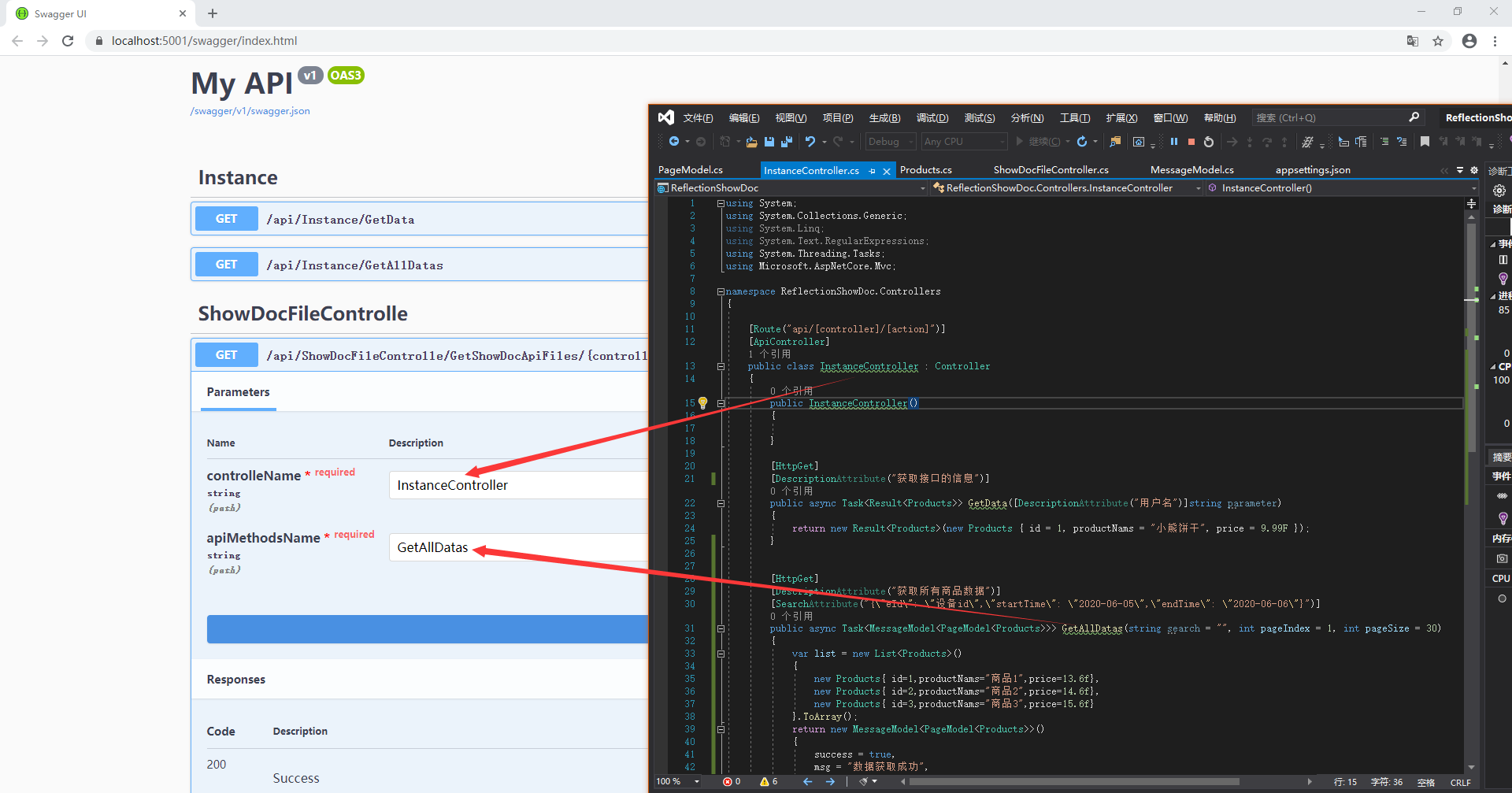
会生成文件流直接下载即可、
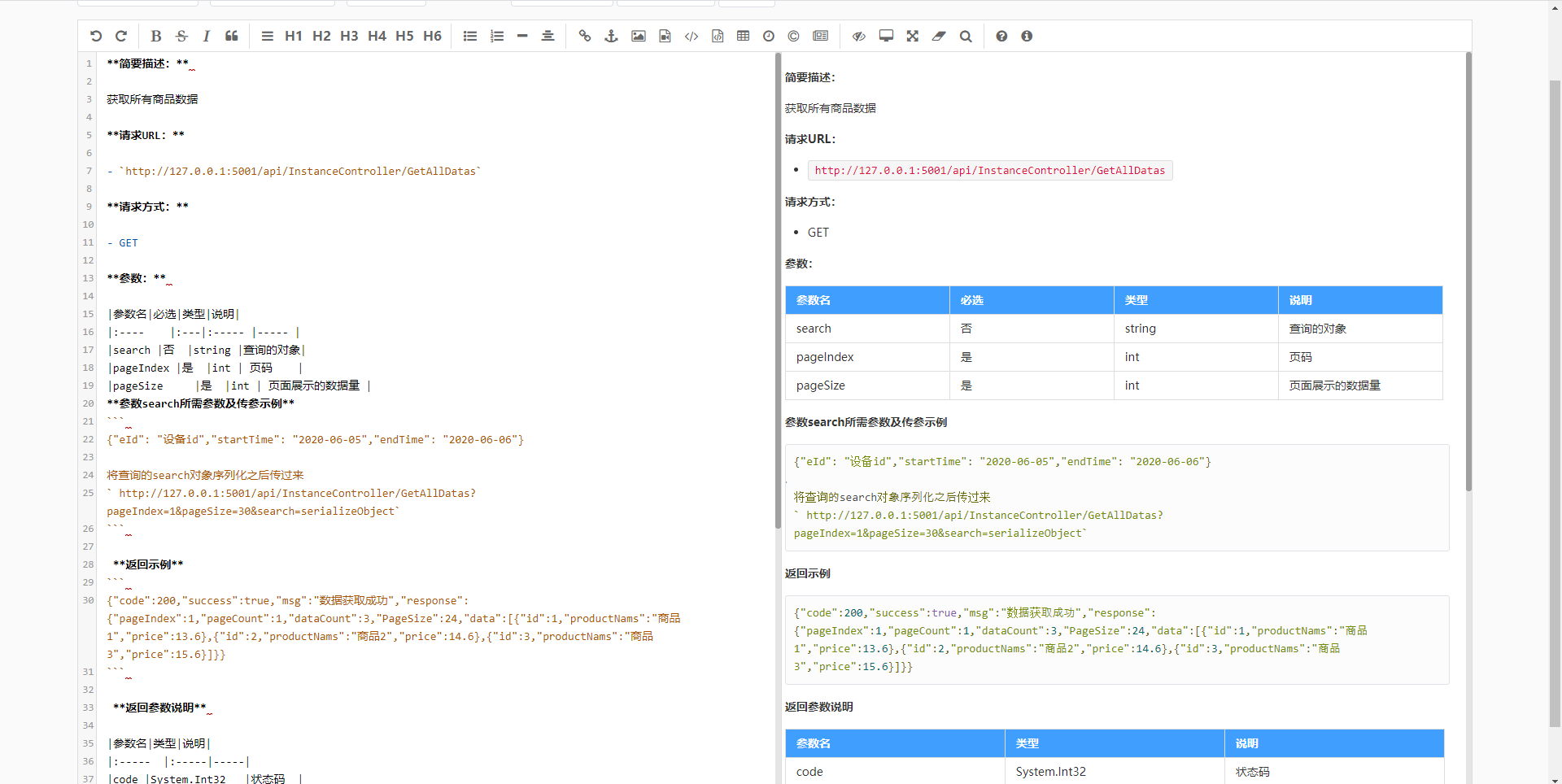
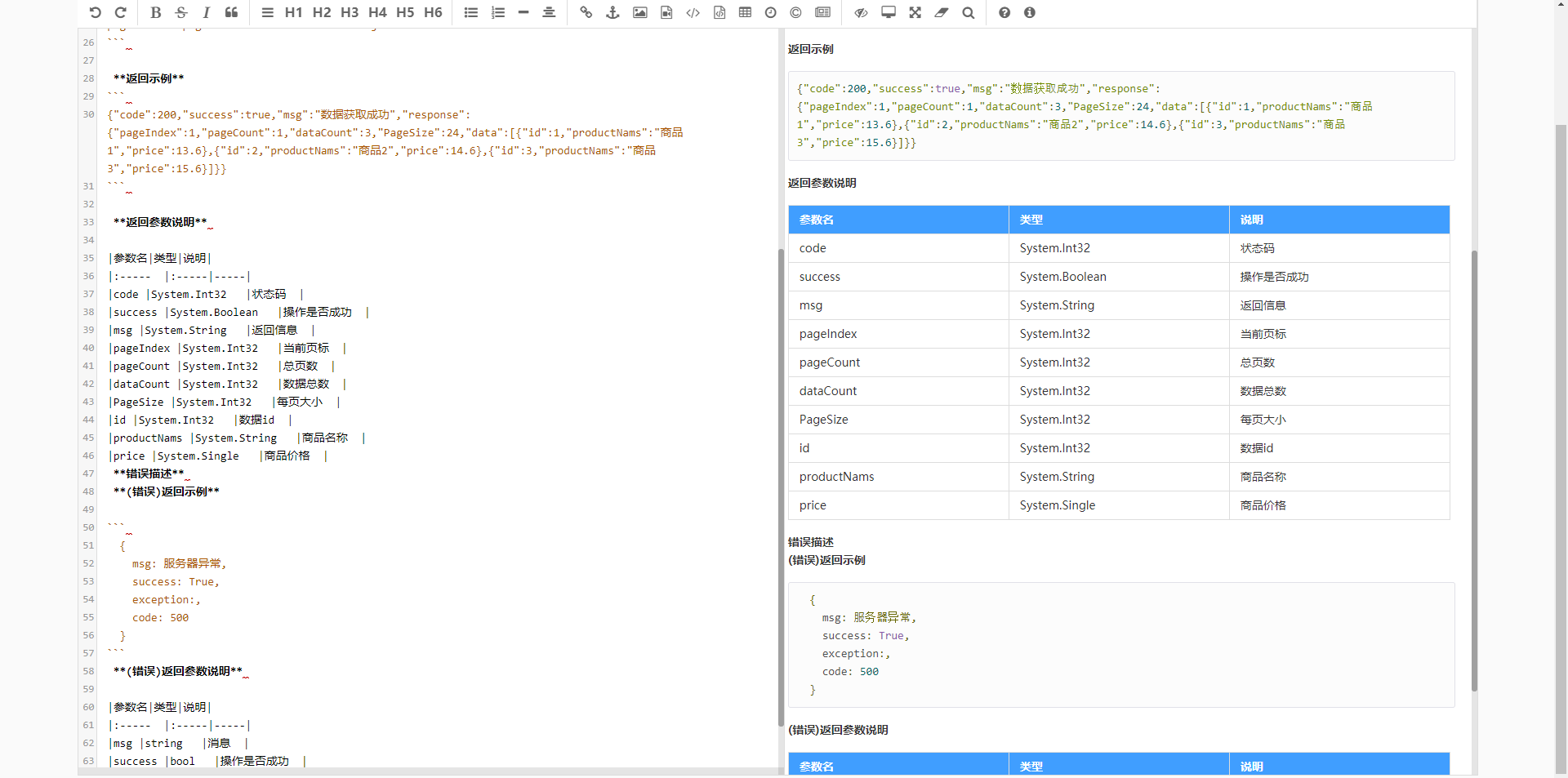
可还行?后续我会抽时间再补充修改,各位同学也可自行扩展、

C#根据反射动态创建ShowDoc接口文本信息的更多相关文章
- StructureMap.dll 中的 GetInstance 重载 + 如何利用 反射动态创建泛型类
public static T GetInstance<T>(ExplicitArguments args); // // Summary: // Creates a new instan ...
- C#反射动态创建实例并调用方法
在.Net 中,程序集(Assembly)中保存了元数据(MetaData)信息,因此就可以通过分析元数据来获取程序集中的内容,比如类,方法,属性等,这大大方便了在运行时去动态创建实例. MSDN解释 ...
- .Net 中的反射(动态创建类型实例) - Part.4
动态创建对象 在前面节中,我们先了解了反射,然后利用反射查看了类型信息,并学习了如何创建自定义特性,并利用反射来遍历它.可以说,前面三节,我们学习的都是反射是什么,在接下来的章节中,我们将学习反射可以 ...
- .Net 中的反射(动态创建类型实例)
动态创建对象 在前面节中,我们先了解了反射,然后利用反射查看了类型信息,并学习了如何创建自定义特性,并利用反射来遍历它.可以说,前面三节,我们学习的都是反射是什么,在接下来的章节中,我们将学习反射可以 ...
- MFC小程序003------MFC使用WebBrowser组件,在对话框中创建滚动视图,动态创建一个静态文本控件并设置鼠标单击的消息响应
MFC小程序截图: 一.在MFC中简单使用WebBrowser的ActiveX插件的方法: 见博文: http://blog.csdn.net/supermanking/article/detail ...
- 反射动态创建不同的Processor
1. 定义抽象方法 public abstract class BaseProcesser { public abstract void GetCustomerReportCard ...
- OC 反射-->动态创建类
系统方法 NSLog(@"%s", __func__); //打印出类的方法名称,如: //打印结果:2018-02-22 10:52:15.394575+0800 DemoRun ...
- C# 学习笔记(一) Winform利用Assembly反射动态创建窗体
1. 添加Reflection //添加对Reflection程序集引用 using System.Reflection; // 引用窗体创建方法CreateForm,传入参数 private voi ...
- WCF 动态调用(动态创建实例接口)
很多时候,服务地址都不止一个的,这个时候就要动态去配置地址.配置Web.config,很麻烦 下面就看看怎样实现动态调用WCF. 首先看看动态创建服务对象的代码: using System; usin ...
随机推荐
- VMWare虚拟机开启时显示模块“Disk”启动失败的解决方案
找到虚拟机所在的目录, 将 .vmx文件打开 将文件vmci0.present = "TRUE"改为 vmci0.present = "FALSE" 删除以.l ...
- TensorFlow从0到1之TensorFlow实现单层感知机(20)
简单感知机是一个单层神经网络.它使用阈值激活函数,正如 Marvin Minsky 在论文中所证明的,它只能解决线性可分的问题.虽然这限制了单层感知机只能应用于线性可分问题,但它具有学习能力已经很好了 ...
- idea创建项目
选项详解如下: Create New Project:创建一个新的工程.Import Project:导入一个现有的工程.Open:打开一个已有工程.比如:可以打开 Eclipse 项目.Check ...
- MQ消息队列(2)—— Java消息服务接口(JMS)
一.理解JMS 1.什么是JMS? JMS即Java消息服务(Java Message Service)应用程序接口,API是一个消息服务的标准或者说是规范,允许应用程序组件基于J ...
- HttpClient优化
HttpClient优化思路: 1.池化 2.长连接 3.httpclient和httpget复用 4.合理的配置参数(最大并发请求数,各种超时时间,重试次数) 5.异步 6.多读源码 1.背景我们有 ...
- 【秒懂Java】【第1章_初识Java】02_软件开发
通过上一篇文章<01_编程语言>,我们了解到 Java是众多编程语言中的其中一种 编程语言可以用来开发软件 因此,我们即将要学习的Java技术,是属于软件开发的范畴.那软件开发的前景如何呢 ...
- day18__文件操作
一.3 种模式 r: 只读模式, r+: 读写模式,覆盖开头内容 w: 写模式,全覆盖 (如果是没有的文件则重新创建空文件) a+: 读写模式,从最开头写,覆盖开头内容 (如果是没有的 ...
- day06获取用户名
可以通过微信内置的接口,调用微信名和微信图片 1.xxx.wxml ===================================== <button open-type="g ...
- SQL注入原理及代码分析(一)
前言 我们都知道,学安全,懂SQL注入是重中之重,因为即使是现在SQL注入漏洞依然存在,只是相对于之前现在挖SQL注入变的困难了.而且知识点比较多,所以在这里总结一下.通过构造有缺陷的代码,来理解常见 ...
- 调试HotSpot源代码
之前的文章在Ubuntu 16.04上编译OpenJDK8的源代码 已经介绍过在Ubuntu上编译OpenJDK8的源代码,这一篇将介绍在Ubuntu上调试OpenJDK8源代码的2种方式. 1.GD ...