
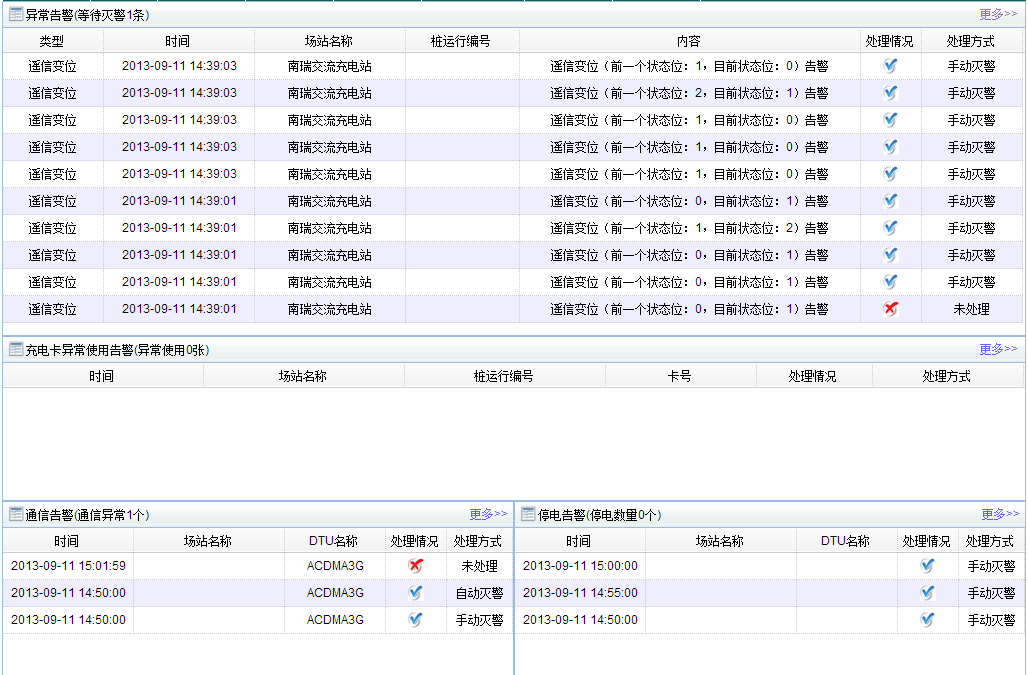
easyui页面布局
html:
<!DOCTYPE html PUBLIC "-//W3C//DTD XHTML 1.0 Transitional//EN" "http://www.w3.org/TR/xhtml1/DTD/xhtml1-transitional.dtd">
<html xmlns="http://www.w3.org/1999/xhtml">
<head>
<title>异常告警</title>
<meta http-equiv="pragma" content="no-cache" />
<meta http-equiv="cache-control" content="no-cache" />
<meta http-equiv="expires" content="0" />
<link href="../../Styles/chargePileDetailInfomation.css" rel="stylesheet" type="text/css" />
<link rel="stylesheet" type="text/css" href="../../Scripts/jquery-easyui-1.3.1/themes/default/easyui.css" />
<link rel="stylesheet" type="text/css" href="../../Scripts/jquery-easyui-1.3.1/themes/icon.css" />
<link href="../../Scripts/jquery-easyui-1.3.1/demo.css" rel="stylesheet" type="text/css" />
<script src="../../Scripts/jquery-easyui-1.3.1/jquery-1.8.0.min.js" type="text/javascript"></script>
<script src="../../Scripts/jquery-easyui-1.3.1/jquery.easyui.min.js" type="text/javascript"></script>
<script src="../../Scripts/jquery-easyui-1.3.1/locale/easyui-lang-zh_CN.js" type="text/javascript"></script>
<script src="../../Scripts/WarnRecService/RealTimeWarn.js" type="text/javascript"></script>
</head>
<body style="margin: 0;padding: 0;">
<div id="telesignalling_warn" class="easyui-panel" style="height: 320px; verflow: hidden;" title=" " iconcls="icon-form" tools="#t_telesignalling_warn">
<table id="dg_telesignalling_warn">
</table>
</div>
<div id="card_Warn" class="easyui-panel" style="overflow: hidden;
height: 150px;" title=" " iconcls="icon-form" tools="#t_card_warn">
<table id="dg_Card_Warn">
</table>
</div>
<div class="easyui-layout" data-options="fit:true" border="false" style="height: 200px;
overflow: hidden;" >
<div data-options="region:'center'" style="width: 512px; height: 200px; overflow: hidden;"
>
<div id="communication_warn" class="easyui-panel" title=" " iconcls="icon-form" style="width: 512px;
height: 200px; overflow: hidden;" border="false"tools="#t_communication_warn">
<table id="dg_communication_warn">
</table>
</div>
</div>
<div data-options="region:'east'" style="width: 512px; height: 200px; overflow: hidden;">
<div id="power_failure" class="easyui-panel" title=" " iconcls="icon-form" style="width: 512px;
height: 200px; overflow: hidden;"border="false" tools="#t_power_failure">
<table id="dg_power_failure">
</table>
</div>
</div>
</div>
<div id="t_telesignalling_warn">
<a href="../../pages/WarnRecService/RealTimeQuery.htm" style="text-align: left; width: 40px;
text-decoration: none;" title="更多">更多>></a>
</div>
<div id="t_card_warn">
<a href="javascript:void(0)" style="text-align: left; width: 40px; text-decoration: none;"
title="更多" onclick="javascript:alert('add')">更多>></a>
</div>
<div id="t_communication_warn">
<a href="javascript:void(0)" style="text-align: left; width: 40px; text-decoration: none;"
title="更多" onclick="javascript:alert('add')">更多>></a>
</div>
<div id="t_power_failure">
<a href="javascript:void(0)" style="text-align: left; width: 40px; text-decoration: none;"
title="更多" onclick="javascript:alert('add')">更多>></a>
</div>
<div id="dlg" class="easyui-dialog" data-options="closed:true,modal:true,buttons:'#dlg_buttons',title:'告警处理',iconCls: 'icon-info'">
<div style="height: 100px; width: 100%;">
<div id="dlg-select">
<input type="radio" id="r_gjcl_done" name="r_gjcl" checked="checked" value="1" />
<label for="r_gjcl_done">
灭警完成</label>
<input type="radio" id="r_gjcl_wait" name="r_gjcl" value="0" /><label for="r_gjcl_wait">继续等待</label>
</div>
</div>
<div id="dlg_buttons">
<a href="#" class="easyui-linkbutton" iconcls="icon-save" onclick="btn_ok();">确定</a>
<a href="#" class="easyui-linkbutton" iconcls="icon-remove" onclick="btn_close();">取消</a>
</div>
</div>
<input id="hidd_warnid" type="hidden" />
<input id="hidd_warntype" type="hidden" />
</body>
</html>
显示:
easyui页面布局的更多相关文章
- 前端框架 EasyUI (2)页面布局 Layout
在 Web 程序中,页面布局对应用程序的用户体验至关重要. 在一般的信息管理类的 Web 应用程序中,页面结构通常有一个主工作区,然后在工作区上下左右靠近边界的区域设置一些边栏,用于显示信息或放置一些 ...
- 【开源】OSharp框架解说系列(2.2):EasyUI复杂布局及数据操作
OSharp是什么? OSharp是个快速开发框架,但不是一个大而全的包罗万象的框架,严格的说,OSharp中什么都没有实现.与其他大而全的框架最大的不同点,就是OSharp只做抽象封装,不做实现.依 ...
- EasyUi – 2.布局Layout + 3.登录界面
1.页面布局 <%@ Page Language="C#" AutoEventWireup="true" CodeBehind="index.a ...
- 本人为项目组制定的一份页面优化指南(easyui页面优化方案)
#本人为项目组制定的一份页面优化指南(easyui页面优化方案) ##背景 这是一篇我之前为项目组制定的页面优化指南,主要是面向表单页面,典型的像[注册用户](https://passport.cnb ...
- jquery-easyui实现页面布局和增删改查操作(SSH2框架支持)转载
http://blessht.iteye.com/blog/1069749/ 已注册:ooip 关联的csdn 前几天心血来潮用jquery-easyui+spring.struts2.hiberna ...
- 布局-EasyUI Panel 面板、EasyUI Tabs 标签页/选项卡、EasyUI Accordion 折叠面板、EasyUI Layout 布局
EasyUI Panel 面板 通过 $.fn.panel.defaults 重写默认的 defaults. 面板(panel)当做其他内容的容器使用.它是创建其他组件(比如:Layout 布局.Ta ...
- EasyUi – 2.布局Layout + 3.登录界面
1.页面布局 <%@ Page Language="C#" AutoEventWireup="true" CodeBehind="index.a ...
- 【EasyUI】——EasyUI的布局
做一个站点首先要有站点的布局,所谓的布局事实上就是网页的排版.就是说你的网页显示时是什么样子的. 就比方百度的首页: 无论是谁登录.网页都是这个样式的. EasyUI中的网页布局一共分为五部分,分别为 ...
- Xamarin+Prism开发详解五:页面布局基础知识
说实在的研究Xamarin到现在,自己就没设计出一款好的UI,基本都在研究后台逻辑之类的!作为Xamarin爱好者,一些简单的页面布局知识还是必备的. 布局常见标签: StackLayout Abso ...
随机推荐
- 初见,Devexpress
[绥江一百]http://www.sj100.net 欢迎,进入绥江一百感谢点击[我的小网站,请大家多 ...
- MVC 页面跳转
想要学习MVC,那么页面跳转就是必不可少的,在此我总结了常见的页面跳转方式,给自己理一下做个备份,也顺便和大家分享一下. 常见页面跳转的:(下面的视图名和控制器中的方法名一样) 在控制器内部跳转: / ...
- yarn.resourcemanager.ha.id设置
resourcemanager启动报错,其中一个启动成功,另一个启动报8088端口被成功启动的rm占用 2016-11-18 17:08:49,478 INFO org.apache.zookeepe ...
- Memcached 使用
using System;using System.Collections.Generic;using System.Linq;using System.Web;using System.Web.UI ...
- Windows 10 (or 8)Chrome 观看视频发生flash不能加载,即"could't load plugins"原因之一
最近一直如题,不能看视频,后来发现从一个已经使用管理员权限打开的应用转到Chrome就可以加载flash,而从桌面打开Chrome就加载不了. 今天再次查找信息,从Ubuntu下Chrome不能加载f ...
- PHP static静态局部变量和静态全局变量总结
1.不会随着函数的调用和退出而发生变化,不过,尽管该变量还继续存在,但不能使用它.倘若再次调用定义它的函数时,它又可继续使用,而且保存了前次被调用后留下的值 2.静态局部变量只会初始化一次 3.静态属 ...
- centos安装与基本使用
1. 插入安装光盘 2. 进入试用 3. 在试用的桌面系统选择安装到硬盘 4. 选择安装语言 5. 选择基本存储或者专门的存储设备 6. - ...
- dateset是不是在缓存中
C#开发erp系统的时候有一个多表数据的查询展示到页面,采用了存储过程的方式,但是存储过程中没有加入分页(菜比).刚开始测试数据几百条没有问题,当数据量提升至十万级后页面加载速度就很卡了,一般是使用分 ...
- UI1_UITouch
// // ViewController.m // UI1_UITouch // // Created by zhangxueming on 15/7/9. // Copyright (c) 2015 ...
- QThread多线程编程经典案例分析
传统的图形界面应用程序都只有一个线程执行,并且一次执行一个操作.如果用户调用一个比较耗时的操作,就会冻结界面响应. 一个解决方法是按照事件处理的思路: 调用 Void QApplication::pr ...