
RequestHander类介绍
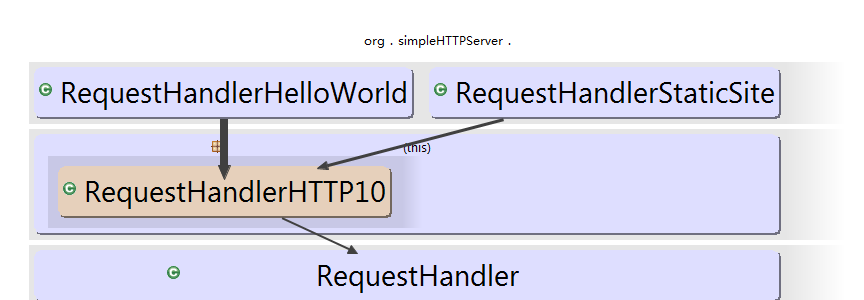
RequestHander是一个抽象类,是一个线程。它封装了一个Socket。代码不难;
package org.simpleHTTPServer;

import java.io.IOException;

import java.net.Socket;

/**

 * Handling Network Socket Requests.

 * This is "general-purpose" so far and could handle different protcols (i.e. it is NOT tied to HTTP).

 *

 * @author vorburger

 */

abstract class RequestHandler implements Runnable {

    private final Socket socket;

    public RequestHandler(Socket socket) {

        this.socket = socket;

    }

    /**

     * Handle a request given a Socket - read stuff from it - answer stuff back, etc!

     *

     * @param socket

     * @throws IOException

     * @throws SimpleWebServerException

     */

    protected abstract void handle(Socket socket) throws IOException, SimpleWebServerException;

    public void run() {

        try {

            handle(socket);

        }

        catch (Exception ex) {

            // TODO Real logging... (WARN here)

            ex.printStackTrace();

            // Note: No re-throwing here! "The show must go on..." - servers doesn't die just because we had a problem with one request.

        }

        finally {

            try {

                // Should never be null, but let's be on the safe side anyway

                if ( socket != null ) {

                    // Some options, faster & safer?

                    socket.setSoLinger(false, 0);

                    socket.shutdownInput();

                    socket.shutdownOutput();

                    socket.close();

                }

            } catch (IOException e) {

                // Ignore... OK.

            }

        }

    }

}
我们看到这种设计方法,可以称作是模板方法,整个逻辑框架已经写好,只有具体的handle()方法,可以通过重写不同的类重现不同的逻辑。
RequestHandlerHTTP10这个类,继承了RequestHandler类,重写了handle方法,在handler逻辑上写加上了对http协议的处理,但是依然是抽闲类,出现一个新的抽象方法
void handle(HTTPRequest request, HTTPResponse response)
 protected abstract void handle(HTTPRequest request, HTTPResponse response) throws IOException;

//该方法中创建了httpRequest对象,和HttpResponse队形,然后调用handle(request,responce)

    @Override

    protected void handle(Socket socket) throws IOException, SimpleWebServerException {

       //构建原始的HttpRequset信息

        HTTPRequest request = this.getHTTPRequest(socket);
    //构建响应信息

        HTTPResponse response = new HTTPResponse(socket);

        // "The Date general-header field represents the date and time at which the message was originated"

        // TODO Profile/research: Is DateFormat initialization an expensive operation?  Do this only once...

        DateFormat rfc1123_DateFormat = new SimpleDateFormat(RFC1123_DATE_PATTERN, Locale.US);

        rfc1123_DateFormat.setTimeZone(new SimpleTimeZone(0, "GMT"));

        String date = rfc1123_DateFormat.format(new Date());

        response.setHeader(HTTPResponse.Header.Date, date);

        response.setHeader(HTTPResponse.Header.Server, "SimpleHTTPServer/1.0");

        // This is Connection: close is probably not strictly neccessary as we are a HTTP/1.0 server so far here, but it can't work and seems to work well

        response.setHeader(HTTPResponse.Header.Connection, "close");

        if (HTTPRequest.Version.HTTP11.toString().equals(request.getHTTPVersion())) {

            // Until HTTP/1.1 is properly implemented here, simply "force" (?) response to 1.0 (http://www.ietf.org/rfc/rfc2145.txt)

            // I'm not 1000% sure if this is correct... but it seems to work well with HTTP/1.1 browsers...

            response.setHTTPVersion(HTTPRequest.Version.HTTP10);

        } else if (!HTTPRequest.Version.HTTP10.toString().equals(request.getHTTPVersion())) {

            throw new SimpleWebServerException("Don't know how to answer HTTP requests with this version header: " + request.getHTTPVersion());

        }

        this.handle(request, response);

        System.out.println(socket.getInetAddress().getHostAddress()+" [" + new Date().toString() + "] " + request.getMethod() + " " + request.getHTTPVersion() + " " + request.getURI() + " " + response.getStatusCode());

        // TODO HTTP/1.1 support, we probably don't want to close this response (ultimately, underlying socket) just yet and wait for more requests in this same Handler?

        response.close();

    }


//从http请求信息中抽取信息,封装成HTTPRequest对象

    private HTTPRequest getHTTPRequest(Socket socket) throws IOException, SimpleWebServerException {

        HTTPRequest r = new HTTPRequest();

        InputStream is = socket.getInputStream();

        // TODO Charset of IS?  Try an URL with an Umlaut..  UTF-8?

        Reader reader = new InputStreamReader(is /* charset??? */);

        BufferedReader bufferedReader = new BufferedReader(reader/*, size???  Default is 8k - leave that for now */);

        String httpRequestLine = "";

        // TODO Security: Use e.g. a custom BufferedReader subclass that limits characters per line and total lines to avoid DOS/exhaustion attacks.. (but take big file uploads via POST into account!)

        httpRequestLine = bufferedReader.readLine();

        // This could throw a SocketTimeoutException, which will propagate to the caller, as it should.

        // If null, this also indicates a timeout occured, and we are not dealing with the request either...

        if (httpRequestLine == null) {

            throw new SimpleWebServerException("No (or not enough) data received (within timeout)");

        }

        try {

            String[] httpRequestLineSplitArray = httpRequestLine.split(" ");

            r.method = httpRequestLineSplitArray[0];

            r.URI = httpRequestLineSplitArray[1];

            r.HTTPVersion = httpRequestLineSplitArray[2];

        } catch (Exception ex) {

            throw new SimpleWebServerException("HTTP Request Line (1st line) invalid, should be 'VERB URI VERSION' and not '" + httpRequestLine + "'; see RFC 2616, Section 5", ex);

        }

        while (bufferedReader.ready()) {

            String line = bufferedReader.readLine();

            if (line.length() == 0) {

                break;

            }

            int httpRequestHeaderKeySeparatorPos = line.indexOf(':');

            String httpRequestHeaderKey = line.substring(0, httpRequestHeaderKeySeparatorPos);

            String httpRequestHeaderValue = line.substring(httpRequestHeaderKeySeparatorPos + 1, line.length());

            httpRequestHeaderValue = httpRequestHeaderValue.trim(); // RFC 2616 Section 4.2

            r.headers.put(httpRequestHeaderKey, httpRequestHeaderValue);

        }

        // TODO Test if Header/Body delimiter code here works

        StringBuffer bodySB = new StringBuffer(1024);

        while (bufferedReader.ready()) {

            String line = "";

            do {

                line = bufferedReader.readLine();

            } while (line.length() == 0);

            bodySB.append(line);

            bodySB.append('\n');

        }

        r.body = bodySB.toString();

        return r;

    }

}
RequestHandlerStaticSite代码就很简单了
/**

 *  Copyright 2006-2012 Michael Vorburger (http://www.vorburger.ch)

 *

 *  Licensed under the Apache License, Version 2.0 (the "License");

 *  you may not use this file except in compliance with the License.

 *  You may obtain a copy of the License at

 *

 *      http://www.apache.org/licenses/LICENSE-2.0

 *

 *  Unless required by applicable law or agreed to in writing, software

 *  distributed under the License is distributed on an "AS IS" BASIS,

 *  WITHOUT WARRANTIES OR CONDITIONS OF ANY KIND, either express or implied.

 *  See the License for the specific language governing permissions and

 *  limitations under the License.

 */

/*******************************************************************************

 * Copyright (c) 2006-2012 Michael Vorburger (http://www.vorburger.ch).

 * All rights reserved. This program and the accompanying materials

 * are made available under the terms of the Eclipse Public License v1.0

 * which accompanies this distribution, and is available at

 * http://www.eclipse.org/legal/epl-v10.html

 *******************************************************************************/

package org.simpleHTTPServer;

import java.io.File;

import java.io.FileInputStream;

import java.io.FileNotFoundException;

import java.io.IOException;

import java.io.OutputStream;

import java.io.PrintWriter;

import java.net.Socket;

import java.net.URI;

import java.net.URISyntaxException;

import javax.activation.MimetypesFileTypeMap;

/**

 * Handle HTTP requests by serving fiels from the local filesystem.

 * Given a root directory, files corresponding to the URI are sent to the client.

 *

 * @author vorburger

 * @author romain

 */

// TODO TestCase for RequestHandlerStaticSite

class RequestHandlerStaticSite extends RequestHandlerHTTP10 {

    File siteRoot;

    public RequestHandlerStaticSite(Socket socket, File htDocsRootPath) {

        super(socket);

        siteRoot = htDocsRootPath;

    }

    protected void handleGet(HTTPRequest request, HTTPResponse response) throws IOException {

        // Note: The JDK URI class can do RFC 2396 encoding and decoding for us here...

        URI uri;

        try {

            uri = new URI(request.getURI());

        } catch (URISyntaxException e) {

            response.setStatusCode(400); // 400 is Bad Request, seems a suitable answer for this case

            handleException(request, response, "URISyntaxException", e);

            return;

        }

        // This wouldn't handle %20-like encoding/decoding:  String uri = request.getURI();

        File file = new File(siteRoot, uri.getPath());

        if (!file.exists()) {

            response.setStatusCode(404); // 404 is 'Not Found', the correct answer for this case

            handleError(request, response, "File Not Found for requested URI '" + uri + "' ");

            return;

        }

        if (!file.canRead()) {

            response.setStatusCode(403); // 403 is 'Forbidden', this seems appropriate here

            handleError(request, response, "Local file matched by requested URI is not readable");

            // SECURITY Note: It's better not to show the full local path to the client, let's just log it on the server to help debugging

            return;

        }

        // TODO Security: Check that no request can read "outside" (above) the siteRoot... using getCanonicalPath() ?

        // (E.g. of the form http://localhost/../java/ch/vorburger/simplewebserver/RequestHandlerStaticSite.java if siteroot is src/htdocs-test)

        // TODO Implement modified-since stuff handling... something like: always send Last-Modified in response, and if request has a If-Modified-Since then check file with file.lastModified() and answer with code 304 if match (and Expires? Also not sure how exactly to handle If-Unmodified-Since request header)

        if (file.isFile()) {

            handleFile(file, response);

        } else if (file.isDirectory()) {

            handleDir(file, response);

        } else {

            handleError(request, response, "Content not file, not directory. We don't know how to handle it.");

        }

    }

    private static void handleFile(File file, HTTPResponse response) throws IOException {

        String filename = file.getName().toLowerCase();

        String contentType = getContentType(filename);

        response.setContentType(contentType);

        long length = file.length();

        response.setHeader(HTTPResponse.Header.ContentLength, Long.toString(length));

        FileInputStream in;

        try {

            in = new FileInputStream(file);

            // TOD Charset conversion for text/* potentially needed?  Do I need to use InputStreamReader(in, Charset/CharsetDecoder/String charsetName) here in some cases?

            OutputStream os = response.getOutputStream();

            int c;

            while ((c = in.read()) != -1) {

                os.write(c);

            }

            in.close();

            os.close();

        } catch (FileNotFoundException ex) {

            throw new IOException("File " + file + " not found.", ex);

        }

    }

    private static String getContentType(String filename) {

        if (filename.endsWith(".js")) {

            return "application/javascript";

        } else if (filename.endsWith(".css")) {

            return "text/css";

        } else {

            return new MimetypesFileTypeMap().getContentType(filename);

        }

    }

    private void handleDir(File dir, HTTPResponse response) throws IOException {

        File indexFile = new File(dir.getAbsolutePath() + File.separator + "index.html");

        if (indexFile.exists()) {

            redirect(indexFile, response);

        } else {

            StringBuilder builder = new StringBuilder("<!DOCTYPE html PUBLIC \"-//W3C//DTD HTML 3.2 Final//EN\"><html> \n"

                    + "<title>Directory listing for /</title>\n"

                    + "<body>\n"

                    + "<h2>Directory listing</h2>\n"

                    + "<hr>\n"

                    + "<ul>");

            File[] files = dir.listFiles();

            for (File file : files) {

                String link = "<li><a href=\"" + getWebPath(file) + "\">" + file.getName() + "<a/></li>\n";

                builder.append(link);

            }

            builder.append("</ul>\n"

                    + "<hr>\n"

                    + "</body>\n"

                    + "</html>");

            String content = builder.toString();

            response.setHeader(HTTPResponse.Header.ContentLength, Long.toString(content.length()));

            response.setContentType("text/html");

            OutputStream os = response.getOutputStream();

            os.write(content.getBytes("utf-8"));

            os.close();

        }

    }

    private String getWebPath(File file) throws IOException {

        return file.getCanonicalPath().replace(siteRoot.getCanonicalPath(), "");

    }

    private void redirect(File file, HTTPResponse response) throws IOException {

        response.setStatusCode(302);

        response.setHeader("Location", getWebPath(file));

    }

    @Override

    protected void handle(HTTPRequest request, HTTPResponse response) throws IOException {

        try {

            if (!HTTPRequest.Method.GET.toString().equals(request.getMethod())) {

                response.setStatusCode(501); // 501 is "Not Implemented"

                return;

            } else {

                handleGet(request, response);

            }

        } catch (Exception ex) {

            handleException(request, response, "Server Error (Unexpected '" + ex.getMessage() + "' while handling request)", ex);

        }

    }

    private void handleError(HTTPRequest request, HTTPResponse response, String message) throws IOException {

        this.handleException(request, response, message, null);

    }

    private void handleException(HTTPRequest request, HTTPResponse response, String message, Exception ex) throws IOException {

        try {

            // If earlier code has already set a more precise HTTP error then

            // leave that, make it a generic 500 only if its still the default 200

            if (response.getStatusCode() == 200) {

                response.setStatusCode(500);

            }

            PrintWriter pw;

            response.setContentType("text/html");

            pw = response.getPrintWriter();

            pw.println("<html><head><title>Server Error</title></head><body><h1>Server Error</h1><p>");

            pw.println(message);

            pw.println("</p><pre>");

            if (ex != null) {

                ex.printStackTrace(pw);

            }

            pw.println("</pre></body></html>");

        } catch (IllegalStateException e) {

            // Oh, too late to getPrintWriter()? Well... log it but otherwise

            // ignore it; at least the setStatusCode() worked if we're here.

            System.out.println("Can't send stack trace to client because OutputStream was already open for something else: " + e.toString()); // TODO Real logging...

            System.out.println("Stack trace of where the IllegalStateException occured:");

            e.printStackTrace();

            return;

        }

    }

}
以下就是实现文件下载功能的核心代码,没啥稀奇的,
1.获得文件输入流
private static void handleFile(File file, HTTPResponse response) throws IOException {

        String filename = file.getName().toLowerCase();

        String contentType = getContentType(filename);

        response.setContentType(contentType);

        long length = file.length();

        // 设置

        response.setHeader(HTTPResponse.Header.ContentLength, Long.toString(length));

        FileInputStream in;

        try {
//获得文件输入流

            in = new FileInputStream(file);

            // TOD Charset conversion for text/* potentially needed?  Do I need to use InputStreamReader(in, Charset/CharsetDecoder/String charsetName) here in some cases?
  //王柳响应流

            OutputStream os = response.getOutputStream();

            int c;

            while ((c = in.read()) != -1) {

                os.write(c);

            }

            in.close();

            os.close();

        } catch (FileNotFoundException ex) {

            throw new IOException("File " + file + " not found.", ex);

        }

    }
RequestHander类介绍的更多相关文章
- CYQ.Data.Orm.DBFast 新增类介绍(含类的源码及新版本配置工具源码)
前言: 以下功能在国庆期就完成并提前发布了,但到今天才有时间写文介绍,主要是国庆后还是选择就职了,悲催的是上班的地方全公司都能上网,唯独开发部竟不让上网,是个局域网. 也不是全不能上,房间里有三台能上 ...
- MediaRecorder类介绍
audiocallbackvideojavadescriptorencoding 目录(?)[+] 找到个MediaRecorder类介绍和大家分享一下. Mediarecorder类在官网的介绍和在 ...
- Object类介绍
一.Object类介绍
- istringstream、ostringstream、stringstream 类介绍 .
istringstream.ostringstream.stringstream 类介绍 . 转自:http://www.cnblogs.com/gamesky/archive/2013/01/09/ ...
- C#中的Dictionary字典类介绍
Dictionary字典类介绍 必须包含名空间System.Collection.Generic Dictionary里面的每一个元素都是一个键值对(由二个元素组成:键和值) 键必须是 ...
- POI 导出导入工具类介绍
介绍: Apache POI是Apache软件基金会的开源项目,POI提供API给Java程序对Microsoft Office格式档案读和写的功能. .NET的开发人员则可以利用NPOI (POI ...
- Android Paint类介绍以及浮雕和阴影效果的设置
Paint类介绍 Paint即画笔,在绘制文本和图形用它来设置图形颜色, 样式等绘制信息. 1.图形绘制 setARGB(int a,int r,int g,int b); 设置绘制的颜色,a代表透明 ...
- Unity3D核心类介绍
脚本介绍与Unity核心类介绍 -------------------------------------------------------------------------------- 脚本介 ...
- istringstream、ostringstream、stringstream 类介绍 和 stringstream类 clear函数的真正用途
istringstream.ostringstream.stringstream 类介绍 和 stringstream类 clear函数的真正用途 来源: http://blog.csdn.net/T ...
随机推荐
- PAT-乙级-1035. 插入与归并(25)
1035. 插入与归并(25) 时间限制 200 ms 内存限制 65536 kB 代码长度限制 8000 B 判题程序 Standard 作者 CHEN, Yue 根据维基百科的定义: 插入排序是迭 ...
- 强大的CImage类
这下有了CImage类,处理其他类型的图片不再寻找第三方类库了.加载到对话框背景的代码如下: //从资源里载入背景JPEG图片 HRSRC hRsrc=::FindResource(AfxGetRe ...
- tomcat部署javaweb项目的三种方式
一.将项目文件夹或war包直接拷贝到tomcat的webapps下 二.在Tomcat\conf\Catalina\localhost下建立xml文件 修改内容如下<Context path=& ...
- Oracle 学习笔记(一)
1.连接数据库命令: conn 用户名/密码,当用特权身份连接时,要加上as sysdba 2.修改密码: passw(ord),如果要修改其他人的密码,需要用sys或者system登录 3.显示当前 ...
- java thread类和runable
java thread 类其实和其他类是一样的.有自己的属性和方法.以及有一个重写的run方法 不同的是:必须重写run()方法. run()方法是线程thread启动后cpu调用运行的程序代码. r ...
- iOS顶部滑动菜单:FDSlideBar 与NinaPagerView
FDSlideBar 是一个顶部滑动菜单,如常见的网易.腾讯新闻等样式.该控件支持自定颜色.字体等多种样式风格.菜单间切换流畅,具有较好的体验性.下部的内容展示经过挣 扎,最后选择了 UITableV ...
- 双机高可用、负载均衡、MySQL(读写分离、主从自动切换)架构设计
前几天网友来信说帮忙实现这样一个架构:只有两台机器,需要实现其中一台死机之后另一台能接管这台机器的服务,并且在两台机器正常服务时,两台机器都能用上.于是设计了如下的架构. 架构简介 此架构主要是由ke ...
- [企业级linux安全管理]- 安全管理基础(1)
1. 操作条件: (1)装有 Cent OS Linux 操作系统的虚拟机一台 2. 背景: 某企业有一台服务器,其信息如下: (1) 该服务器上存在管理员 root,密码为 root,另存有一些 ...
- Flex Array内置排序方法的使用
在Array类中,提供内置的排序方法.排序是在软件开发的过程中,经常遇到的问题.通过这些内置的方法,可以快速轻便的进行排序操作. Array类提供sort方法对Array实例进行排序.sort方法没有 ...
- AndroidManifest.xml 详情对应介绍
——————————————————————————————————————————————————————————————————————————SETTING设置功能消息免打搅 com.tence ...