
iScroll-5拉动刷新功能实现与iScroll-4上拉刷新的一点改进
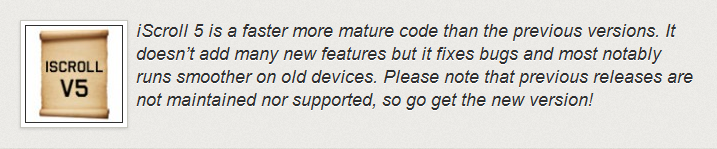
近来在学习移动设备的应用开发,接触了jQuery mobile,在网上查阅相关资料时发现一个叫”iScroll“的小插件。其实这个iScroll插件跟jQuery mobile没有多大关系,并不是基于jQuery mobile类库开发的js插件,是一个独立的js插件,使用它时不必预先引用jquery或jquery mobile类库。关于iScroll的详细介绍可以去它的官网了解或者去GitHub(https://github.com/cubiq/iscroll/)下载它的源码学习。iScroll现在已经更新为iScroll-5,但并没有加入太多新的功能,只是对前一个版本iScroll-4进行重构优化与修复,而且官方消息说不再对iScroll-4进行维护和技术支持,建议使用新版本。官方说法如下:
iScroll-5与iScroll-4的差别还挺大的,首先在声明定义上写法就不一样了。
| iScroll-4: | iScroll-5: |
var myScroll = new iScroll('wrapper', {
|
var myScroll = new IScroll('#wrapper', {
//Event: refresh ... |
从上面两者的示例代码对比,以前的声明定义是new iScroll('wrapper'...),现在变为new IScroll('#wrapper'...),类名变为大写I开头了,容器的Id要加上前缀#,某些参数名称改变了(以前的topOffset变为startY和startX),关键是事件(event)不再是从options参数中指定,而是用on去注册等等。
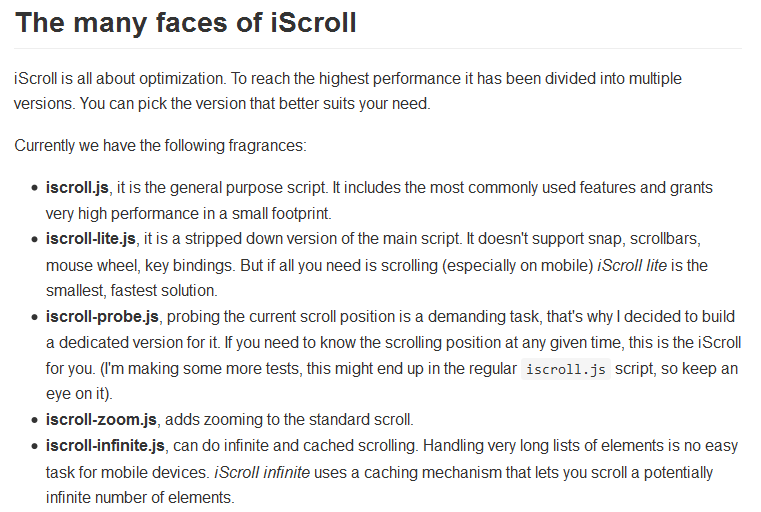
还有一个重大的不同是,iScroll-5按照功能点不同自身又划分为不同的版本,官方划分如下:
还有其他的差异就不再逐个列出了,大家可以到官网去了解。
其实iScroll之所以吸引我,主要是在iScroll-4中的demo里面有一个叫”pull-to-refresh“的示例,也就是我们说拉动更新,包括列表内容的下拉和上拉更新。这个功能在触摸的移动应用上经常用到,可以不夸张的说是必不可少的。但这个重要的示例在新版iScroll-5的demo中却找不到了。不知什么原因作者将它去掉了(据说iScroll-4的pull-to-refresh这个示例并不是作者的杰作),我在网上找了很久都没发现有关于iScroll-5官方的pull-to-refresh示例,个别实现的例子倒也是有一些,但效果都不是很令人满意。为了加深和巩固对iScroll的学习,本人就参考iScroll-4的pull-to-refresh示例来实现iScroll-5的拉动刷新功能,同时也对iScroll-4的pull-to-refresh示例根据个人需求进行了一点改进。
首先给出iScroll-4的pull-to-refresh示例改动后的代码:
 <script type="text/javascript">

 var myScroll,

     pullDownEl, pullDownOffset,

     pullUpEl, pullUpOffset, _maxScrollY;

 var generatedCount = 0;

 function pullDownAction () {

     setTimeout(function () {    // <-- Simulate network congestion, remove setTimeout from production!

         var el, li, i;

         el = document.getElementById('thelist');

         for (i=0; i<3; i++) {

             li = document.createElement('li');

             li.innerHTML = '(Pull down) Generated row ' + (++generatedCount);//Firefox  does not suppose innerText, use innerHTML instead.

             el.insertBefore(li, el.childNodes[0]);

         }

         myScroll.refresh();        // Remember to refresh when contents are loaded (ie: on ajax completion)

     }, 1000);    // <-- Simulate network congestion, remove setTimeout from production!

 }

 function pullUpAction () {

     setTimeout(function () {    // <-- Simulate network congestion, remove setTimeout from production!

         var el, li, i;

         el = document.getElementById('thelist');

         for (i=0; i<3; i++) {

             li = document.createElement('li');

             li.innerHTML = '(Pull up) Generated row ' + (++generatedCount);//Firefox  does not suppose innerText, use innerHTML instead.

             el.appendChild(li, el.childNodes[0]);

         }

         myScroll.refresh();        // Remember to refresh when contents are loaded (ie: on ajax completion)

     }, 1000);    // <-- Simulate network congestion, remove setTimeout from production!

 }

 function loaded() {

     pullDownEl = document.getElementById('pullDown');

     pullDownOffset = pullDownEl.offsetHeight;

     pullUpEl = document.getElementById('pullUp');

     pullUpOffset = pullUpEl.offsetHeight;

     myScroll = new iScroll('wrapper', {

         useTransition: true,

         topOffset: pullDownOffset,

         onRefresh: function () {

             console.log('maxScrollY-0:'+this.maxScrollY);

             _maxScrollY = this.maxScrollY = this.maxScrollY + pullUpOffset;

             console.log('maxScrollY-1:'+this.maxScrollY);

             if (pullDownEl.className.match('loading')) {

                 pullDownEl.className = '';

                 pullDownEl.querySelector('.pullDownLabel').innerHTML = 'Pull down to refresh...';

             } else if (pullUpEl.className.match('loading')) {

                 pullUpEl.className = '';

                 pullUpEl.querySelector('.pullUpLabel').innerHTML = 'Pull up to load more...';

                 this.scrollTo(0,this.maxScrollY,0);

             }

         },

         onScrollMove: function () {

             console.log('maxScrollY-3:'+this.maxScrollY);

             if (this.y > 5 && !pullDownEl.className.match('flip')) {

                 pullDownEl.className = 'flip';

                 pullDownEl.querySelector('.pullDownLabel').innerHTML = 'Release to refresh...';

                 this.minScrollY = 0;

             } else if (this.y < 5 && pullDownEl.className.match('flip')) {

                 pullDownEl.className = '';

                 pullDownEl.querySelector('.pullDownLabel').innerHTML = 'Pull down to refresh...';

                 this.minScrollY = -pullDownOffset;

             } else if (this.y <= (_maxScrollY - pullUpOffset) && !pullUpEl.className.match('flip')) {

                 pullUpEl.className = 'flip';

                 pullUpEl.querySelector('.pullUpLabel').innerHTML = 'Release to refresh...';

                 this.maxScrollY = this.maxScrollY - pullUpOffset;

             } else if (this.y > (_maxScrollY - pullUpOffset) && pullUpEl.className.match('flip')) {

                 pullUpEl.className = '';

                 pullUpEl.querySelector('.pullUpLabel').innerHTML = 'Pull up to load more...';

                 this.maxScrollY = this.maxScrollY + pullUpOffset;

             }

         },

         onScrollEnd: function () {

             if (pullDownEl.className.match('flip')) {

                 pullDownEl.className = 'loading';

                 pullDownEl.querySelector('.pullDownLabel').innerHTML = 'Loading...';

                 console.log('pull down---scroll end');

                 pullDownAction();    // Execute custom function (ajax call?)

             } else if (pullUpEl.className.match('flip')) {

                 pullUpEl.className = 'loading';

                 pullUpEl.querySelector('.pullUpLabel').innerHTML = 'Loading...';

                 console.log('pull up---scroll end');

                 pullUpAction();    // Execute custom function (ajax call?)

             }

         }

     });

     setTimeout(function () { document.getElementById('wrapper').style.left = '0'; }, 800);

 }

 document.addEventListener('touchmove', function (e) { e.preventDefault(); }, false);

 document.addEventListener('DOMContentLoaded', function () { setTimeout(loaded, 200); }, false);

 </script>
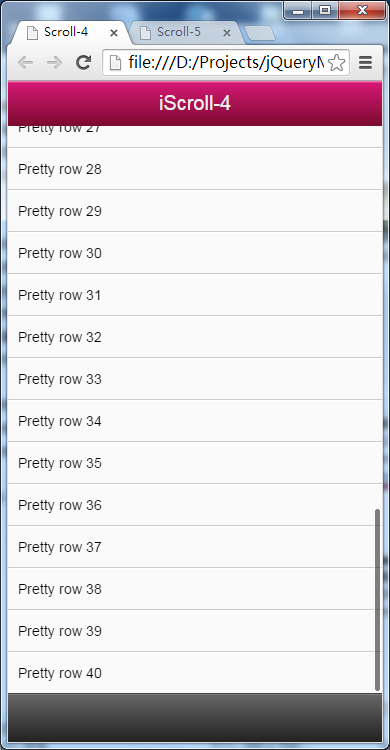
上面代码高亮标注(黄色底色)的地方是主要的改动点,对于第15,30行标注的innerHTML原来例子是innerText,但我发现在firefox运行后新增的li会显示不了内容(应该是firebox不支持innerText),改为innerHTML后就正常显示了。其他处的改动主要是针对maxScrollY这个变量,这样改主要是为了让列表内容滚动到底部时上拉前不显示提示栏。
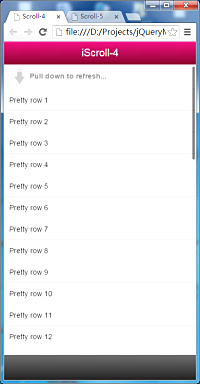
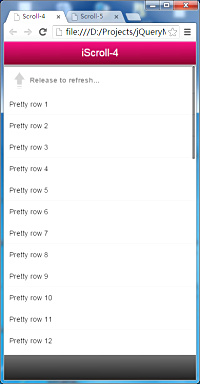
| iScroll-4 示例改动前: | iScroll-4 示例改动后: |
 |
 |
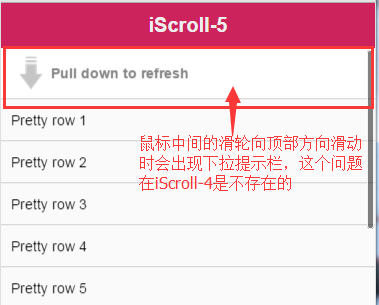
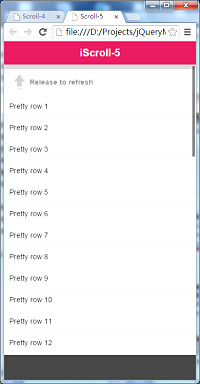
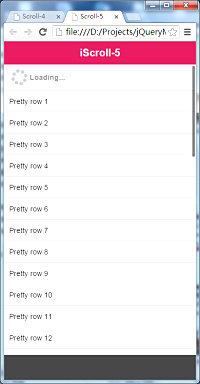
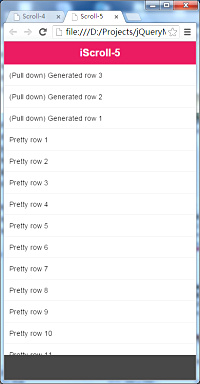
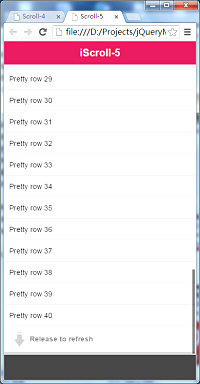
下面参照iScroll-4改动后的push-to-refresh示例来实现iScroll-5的拉动刷新功能。使用iScroll-5来实现的话,要引用的js类库是iScroll-5细分后的iscroll-probe.js,按照前面的划分介绍,此细分版本主要是为了探查当前滚动位置(x,y)。在实现过程中我发现类库有一小处源码是需要改动的,主要是解决鼠标滑轮向顶部滚动时,不显示下拉提示栏(这个问题在iScroll-4下是不存在的,应该跟iScroll-5去掉了minScrollY这个变量有关),我们希望在下拉时才会出现提示栏。
解决办法其实也不复杂,只需改动一下iscroll-probe.js文件里面的第1122行处的一小段代码。如下图:
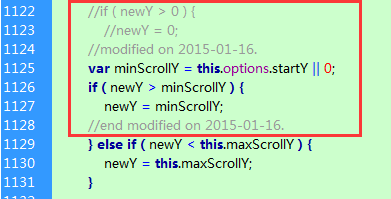
之所以这样修改,主要是参考iScroll-4里面的源码。如下图:
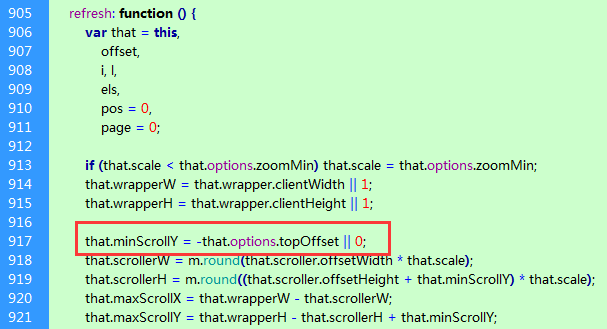

好,源文件iscroll-probe.js的修改就完成了,下面给出iScroll-5拉动刷新功能的页面js代码:
 <script type="text/javascript">

 var myScroll,

     pullDownEl, pullDownOffset,

     pullUpEl, pullUpOffset, _maxScrollY;

 var generatedCount = 0;

 function pullDownAction(){

         setTimeout(function () {    // <-- Simulate network congestion, remove setTimeout from production!

             var el, li, i;

             el = document.querySelector('#scroller ul');

             for (i=0; i<3; i++) {

                 li = document.createElement('li');

                 li.innerHTML = '(Pull down) Generated row ' + (++generatedCount);//Firefox  does not suppose innerText, use innerHTML instead.

                 el.insertBefore(li, el.childNodes[0]);

             }

             if(myScroll){

                 myScroll.refresh();        // Remember to refresh when contents are loaded (ie: on ajax completion)

             }

         }, 1000);    // <-- Simulate network congestion, remove setTimeout from production!

 }

 function pullUpAction () {

     setTimeout(function () {    // <-- Simulate network congestion, remove setTimeout from production!

         var el, li, i;

         el = document.querySelector('#scroller ul');

         for (i=0; i<3; i++) {

             li = document.createElement('li');

             li.innerHTML = '(Pull up) Generated row ' + (++generatedCount);//Firefox  does not suppose innerText, use innerHTML instead.

             el.appendChild(li, el.childNodes[0]);

         }

         if(myScroll){

             myScroll.refresh();        // Remember to refresh when contents are loaded (ie: on ajax completion)

         }

     }, 1000);    // <-- Simulate network congestion, remove setTimeout from production!

 }

 function loaded() {

     pullDownEl = document.querySelector('#pullDown');

     if (pullDownEl) {

         pullDownOffset = pullDownEl.offsetHeight;

     } else {

         pullDownOffset = 0;

     }

     pullUpEl = document.querySelector('#pullUp');

     if (pullUpEl) {

         pullUpOffset = pullUpEl.offsetHeight;

     } else {

         pullUpOffset = 0;

     }

     console.log('pullDownOffset:'+pullDownOffset);

     console.log('pullUpOffset:'+pullUpOffset);

     //Options of IScroll

     var myOptions = {

             mouseWheel: true,

             scrollbars: true,

             fadeScrollbars: true,

             probeType:1,

             startY:-pullDownOffset

         };

     myScroll = new IScroll('#wrapper',myOptions);

     console.log('maxScrollY-1:'+myScroll.maxScrollY);

     _maxScrollY = myScroll.maxScrollY = myScroll.maxScrollY + pullUpOffset;

     console.log('maxScrollY-2:'+myScroll.maxScrollY);

     var isScrolling = false;

     //Event: scrollStart

     myScroll.on("scrollStart", function() {

         if(this.y==this.startY){

             isScrolling = true;

         }

         console.log('start-y:'+this.y);

     });

     //Event: scroll

     myScroll.on('scroll', function(){

         if (this.y >= 5 && pullDownEl && !pullDownEl.className.match('flip')) {

             pullDownEl.className = 'flip';

             pullDownEl.querySelector('.pullDownLabel').innerHTML = 'Release to refresh';

             //this.minScrollY = 0;

         } else if (this.y < 5  && pullDownEl && pullDownEl.className.match('flip')) {

             pullDownEl.className = '';

             pullDownEl.querySelector('.pullDownLabel').innerHTML = 'Pull down to refresh';

             //this.minScrollY = -pullDownOffset;

         }else if (this.y <= (_maxScrollY - pullUpOffset) && pullUpEl && !pullUpEl.className.match('flip')) {

             pullUpEl.className = 'flip';

             pullUpEl.querySelector('.pullUpLabel').innerHTML = 'Release to refresh';

             //this.maxScrollY = this.maxScrollY;

             this.maxScrollY = this.maxScrollY - pullUpOffset;

         } else if (this.y > (_maxScrollY - pullUpOffset) && pullUpEl && pullUpEl.className.match('flip')) {

             pullUpEl.className = '';

             pullUpEl.querySelector('.pullUpLabel').innerHTML = 'Pull up to load more';

             //this.maxScrollY = pullUpOffset;

             this.maxScrollY = this.maxScrollY + pullUpOffset;

         }

         console.log('y:'+this.y);

     });

     //Event: scrollEnd

     myScroll.on("scrollEnd", function() {

         console.log('scroll end');

         console.log('directionY:'+this.directionY);

         console.log('y1:'+this.y);

         console.log('maxScrollY-3:'+this.maxScrollY);

         if (pullDownEl && !pullDownEl.className.match('flip') && this.y > this.options.startY) {

             console.log('resume');

             this.scrollTo(0, this.options.startY,800);

           }

         else if (pullDownEl && pullDownEl.className.match('flip')){

                 pullDownEl.className = 'loading';

                 pullDownEl.querySelector('.pullDownLabel').innerHTML = 'Loading...';

                 // Execute custom function (ajax call?)

                 if (isScrolling) {

                     console.log('before pull down action:'+this.y);

                     pullDownAction();

                       console.log('after pull down action:'+this.y);

                   }

         }

         else if (pullUpEl && pullUpEl.className.match('flip')) {

                 console.log('pull up loading');

                 pullUpEl.className = 'loading';

                 pullUpEl.querySelector('.pullUpLabel').innerHTML = 'Loading...';

                 // Execute custom function (ajax call?)

                 if (isScrolling) {

                     console.log('before pull up action:'+this.y);

                     pullUpAction();

                     console.log('after pull up action:'+this.y);

                 }

         }

         isScrolling = false;

     });

     //Event: refresh

     myScroll.on("refresh", function() {

          console.log('maxScrollY-4:'+this.maxScrollY);

          _maxScrollY = this.maxScrollY = this.maxScrollY+pullUpOffset;

          console.log('maxScrollY-5:'+this.maxScrollY);

          if (pullDownEl  && pullDownEl.className.match('loading')) {

                 pullDownEl.className = '';

                 pullDownEl.querySelector('.pullDownLabel').innerHTML = 'Pull down to refresh';

                 this.scrollTo(0,this.options.startY,0);

          } else if (pullUpEl && pullUpEl.className.match('loading')) {

                 pullUpEl.className = '';

                 pullUpEl.querySelector('.pullUpLabel').innerHTML = 'Pull up to load more';

                 this.scrollTo(0,this.maxScrollY,0);

          }

          console.log('refresh finished!');

     });

     setTimeout(function () { document.getElementById('wrapper').style.left = '0'; }, 500);

 }

 document.addEventListener('touchmove', function (e) { e.preventDefault(); }, false);

 </script>
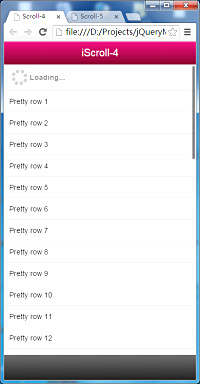
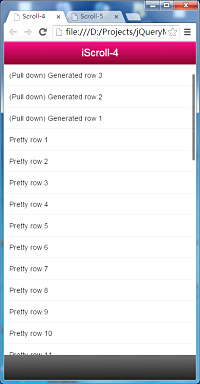
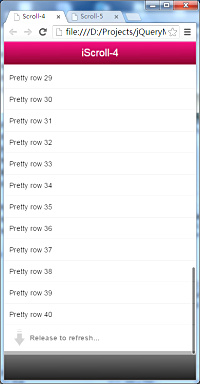
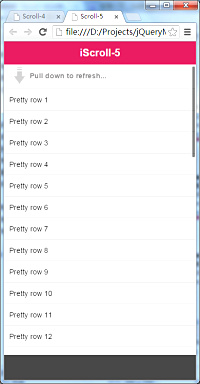
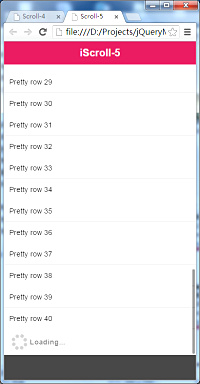
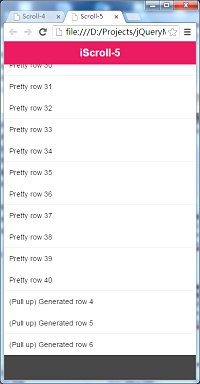
运行效果:
| iScroll-4: | |||
 |
 |
 |
 |
 |
 |
 |
 |
| iScroll-5: | |||
 |
 |
 |
 |
 |
 |
 |
 |
后话:按照官网的介绍iScroll-5比iScroll-4更快,性能更好。但在上面的拉动刷新的示例中,iScroll-5在firefox中运行时比iScroll-4要占用更多的CPU,感觉iScroll-4要流畅得多,但仅限于拉动功能的比较,至于iScroll的其他功能没有测试对比过,所以也不敢以偏概全地断言说iScroll-5的性能就比上iScroll-4。有兴趣的朋友可以去测试一下,测完后给我分享一下结果,谢谢!
iScroll-5拉动刷新功能实现与iScroll-4上拉刷新的一点改进的更多相关文章
- Android PullToRefreshListView上拉刷新和下拉刷新
PullToRefreshListView实现上拉和下拉刷新有两个步骤: 1.设置刷新方式 pullToRefreshView.setMode(PullToRefreshBase.Mode.BOTH) ...
- iscroll.js实现上拉刷新,下拉加载更多,应用技巧项目实战
上拉刷新,下拉加载更多...仿原生的效果----iscroll是一款做滚动效果的插件,具体介绍我就不废话,看官方文档,我只写下我项目开发的一些用到的用法: (如果不好使,调试你的css,想必是个很蛋疼 ...
- iScroll示例,下拉刷新,上拉刷新
iScroll示例,下拉刷新,上拉刷新 <!DOCTYPE html> <html> <head> <meta http-equiv="Conten ...
- 使用mescroll来实现移动端页面上拉刷新, 下拉加载更多功能
* mescroll请参考官方文档 1. 使用mescroll实现下拉滑动的效果: (仅仅效果, 有的页面不需要刷新数据, 只要你能下拉就行) 代码如下: var mescroll = new MeS ...
- 安卓自带下拉刷新SwipeRefreshLayout加入上拉刷新功能
在项目里面要用到刷新库.曾经都是使用第三方的.只是看到官方出了 SwipeRefreshLayout之后就用SwipeRefreshLayout.可是不知道什么原因官方SwipeRefreshL ...
- SuperSwipeRefreshLayout 一个功能强大的自己定义下拉刷新组件
SuperSwipeRefreshLayout 一个功能强大的自己定义下拉刷新组件. Why? 下拉刷新这样的控件.想必大家用的太多了,比方使用非常多的XListView等. 近期.项目中非常多列表都 ...
- MUI - 上拉刷新/下拉加载
新闻信息列表必备的功能,支持Table,Ul等列表. 以下是DIV版本,在安卓端或者ios端必须使用双webview模式,传送门:http://dev.dcloud.net.cn/mui/pulldo ...
- Android UI之下拉刷新上拉刷新实现
在实际开发中我们经常要用到上拉刷新和下拉刷新,因此今天我写了一个上拉和下拉刷新的demo,有一个自定义的下拉刷新控件 只需要在布局文件中直接引用就可以使用,非常方便,非常使用,以下是源代码: 自定义的 ...
- iOS MJRefresh下拉、上拉刷新自定义以及系统详细讲解
更新: MJRefresh 更新功能,默认根据数据来源 自动显示 隐藏footer,这个功能可以关闭 DoctorTableView.mj_footer.automaticallyHidden = N ...
- iOS--MJRefresh的使用 上拉刷新和下拉加载
1.一般使用MJRefresh 来实现上拉刷新和下拉加载功能 2.MJRefresh 下载地址:https://github.com/CoderMJLee/MJRefresh 3. MJRefresh ...
随机推荐
- php 批量生成html,txt文件的方法(实例代码)
php批量生成html,txt文件的实现代码. 首先,建立一个conn.php 链接数据库. <?php $link = mysql_connect("mysql_host" ...
- delphi 仅带下划线的TEdit控件
在做录入框的时候,很希望有一个只带下划线的文本框,网上介绍的很多,有自己做组件的,须不知Delphi下只需要简单设置几个属性即可达到目的.
- jsp+oracle 排序分页+Pageutil类
1.rownum和排序 Oracle中的rownum的是在取数据的时候产生的序号,所以想对指定排序的数据去指定的rowmun行数据就必须注意了. SQL> select rownum ,id,n ...
- java 两个日期之间的标准工作日(原创)
package control; import java.text.ParseException; import java.text.SimpleDateFormat; import java.uti ...
- Linux 启动直接进入 console,
我的电脑上有两块显卡,上次fedora更新后,自动安装了nvidia的驱动, 然后悲剧发生了.再也不能够正常进行图形界面了.所以需要进入CONSOLE. 1. 当系统启动时,停止grub menu自动 ...
- 监听EditText
0.得到焦点的时候,作一些处理 public class AbcActivity extends Activity implements OnFocusChangeListener{ @Overrid ...
- PostgreSQL+PostGIS的使用 函数清单
一. PostgreSQL与PostGIS的关系 PostgreSQL 是世界上技术最先进的开源数据库,其前身是1977年一个源于Berkeley名为Ingres的非关系型数据库,其项目领导人为Mic ...
- 正则表达式通过Unicode属性匹配
原文链接:http://zochen.iteye.com/blog/690716 Unicode 编码并不只是为某个字符简单定义了一个编码,而且还将其进行了归类. \pP 其中的小写 p 是 prop ...
- 跨过slf4j和logback,直接晋级log4j 2
今年一直关注log4j 2,但至今还没有出正式版.等不及了,今天正式向大家介绍一下log4j的升级框架,log4j 2. log4j,相信大家都熟悉,至今对java影响最大的logging系统,至今仍 ...
- 3.9 spring-自定义标签解析
到这里,我们已经完成了分析默认标签的解析与提取过程,或许设计的内容太多,我们忘了我们是冲哪个函数开始了的, 让我们再次回顾一下默认标签解析方法的起始方法. 入口如下: /** * Parse the ...