
Part 14 ng hide and ng show in AngularJS
ng-hide and ng-show directives are used to control the visibility of the HTML elements. Let us understand this with an example
When Hide Salary checkbox is checked, the Salary column should be hidden.
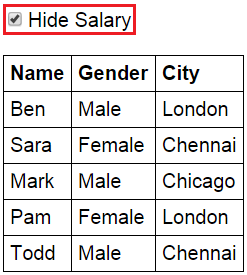
When it is unchecked the Salary column should be unhidden
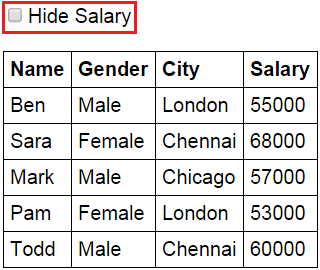
Script.js : The controller function builds the model
 var app = angular

        .module("myModule", [])

        .controller("myController", function ($scope) {

            var employees = [

                { name: "Ben", gender: "Male", city: "London", salary: 55000 },

                { name: "Sara", gender: "Female", city: "Chennai", salary: 68000 },

                { name: "Mark", gender: "Male", city: "Chicago", salary: 57000 },

                { name: "Pam", gender: "Female", city: "London", salary: 53000 },

                { name: "Todd", gender: "Male", city: "Chennai", salary: 60000 }

            ];

            $scope.employees = employees;

        });
HtmlPage1.html : Notice ng-model directive on the checkbox is set to hideSalary. hideSalary variable is then used as the value for ng-hide directive on the th and td elements that displays Salary. When the page is first loaded, hideSalary variable will be undefined which evaluates to false, as a result Salary column will be visible. When the checkbox is checked, hideSalary variable will be attached to the $scope object and true value is stored in it. This value is then used by the ng-hide directive to hide the salary td and it's th element. When the checkbox is unchecked, false value is stored in the hideSalary variable, which is then used by the ng-hide directive to display the Salary column.
 <!DOCTYPE html>

<html xmlns="http://www.w3.org/1999/xhtml">

<head>

    <title></title>

    <script src="Scripts/angular.min.js"></script>

    <script src="Scripts/Script.js"></script>

    <link href="Styles.css" rel="stylesheet" />

</head>

<body ng-app="myModule">

    <div ng-controller="myController">

        <input type="checkbox" ng-model="hideSalary" />Hide Salary

        <br /><br />

        <table>

            <thead>

                <tr>

                    <th>Name</th>

                    <th>Gender</th>

                    <th>City</th>

                    <th ng-hide="hideSalary">Salary</th>

                </tr>

            </thead>

            <tbody>

                <tr ng-repeat="employee in employees">

                    <td> {{ employee.name }} </td>

                    <td> {{ employee.gender}} </td>

                    <td> {{ employee.city}} </td>

                    <td ng-hide="hideSalary"> {{ employee.salary  }} </td>

                </tr>

            </tbody>

        </table>

    </div>

</body>

</html>
With the above example we can also use ng-show directive instead of ng-hide directive. For this example to behave the same as before, we will have to negate the value of hideSalary variable using ! operator.
 <!DOCTYPE html>

<html xmlns="http://www.w3.org/1999/xhtml">

<head>

    <title></title>

    <script src="Scripts/angular.min.js"></script>

    <script src="Scripts/Script.js"></script>

    <link href="Styles.css" rel="stylesheet" />

</head>

<body ng-app="myModule">

    <div ng-controller="myController">

        <input type="checkbox" ng-model="hideSalary" />Hide Salary

        <br /><br />

        <table>

            <thead>

                <tr>

                    <th>Name</th>

                    <th>Gender</th>

                    <th>City</th>

                    <th ng-show="!hideSalary">Salary</th>

                </tr>

            </thead>

            <tbody>

                <tr ng-repeat="employee in employees">

                    <td> {{ employee.name }} </td>

                    <td> {{ employee.gender}} </td>

                    <td> {{ employee.city}} </td>

                    <td ng-show="!hideSalary"> {{ employee.salary  }} </td>

                </tr>

            </tbody>

        </table>

    </div>

</body>

</html>
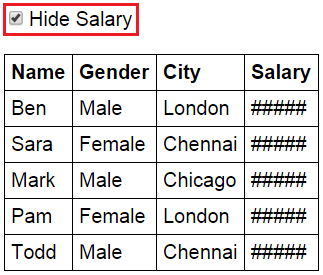
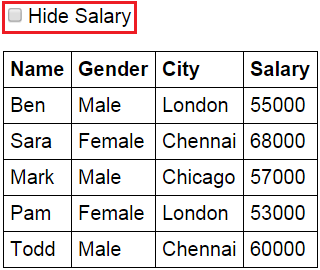
The following example masks and unmasks the Salary column values using ng-hide and ng-show directives, depending on the checked status of the Hide Salary checkbox.
<!DOCTYPE html>

<html xmlns="http://www.w3.org/1999/xhtml">

<head>

    <title></title>

    <script src="Scripts/angular.min.js"></script>

    <script src="Scripts/Script.js"></script>

    <link href="Styles.css" rel="stylesheet" />

</head>

<body ng-app="myModule">

    <div ng-controller="myController">

        <input type="checkbox" ng-model="hideSalary" />Hide Salary

        <br /><br />

        <table>

            <thead>

                <tr>

                    <th>Name</th>

                    <th>Gender</th>

                    <th>City</th>

                    <th ng-hide="hideSalary">Salary</th>

                    <th ng-show="hideSalary">Salary</th>

                </tr>

            </thead>

            <tbody>

                <tr ng-repeat="employee in employees">

                    <td> {{ employee.name }} </td>

                    <td> {{ employee.gender}} </td>

                    <td> {{ employee.city}} </td>

                    <td ng-hide="hideSalary"> {{ employee.salary  }} </td>

                    <td ng-show="hideSalary"> ##### </td>

                </tr>

            </tbody>

        </table>

    </div>

</body>

</html>
Part 14 ng hide and ng show in AngularJS的更多相关文章
- Angular6之ng build | ng build --aot | ng build --prod 差异
由于写了大半年的项目终于要告一段落并且即将进行第二阶段优化开发,emmm 基础版本已经二十多个模块了,必不可少的优化是很重要的,尽管项目上使用多层嵌套懒加载,但是在首屏加载的时候,任然很慢啊,因为一直 ...
- 在库中使用schematics——ng add与ng update
起步 创建一个angular库 ng new demo --create-application=false ng g library my-lib 可见如下目录结构 ├── node_modules ...
- 重构改善既有代码设计--重构手法14:Hide Delegate (隐藏委托关系)
客户通过一个委托类来调用另一个对象.在服务类上建立客户所需的所有函数,用以隐藏委托关系. 动机:封装即使不是对象的最关机特性,也是最关机特性之一.“封装”意味着每个对象都应该少了解系统的其他部分.如此 ...
- angular 2 - 001 ng cli的安装和使用
angular cli 创建项目和组件 ng new my-app --skip-install cd my-app cnpm install ng serve localhost:4200 angu ...
- Angular 中后台前端解决方案 - Ng Alain 介绍
背景 之前项目使用过vue.js+iview,习惯了后端开发的我,总觉得使用不习惯,之前分析易企秀前端代码,接触到了angular js,完备的相关功能,类似后端开发的体验,让人耳目一新,全新的ang ...
- How to Pronounce the Letters NG – No Hard G
How to Pronounce the Letters NG – No Hard G Share Tweet Share Most of the time when you see the lett ...
- angular2 ng build --prod 报错:Module not found: Error: Can't resolve './$$_gendir/app/app.module.ngfactory'
调试页面 ng serve 正常 ng build 也正常 ng build --prod 异常:Module not found: Error: Can't resolve './$$_gendir ...
- ng 构建
1.ng 构建和部署 构建:编译和合并ng build 部署:复制dist里面的文件到服务器 2.多环境的支持 配置环境package.json "scripts": { &quo ...
- Flume NG高可用集群搭建详解
.Flume NG简述 Flume NG是一个分布式,高可用,可靠的系统,它能将不同的海量数据收集,移动并存储到一个数据存储系统中.轻量,配置简单,适用于各种日志收集,并支持 Failover和负载均 ...
随机推荐
- Linux错误代码
#ifndef _I386_ERRNO_H #define _I386_ERRNO_H #define EPERM 1 /* Operation not permitted */ #define EN ...
- XHTML标签的嵌套规则--很基础很重要
XHTML的标签有许多:div.ul.li.dl.dt.dd.h1~h6.p.a.addressa.span. strong……我们在运用这些标签搭建页面结构的时候,是可以将它们无限嵌套的,但是,嵌套 ...
- Android中string.xml文件中设置部分字体颜色大小
1.在string.xml文件中: <string name="tips_all"><Data><![CDATA[清理进程:<font colo ...
- js设置控件的隐藏与显示的两种方法
js设置控件的隐藏与显示,设置控件style的display和visibility属性就可以了,下面有个示例,需要的朋友可以参考下用JavaScript隐藏控件的方法有两种,分别是通过设置控件的sty ...
- 小票打印机指令集封装(支持EPSON指令)
最近写了一些关于小票打印机的程序,不难,但是记录下来,作为足迹吧. 现在市场上的小票机基本都支持EPSON指令.指令集文档 对指令集进行了自己的封装,方便以后调用: package aheiziUti ...
- ACdream 1115 Salmon And Cat (找规律&&打表)
题目链接:传送门 题意: 一个数被觉得是一个完美的数,仅仅要须要满足下面的两个条件之中的一个 1)x = 1 or 3 2)x = 2 + a*b + 2*a + 2*b; a.b都是完美的数. 分析 ...
- Codeforces Round #250 (Div. 2)——The Child and Set
题目链接 题意: 给定goal和limit,求1-limit中的若干个数,每一个数最多出现一次,且这些数的lowbit()值之和等于goal,假设存在这种一些数,输出个数和每一个数:否则-1 分析: ...
- 深入了解android平台的jni(一)
android中很多Java类都具有native接口,这些接口由本地实现,然后注册到系统中. 主要的JNI代码放在以下的路径中:frameworks/base/core/jni/,这个路径中的 ...
- KMP算法具体解释(转)
作者:July. 出处:http://blog.csdn.net/v_JULY_v/. 引记 此前一天,一位MS的朋友邀我一起去与他讨论高速排序,红黑树,字典树,B树.后缀树,包含KMP算法,只有在解 ...
- C++对象模型(虽然在GCC下很大的不同,但是先收藏)
C++对象模型 何为C++对象模型? 部分: 1. 语言中直接支持面向对象程序设计的部分 2. 对于各种支持的底层实现机制 语言中直接支持面向对象程序设计的部分,如构造函数 ...