
L002-oldboy-mysql-dba-lesson02

L002-oldboy-mysql-dba-lesson02
[root@web01 ~]# mysql -uroot -ptestpassword
mysql> use mysql;
mysql> show tables;
show create table user;
use test;
create table t1 (id int, name char(100), age smallint,
primary key(id)) engine=innodb;
create table t1 (id int, name char(100), age smallint,
primary key(id)) engine=innodb;
show create table t1;
alter table t1 add index test_index(name);
alter table t1 add index test_index2(age);
alter table t1 add index test_index3(name,age);
show global variables;
show global variables like '%pool%';
show variables like '%timeout%';
set global wait_timeout=20; set session wait_timeout=20;
insert into t1 values(1,'aaaa',25);
insert into t1 values(2,'bbbbb',25);
insert into t1 values(3,'bbbbb',25);
insert into t1 values(3,'cccc',25);
insert into t1 values(4,'cccc',25);
select * from t1;
show global variables like '%per_table%';
show global variables like '%innodb%';
show engines \G
show global variables like '%autocommit%';
use mysql;
show table status like '%host%'\G
show global variables like '%autocommit%';
show global variables like '%_io_thread%';
show global variables like '%key_check%';
show global variables like '%isolation%';
[root@web01 ~]# vi /var/lib/mysql/my.cnf
131 innodb_buffer_pool_size = 384M
132 innodb_buffer_pool_instances = 4
133 innodb_file_per_table =
1 #设置innodb独立独立表空间
134 innodb_flush_method = O_DIRECT
135 default_storage_engine = innodb
136
transaction-isolation = READ-COMMITTED
[root@web01 ~]# mysqladmin -ptestpassword shutdown
#优雅的关闭数据库
[root@web01 ~]# /usr/local/mysql/bin/mysqld_safe
--defaults-file=/var/lib/mysql/my.cnf &
#删除bin-log;
mysql> show master logs;
mysql> purge master logs to 'mysql-bin.000003';
mysql> show master logs;
mysql> purge master logs before
'2016-03-17 00:00:00';
mysql> show master logs;
show global variables like '%expire%';
show full processlist;
show global variables like '%slow%'; # 开启慢查询
show global variables like '%connection%';
show global variables like '%prof%';
setprofiling=1; set global profiling=1;
show global variables like '%prof%';
select * from mysql.user;
show profile; #查看上一句sql的资源消耗瓶颈在哪里!
show profile all;
#修复表语句
[root@web01 ~]#
/usr/local/mysql/bin/myisamchk -r /var/lib/mysql/mysql/*.MYI
#主从同步出现错误的时候,一般会跳过这一条错误,尽快恢复主从结构;
show slave status\G;
slave stop; set global
sql_slave_skip_counter=1; slave start;
show slave status\G;
#监控innodb的状态
show global variables like '%io_thread%';
show engine innodb status\G #查看innodb有无死锁
show global status; #查看目前数据库的状态
show global status like '%Com_insert%';
#统计mysql数据库每秒查询值(同理每秒删除、插入、更新)
[root@web01 ~]# mysqladmin -S
/tmp/mysql.sock -uroot -ptestpassword -i 1 -r exten |grep
Com_select #-i 1 间隔1秒钟; -r当前值减去历史积累值;exten = exten-status
[root@web01 ~]# mysqladmin -S
/tmp/mysql.sock -uroot -ptestpassword -i
1 -r exten |grep -E "Com_select|Com_update|Com_delete|Com_insert"
#不重启mysql,直接使得参数生效的方法(有一定风险,慎重使用)
[root@web01 ~]#
/usr/local/mysql/bin/mysqladmin -S /tmp/mysql.sock -ptestpassword shutdown
[root@web01 ~]#
/usr/local/mysql/bin/mysqld_safe --defaults-file=/var/lib/mysql/my.cnf &
show global variables like
'%log_slave_updates%';
[root@web01 ~]# yum install -y gdb
[root@web01 ~]# gdb -p $(pidof mysqld) ex
"set opt_log_slave_updates=1"
(gdb) quit y
show global variables like
'%log_slave_updates%'; #此法比restart 数据库要快很多
#mysql版本升级
需要执行此命令,进行修复一些元数据。
把老表all db dump出来进行恢复之后
[root@web01 ~]#
/usr/local/mysql/bin/mysql_upgrade -S /tmp/mysql.sock -ptestpassword
#mysql更换引擎
mysql> alter tables t1 engine=innodb;


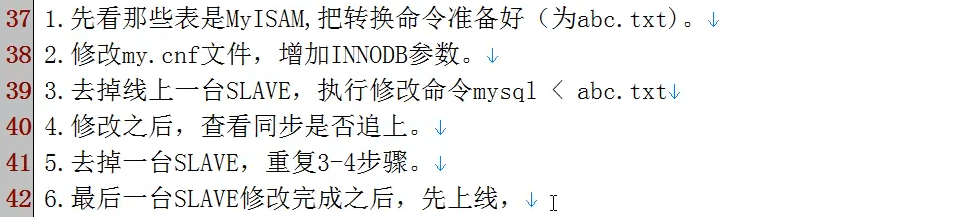
[root@oldboy mysql]# mysql -S
/tmp/mysql.sock -u root -ptestpassword -e "use test;show tables" |
grep -v Tables_in | sed 's/^/alter table /g' | sed 's/$/ engine=innodb;/g' >
abc.txt
[root@oldboy mysql]# vi abc.txt
alter table t1 engine=innodb;
alter table t2 engine=innodb;
alter table t1 engine=innodb;
[MySQL]表在线重定义pt-online-schema-change:
http://www.2cto.com/database/201401/272616.html
http://blog.itpub.net/22664653/viewspace-772250/
mysql分页优化 PPC2009_mysql_pagination:
mysql> select current_time ;
mysql> select now(); #这个带日期
mysql> select unix_timestamp();
+------------------+
| unix_timestamp() |
+------------------+
|1458482559 |
+------------------+
1 row in set (0.00 sec)
mysql> select from_unixtime(1458482559);
+---------------------------+
| from_unixtime(1458482559) |
+---------------------------+
| 2016-03-20 22:02:39 |
+---------------------------+
1 row in set (0.00 sec)
附件列表
L002-oldboy-mysql-dba-lesson02的更多相关文章
- 我心中的MySQL DBA
原文网址链接:http://wangwei007.blog.51cto.com/68019/1718311 MySQL是一个跨平台的开源关系型数据库管理系统,目前MySQL被广泛地应用在Interne ...
- 招聘前端、Java后端开发、测试、Mysql DBA
公司介绍: http://www.lagou.com/gongsi/43095.html http://www.yamichu.com 简历发到: zhuye@yamichu.com 招聘职位: JA ...
- MySQL DBA的个人修养
做为一个MySQL DBA,必须具有以下的素质: 一, 身体素质 DBA必须接收和处理各种报警,不论是中午在吃饭或者凌晨三点已经进入深度睡眠.接到报警需要立即进入应急状态,找到电脑,联上网络,快速定位 ...
- MySQL DBA面试全揭秘
来源:http://ourmysql.com/archives/1426 本文起源于有同学留言回复说想了解下MySQL DBA面试时可能涉及到的知识要点,那我们今天就来大概谈谈吧. MySQL DBA ...
- Mysql DBA 20天速成教程,DBA大纲
Mysql DBA 20天速成教程 基本知识1.mysql的编译安装2.mysql 第3方存储引擎安装配置方法3.mysql 主流存储引擎(MyISAM/innodb/MEMORY)的特点4.字符串编 ...
- MySQL DBA教程:Mysql性能优化之缓存参数优化
在平时被问及最多的问题就是关于 MySQL 数据库性能优化方面的问题,所以最近打算写一个MySQL数据库性能优化方面的系列文章,希望对初中级 MySQL DBA 以及其他对 MySQL 性能优化感 ...
- MySQL DBA修炼秘籍
0.导读 本文主要写给那些立志成为MySQL DBA,以及正在学习MySQL的同行们,结合个人及业内其他同行的职业发展经历给大家一些参考,如何成为合格的MySQL DBA. 1.什么是MySQL DB ...
- “快的打车”创始人陈伟星的新项目招人啦,高薪急招Java服务端/Android/Ios 客户端研发工程师/ mysql DBA/ app市场推广专家,欢迎大家加入我们的团队! - V2EX
"快的打车"创始人陈伟星的新项目招人啦,高薪急招Java服务端/Android/Ios 客户端研发工程师/ mysql DBA/ app市场推广专家,欢迎大家加入我们的团队! - ...
- 【转】MYSQL DBA知识了解-面试准备
http://www.itpub.net/forum.php?mod=viewthread&tid=1825849 公司招聘MySQL DBA,也面试了10个2年MySQL DBA工作经验的朋 ...
- MySQL DBA工作角色和职责介绍
MySQL DBA分架构DBA,运维DBA和开发DBA三种角色,职责介绍如下:
随机推荐
- Python小工具--删除svn文件
有的时候我们需要删除项目下的svn相关文件,但是SVN会在所有的目录下都创建隐藏文件.svn,手工一个个目录查找然后删除显然比较麻烦.所以这里提供了一个Python小工具用于批量删除svn的相关文件: ...
- HDU--杭电--1195--Open the Lock--深搜
Open the Lock Time Limit: 2000/1000 MS (Java/Others) Memory Limit: 65536/32768 K (Java/Others) To ...
- C语言之指针与数组总结
和指针相关的问题口诀1: 1. 地址变量得地址,得谁地址指向谁 和指针相关的问题要画图: 内容变量画房子,指针画箭头 ---->口 ------------------------------- ...
- Linux命令行技巧
Linux命令行技巧 命令 描述 • apropos whatis 显示和word相关的命令. 参见线程安全 • man -t man | ps2pdf - > man.pdf 生成一个PDF格 ...
- Java(Android)编程思想笔记01:多态性的理解
1. 多态的定义: 指允许不同类的对象对同一消息做出响应.即同一消息可以根据发送对象的不同而采用多种不同的行为方式. (发送消息就是函数调用) 2. 多态的理解 多态是面向对象的重要特性,简 ...
- 渐进式jpeg(progressive jpeg)图片及其相关 --图片的两种加载方式
渐进式jpeg(progressive jpeg)图片及其相关 一.基本JPEG(baseline jpeg)和渐进JPEG 网络上那些色色的照片都是.jpg格式的("色色"指 ...
- SSIS 学习(6):包配置(上)【转】
Integrartion Services 包实际上就是一个对象属性的集合,在前面我们开发的所有 Integration Services包,其中的变量.属性,比如:数据库链接.同步文件目录等,我们都 ...
- JavaScript中常用函数(入门级)(持续更新)
本文中枫竹梦介绍一些JavaScript中入门级的常用函数,对于已经过了入门的童鞋可选择略过,都是一些非常实用的函数.如果发现什么问题,欢迎讨论. 问题列表 Q1: 设计一个函数repeatIt(st ...
- CentOS(二)--初识linux的一些常用命令
linux命令是对Linux系统进行管理的命令.对于Linux系统来说,无论是中央处理器.内存.磁盘驱动器.键盘.鼠标,还是用户等都是文件,Linux系统管理的命令是它正常运行的核心,与之前的DOS命 ...
- [改善Java代码]在接口中不要存在实现代码
第3章 类.对象及方法 书读得多而不思考,你会觉得自己知道的很多. 书读得多而思考,你会觉得自己不懂的越来越多. —伏尔泰 在面向对象编程(Object-Oriented Programming,O ...