
C# & SQLite - Storing Images
Introduction
This article is to demonstrate how to load images into a SQLite database and retrieve them for viewing. It is written in VS2010, C#, .NET4.0, and uses an ADO.NET provider System.Data.SQLite to connect to the SQLite database. And this all in a Windows XP environment.
Background
First of all, one has to obtain a few files and install them according to the rules:
- SQLite ADO.NET provider: http://sqlite.phxsoftware.com
- SQLite Administrator: http://sqliteadmin.orbmu2k.de
- SQLite Administrator: http://www.sqlite.org
SQLite ADO.NET provider: I installed the package into my "C:\" directory and chose not to register the DLL files, due to only wanting to include the DLL files to my project.
Using the code
SQLite
First, I created a new database named ImageLib.s3db and added a table and required fields.
 Collapse | Copy Code
CREATE TABLE [ImageStore] (

[ImageStore_Id] INTEGER  NOT NULL PRIMARY KEY AUTOINCREMENT,

[ImageFile] NVARCHAR(20)  NULL,

[ImageBlob] BLOB  NULL

);
VS2010 - C# - .NET 4.0
Next, I created a VS2010 project named StoringImages, changed the default namespace, and added a few folders and files.
- folder: Database
- file: StoringImages.s3db
- Property: Copy to Output Directory => Copy Always
- file: StoringImages.s3db
- folder: Model
- dBFunctions.cs
- dBHelper.cs
- Image.cs
- ImageHelper.cs
- file: System.Data.SQLite.dll
- Property: Copy to Output Directory => Copy Always
- file: SQLite.Interop.dll
- Property: Copy to Output Directory => Copy Always
- form: DisplayImages
- This is the startup form of the project
Both System.Data.SQLite.dll and SQLite.Interop.dll need to be placed just beneath the root (project) StoringImages. This ensures that both files are installed into the same directory as the the project's "*.exe" file.
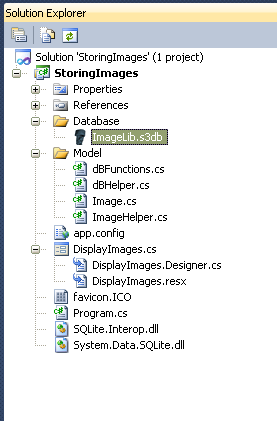
Solution Explorer
Model
Within the folder Model, there are a few classes, two for handling all database transactions and two for handling image transactions. The two for handling database transactions, dBFunctions and dBHelper, I've used before in my previous article C# & SQLite. So next, I'll be explaining how to use the remaining two classes, Image andImageHelper.
The class Image I'll be using as a custom made variable, which will be used to store the data of an imported image file, so it can be passed along between methods.
The class that will be doing all the hard work is ImageHelper. Within this class, you'll find various methods for handling the Insert, Delete, and SaveAs of an image. Insert uses another method called LoadImage which handles the binary reading of an image. Delete is for the removal of the data from the database. SaveAs is for saving the image back to a directory of choice. After every transaction, a transaction state is generated in the form ofisSucces. The view (form) DisplayImages requires this state in order to or not to update itself.
ImageHelper - Assigning of references
I try never to use more references than needed, but sometimes forget to remove the ones VS2010 automatically adds to every new class.
Collapse | Copy Code
using System;

using System.IO;

using System.Windows.Forms;

using System.Data;

using System.Data.SQLite;
ImageHelper - Declairation of variables
MaxImageSize is used to declare the maximum number of bytes allowed when importing an image, which in this example is overridden in the LoadImage method.
Collapse | Copy Code
private dBHelper helper = null;

private string fileLocation = string.Empty;

private bool isSucces = false;

private int maxImageSize = 2097152;

//2MB   - 2097152

//5MB   - 5242880

//10MB  - 10485760

/*  Conversion

 *  1 Byte = 8 Bit

 *  1 Kilobyte = 1024 Bytes

 *  1 Megabyte = 1048576 Bytes

 *  1 Gigabyte = 1073741824 Bytes

 * */
dBHelper is the class that handles transactions to the database. maxImageSize is for the default maximum number of bytes allowed during upload. isSucces lets the view know that a transaction [Insert, Delete, SaveAs] was a success or not.
ImageHelper - Properties
Collapse | Copy Code
private string FileLocation

{

    get { return fileLocation; }

    set

    {

        fileLocation = value;

    }

}
ImageHelper - Method GetSucces
This method is used by the form DisplayImage to find if a transaction [Insert, Delete, SaveAs] was a success or not.
Collapse | Copy Code
public Boolean GetSucces()

{

    return isSucces;

}
ImageHelper - Method LoadImage
First we ask the user for the selected image file location [path] so that we can use this in our FileStream. Once theFilestream is open, we read the image as binary and store the acquired data in an instance of the Image class, which we'll be sending to the caller of the method LoadImage, the InsertImage method.
Collapse | Copy Code
private Image LoadImage()

{

    //Create an instance of the Image Class/Object

    //so that we can store the information

    //about the picture an send it back for

    //processing into the database.

    Image image = null;

    //Ask user to select Image

    OpenFileDialog dlg = new OpenFileDialog();

    dlg.InitialDirectory = @"C:\\";

    dlg.Title = "Select Image File";

    //dlg.Filter = "Tag Image File Format (*.tiff)|*.tiff";

    //dlg.Filter += "|Graphics Interchange Format (*.gif)|*.gif";

    //dlg.Filter += "|Portable Network Graphic Format (*.png)|*.png";

    //dlg.Filter += "|Joint Photographic Experts Group Format (*.jpg)|*.jpg";

    //dlg.Filter += "|Joint Photographic Experts Group Format (*.jpeg)|*.jpeg";

    //dlg.Filter += "|Nikon Electronic Format (*.nef)|*.nef";

    //dlg.Filter += "|All files (*.*)|*.*";

    dlg.Filter = "Image Files  (*.jpg ; *.jpeg ; *.png ; *.gif ; *.tiff ; *.nef)

                                |*.jpg;*.jpeg;*.png;*.gif;*.tiff;*.nef";

    dlg.ShowDialog();

    this.FileLocation = dlg.FileName;

    if (fileLocation == null || fileLocation == string.Empty)

        return image;

    if (FileLocation != string.Empty && fileLocation != null)

    {

        Cursor.Current = Cursors.WaitCursor;

        //Get file information and calculate the filesize

        FileInfo info = new FileInfo(FileLocation);

        long fileSize = info.Length;

        //reasign the filesize to calculated filesize

        maxImageSize = (Int32)fileSize;

        if (File.Exists(FileLocation))

        {

            //Retreave image from file and binary it to Object image

            using (FileStream stream = File.Open(FileLocation, FileMode.Open))

            {

                BinaryReader br = new BinaryReader(stream);

                byte[] data = br.ReadBytes(maxImageSize);

                image = new Image(dlg.SafeFileName, data, fileSize);

            }

        }

        Cursor.Current = Cursors.Default;

    }

    return image;

}
ImageHelper - Method InsertImage
InsertImage is called from the view (form) DisplayImages via the NewPicture method. Once the insert is successfully completed, it will return the newly obtained image_id back to the view.
As you'll notice, an instance of the class Image is used between the methods InsertImage and LoadImage.
Collapse | Copy Code
public Int32 InsertImage()

{

    DataRow dataRow = null;

    isSucces = false;

    Image image = LoadImage();

    //if no file was selected and no image was created return 0

    if (image == null) return 0;

    if (image != null)

    {

        // Determin the ConnectionString

        string connectionString = dBFunctions.ConnectionStringSQLite;

        // Determin the DataAdapter = CommandText + Connection

        string commandText = "SELECT * FROM ImageStore WHERE 1=0";

        // Make a new object

        helper = new dBHelper(connectionString);

        {

            // Load Data

            if (helper.Load(commandText, "image_id") == true)

            {

                // Add a row and determin the row

                helper.DataSet.Tables[0].Rows.Add(

                                   helper.DataSet.Tables[0].NewRow());

                dataRow = helper.DataSet.Tables[0].Rows[0];

                // Enter the given values

                dataRow["imageFileName"] = image.FileName;

                dataRow["imageBlob"] = image.ImageData;

                dataRow["imageFileSizeBytes"] = image.FileSize;

                try

                {

                    // Save -> determin succes

                    if (helper.Save() == true)

                    {

                        isSucces = true;

                    }

                    else

                    {

                        isSucces = false;

                        MessageBox.Show("Error during Insertion");

                    }

                }

                catch (Exception ex)

                {

                    // Show the Exception --> Dubbel Id/Name ?

                    MessageBox.Show(ex.Message);

                }

            }//END IF

        }

    }

   //return the new image_id

   return Convert.ToInt32(dataRow[0].ToString());

}
ImageHelper - Method DeleteImage
DeleteImage executes the removal of an image from the database. The method requires an integer, the row number of the dataset, given by the view (form) DisplayImages via the method DeletePicture. And after processing,DeleteImage returns the "state" back to DeletePicture.
Collapse | Copy Code
public void DeleteImage(Int32 imageID)

{

    //Set variables

    isSucces = false;

    // Determin the ConnectionString

    string connectionString = dBFunctions.ConnectionStringSQLite;

    // Determin the DataAdapter = CommandText + Connection

    string commandText = "SELECT * FROM ImageStore WHERE image_id=" + imageID;

    // Make a new object

    helper = new dBHelper(connectionString);

    {

        // Load Data

        if (helper.Load(commandText, "image_id") == true)

        {

            // Determin if the row was found

            if (helper.DataSet.Tables[0].Rows.Count == 1)

            {

                // Found, delete row

                helper.DataSet.Tables[0].Rows[0].Delete();

                try

                {

                    // Save -> determin succes

                    if (helper.Save() == true)

                    {

                        isSucces = true;

                    }

                    else

                    {

                        isSucces = false;

                        MessageBox.Show("Delete failed");

                    }

                }

                catch (Exception ex)

                {

                    // Show the Exception --> Dubbel ContactId/Name ?

                    MessageBox.Show(ex.Message);

                }

            }

        }

    }

}
ImageHelper - Method SaveAsImage
To top it all off, I've added a SaveAs method. Save the binary data back to an image file, to an allocated directory of the user's choice.
Once again, we need to know which row of the dataset needs to be saved to file, thus our method requires an integer as parameter.
First, we set the local variables to the default values, a C# - .NET requirement and good standard programming practice.
Then we ask the user, via a SaveDialog, for the directory location and file name for the new image. A dialog.Filterrange is set, that we allow, and a check is executed accordingly.
The binary data is retrieved from the database with the use of dBHelper, once again using an instance of the Imageclass. If dBHelper.Load returns the value "true", the FileStream is executed and writing the binary to image processed. To end the process the "state" isSucces is returned to the view (form) DisplayImages.
Collapse | Copy Code
public void SaveAsImage(Int32 imageID)

{

    //set variables

    DataRow dataRow = null;

    Image image = null;

    isSucces = false;

    // Displays a SaveFileDialog so the user can save the Image

    SaveFileDialog dlg = new SaveFileDialog();

    dlg.InitialDirectory = @"C:\\";

    dlg.Title = "Save Image File";

    //1

    dlg.Filter = "Tag Image File Format (*.tiff)|*.tiff";

    //2

    dlg.Filter += "|Graphics Interchange Format (*.gif)|*.gif";

    //3

    dlg.Filter += "|Portable Network Graphic Format (*.png)|*.png";

    //4

    dlg.Filter += "|Joint Photographic Experts Group Format (*.jpg)|*.jpg";

    //5

    dlg.Filter += "|Joint Photographic Experts Group Format (*.jpeg)|*.jpeg";

    //6

    dlg.Filter += "|Bitmap Image File Format (*.bmp)|*.bmp";

    //7

    dlg.Filter += "|Nikon Electronic Format (*.nef)|*.nef";

    dlg.ShowDialog();

    // If the file name is not an empty string open it for saving.

    if (dlg.FileName != "")

    {

        Cursor.Current = Cursors.WaitCursor;

        //making shore only one of the 7 is being used.

        //if not added the default extention to the filename

        string defaultExt = ".png";

        int pos = -1;

        string[] ext = new string[7] {".tiff", ".gif", ".png",

                                      ".jpg", ".jpeg", ".bmp", ".nef"};

        string extFound = string.Empty;

        string filename = dlg.FileName.Trim();

        for (int i = 0; i < ext.Length; i++)

        {

            pos = filename.IndexOf(ext[i], pos + 1);

            if (pos > -1)

            {

                extFound = ext[i];

                break;

            }

        }

        if (extFound == string.Empty) filename = filename + defaultExt;

        // Determin the ConnectionString

        string connectionString = dBFunctions.ConnectionStringSQLite;

        // Determin the DataAdapter = CommandText + Connection

        string commandText = "SELECT * FROM ImageStore WHERE image_id=" + imageID;

        // Make a new object

        helper = new dBHelper(connectionString);

        // Load the data

        if (helper.Load(commandText, "") == true)

        {

            // Show the data in the datagridview

            dataRow = helper.DataSet.Tables[0].Rows[0];

            image = new Image(

                              (string)dataRow["imageFileName"],

                              (byte[])dataRow["imageBlob"],

                              (long)dataRow["imageFileSizeBytes"]

                              );

            // Saves the Image via a FileStream created by the OpenFile method.

            using (FileStream stream = new FileStream(filename, FileMode.Create))

            {

                BinaryWriter bw = new BinaryWriter(stream);

                bw.Write(image.ImageData);

                isSucces = true;

            }

        }

        Cursor.Current = Cursors.Default;

    }

    if (isSucces)

    {

        MessageBox.Show("Save succesfull");

    }

    else

    {

        MessageBox.Show("Save failed");

    }

}
View - (form) DisplayImages
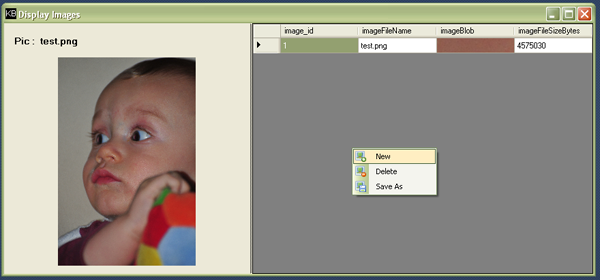
The form contains a splitpanel with a picture box on one side (left) + a label on the other side (right) of aDataGridView. It also contains a ContextMenuStrip which is linked to the DataGridView. TheContextMenuStrip contains the three commands for this little project, the commands being New, Delete, andSaveAs.
The form itself contains a few extra methods for handling the commands, retrieving the data from the database, and filling up the DataGridView. The filling up of the DataGridView is only executed at the start of the application and after every execution of a command if the command was a success.
Remark
I know that the class ImageHelper and its methods need refactoring but I specially left it like this so that all its functionalities are contained; this makes it easier to read.
I hate reading articles about code and it's all over the place, jumping in and out methods to get a grip on things.
Points of Interest
Those who have read my previous article C# & SQLite will recognize the two database classes for handling all database transactions.
License
This article, along with any associated source code and files, is licensed under The Code Project Open License (CPOL)
About the Author

Software Developer
Belgium 
Developer within C#, Dynamics NAV (Navision), Php environments.
C# & SQLite - Storing Images的更多相关文章
- what are Datatypes in SQLite supporting android
As said at Datatypes In SQLite Version 3: Datatypes In SQLite Version 3 Most SQL database engines (e ...
- SQLite数据库连接方式
http://blog.csdn.net/ZF101201/archive/2010/05/26/5626365.aspx SQLite.NET Type: .NET Framework Cla ...
- SQLite/嵌入式数据库
SQLite/嵌入式数据库 的项目要么不使用数据库(一两个文配置文件就可以搞定),要么就会有很多的数据,用到 postgresql,操练sqlite的还没有.现在我有个自己的小测试例子,写个数据库对比 ...
- SQLITE WITH ENTITY FRAMEWORK CODE FIRST AND MIGRATION
Last month I’ve a chance to develop an app using Sqlite and Entity Framework Code First. Before I st ...
- php读取sqlite数据库入门实例
php读取sqlite数据库的例子,php编程中操作sqlite入门实例.原文参考:http://www.jbxue.com/article/php/22383.html在使用SQLite前,要确保p ...
- Persisting iOS Application Data in SQLite Database Using FMDB
In previous articles we have utilized NSUserDefaults and .NET web services to persist iPhone data. N ...
- SQLite connection strings
Basic Data Source=c:\mydb.db;Version=3; Version 2 is not supported by this class library. SQLite In- ...
- 提高sqlite 的运行性能(转载)
原文地址: https://blog.devart.com/increasing-sqlite-performance.html One the major issues a developer en ...
- SQLite is 35% Faster Than The Filesystem
比方说你要在C++/PHP里实现一个函数Image get_image(string id),不同的图片有1万张(用户头像),你可以把它们存在一个目录/文件夹里,然后fopen()再fread. 你也 ...
随机推荐
- SQL Server常见问题总结
写在前面 在QQ群,微信群,论坛中经常帮助使用SQL Server数据库的朋友解决问题,但是有一些最常见最基本的问题,每天都有人问,回答多了也不想再解答了,索性把这些问题整理一下,再有人问到直接发链接 ...
- knowledge about apache
http://wenku.baidu.com/link?url=6O51BQJdtFRFWDGszKfN3aK7IY92QTCpuc7miBhRLazXvxL5gXb18B_TqIdi3EruX1o_ ...
- dom4j 的小小测试
@Test public void gogo() throws IOException{ InputStream in = this.getClass().getClassLoader() .getR ...
- Android开发UI之ListView中的Button点击设置
在ListView的Item中,如果有Button控件,那么要实现Button和Item点击都有响应,可以将Item的Layout中Button的focusable属性设为false,然后设置layo ...
- WPF程序中处理Windows消息
首先通过WindowInteropHelper类,我们可以获取WPF Window的Handle. WindowInteropHelper helper = new WindowInteropHelp ...
- 彻底搞懂javascript中的match, exec的区别
在工作中经常发现一些同学把这两个方法搞混,以致把自己弄的很郁闷.所以我和大家一起来探讨一下这两个方法的奥妙之处吧. 我们分以下几点来讲解: 相同点: 1.两个方法都是查找符合条件的匹配项,并以数组形式 ...
- ↗☻【PHP与MySQL程序设计 #BOOK#】第3章 PHP基础
<!DOCTYPE html> <html lang="zh-CN"> <head> <meta charset="utf-8& ...
- php对提交数据的验证
<?php //security.php /** * @author zhengwei * @copyright 2007 */ /* 函数名称:inject_check() 函数作用:检测提交 ...
- jquery的一些select操作小记
添加option $("#ID option").each(function(){ if($(this).val() == 111){ $(this).remove(); } }) ...
- 自定义Sharepoint的登陆页面
转:http://www.cnblogs.com/jecoso/archive/2008/05/25/1207151.html 原文作者:Damon Armstrong 原文地址:http://www ...