
maven项目编译漏掉src/main/java下的xml配置文件
在整合Spring + Mybatis框架的时候,自动扫描配置都已经配置好了。
配置如下:
<?xml version="1.0" encoding="UTF-8"?>

<beans xmlns="http://www.springframework.org/schema/beans"

    xmlns:xsi="http://www.w3.org/2001/XMLSchema-instance" xmlns:p="http://www.springframework.org/schema/p"

    xmlns:context="http://www.springframework.org/schema/context"

    xmlns:mvc="http://www.springframework.org/schema/mvc"

    xsi:schemaLocation="http://www.springframework.org/schema/beans

                        http://www.springframework.org/schema/beans/spring-beans-3.1.xsd

                        http://www.springframework.org/schema/context

                        http://www.springframework.org/schema/context/spring-context-3.1.xsd

                        http://www.springframework.org/schema/mvc

                        http://www.springframework.org/schema/mvc/spring-mvc-4.0.xsd">

    <!-- 自动扫描 -->

    <context:component-scan base-package="com.aheizi" />

    <!-- 引入配置文件 -->

    <bean id="propertyConfigurer"

        class="org.springframework.beans.factory.config.PropertyPlaceholderConfigurer">

        <property name="location" value="classpath:properties/jdbc.properties" />

    </bean>

    <bean id="dataSource" class="org.apache.commons.dbcp.BasicDataSource"

        destroy-method="close">

        <property name="driverClassName" value="${driver}" />

        <property name="url" value="${url}" />

        <property name="username" value="${username}" />

        <property name="password" value="${password}" />

        <!-- 初始化连接大小 -->

        <property name="initialSize" value="${initialSize}"></property>

        <!-- 连接池最大数量 -->

        <property name="maxActive" value="${maxActive}"></property>

        <!-- 连接池最大空闲 -->

        <property name="maxIdle" value="${maxIdle}"></property>

        <!-- 连接池最小空闲 -->

        <property name="minIdle" value="${minIdle}"></property>

        <!-- 获取连接最大等待时间 -->

        <property name="maxWait" value="${maxWait}"></property>

    </bean>

    <!-- spring和MyBatis完美整合,不需要mybatis的配置映射文件 -->

    <bean id="sqlSessionFactory" class="org.mybatis.spring.SqlSessionFactoryBean">

        <property name="dataSource" ref="dataSource" />

        <!-- 自动扫描mapping.xml文件 -->

        <property name="mapperLocations" value="classpath*:com/aheizi/mapping/*.xml"></property>

        <property name="typeAliasesPackage" value="com.aheizi.domain" />

    </bean>

    <!-- DAO接口所在包名,Spring会自动查找其下的类 -->

    <bean class="org.mybatis.spring.mapper.MapperScannerConfigurer">

        <property name="basePackage" value="com.aheizi.dao" />

        <property name="sqlSessionFactoryBeanName" value="sqlSessionFactory"></property>

    </bean>

    <!-- (事务管理)transaction manager, use JtaTransactionManager for global tx -->

    <bean id="transactionManager"

        class="org.springframework.jdbc.datasource.DataSourceTransactionManager">

        <property name="dataSource" ref="dataSource" />

    </bean>

</beans>
但是在install的时候报了如下错误:
org.apache.ibatis.binding.BindingException: Invalid bound statement (not found): com.aheizi.dao.UserMapper.selectByUserId

	at org.apache.ibatis.binding.MapperMethod$SqlCommand.<init>(MapperMethod.java:184)

	at org.apache.ibatis.binding.MapperMethod.<init>(MapperMethod.java:38)

	at org.apache.ibatis.binding.MapperProxy.cachedMapperMethod(MapperProxy.java:49)

	at org.apache.ibatis.binding.MapperProxy.invoke(MapperProxy.java:42)

	at com.sun.proxy.$Proxy11.selectByUserId(Unknown Source)

	at com.aheizi.service.impl.UserServiceImpl.getUserById(UserServiceImpl.java:20)

	at com.aheizi.testmybatis.TestSpringDemo.test1(TestSpringDemo.java:37)

	at sun.reflect.NativeMethodAccessorImpl.invoke0(Native Method)

	at sun.reflect.NativeMethodAccessorImpl.invoke(NativeMethodAccessorImpl.java:57)

	at sun.reflect.DelegatingMethodAccessorImpl.invoke(DelegatingMethodAccessorImpl.java:43)

	at java.lang.reflect.Method.invoke(Method.java:601)

	at org.junit.runners.model.FrameworkMethod$1.runReflectiveCall(FrameworkMethod.java:47)

	at org.junit.internal.runners.model.ReflectiveCallable.run(ReflectiveCallable.java:12)

	at org.junit.runners.model.FrameworkMethod.invokeExplosively(FrameworkMethod.java:44)

	at org.junit.internal.runners.statements.InvokeMethod.evaluate(InvokeMethod.java:17)

	at org.springframework.test.context.junit4.statements.RunBeforeTestMethodCallbacks.evaluate(RunBeforeTestMethodCallbacks.java:74)

	at org.springframework.test.context.junit4.statements.RunAfterTestMethodCallbacks.evaluate(RunAfterTestMethodCallbacks.java:83)

	at org.springframework.test.context.junit4.statements.SpringRepeat.evaluate(SpringRepeat.java:72)

	at org.springframework.test.context.junit4.SpringJUnit4ClassRunner.runChild(SpringJUnit4ClassRunner.java:231)

	at org.springframework.test.context.junit4.SpringJUnit4ClassRunner.runChild(SpringJUnit4ClassRunner.java:88)

	at org.junit.runners.ParentRunner$3.run(ParentRunner.java:238)

	at org.junit.runners.ParentRunner$1.schedule(ParentRunner.java:63)

	at org.junit.runners.ParentRunner.runChildren(ParentRunner.java:236)

	at org.junit.runners.ParentRunner.access$000(ParentRunner.java:53)

	at org.junit.runners.ParentRunner$2.evaluate(ParentRunner.java:229)

	at org.springframework.test.context.junit4.statements.RunBeforeTestClassCallbacks.evaluate(RunBeforeTestClassCallbacks.java:61)

	at org.springframework.test.context.junit4.statements.RunAfterTestClassCallbacks.evaluate(RunAfterTestClassCallbacks.java:71)

	at org.junit.runners.ParentRunner.run(ParentRunner.java:309)

	at org.springframework.test.context.junit4.SpringJUnit4ClassRunner.run(SpringJUnit4ClassRunner.java:174)

	at org.apache.maven.surefire.junit4.JUnit4Provider.execute(JUnit4Provider.java:252)

	at org.apache.maven.surefire.junit4.JUnit4Provider.executeTestSet(JUnit4Provider.java:141)

	at org.apache.maven.surefire.junit4.JUnit4Provider.invoke(JUnit4Provider.java:112)

	at sun.reflect.NativeMethodAccessorImpl.invoke0(Native Method)

	at sun.reflect.NativeMethodAccessorImpl.invoke(NativeMethodAccessorImpl.java:57)

	at sun.reflect.DelegatingMethodAccessorImpl.invoke(DelegatingMethodAccessorImpl.java:43)

	at java.lang.reflect.Method.invoke(Method.java:601)

	at org.apache.maven.surefire.util.ReflectionUtils.invokeMethodWithArray(ReflectionUtils.java:189)

	at org.apache.maven.surefire.booter.ProviderFactory$ProviderProxy.invoke(ProviderFactory.java:165)

	at org.apache.maven.surefire.booter.ProviderFactory.invokeProvider(ProviderFactory.java:85)

	at org.apache.maven.surefire.booter.ForkedBooter.runSuitesInProcess(ForkedBooter.java:115)

	at org.apache.maven.surefire.booter.ForkedBooter.main(ForkedBooter.java:75)
显示绑定错误,分析可知应该是在UserMapper接口和SQL的隐射文件没有结合。
第一时间检查了mapper的namespace属性,确认没有错。
后来查看了target/classes/../mapping并不存在,也就是说mapper.xml文件并没有在编译的时候放进classes中。
那么接口当然绑定不了selectByUserId这个方法。
查资料得知,有两个解决办法:
1.在pom.xml中添加如下代码:
<resources>

    <resource>

        <directory>src/main/resources</directory>

        <includes>

            <include>**/*.properties</include>

            <include>**/*.xml</include>

        </includes>

        <filtering>true</filtering>

    </resource>

    <resource>

        <directory>src/main/java</directory>

        <includes>

            <include>**/*.xml</include>

        </includes>

        <filtering>true</filtering>

    </resource>

</resources>
添加完成后,install仍然报错,查看classes文件,xml文件已经存在,但是却出现了其他问题,jdbc驱动找不到了,唉,无力。
解决不了心里很不舒服啊,花了一下午,终于解决了,将上面的文件修改为:
<resources>

    <resource>

        <directory>src/main/resources</directory>

    </resource>

    <resource>

        <directory>src/main/java</directory>

        <includes>

            <include>**/*.xml</include>

        </includes>

        <filtering>true</filtering>

    </resource>

</resources>
意思是maven在编译的时候class文件夹下包含src/main/resources下的文件与src/main/java下的*.properties文件。
上面一个直接指定,会加载不了。
这样处理让我感觉有点别扭。
2.将mapper.xml映射文件放到resources文件夹下。
文件目录如下:
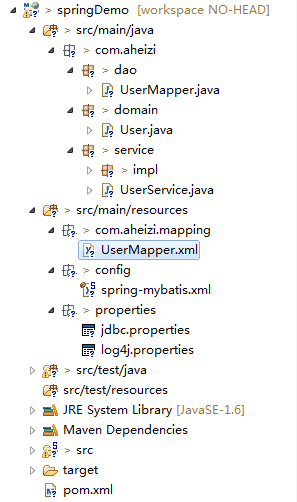
运行就不会报错了,但是我看着还是有点别扭,就是看着不爽,等以后想到好办法之后再换吧。
我就纳了个闷了,maven这样限制xml文件的位置,即没让我觉得美观,也没有感到实用。
maven项目编译漏掉src/main/java下的xml配置文件的更多相关文章
- 解决idea中maven项目无法读取src/main/java目录下面的配置文件问题
解决idea中maven项目无法读取src/main/java目录下面的配置文件问题 当我们在maven项目中使用Mybatis的时候,需要给Mybatis配置核心xml文件(MyBatis-Conf ...
- 解决maven项目无法读取src/main/java目录下面的配置文件问题
我们在用Mybatis去操作底层数据库的时候,需要用到xml配置文件,一般我们是把配置文件和dao放置在同一层目录. 但是在用idea操作maven项目的时候,我们可能会遇到无法读取到dao对应的ma ...
- maven 编译部署src/main/java下的资源文件
maven 编译部署src/main/java下的资源文件 maven默认会把src/main/resources下的所有配置文件以及src/main/java下的所有java文件打包或发布到targ ...
- maven项目无法读取src/main/java目录下的配置文件解决方法
我们在用Mybatis去操作底层数据库的时候,需要用到xml配置文件,一般我们是把配置文件和dao放置在同一层目录.但是在用idea操作maven项目的时候,我们可能会遇到无法读取到dao对应的map ...
- 解决Eclipse建立Maven项目后无src/main/java资源文件夹的办法
建立好一个Maven项目后,如果Java Resources资源文件下没有src/main/java文件夹,并且在手动创建这个文件时提示“已存在文件”.这说明,在这个项目配置中已经有了src/main ...
- eclipse中新建maven项目无法添加src/main/java问题
eclipse创建maevn web项目,在选择maven_archetype_web原型后,默认只有src/main/resources这个Source Floder. 按照maven目录结构,添加 ...
- Eclipse 中 新建maven项目 无法添加src/main/java 问题
eclipse创建maven web项目,在选择maven_archetype_web原型后,默认只有src/main/resources这个Source Floder. 按照maven目录结构,添加 ...
- maven web项目不能创建src/main/java等文件夹的问题
eclipse创建maevn web项目,在选择maven_archetype_webapp原型后,默认只有src/main/resources这个Source Floder. 按照maven目录结 ...
- maven项目自动创建src/main/resources等四个资源文件夹
如何使maven项目自动创建这四个文件夹:src/main/resources.src/main/java.src/test/java.src/test/resources 网传甚广的在Config ...
随机推荐
- Mountain Road
题意: n个车,过一条路,有不同的方向,路上不允许同时有两个方向的车,给出每个车的起始时间,方向,和经过路花费的时间,车最小间隔10个时间,求最后一个车通过路的最早的时间. 分析: dp[i][j][ ...
- BITED数学建模七日谈之七:临近比赛时的准备工作
经过前面六天的文章分享,相信大家对数学模型的相关准备.学习都有了更新的认识,希望大家能从中有所收获,以便更高效地准备比赛和学习数学模型,本文是数学建模经验谈的最后一天:临近比赛的准备工作,希望在临近比 ...
- For Microsoft Azure Network VNET to VNET Connection
将一个 Azure 虚拟网络 (VNet) 连接到另一个 Azure 虚拟网络非常类似于将虚拟网络连接到本地站点位置.这两种连接类型都使用虚拟网络网关通过 IPsec/IKE 提供安全隧道.连接的 V ...
- Yarn通信过程
yarn包括两块,一个是ResourceManager,主要的作用是管理集群上的资源,目前hadoop版本上,管理的只有cpu和内存. 另外一个叫NodeManager,这上面会跑我们的程序,叫App ...
- Mono 之 Jexus
Jexus web server for linux 是运行在Linux上的Web服务器.其安装和部署及其简单,直接支持Asp.net . 下载Jexus wget http://linux.j66. ...
- sysctl.conf
linux系统接口 允许改变正在运作linux系统接口Tcp/IP堆栈和虚拟内存系统的高级选项 用来控制Linux网络配置/proc/sys/net/core/ TCP/IP参数修改添加到/etc/s ...
- linux top命令VIRT,RES,SHR,DATA的含义
VIRT:virtual memory usage 虚拟内存1.进程“需要的”虚拟内存大小,包括进程使用的库.代码.数据等2.假如进程申请100m的内存,但实际只使用了10m,那么它会增长100m,而 ...
- 记拿到鹅厂前端开发暑期实习offer的经历
#想起来时的路 在真正拿到腾讯实习offer之前,也是看过不少人的面经,心生向往.很早在入前端坑之前,我就想着大四的时候有机会要尝试去腾讯里实习. 大一入门语言就是C++,这让我很无奈,所以我很快的就 ...
- python抓取网页例子
python抓取网页例子 最近在学习python,刚刚完成了一个网页抓取的例子,通过python抓取全世界所有的学校以及学院的数据,并存为xml文件.数据源是人人网. 因为刚学习python,写的代码 ...
- LightOJ 1341 - Aladdin and the Flying Carpet (唯一分解定理 + 素数筛选)
http://lightoj.com/volume_showproblem.php?problem=1341 Aladdin and the Flying Carpet Time Limit:3000 ...