
C#&.Net干货分享- 构建Spire-Office相关Helper操作Word、Excel、PDF等
先下载好如下的组件:
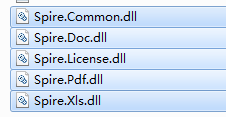
直接使用完整源码分享:
namespace Frame.Office
{
/// <summary>
/// Spire_WordHelper
/// </summary>
public static class Spire_WordHelper
{
/// <summary>
/// 设置Word图片水印
/// </summary>
/// <param name="wordFilepath"></param>
/// <param name="imageFilepath"></param>
/// <param name="waterMarkSavePath"></param>
public static void SetWordImageWaterMark(string wordFilepath, string imageFilepath, string waterMarkSavePath)
{
Document doc = new Document();
doc.LoadFromFile(wordFilepath);
PictureWatermark picture = new PictureWatermark();
picture.Picture = Image.FromFile(imageFilepath);
picture.Scaling = 80;
doc.Watermark = picture;
doc.SaveToFile(waterMarkSavePath);
}
/// <summary>
///
/// </summary>
/// <param name="wordFilepath"></param>
/// <param name="waterMarkText"></param>
/// <param name="fontSize"></param>
/// <param name="waterMarkSavePath"></param>
public static void SetWordTextWaterMark(string wordFilepath, string waterMarkText, float fontSize, string waterMarkSavePath)
{
Document document = new Document();
document.LoadFromFile(wordFilepath);
TextWatermark txtWatermark = new TextWatermark();
txtWatermark.Text = waterMarkText;
txtWatermark.FontSize = fontSize;
txtWatermark.Layout = WatermarkLayout.Diagonal;
document.Watermark = txtWatermark;
document.SaveToFile(waterMarkSavePath);
}
/// <summary>
/// 读取源文档表头文档的标题并将其仅插入另一个文档的第一页
/// </summary>
/// <param name="sourceWordFilepath">源文档路径</param>
/// <param name="toWordFilepath">目标文档路径</param>
/// <param name="saveWordFilepath">加工后保存的文档路径</param>
public static void SetDocumentHeaderFooter(string sourceWordFilepath, string toWordFilepath, string saveWordFilepath)
{
Document sourceDocument = new Document();
sourceDocument.LoadFromFile(sourceWordFilepath);
Document toDocument = new Document();
toDocument.LoadFromFile(toWordFilepath);
HeaderFooter sourceHeaderFooter = sourceDocument.Sections[0].HeadersFooters.Header;
HeaderFooter firstPageHeader = toDocument.Sections[0].HeadersFooters.FirstPageHeader;
foreach (Section section in toDocument.Sections)
{
section.PageSetup.DifferentFirstPageHeaderFooter = true;
}
firstPageHeader.Paragraphs.Clear();
foreach (DocumentObject documentObject in sourceHeaderFooter.ChildObjects)
{
firstPageHeader.ChildObjects.Add(documentObject.Clone());
}
toDocument.SaveToFile(saveWordFilepath, Spire.Doc.FileFormat.Docx);
}
/// <summary>
/// 设置文档某一个段落的背景色
/// </summary>
/// <param name="sourceWordFilepath"></param>
/// <param name="saveWordFilepath"></param>
/// <param name="paragraphsIndex"></param>
/// <param name="colorType"></param>
public static void SetDocumentParagraphBackColor(string sourceWordFilepath, string saveWordFilepath, int paragraphsIndex, Color colorType)
{
Document sourceDocument = new Document();
sourceDocument.LoadFromFile(sourceWordFilepath);
Paragraph paragaph = sourceDocument.Sections[0].Paragraphs[paragraphsIndex];
paragaph.Format.BackColor = colorType;
sourceDocument.SaveToFile(saveWordFilepath, Spire.Doc.FileFormat.Docx);
}
/// <summary>
/// 设置文档内某个指定文本,所有位置的都是高亮文本
/// </summary>
/// <param name="sourceWordFilepath"></param>
/// <param name="saveWordFilepath"></param>
/// <param name="paragraphsIndex"></param>
/// <param name="highlightText"></param>
/// <param name="colorType"></param>
public static void SetDocumentAllParagraphTextBackgroundColor(string sourceWordFilepath, string saveWordFilepath, string highlightText, Color colorType)
{
Document sourceDocument = new Document();
sourceDocument.LoadFromFile(sourceWordFilepath);
int paragraphsCount = sourceDocument.Sections[0].Paragraphs.Count;
Paragraph paragaph = null;
TextSelection textSelection = null;
TextRange textRange = null;
for (int ii = 0; ii < paragraphsCount - 1; ii++)
{
paragaph = sourceDocument.Sections[0].Paragraphs[ii];
textSelection = paragaph.Find(highlightText, true, false);
textRange = textSelection.GetAsOneRange();
textRange.CharacterFormat.TextBackgroundColor = colorType;
}
sourceDocument.SaveToFile(saveWordFilepath, Spire.Doc.FileFormat.Docx);
}
/// <summary>
/// 设置文档某一个段落内某个文本为高亮文本
/// </summary>
/// <param name="sourceWordFilepath"></param>
/// <param name="saveWordFilepath"></param>
/// <param name="paragraphsIndex"></param>
/// <param name="highlightText"></param>
/// <param name="colorType"></param>
public static void SetDocumentParagraphTextBackgroundColor(string sourceWordFilepath, string saveWordFilepath, int paragraphsIndex, string highlightText, Color colorType)
{
Document sourceDocument = new Document();
sourceDocument.LoadFromFile(sourceWordFilepath);
Paragraph paragaph = sourceDocument.Sections[0].Paragraphs[paragraphsIndex];
TextSelection textSelection = paragaph.Find(highlightText, true, false);
TextRange textRange = textSelection.GetAsOneRange();
textRange.CharacterFormat.TextBackgroundColor = colorType;
sourceDocument.SaveToFile(saveWordFilepath, Spire.Doc.FileFormat.Docx);
}
/// <summary>
/// 删除文档的页与页之间的分页符号
/// </summary>
/// <param name="sourceWordFilepath"></param>
/// <param name="fileFormat"></param>
/// <param name="saveWordFilepath"></param>
public static void DeleteDocumentObjectBreak(string sourceWordFilepath, Spire.Doc.FileFormat fileFormat, string saveWordFilepath)
{
Document sourceDocument = new Document();
sourceDocument.LoadFromFile(sourceWordFilepath, fileFormat);
for (int ii = 0; ii < sourceDocument.Sections[0].Paragraphs.Count; ii++)
{
Paragraph paragraph = sourceDocument.Sections[0].Paragraphs[ii];
for (int jj = 0; jj < paragraph.ChildObjects.Count; jj++)
{
DocumentObject documentObject = paragraph.ChildObjects[jj];
if (documentObject.DocumentObjectType == DocumentObjectType.Break)
{
Break bBreak = documentObject as Break;
paragraph.ChildObjects.Remove(bBreak);
}
}
}
sourceDocument.SaveToFile(saveWordFilepath, fileFormat);
}
/// <summary>
///
/// </summary>
/// <param name="sourceFilePath"></param>
/// <param name="errMsg"></param>
/// <returns></returns>
public static bool DocumentToPdf(string sourcePathFileName, string targetPathFileName)
{
bool flag = true;
try
{
Regex regexExcel = new Regex(@"^.*?\.(xls|xlsx)$");
Regex regexWord = new Regex(@"^.*?\.(doc|docx|ppt|pptx)$");
string fileName = Path.GetFileName(sourcePathFileName).ToLower();
if (regexExcel.IsMatch(fileName))//Excel
{
Workbook workbook = new Workbook();
workbook.LoadFromFile(sourcePathFileName);
workbook.SaveToFile(targetPathFileName, Spire.Xls.FileFormat.PDF);
}
else if (regexWord.IsMatch(fileName))//Word
{
Document document = new Document(sourcePathFileName);
document.SaveToFile(targetPathFileName, Spire.Doc.FileFormat.PDF);
}
}
catch
{
flag = false;
}
return flag;
}
}
/// <summary>
/// Spire_PDFHelper导出数据源到PDF
/// </summary>
public static class Spire_PDFHelper
{
/// <summary>
/// 提取PDF文件的文本内容
/// </summary>
/// <param name="pdfFilepath"></param>
/// <returns></returns>
public static string ReadPdfText(string pdfFilepath)
{
try
{
PdfDocument docPdf = new PdfDocument();
docPdf.LoadFromFile(pdfFilepath);
StringBuilder buffer = new StringBuilder();
foreach (PdfPageBase page in docPdf.Pages)
{
if (page.ExtractImages() != null)
{
List<Bitmap> bitmaps = new List<Bitmap>();
foreach (Image image in page.ExtractImages())
{
Bitmap bitmap = new Bitmap(image);
bitmaps.Add(bitmap);
}
buffer.Append(Aocr_ImageHelper.ReadBitmapText(bitmaps, AspriseOCRLanguages.LANGUAGE_ENG));
}
buffer.Append(page.ExtractText());
}
docPdf.Close();
return buffer.ToString();
}
catch
{
return string.Empty;
}
}
/// <summary>
/// 提取PDF中的图片
/// </summary>
/// <param name="pdfFilepath"></param>
public static void ReadPdfImage(string pdfFilepath)
{
try
{
PdfDocument docPdf = new PdfDocument();
docPdf.LoadFromFile(pdfFilepath);
IList<Image> images = new List<Image>();
foreach (PdfPageBase page in docPdf.Pages)
{
if (page.ExtractImages() != null)
{
foreach (Image image in page.ExtractImages())
{
images.Add(image);
}
}
}
docPdf.Close();
int index = 0;
foreach (Image image in images)
{
String imageFileName = String.Format("Image-{0}.png", index++);
image.Save(imageFileName, ImageFormat.Png);
}
}
catch
{
}
}
/// <summary>
/// PDF增加图片水印
/// </summary>
/// <param name="pdfFilepath">源PDF文件</param>
/// <param name="imageFilepath">水印图片</param>
/// <param name="waterMarkSavePath">水印文件保存路径</param>
public static void SetPdfImageWaterMark(string pdfFilepath, string imageFilepath, string waterMarkSavePath)
{
PdfDocument pdf = new PdfDocument();
pdf.LoadFromFile(pdfFilepath);
Image image = Image.FromFile(imageFilepath);
foreach (PdfPageBase pdfPageBase in pdf.Pages)
{
pdfPageBase.BackgroundImage = image;
}
pdf.SaveToFile(waterMarkSavePath);
}
/// <summary>
/// PDF增加文本水印
/// </summary>
/// <param name="pdfFilepath">源PDF文件</param>
/// <param name="spireTextWaterMarkPara">水印参数</param>
/// <param name="waterMarkSavePath">水印文件保存路径</param>
public static void SetPdfTextWaterMark(string pdfFilepath, SpireTextWaterMarkPara spireTextWaterMarkPara, string waterMarkSavePath)
{
PdfDocument pdf = new PdfDocument();
pdf.LoadFromFile(pdfFilepath);
foreach (PdfPageBase pdfPageBase in pdf.Pages)
{
SizeF sizeF = new SizeF(spireTextWaterMarkPara.Width, spireTextWaterMarkPara.Height);
PdfTilingBrush brush = new PdfTilingBrush(sizeF);
brush.Graphics.SetTransparency(spireTextWaterMarkPara.Alpha);
brush.Graphics.Save();
brush.Graphics.TranslateTransform(brush.Size.Width / 2, brush.Size.Height / 2);
brush.Graphics.RotateTransform(spireTextWaterMarkPara.RotateDegree);
PdfFont pdfFont = new PdfFont(spireTextWaterMarkPara.PdfFontFamily, spireTextWaterMarkPara.FontSize);
PdfStringFormat pdfStringFormat = new PdfStringFormat(spireTextWaterMarkPara.PdfTextAlignment);
brush.Graphics.DrawString(spireTextWaterMarkPara.WaterMarkText, pdfFont, spireTextWaterMarkPara.PdfBrush, spireTextWaterMarkPara.XCoordinate, spireTextWaterMarkPara.YCoordinate, pdfStringFormat);
brush.Graphics.Restore();
brush.Graphics.SetTransparency(spireTextWaterMarkPara.Alpha);
RectangleF rectangleF = new RectangleF(new PointF(0, 0), pdfPageBase.Canvas.ClientSize);
pdfPageBase.Canvas.DrawRectangle(brush, rectangleF);
}
pdf.SaveToFile(waterMarkSavePath);
}
/// <summary>
///
/// </summary>
public static void SetPdfDocumentSignature(DataTable dataTable, PdfSignatureInfo pdfSignatureInfo, string saveWordFilepath)
{
PdfDocument pdfDocument = new PdfDocument();
PdfPageBase pdfPageBase = pdfDocument.Pages.Add(PdfPageSize.A4);
float y = 10;
PdfTable pdfTable = new PdfTable();
pdfTable.Style.CellPadding = 2;
PdfBrush pdfBrush = PdfBrushes.Black;
pdfTable.Style.BorderPen = new PdfPen(pdfBrush, 0.75f);
pdfTable.Style.DefaultStyle.BackgroundBrush = PdfBrushes.SkyBlue;
pdfTable.Style.DefaultStyle.Font = new PdfTrueTypeFont(new Font("Arial", 10f));
pdfTable.Style.AlternateStyle = new PdfCellStyle();
pdfTable.Style.AlternateStyle.BackgroundBrush = PdfBrushes.LightYellow;
pdfTable.Style.AlternateStyle.Font = new PdfTrueTypeFont(new Font("Arial", 10f));
pdfTable.Style.HeaderSource = PdfHeaderSource.ColumnCaptions;
pdfTable.Style.HeaderStyle.BackgroundBrush = PdfBrushes.CadetBlue;
pdfTable.Style.HeaderStyle.Font = new PdfTrueTypeFont(new Font("Arial", 11f, FontStyle.Bold));
pdfTable.Style.HeaderStyle.StringFormat = new PdfStringFormat(PdfTextAlignment.Center);
pdfTable.Style.ShowHeader = true;
pdfTable.DataSourceType = PdfTableDataSourceType.TableDirect;
pdfTable.DataSource = dataTable;
float width = pdfPageBase.Canvas.ClientSize.Width - (pdfTable.Columns.Count + 1) * pdfTable.Style.BorderPen.Width;
pdfTable.Columns[0].Width = width * 0.24f * width;
pdfTable.Columns[0].StringFormat = new PdfStringFormat(PdfTextAlignment.Left, PdfVerticalAlignment.Middle);
pdfTable.Columns[1].Width = width * 0.21f * width;
pdfTable.Columns[1].StringFormat = new PdfStringFormat(PdfTextAlignment.Left, PdfVerticalAlignment.Middle);
pdfTable.Columns[2].Width = width * 0.24f * width;
pdfTable.Columns[2].StringFormat = new PdfStringFormat(PdfTextAlignment.Left, PdfVerticalAlignment.Middle);
pdfTable.Columns[3].Width = width * 0.13f * width;
pdfTable.Columns[3].StringFormat = new PdfStringFormat(PdfTextAlignment.Right, PdfVerticalAlignment.Middle);
pdfTable.Columns[4].Width = width * 0.18f * width;
pdfTable.Columns[4].StringFormat = new PdfStringFormat(PdfTextAlignment.Right, PdfVerticalAlignment.Middle);
PdfLayoutResult result = pdfTable.Draw(pdfPageBase, new PointF(30, y));
y = y + result.Bounds.Height + 10;
PdfCertificate pdfCertificate = new PdfCertificate(pdfSignatureInfo.PdfCertificatePath, pdfSignatureInfo.PdfCertificatePathPwd);
PdfSignature pdfSignature = new PdfSignature(pdfDocument, pdfPageBase, pdfCertificate, pdfSignatureInfo.PdfSignatureName);
RectangleF rectangleF = new RectangleF(new PointF(150, y), new SizeF(260, 90));
pdfSignature.Bounds = rectangleF;
SetPdfSignatureInfo(pdfSignature, pdfSignatureInfo);
pdfDocument.SaveToFile(saveWordFilepath, Spire.Pdf.FileFormat.PDF);
}
/// <summary>
/// 设置签章属性
/// </summary>
/// <param name="pdfSignature"></param>
/// <param name="pdfSignatureInfo"></param>
public static void SetPdfSignatureInfo(PdfSignature pdfSignature, PdfSignatureInfo pdfSignatureInfo)
{
pdfSignature.NameLabel = pdfSignatureInfo.NameLabel;
pdfSignature.Name = pdfSignatureInfo.Name;
pdfSignature.DistinguishedName = pdfSignatureInfo.DistinguishedName;
pdfSignature.LocationInfoLabel = pdfSignatureInfo.LocationInfoLabel;
pdfSignature.LocationInfo = pdfSignatureInfo.LocationInfo;
pdfSignature.ReasonLabel = pdfSignatureInfo.ReasonLabel;
pdfSignature.Reason = pdfSignatureInfo.Reason;
pdfSignature.DateLabel = pdfSignatureInfo.DateLabel;
pdfSignature.Date = pdfSignatureInfo.Date;
pdfSignature.ContactInfoLabel = pdfSignatureInfo.ContactInfoLabel;
pdfSignature.ContactInfo = pdfSignatureInfo.ContactInfo;
pdfSignature.Certificated = pdfSignatureInfo.Certificated;
pdfSignature.GraphicsMode = pdfSignatureInfo.GraphicsMode;
pdfSignature.SignImageSource = PdfImage.FromFile(pdfSignatureInfo.SignImageSourcePath);
pdfSignature.DocumentPermissions = PdfCertificationFlags.ForbidChanges;
}
}
/// <summary>
/// Spire操作excel
/// </summary>
public static class Spire_ExcelHelper
{
/// <summary>
/// Excel增加水印
/// </summary>
/// <param name="fileName"></param>
/// <param name="watermarkText"></param>
/// <returns></returns>
public static string AddExcelSpire(string fileName, string watermarkText)
{
//初始化一个新工作簿并加载要添加水印的文件
Workbook workbook = new Workbook();
workbook.LoadFromFile(fileName);
//在页眉插入图片
Font font = new Font("arial", 40);
foreach (Worksheet sheet in workbook.Worksheets)
{
//调用DrawText()方法新建图片
Image imgWtrmrk = DrawText(watermarkText, font, Color.LightCoral, System.Drawing.Color.White, sheet.PageSetup.PageHeight, sheet.PageSetup.PageWidth);
////将页眉图片设置为左对齐
//sheet.PageSetup.LeftHeaderImage = imgWtrmrk;
//sheet.PageSetup.LeftHeader = "&G";
////水印只会在此种模式下显现
//sheet.ViewMode = ViewMode.Layout;
sheet.PageSetup.BackgoundImage = imgWtrmrk as Bitmap;
}
workbook.SaveToFile(fileName);
return string.Empty;
}
/// <summary>
///
/// </summary>
/// <param name="text"></param>
/// <param name="font"></param>
/// <param name="textColor"></param>
/// <param name="backColor"></param>
/// <param name="height"></param>
/// <param name="width"></param>
/// <returns></returns>
private static Image DrawText(String text, System.Drawing.Font font, Color textColor, Color backColor, double height, double width)
{
//创建一个指定宽度和高度的位图图像
Image img = new Bitmap((int)width, (int)height);
Graphics drawing = Graphics.FromImage(img);
//获取文本大小
SizeF textSize = drawing.MeasureString(text, font);
//旋转图片
drawing.TranslateTransform(((int)width - textSize.Width) / 2, ((int)height - textSize.Height) / 2);
drawing.RotateTransform(-45);
drawing.TranslateTransform(-((int)width - textSize.Width) / 2, -((int)height - textSize.Height) / 2);
//绘制背景
drawing.Clear(backColor);
//创建文本刷
Brush textBrush = new SolidBrush(textColor);
drawing.DrawString(text, font, textBrush, ((int)width - textSize.Width) / 2, ((int)height - textSize.Height) / 2);
drawing.Save();
return img;
}
}
/// <summary>
/// 签章参数
/// </summary>
public class PdfSignatureInfo
{
public PdfSignatureInfo()
{
}
/// <summary>
///
/// </summary>
public string PdfCertificatePath { get; set; }
/// <summary>
///
/// </summary>
public string PdfCertificatePathPwd { get; set; }
/// <summary>
///
/// </summary>
public string PdfSignatureName { get; set; }
/// <summary>
///
/// </summary>
public bool Certificated { get; set; }
/// <summary>
///
/// </summary>
public string ContactInfo { get; set; }
/// <summary>
///
/// </summary>
public string ContactInfoLabel { get; set; }
/// <summary>
///
/// </summary>
public DateTime Date { get; set; }
/// <summary>
///
/// </summary>
public string DateLabel { get; set; }
/// <summary>
///
/// </summary>
public string DigitalSigner { get; set; }
/// <summary>
///
/// </summary>
public string DigitalSignerLable { get; set; }
/// <summary>
///
/// </summary>
public string DistinguishedName { get; set; }
/// <summary>
///
/// </summary>
public string DistinguishedNameLabel { get; set; }
/// <summary>
///
/// </summary>
public bool IsConfiguerGraphicFilledBounds { get; set; }
/// <summary>
///
/// </summary>
public bool IsTag { get; set; }
/// <summary>
///
/// </summary>
public string LocationInfo { get; set; }
/// <summary>
///
/// </summary>
public string LocationInfoLabel { get; set; }
/// <summary>
///
/// </summary>
public string Name { get; set; }
/// <summary>
///
/// </summary>
public string NameLabel { get; set; }
/// <summary>
///
/// </summary>
public string Reason { get; set; }
/// <summary>
///
/// </summary>
public string ReasonLabel { get; set; }
/// <summary>
///
/// </summary>
public GraphicMode GraphicsMode { get; set; }
/// <summary>
/// 签章图片地址
/// </summary>
public string SignImageSourcePath { get; set; }
}
/// <summary>
///
/// </summary>
public class SpireTextWaterMarkPara
{
/// <summary>
///
/// </summary>
public SpireTextWaterMarkPara()
{
PdfFontFamily = PdfFontFamily.Helvetica;
PdfBrush = PdfBrushes.Blue;
PdfTextAlignment = PdfTextAlignment.Center;
Width = 0;
Height = 0;
XCoordinate = 0;
YCoordinate = 0;
}
/// <summary>
/// 水印文本
/// </summary>
public string WaterMarkText { get; set; }
/// <summary>
/// 透明度:0,10%,20%。。。。。90%,100%
/// 0,0.1f,0.2f,。。。。。0.9f,1
/// </summary>
public float Alpha { get; set; }
/// <summary>
/// 旋转度数
/// </summary>
public float RotateDegree { get; set; }
/// <summary>
/// 字体样式
/// </summary>
public PdfFontFamily PdfFontFamily { get; set; }
/// <summary>
/// 字体大小
/// </summary>
public int FontSize { get; set; }
/// <summary>
/// 文本颜色,获取Aqua....画笔
/// </summary>
public PdfBrush PdfBrush { get; set; }
/// <summary>
/// 指定文本对齐到...
/// </summary>
public PdfTextAlignment PdfTextAlignment { get; set; }
/// <summary>
/// PDF的左边距离
/// </summary>
public float Width { get; set; }
/// <summary>
/// PDF的上边距离
/// </summary>
public float Height { get; set; }
/// <summary>
/// X坐标
/// </summary>
public float XCoordinate { get; set; }
/// <summary>
/// Y坐标
/// </summary>
public float YCoordinate { get; set; }
}
}
C#&.Net干货分享- 构建Spire-Office相关Helper操作Word、Excel、PDF等的更多相关文章
- C#&.Net干货分享- 构建PrinterHelper直接调用打印机相关操作
namespace Frame.Printer{ /// <summary> /// /// </summary> public class Prin ...
- C#&.Net干货分享-构建Aocr_ImageHelper读取图片文字做解析
直接源码,就是这么干脆... namespace Frame.Image{ /// <summary> /// /// </summary> publ ...
- C#&.Net干货分享-构建后台自动定时任务的源码
1.创建一个自动处理中心任务参数的类,直接源码: namespace Frame.AutoProcess{ /// <summary> /// 委托(用于异步处理任务) ...
- Web方式预览Office/Word/Excel/pdf文件解决方案
最近在做项目时需要在Web端预览一些Office文件,经过在万能的互联网上一番搜索确定并解决了. 虽然其中碰到的一些问题已经通过搜索和自己研究解决了,但是觉得有必要将整个过程记录下来,以方便自己以后查 ...
- Atitit.office word excel ppt pdf 的web在线预览方案与html转换方案 attilax 总结
Atitit.office word excel ppt pdf 的web在线预览方案与html转换方案 attilax 总结 1. office word excel pdf 的web预览要求 ...
- Java解析OFFICE(word,excel,powerpoint)以及PDF的实现方案及开发中的点滴分享
Java解析OFFICE(word,excel,powerpoint)以及PDF的实现方案及开发中的点滴分享 在此,先分享下写此文前的经历与感受,我所有的感觉浓缩到一个字,那就是:"坑&qu ...
- 干货分享:SQLSERVER使用裸设备
干货分享:SQLSERVER使用裸设备 这篇文章也适合ORACLE DBA和MYSQL DBA 阅读 裸设备适用于Linux和Windows 在ORACLE和MYSQL里也是支持裸设备的!! 介绍 大 ...
- iOS - GitHub干货分享(APP引导页的高度集成 - DHGuidePageHUD - ①)
好长时间没更新博客, 是时候来一波干货分享了;APP引导页话不多说每一个APP都会用到,分量不重但是不可缺少,不论是APP的首次安装还是版本的更新,首先展现给用户眼前的也就只有它了吧,当然这里讲的不是 ...
- Spire.Office组件使用例子
用.NET开发程序通常要涉及到对Office文件读写操作,比较常见的操作比如提取文本,导出Excel格式数据,动态生成word文档,生成pdf文档等. 实现这些功能通常需要在服务端安装office软件 ...
随机推荐
- 2018 ACM/ICPC 南京 I题 Magic Potion
题解:最大流板题:增加两个源点,一个汇点.第一个源点到第二个源点连边,权为K,然后第一个源点再连其他点(英雄点)边权各为1,然后英雄和怪物之间按照所给连边(边权为1). 每个怪物连终点,边权为1: 参 ...
- Node笔记 - process.cwd() 和 __dirname 的区别
process.cwd() 返回工作目录 __dirname 返回脚本所在的目录位置 单看概念觉得都差不多,有种似懂非懂的感觉,那么接下用一个简单易懂的例子来理解下这两者的区别,在此之前先看一个方法 ...
- ARTS-S mac终端ftp命令行上传下载文件
上传 ftp -u ftp://root:123456@10.11.12.3/a.txt a.txt 下载 ftp -o a.txt ftp://root:123456@10.11.12.13/a.t ...
- flash插件
偶尔见到别人的博客侧边栏 有一些很有意思的flash插件,也想加入到自己博客里面,这里来大概讲一下~ 一.支持js代码 首先要在 博客设置 >开启博客侧边栏公告的js代码支持,提交审核后 很快 ...
- 《大话设计模式》——简单工厂模式(Python版)
简单工厂模式(Simple Factory Pattern):是通过专门定义一个类来负责创建其他类的实例,被创建的实例通常都具有共同的父类. 例: 使用Python设计一个控制台计算器,要求输入两个数 ...
- 使用t-SNE做降维可视化
最近在做一个深度学习分类项目,想看看训练集数据的分布情况,但由于数据本身维度接近100,不能直观的可视化展示,所以就对降维可视化做了一些粗略的了解以便能在低维空间中近似展示高维数据的分布情况,以下内容 ...
- MySql数据库之连接查询
在MySql数据库中连接查询分为以下几种方式: 1.内连接查询 内连接查询通过关键字 inner join 关键字来实现,通过代码实现: select * from 表1 inner join 表2 ...
- aspnet boilerplate 随笔二
项目框架介绍: 1:Application: 在service里面事件具体业务,Dto相当于viewmodel实现了验证 2:Core:实现了数据层Model 3:EntityFrameworkC ...
- Nmap参数详解(含扫描参数原理解释)
语法结构:nmap [Scan Type(s)] [Options] {target specification} 端口状态介绍 open:确定端口开放,可达 closed :关闭的端口对于nmap也 ...
- asp.net core web应用以服务的方式安装运行
目录 一.方案:使用Microsoft.Extensions.Hosting.WindowsServices实现: 一.方案:使用Microsoft.Extensions.Hosting.Window ...