
SSM 实现登录注册功能
1.上一篇SSM框架搭建好了之后就要开始写功能了,现在来写一个简单的登录注册功能
这几个包是自己手动创建的,然后往里面写代码
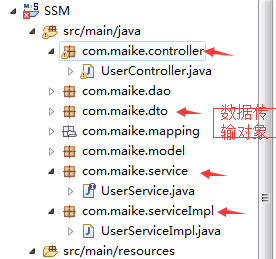
2.代码详情
 package com.maike.controller;

 import javax.servlet.http.HttpServletRequest;

 import org.springframework.beans.factory.annotation.Autowired;

 import org.springframework.stereotype.Controller;

 import org.springframework.web.bind.annotation.RequestMapping;

 import org.springframework.web.servlet.ModelAndView;

 import com.maike.dto.UserDto;

 import com.maike.model.User;

 import com.maike.service.UserService;

 /**

  *

  * @author tan

  *

  */

 @Controller

 @RequestMapping("/user")

 public class UserController {

     @Autowired

     private UserService userService;

     /**

      * toRegister: 跳转到注册页面<br/>

      * @return

      */

     @RequestMapping("/toRegister")

     public String toRegister(){

         return "register";

     }

     /**

      * addUser:实现注册 <br/>

      * @param userDto

      * @return

      */

     @RequestMapping("/addUser")

     public ModelAndView addUser(UserDto userDto) {

         int k = userService.addUser(userDto);

         if(k > 0) {

             ModelAndView view = new ModelAndView("login");

             return view;

         }else {

             ModelAndView view = new ModelAndView("register");

             return view;

         }

     }

     /**

      * 登录判断

      * @param userDto

      * @return

      */

     @RequestMapping("/judgeLogin")

     public ModelAndView judgeLogin(UserDto userDto) {

         int k = userService.judgeLogin(userDto);

         if(k > 0) {

             ModelAndView view = new ModelAndView("success");

             return view;

         }else {

             ModelAndView view = new ModelAndView("login");

             return view;

         }

     }

 }
UserController
 package com.maike.dto;

 import java.io.Serializable;

 public class UserDto implements Serializable {

     /**

      *

      */

     private static final long serialVersionUID = 1L;

     private String userName;

     private String userPwd;

     private String reUserPwd;

     public String getUserName() {

         return userName;

     }

     public void setUserName(String userName) {

         this.userName = userName;

     }

     public String getUserPwd() {

         return userPwd;

     }

     public void setUserPwd(String userPwd) {

         this.userPwd = userPwd;

     }

     public String getReUserPwd() {

         return reUserPwd;

     }

     public void setReUserPwd(String reUserPwd) {

         this.reUserPwd = reUserPwd;

     }

     public static long getSerialversionuid() {

         return serialVersionUID;

     }

     @Override

     public String toString() {

         return "UserDto [userName=" + userName + ", userPwd=" + userPwd + ", reUserPwd=" + reUserPwd + "]";

     }

 }
UserDto
UserMapper.xml
  <!-- 通过用户名查询用户 -->

   <select id="selectByName" parameterType="java.lang.String" resultMap="BaseResultMap">

       SELECT

       <include refid="Base_Column_List" />

       FROM user WHERE user_name=#{userName,jdbcType=VARCHAR}

   </select>

   <!--  通过用户名密码查询 -->

   <select id="selectByNamePwd" parameterType="java.lang.String" resultMap="BaseResultMap">

     select

     <include refid="Base_Column_List" />

     from user

     where user_name=#{userName,jdbcType=VARCHAR} and user_pwd=#{userPwd,jdbcType=VARCHAR}

   </select>

   <!--  添加用户信息 -->

   <insert id="insert" parameterType="com.maike.model.User">

       INSERT INTO user(user_id, user_name, user_pwd) values(#{userId,jdbcType=INTEGER}, #{userName,jdbcType=VARCHAR}, #{userPwd,jdbcType=VARCHAR})

   </insert>
UserMapper.java
     int insert(User user);

     User selectByName(String userName);

     User selectByNamePwd(@Param("userName") String userName,@Param("userPwd") String userPwd);
 package com.maike.service;

 import com.maike.dto.UserDto;

 public interface UserService {

     int addUser(UserDto userDto);

     int judgeLogin(UserDto userDto);

 }
UserService
 package com.maike.serviceImpl;

 import org.springframework.beans.factory.annotation.Autowired;

 import org.springframework.stereotype.Service;

 import com.maike.dao.UserMapper;

 import com.maike.dto.UserDto;

 import com.maike.model.User;

 import com.maike.service.UserService;

 @Service

 public class UserServiceImpl implements UserService {

     @Autowired

     private UserMapper userMapper;

     /**

      * addUser: 添加用户<br/>

      */

     public int addUser(UserDto userDto) {

         // TODO Auto-generated method stub

         int k = 0;

         String userName = userDto.getUserName();

         String userPwd = userDto.getUserPwd();

         String reUserPwd = userDto.getReUserPwd();

         if("" == userName || "" == userPwd|| "" == reUserPwd) {

             return k;

         }

         if(!userPwd.equals(reUserPwd)) {

             return k;

         }

         User u = userMapper.selectByName(userName);

         if(null != u) {

             return k;

         }

         User user = new User();

         user.setUserName(userName);

         user.setUserPwd(reUserPwd);

         k = userMapper.insert(user);

         return k;

     }

     /**

      * 登录判断

      */

     public int judgeLogin(UserDto userDto) {

         // TODO Auto-generated method stub

         int k = 0;

         String userName = userDto.getUserName();

         String userPwd = userDto.getUserPwd();

         if("" == userName || "" == userPwd) {

             return 0;

         }

         User user = userMapper.selectByNamePwd(userName, userPwd);

         if(null != user) {

             k = 1;

             return k;

         }

         return 0;

     }

 }
UserServiceImpl
JSP
 <%@ page language="java" contentType="text/html; charset=utf-8"

     pageEncoding="utf-8"%>

 <!DOCTYPE html PUBLIC "-//W3C//DTD HTML 4.01 Transitional//EN" "http://www.w3.org/TR/html4/loose.dtd">

 <html>

 <head>

 <meta http-equiv="Content-Type" content="text/html; charset=utf-8">

 <title>注册页面</title>

 </head>

 <body>

   <br/>

   <br/>

   <br/>

     <form action="addUser">

        <table align = "center" >

            <tr>

                <td>用户名</td><td><input type = "text" name = "userName"></td>

            </tr>

            <tr>

                <td>密码</td><td><input type = "password" name = "userPwd"></td>

            </tr>

            <tr>

                <td>确认密码</td><td><input type = "password" name = "reUserPwd"></td>

            </tr>

            <tr>

                <td colspan="2" align = "center"><input type = "submit" value = "注册" style = "background-color: Cyan;color:blue"></td>

            </tr>

        </table>

     </form>

 </body>

 </html>
register
 <%@ page language="java" contentType="text/html; charset=utf-8"

     pageEncoding="utf-8"%>

 <!DOCTYPE html PUBLIC "-//W3C//DTD HTML 4.01 Transitional//EN" "http://www.w3.org/TR/html4/loose.dtd">

 <html>

 <head>

 <meta http-equiv="Content-Type" content="text/html; charset=utf-8">

 <title>登录页面</title>

 </head>

 <body>

   <br/>

   <br/>

   <br/>

     <form action="user/judgeLogin">

        <table align = "center">

            <tr>

                <td>用户名</td><td><input type = "text" name = "userName"></td>

            </tr>

            <tr>

                <td>密码</td><td><input type = "password" name = "userPwd"></td>

            </tr>

            <tr>

                <td align = "left"><input type = "submit" value = "登录" style = "background-color: Cyan;color:blue"></td>

                <td align = "right" ><button style = "background-color: Cyan;color:blue"><a href = "/SSM/user/toRegister">注册</a></button></td>

            </tr>

        </table>

     </form>

 </body>

 </html>
login
3.最好部署到Tomcat上 运行成功

SSM 实现登录注册功能的更多相关文章
- Java Spring+Mysql+Mybatis 实现用户登录注册功能
前言: 最近在学习Java的编程,前辈让我写一个包含数据库和前端的用户登录功能,通过看博客等我先是写了一个最基础的servlet+jsp,再到后来开始用maven进行编程,最终的完成版是一个 Spri ...
- Node.js实现登录注册功能
使用Node.js + Navicat for mysql实现的登录注册功能 数据库中存在有”user_id,user_name,password,user_img,user_number“字段,其中 ...
- flask 开发用户登录注册功能
flask 开发用户登录注册功能 flask开发过程议案需要四个模块:html页面模板.form表单.db数据库操作.app视图函数 1.主程序 # app.py # Auther: hhh5460 ...
- vue koa2 mongodb 从零开始做个人博客(一) 登录注册功能前端部分
0.效果演示 插入视频插不进来,就很烦.可以出门右拐去优酷看下(点我!). 1.准备工作 1.1前端框架 前端使用了基于vue.js的nuxt.js.为什么使用nuxt.js? 首先我做的是博客的项目 ...
- JAVAEE_Servlet_20_登录注册功能
实现登录注册功能 注册功能 import javax.servlet.ServletException; import javax.servlet.http.HttpServlet; import j ...
- JAVAEE——宜立方商城11:sso登录注册功能实现、通过token获得用户信息、Ajax跨域请求(jsonp)
1. 学习计划 第十一天: 1.sso注册功能实现 2.sso登录功能实现 3.通过token获得用户信息 4.Ajax跨域请求(jsonp) 2. Sso系统工程搭建 需要创建一个sso服务工程,可 ...
- App登录注册功能,怎样做到用户体验最佳?
用户登录系统,可以细分为三项功能模块,分别是:登录.注册和密码找回.本文作者将结合自身经历,谈谈他在做这块的时候一些想法,主要是涉及业务流程. 登录和注册功能,不论是PC端还是移动端,大多数产品都会涉 ...
- PHP实现用户登录注册功能
初学php做了一些比较常见且有用的页面,放在上面记录一下咯 我是用了bootstrap框架里面的模态框做注册登陆页面,这样页面比较美观 页面效果: 注册成功条件/功能: 1)用户名不能冲突 2)两次密 ...
- 一个关于vue+mysql+express的全栈项目(三)------ 登录注册功能的实现(已经密码安全的设计)
本系列文章,主要是一个前端的视角来实现一些后端的功能,所以不会讲太多的前端东西,主要是分享做这个项目学到的一些东西,,,,, 好了闲话不多说,我们开始搭建后端服务,这里我们采用node的express ...
随机推荐
- 【实习第十天】odoo开发基础整合
前言 发文时间是2019年7月19日.提一下学习odoo的感受,odoo目前在国内并不是很流行,且主流是在企业型软件,所以导致目前odoo在网上的文献很少,学习相对来说比其他框架吃力.以下为大家总结1 ...
- web项目的初始搭建和intellij的tomcat的配置
点击web application
- sql语句中给列参数取别名及相关注意事项
1.使用双引号 select count(*) "总数" from table: 2.使用单引号 select count(*) '总数' from table: 3.直接加别名, ...
- mysql登录错误:'Access denied for user 'root'@'localhost'
首先是不知道怎么忽然mysql用命令行,workbench都登录不了,都提示'Access denied for user 'root'@'localhost'. 数据库卸载重装了几次都不行.好像感觉 ...
- 第二篇:C++画圆
安装GUI开发工具easyX #include <graphics.h>#include <Windows.h> int main(void) { initgraph(640, ...
- tensorflow和pytorch教程
https://github.com/dragen1860/Deep-Learning-with-TensorFlow-book
- 一篇和Redis有关的锁和事务的文章
部分参考链接 Transaction StackExchange.Redis Transaction hashest 正文 Redis 是一种基于内存的单线程数据库.意味着所有的命令是一个接一个的执行 ...
- Git终端命令行的常用操作
一.git源代码管理的优点 方便多人协同开发.工作 降低代码的管理成本 良好的分支管理机制 二.结构分析 服务端和客户端都有版本控制能力,都能进行代码的提交.合并 结构一: 结构二: 三.工作区的创建 ...
- 在eclipse中添加jdk源码
window->Preferences->java->Installed JREs 点击你的jre然后点右边的Edit 找到以rt.jar结尾的jar,点击右边的Source Att ...
- Spring Boot Redis 解析
redis使用示例 本示例主要内容 使用lettuce操作redis redis字符串存储(RedisStringController.java) redis对象存储(RedisObjectContr ...