
python 编程2
一、课堂练习
描述
使用input输入若干个数,输出个数以及其中最大的数
1.普通方法实现
def max(*a):

    m=a[0]

    b=0

    for x in a:

        if x>m:

            m=x

        b+=1

    print(b)

    return m

a=input().split()

lst=[]

for i in a:

    lst.append(int(i))

print(max(*lst))
2.用列表推导式实现
def max(*a):

    m=a[0]

    b=0

    for x in a:

        if x>m:

            m=x

        b+=1

    print(b)

    return m

a=input().split()

lst=[int(i) for i in a]

print(max(*lst))
二、列表推导式
列表推导式(又称列表解析式)提供了一种简明扼要的方法来创建列表。
它的结构是在一个中括号里包含一个表达式,然后是一个for语句,然后是 0 个或多个 for 或者 if 语句。那个表达式可以是任意的,意思是你可以在列表中放入任意类型的对象。返回结果将是一个新的列表,在这个以 if 和 for 语句为上下文的表达式运行完成之后产生。
列表推导式的执行顺序:各语句之间是嵌套关系,左边第二个语句是最外层,依次往右进一层,左边第一条语句是最后一层。
[x*y for x in range(1,5) if x > 2 for y in range(1,4) if y < 3]
他的执行顺序是:
for x in range(1,5)

    if x > 2

        for y in range(1,4)

            if y < 3

                x*y
1、示例
方法1
egg_list1 = []

for i in range(10):

    egg_list1.append('鸡蛋%s' % i)

print(egg_list1)
方法2
egg_list2 = ['鸡蛋%s' %i for i in range(10)]

print(egg_list2)
2、语法
[expression for item1 in iterable1 if condition1

for item2 in iterable2 if condition2

...

for itemN in iterableN if conditionN

]

类似于

ret=[]

    for item1 in iterable1:

        if condition1:

            for item2 in iterable2:

                if condition2:

                    ...

                    for itemN in iterableN:

                        if conditionN:

                            ret.append(expression)
3、优点:方便,改变了编程习惯,可称之为声明式编程。
三、海龟绘图
在1966年,Seymour Papert和Wally Feurzig发明了一种专门给儿童学习编程的语言——LOGO语言,它的特色就是通过编程指挥一个小海龟(turtle)在屏幕上绘图。
海龟绘图(Turtle Graphics)后来被移植到各种高级语言中,Python内置了turtle库,基本上100%复制了原始的Turtle Graphics的所有功能。
我们来看一个指挥小海龟绘制一个长方形的简单代码:
# 导入turtle包的所有内容:

from turtle import *

# 设置笔刷宽度:

width(4)

# 前进:

forward(200)

# 右转90度:

right(90)

# 笔刷颜色:

pencolor('red')

forward(100)

right(90)

pencolor('green')

forward(200)

right(90)

pencolor('blue')

forward(100)

right(90)

# 调用done()使得窗口等待被关闭,否则将立刻关闭窗口:

done()
在命令行运行上述代码,会自动弹出一个绘图窗口,然后绘制出一个长方形:

从程序代码可以看出,海龟绘图就是指挥海龟前进、转向,海龟移动的轨迹就是绘制的线条。要绘制一个长方形,只需要让海龟前进、右转90度,反复4次。
调用width()函数可以设置笔刷宽度,调用pencolor()函数可以设置颜色。更多操作请参考turtle库的说明。
绘图完成后,记得调用done()函数,让窗口进入消息循环,等待被关闭。否则,由于Python进程会立刻结束,将导致窗口被立刻关闭。
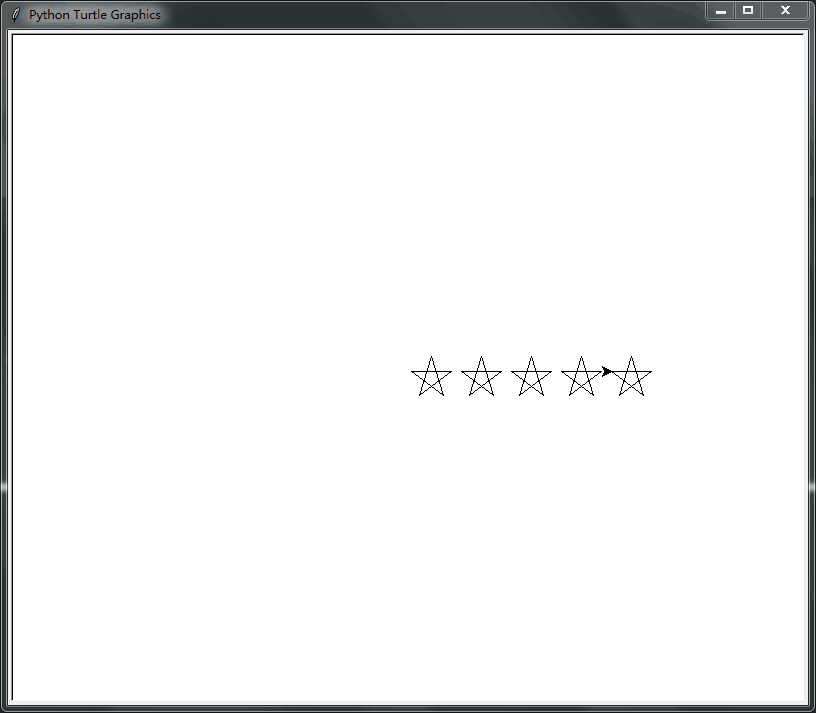
turtle包本身只是一个绘图库,但是配合Python代码,就可以绘制各种复杂的图形。例如,通过循环绘制5个五角星:
from turtle import *

def drawStar(x, y):

    pu()

    goto(x, y)

    pd()

    # set heading: 0

    seth(0)

    for i in range(5):

        fd(40)

        rt(144)

for x in range(0, 250, 50):

    drawStar(x, 0)

done()
程序执行效果如下:
使用递归,可以绘制出非常复杂的图形。例如,下面的代码可以绘制一棵分型树:
from turtle import *

# 设置色彩模式是RGB:

colormode(255)

lt(90)

lv = 14

l = 120

s = 45

width(lv)

# 初始化RGB颜色:

r = 0

g = 0

b = 0

pencolor(r, g, b)

penup()

bk(l)

pendown()

fd(l)

def draw_tree(l, level):

    global r, g, b

    # save the current pen width

    w = width()

    # narrow the pen width

    width(w * 3.0 / 4.0)

    # set color:

    r = r + 1

    g = g + 2

    b = b + 3

    pencolor(r % 200, g % 200, b % 200)

    l = 3.0 / 4.0 * l

    lt(s)

    fd(l)

    if level < lv:

        draw_tree(l, level + 1)

    bk(l)

    rt(2 * s)

    fd(l)

    if level < lv:

        draw_tree(l, level + 1)

    bk(l)

    lt(s)

    # restore the previous pen width

    width(w)

speed("fastest")

draw_tree(l, 4)

done()
执行上述程序需要花费一定的时间,最后的效果如下:

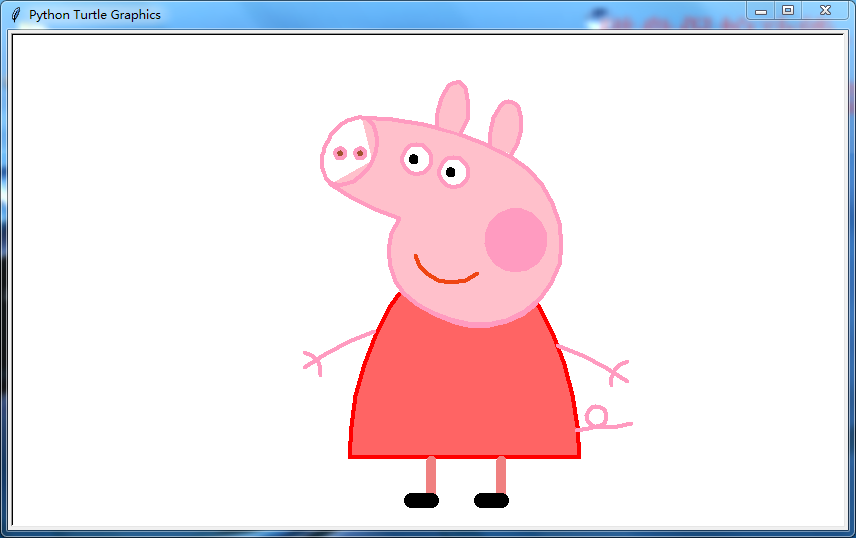
下面绘制一个小猪佩奇:
#!/usr/bin/python

# -*- coding: utf-8 -*-

"""

@time :2018/10/10 10:18

@author: yang.bin

"""

# coding:utf-8

import turtle as t

# 绘制小猪佩奇

# =======================================

t.pensize(4)

t.hideturtle()

t.colormode(255)

t.color((255, 155, 192), "pink")

t.setup(840, 500)

t.speed(10)

# 鼻子

t.penup()

t.goto(-100,100)

t.pendown()

t.seth(-30)

t.begin_fill()

a = 0.4

for i in range(120):

    if 0 <= i < 30 or 60 <= i < 90:

        a = a+0.08

        t.left(3)  # 向左转3度

        t.forward(a)  # 向前走a的步长

    else:

        a = a-0.08

        t.left(3)

        t.forward(a)

        t.end_fill()

t.penup()

t.seth(90)

t.forward(25)

t.seth(0)

t.forward(10)

t.pendown()

t.pencolor(255, 155, 192)

t.seth(10)

t.begin_fill()

t.circle(5)

t.color(160, 82, 45)

t.end_fill()

t.penup()

t.seth(0)

t.forward(20)

t.pendown()

t.pencolor(255, 155, 192)

t.seth(10)

t.begin_fill()

t.circle(5)

t.color(160, 82, 45)

t.end_fill()

# 头

t.color((255, 155, 192), "pink")

t.penup()

t.seth(90)

t.forward(41)

t.seth(0)

t.forward(0)

t.pendown()

t.begin_fill()

t.seth(180)

t.circle(300, -30)

t.circle(100, -60)

t.circle(80, -100)

t.circle(150, -20)

t.circle(60, -95)

t.seth(161)

t.circle(-300, 15)

t.penup()

t.goto(-100, 100)

t.pendown()

t.seth(-30)

a = 0.4

for i in range(60):

    if 0 <= i < 30 or 60 <= i <90:

        a = a+0.08

        t.left(3)  # 向左转3度

        t.forward(a)  # 向前走a的步长

    else:

        a = a-0.08

        t.left(3)

        t.forward(a)

        t.end_fill()

# 耳朵

t.color((255, 155, 192), "pink")

t.penup()

t.seth(90)

t.forward(-7)

t.seth(0)

t.forward(70)

t.pendown()

t.begin_fill()

t.seth(100)

t.circle(-50, 50)

t.circle(-10, 120)

t.circle(-50, 54)

t.end_fill()

t.penup()

t.seth(90)

t.forward(-12)

t.seth(0)

t.forward(30)

t.pendown()

t.begin_fill()

t.seth(100)

t.circle(-50, 50)

t.circle(-10, 120)

t.circle(-50, 56)

t.end_fill()

#眼睛

t.color((255, 155, 192), "white")

t.penup()

t.seth(90)

t.forward(-20)

t.seth(0)

t.forward(-95)

t.pendown()

t.begin_fill()

t.circle(15)

t.end_fill()

t.color("black")

t.penup()

t.seth(90)

t.forward(12)

t.seth(0)

t.forward(-3)

t.pendown()

t.begin_fill()

t.circle(3)

t.end_fill()

t.color((255, 155, 192), "white")

t.penup()

t.seth(90)

t.forward(-25)

t.seth(0)

t.forward(40)

t.pendown()

t.begin_fill()

t.circle(15)

t.end_fill()

t.color("black")

t.penup()

t.seth(90)

t.forward(12)

t.seth(0)

t.forward(-3)

t.pendown()

t.begin_fill()

t.circle(3)

t.end_fill()

# 腮

t.color((255, 155, 192))

t.penup()

t.seth(90)

t.forward(-95)

t.seth(0)

t.forward(65)

t.pendown()

t.begin_fill()

t.circle(30)

t.end_fill()

# 嘴

t.color(239, 69, 19)

t.penup()

t.seth(90)

t.forward(15)

t.seth(0)

t.forward(-100)

t.pendown()

t.seth(-80)

t.circle(30, 40)

t.circle(40, 80)

# 身体

t.color("red", (255, 99, 71))

t.penup()

t.seth(90)

t.forward(-20)

t.seth(0)

t.forward(-78)

t.pendown()

t.begin_fill()

t.seth(-130)

t.circle(100,10)

t.circle(300,30)

t.seth(0)

t.forward(230)

t.seth(90)

t.circle(300,30)

t.circle(100,3)

t.color((255,155,192),(255,100,100))

t.seth(-135)

t.circle(-80,63)

t.circle(-150,24)

t.end_fill()

# 手

t.color((255,155,192))

t.penup()

t.seth(90)

t.forward(-40)

t.seth(0)

t.forward(-27)

t.pendown()

t.seth(-160)

t.circle(300,15)

t.penup()

t.seth(90)

t.forward(15)

t.seth(0)

t.forward(0)

t.pendown()

t.seth(-10)

t.circle(-20,90)

t.penup()

t.seth(90)

t.forward(30)

t.seth(0)

t.forward(237)

t.pendown()

t.seth(-20)

t.circle(-300,15)

t.penup()

t.seth(90)

t.forward(20)

t.seth(0)

t.forward(0)

t.pendown()

t.seth(-170)

t.circle(20,90)

# 脚

t.pensize(10)

t.color((240,128,128))

t.penup()

t.seth(90)

t.forward(-75)

t.seth(0)

t.forward(-180)

t.pendown()

t.seth(-90)

t.forward(40)

t.seth(-180)

t.color("black")

t.pensize(15)

t.forward(20)

t.pensize(10)

t.color((240, 128, 128))

t.penup()

t.seth(90)

t.forward(40)

t.seth(0)

t.forward(90)

t.pendown()

t.seth(-90)

t.forward(40)

t.seth(-180)

t.color("black")

t.pensize(15)

t.forward(20)

# 尾巴

t.pensize(4)

t.color((255, 155, 192))

t.penup()

t.seth(90)

t.forward(70)

t.seth(0)

t.forward(95)

t.pendown()

t.seth(0)

t.circle(70, 20)

t.circle(10, 330)

t.circle(70, 30)

t.done()
程序执行效果如下:
python 编程2的更多相关文章
- Python黑帽编程2.1 Python编程哲学
Python黑帽编程2.1 Python编程哲学 本节的内容有些趣味性,涉及到很多人为什么会选择Python,为什么会喜欢这门语言.我带大家膜拜下Python作者的Python之禅,然后再来了解下P ...
- Linux运维人员如何学习python编程
Linux运维人员如何学习python编程 从不会写代码,到自己独立能写代码解决问题 .这个问题很重要!盲目学习所谓的项目,最后 还是不会自己写代码解决问题.首先解决了独立能写代码解决问题,再通过项目 ...
- Python编程核心之makeTextFile.py和readTextFile.py
引言: 最近大半年都在学习python编程,在双十一的时候购买了<Python编程核心>,看到makeTextFile.py和readTextFile.py两个例子有点错误,所以在这里给修 ...
- Python编程规范(PEP8)
Python编程规范(PEP8) 代码布局 缩进 对于每一次缩进使用4个空格.使用括号.中括号.大括号进行垂直对齐,或者缩进对齐. 制表符还是空格? 永远不要将制表符与空格混合使用.Python最常用 ...
- Python 编程规范-----转载
Python编程规范及性能优化 Ptyhon编程规范 编码 所有的 Python 脚本文件都应在文件头标上 # -*- coding:utf-8 -*- .设置编辑器,默认保存为 utf-8 格式. ...
- 学习Python编程的11个资源
用 Python 写代码并不难,事实上,它一直以来都是被声称为最容易学习的编程语言.如果你正打算学习 web 开发,Python 是一个不错的选择,甚至你想学游戏开发也可 以从 Python 开始,因 ...
- Emacs 配置 Python 编程环境
python编程环境设置涉及到:自动完成.语法检查.虚拟环境. 为了不把系统搞乱,在python的虚拟环境中安装相关的插件. 一.安装python虚拟环境 virtualenvwrapper sudo ...
- Python编程规范及性能优化(转载)
转载地址:http://codeweblog.com/python编程规范及性能优化/
- 精通 Oracle+Python,第 5 部分:存储过程、Python 编程
调用数据库存储过程及其他感兴趣的高级 Python 编程功能. 2010 年 3 月发布 对于涉及数据库的软件开发来说,有两种主流开发方法:一种是在应用程序中(对于三层体系结构,也可以是在中间件中)实 ...
- 【转载】Python编程中常用的12种基础知识总结
Python编程中常用的12种基础知识总结:正则表达式替换,遍历目录方法,列表按列排序.去重,字典排序,字典.列表.字符串互转,时间对象操作,命令行参数解析(getopt),print 格式化输出,进 ...
随机推荐
- 关于华为模拟器eNSP-防火墙USG6000V怎么重装镜像
一.首先关闭eNSP软件 二.打开Oracle VM VirtualBox 三.单击VirtualBox “管理 - 虚拟介质管理”,将vfw_usg.vdi下面的子链接释放然后删除 四.最后回到主界 ...
- Flask 教程 第十三章:国际化和本地化
本文翻译自The Flask Mega-Tutorial Part XIII: I18n and L10n 这是Flask Mega-Tutorial系列的第十三部分,我将告诉你如何扩展Microbl ...
- 对java异常的总结及java项目中的常用的异常处理情况
文章涉及内容来源:黑马程序员自学整理的笔记,网上查阅资料,以及转载名为墨钺的博客大佬,附上博客转载地址:https://www.cnblogs.com/gothic-death/p/9946415.h ...
- Computer: Use the mouse to open the analog keyboard
Xx_Introduction Please protection,respect,love,"China's Internet Security Act"! For learni ...
- 3、netty第二个例子,使用netty建立客户端,与服务端通讯
第一个例子中,建立了http的服务器端,可以直接使用curl命令,或者浏览器直接访问. 在第二个例子中,建立一个netty的客户端来主动发送请求,模拟浏览器发送请求. 这里先启动服务端,再启动客户端, ...
- Redis速记
参考: 集群 https://blog.csdn.net/xiaoxiaoyusheng2012/article/details/82051744 主从 https://blog.csdn.net/u ...
- SQL索引碎片的产生,处理过程。
本文参考 https://www.cnblogs.com/CareySon/archive/2011/12/22/2297568.html https://www.jb51.net/softjc/12 ...
- tensorflow 性能调优相关
如何进行优化tensorflow 将极大得加速机器学习模型的训练的时间,下面是一下tensorflow性能调优相关的阅读链接: tensorflow 性能调优:http://d0evi1.com/te ...
- C语言复习上
通常开始学习C语言的时候,第一句写的就是"helloword" int main(){ printf("hello word"); } 接下来的日子里需要注意的 ...
- 开发一个这样的 APP 要多长时间?
作者:蒋国刚 www.cnblogs.com/guogangj/p/4676836.html 这是一个“如有雷同,纯属巧合”的故事,外加一些废话,大家请勿对号入座.开始了…… 我有些尴尬地拿着水杯,正 ...