
vue-cli项目中引入第三方插件
前言
最近有小伙伴问道如何在vue-cli项目中引入第三方插件或者库,例如如果想在项目中使用jQuery中的Ajax请求数据呢?或者我想使用Bootstrap框架呢?等等这些问题,本篇博客将带你学习如何引入第三方插件或者库(仅仅只是一部分,如果没有您想要的可以自行百度),那么一起来看看吧!
本章目标
学会vue-cli项目中引入jQuery
学会vue-cli项目中引入Bootstrap
vue-cli项目中引入jQuery和Bootstrap
首先我们需要引入的是jQuey这个库,毕竟作为一名前端开发人员,我们经常使用jQuey中的ajax请求数据,但是学完本篇博客你可以使用另一种方法请求数据,就是下文提到的axios,这个相对于jQuey中的ajax来说是相对好用的。
(1)添加依赖并安装依赖
项目根目录下找到package.json 添加
"bootstrap": "^3.3.6",

"jquery": "^2.1.4",
版本可以根据自己的需要修改
安装命令
cnpm install

npm install
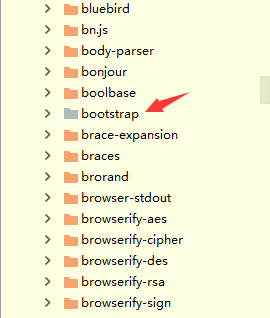
安装完成之后我们去node_modules查看是否安装成功,安装成功之后的结果

(2)导入jQuey和Bootstrap
在main.js 导入 (注意导入是node_modules下的路径可以点进去查看具体位置)min是压缩后文件建议导入这个
import 'jquery/dist/jquery.min.js'

import 'bootstrap/dist/css/bootstrap.min.css'

import 'bootstrap/dist/js/bootstrap.min.js'
main.js
// The Vue build version to load with the `import` command

// (runtime-only or standalone) has been set in webpack.base.conf with an alias.

import Vue from 'vue'

import Vuex from 'vuex'

import store from './store/index'

// import router from './router'

// import router from './router/hello'

// import  router from './router/test'

// import  router from './router/common'

// import router from './router/one'

import router from './router/two'

import 'jquery/dist/jquery.min'

import 'bootstrap/dist/js/bootstrap.min'

import 'bootstrap/dist/css/bootstrap.min.css'

Vue.config.productionTip = false

Vue.use(Vuex)

/* eslint-disable no-new */

new Vue({

  el: '#app',

  router,

  store,

  components: {},

  template: ''

})
使用这种方法引入
(3)使用内置插件ProvidePlugin自动加载模块
此时jQuery并未依赖成功,将提示错误:

需在build/webpack.base.conf.js中增加插件配置
const webpack = require('webpack')
配置中添加
plugins: [

  new webpack.ProvidePlugin({

    $: "jquery",

    jQuery: "jquery",

    "windows.jQuery": "jquery"

  })

],
build下webpack.base.conf.js的完整结果
 'use strict'

const path = require('path')

const utils = require('./utils')

const config = require('../config')

const vueLoaderConfig = require('./vue-loader.conf')

const webpack =require('webpack')

function resolve (dir) {

  return path.join(__dirname, '..', dir)

}

module.exports = {

  context: path.resolve(__dirname, '../'),

  entry: {

    app: './src/main.js'

  },

  output: {

    path: config.build.assetsRoot,

    filename: '[name].js',

    publicPath: process.env.NODE_ENV === 'production'

      ? config.build.assetsPublicPath

      : config.dev.assetsPublicPath

  },

  resolve: {

    extensions: ['.js', '.vue', '.json'],

    alias: {

      'vue$': 'vue/dist/vue.esm.js',

      '@': resolve('src'),

    }

  },

  module: {

    rules: [

      {

        test: /\.vue$/,

        loader: 'vue-loader',

        options: vueLoaderConfig

      },

      {

        test: /\.js$/,

        loader: 'babel-loader',

        include: [resolve('src'), resolve('test'), resolve('node_modules/webpack-dev-server/client')]

      },

      {

        test: /\.(png|jpe?g|gif|svg)(\?.*)?$/,

        loader: 'url-loader',

        options: {

          limit: 10000,

          name: utils.assetsPath('img/[name].[hash:7].[ext]')

        }

      },

      {

        test: /\.(mp4|webm|ogg|mp3|wav|flac|aac)(\?.*)?$/,

        loader: 'url-loader',

        options: {

          limit: 10000,

          name: utils.assetsPath('media/[name].[hash:7].[ext]')

        }

      },

      {

        test: /\.(woff2?|eot|ttf|otf)(\?.*)?$/,

        loader: 'url-loader',

        options: {

          limit: 10000,

          name: utils.assetsPath('fonts/[name].[hash:7].[ext]')

        }

      }

    ]

  },

  plugins: [

    new webpack.ProvidePlugin({

      $: "jquery",

      jQuery: "jquery",

      "windows.jQuery": "jquery"

    })

  ],

  node: {

    // prevent webpack from injecting useless setImmediate polyfill because Vue

    // source contains it (although only uses it if it's native).

    setImmediate: false,

    // prevent webpack from injecting mocks to Node native modules

    // that does not make sense for the client

    dgram: 'empty',

    fs: 'empty',

    net: 'empty',

    tls: 'empty',

    child_process: 'empty'

  }

}
(4)使用jQuery与Bootstrap
Bootstrap资料
Bootstrap中文网:https://www.bootcss.com/
菜鸟教程:https://www.runoob.com/bootstrap/bootstrap-tutorial.html
配置好之后我们就直接使用jQuey和Bootstrap
自己可以新建一个组件中使用jQuery相关方法和Bootstrap相关资源
IndexComponent.vue
<template>

    <div>

      <h1>你好</h1>

      <button @click="changeMsg">改变消息</button>

      <ul class="nav nav-tabs">

        <li role="presentation" class="active"><a href="/">首页</a></li>

        <li role="presentation"><a href="#/a">组件A</a></li>

        <li role="presentation"><a href="#/b">组件B</a></li>

        <li role="presentation"><a href="#/c">组件C</a></li>

      </ul>

    </div>

</template>

<script>

    export default {

        name: "IndexComponent",

        data(){

          return{

          }

        },

        methods:{

          changeMsg(){

            $('h1').text('我好')

          }

        }

    }

</script>

<style scoped>

</style>
结果:

vue-cli项目中引入第三方插件的更多相关文章
- 项目中整合第三方插件与SpringMVC数据格式化关于ip地址
一.Bootstrap 响应式按钮 <div calss="col-sm-2"> <button class="btn btn-default btn- ...
- vue-cli创建的项目中引入第三方库报错 'caller', 'calle', and 'arguments' properties may not be...
http://blog.csdn.net/sophie_u/article/details/76223978 以在vue中引入mui第三方库为例: 虽然针对vue,有单独的vue-mui库可以使用,但 ...
- vue-cli创建的项目中引入第三方库报错'caller', 'calle', and 'arguments' properties may not be...
本文链接:https://blog.csdn.net/Sophie_U/article/details/76223978 问题: 在vue的main.js中引入mui.min.js时,报错. 如上,单 ...
- spring boot:在项目中引入第三方外部jar包集成为本地jar包(spring boot 2.3.2)
一,为什么要集成外部jar包? 不是所有的第三方库都会上传到mvnrepository, 这时我们如果想集成它的第三方库,则需要直接在项目中集成它们的jar包, 在操作上还是很简单的, 这里用luos ...
- vue项目中引入第三方框架
element-ui npm install element-ui -- save; main.js中 import Element from 'element-ui'; import 'elemen ...
- Vuex内容解析和vue cli项目中使用状态管理模式Vuex
中文文档:vuex官方中文网站 一.vuex里面都有些什么内容? const store = new Vuex.Store({ state: { name: 'weish', age: }, gett ...
- vue.cli项目中src目录每个文件夹和文件的用法
assets文件夹是放静态资源:components是放组件:router是定义路由相关的配置:view视图:app.vue是一个应用主组件:main.js是入口文件:
- vue cli 项目中设置背景图
https://blog.csdn.net/MoLvSHan/article/details/78204972 不能直接写成相对路径,像下面这这种就会报错 backgroundImage: " ...
- vue项目中的相关插件
所有安装都是cd到该项目目录中安装 -S代表将插件添加到项目中的package.json文件 1.iview 是一套基于 Vue.js 的开源 UI 组件库,主要服务于 PC 界面的中后台产品 cnp ...
随机推荐
- 【集合系列】- 深入浅出的分析 WeakHashMap
一.摘要 在集合系列的第一章,咱们了解到,Map 的实现类有 HashMap.LinkedHashMap.TreeMap.IdentityHashMap.WeakHashMap.Hashtable.P ...
- String类的详细
String str = new String("abc")创建过程 (1) 先定义一个名为str的对String类的对象引用变量放入栈中. (2) 然后在堆中(不是常量池)创建一 ...
- 2019-11-19:无返回的盲型xxe,使用带外读取数据
文章资料来源于网络,仅供参考,学习使用 复现盲型xxe 实验环境:bwapp,xxe关,注释掉了返回值 准备读取的flag.txt文件为 通过利用服务器外带数据方法步骤 1,攻击机服务器新建两个文件, ...
- 【RocketMQ源码学习】- 5. 消息存储机制
前言 面试官:你了解RocketMQ是如何存储消息的吗?我:额,,,你等下,我看下这篇文字, (逃 由于这部分内容优点多,所以请哥哥姐姐们自备茶水,欢迎留言! RocketMQ存储设计是高可用和高性能 ...
- SpringBoot:带你认认真真梳理一遍自动装配原理
前言 Spring翻译为中文是“春天”,的确,在某段时间内,它给Java开发人员带来过春天,但是随着我们项目规模的扩大,Spring需要配置的地方就越来越多,夸张点说,“配置两小时,Coding五分钟 ...
- Java 理论与实践: 处理 InterruptedException【转】
这样的情景您也许并不陌生:您在编写一个测试程序,程序需要暂停一段时间,于是调用Thread.sleep().但是编译器或 IDE 报错说没有处理检查到的InterruptedException.Int ...
- 【数据结构】之链表(C语言描述)
链表是线性表的一种,是一种物理存储单元上非连续的存储结构,链表中的数据元素之间是通过指针链接实现的. 链表由一系列节点组成,节点可以在运行时动态的生成. 链表中国的每个节点分为两部分:一部分是存储数据 ...
- VLAN实验2(配置Trunk接口)
本实验基于<HCNA网络技术实验指南> 本实验使用eNSP软件 原理概述: 在以太网中,通过划分VLAN来隔离广播域和增强网络通信的安全性.以太网通常由 多台交换机组成,为了使VLAN的数 ...
- NSAttributedString可以强制转换为NSMutableAttributedString类型吗?下面这代码有什么问题 为什么报错
-(void)insetEmotion:(EmotionModel*)emotionModel{ if(emotionModel.code){ /** 在TextView中插入图片首选要知道光标的位置 ...
- 当url中出现汉字