
nginx重启后,反向代理失败之问题排查记录
问题与排查过程
本地开发环境的服务器,部署了nginx,nginx上对静态的web前端页面进行了http 80端口代理;然后呢,因为一些原因,服务器重启了,重启服务器后,我去把nginx启动起来,但是nginx怎么也代理不了80端口,问题如下:
浏览器访问没响应,本地telnet服务器的80端口是通的,使用wireshark抓包,过程如下:
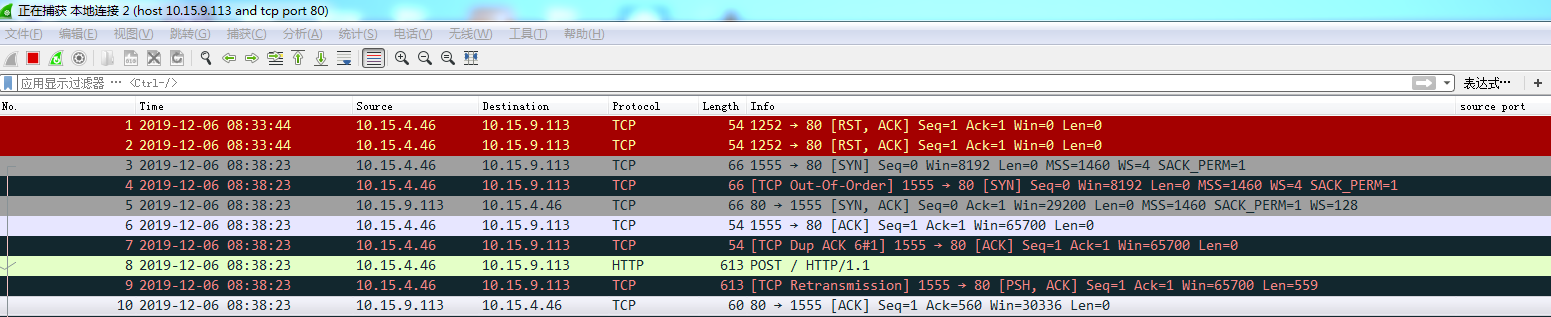
包3-包7,tcp 三次握手;
包8,本机给开发服务器发了http请求;
包9,本机重传;
包10,服务器返回ack,确认收到请求,但是依然没有请求返回。
后续一直没有请求返回
服务器端,将nginx.conf进行了精简,精简后,主要配置如下:
server {

        listen       80;

        server_name  localhost;

        gzip on;

        gzip_http_version 1.1;

        gzip_comp_level 3;

        gzip_types text/plain application/json application/javascript text/css  image/jpeg image/gif image/png application/zip;

        access_log  logs/host.access.log;

        #这里对web前端静态页面做了代理,路径为/police3-web/scm

        location / {

            root   /police3-web/scm;

            try_files $uri index.html /index.html;

            if ($request_filename ~* \.(gif|jpg|jpeg|png|css|js|ico|eot|otf|fon|font|ttf|ttc|woff|woff2)$) {

              expires   7d;

            }

        }

        location ^~ /scm {

           proxy_set_header X-Real-IP $remote_addr;

           proxy_set_header Host $host;

           proxy_set_header X-Forwarded-For $proxy_add_x_forwarded_for;

             proxy_pass http://localhost:9080;

        }

        location ~/group([0-9])/M([0-9])([0-9]) {

                add_header Access-Control-Allow-Origin *;

                add_header Access-Control-Allow-Methods 'GET, POST, OPTIONS';

                add_header Access-Control-Allow-Headers 'DNT,X-Mx-ReqToken,Keep-Alive,User-Agent,X-Requested-With,If-Modified-Since,Cache-Control,Content-Type,Authorization';

                #ngx_fastdfs_module;//因为怀疑和fastdfs有关系,专门注释了

        }

    }
重启nginx后,观察logs/error.log:
2019/12/06 08:56:53 [alert] 10588#0: worker process 10802 exited on signal 11 (core dumped)

2019/12/06 08:56:53 [alert] 10588#0: worker process 10802 exited on signal 11 (core dumped)

2019/12/06 08:56:53 [alert] 10588#0: worker process 10802 exited on signal 11 (core dumped)

2019/12/06 08:56:53 [notice] 10588#0: start worker process 10806

2019/12/06 08:56:53 [notice] 10588#0: start worker process 10806

ngx_http_fastdfs_process_init pid=10806

2019/12/06 08:56:56 [notice] 10588#0: signal 17 (SIGCHLD) received from 10806

2019/12/06 08:56:56 [notice] 10588#0: signal 17 (SIGCHLD) received from 10806

2019/12/06 08:56:56 [alert] 10588#0: worker process 10806 exited on signal 11 (core dumped)

2019/12/06 08:56:56 [alert] 10588#0: worker process 10806 exited on signal 11 (core dumped)

2019/12/06 08:56:56 [alert] 10588#0: worker process 10806 exited on signal 11 (core dumped)

2019/12/06 08:56:56 [notice] 10588#0: start worker process 10808

2019/12/06 08:56:56 [notice] 10588#0: start worker process 10808

ngx_http_fastdfs_process_init pid=10808

2019/12/06 08:56:59 [notice] 10588#0: signal 17 (SIGCHLD) received from 10808

2019/12/06 08:56:59 [notice] 10588#0: signal 17 (SIGCHLD) received from 10808

2019/12/06 08:56:59 [alert] 10588#0: worker process 10808 exited on signal 11 (core dumped)

2019/12/06 08:56:59 [alert] 10588#0: worker process 10808 exited on signal 11 (core dumped)

2019/12/06 08:56:59 [alert] 10588#0: worker process 10808 exited on signal 11 (core dumped)

2019/12/06 08:56:59 [notice] 10588#0: start worker process 10812

2019/12/06 08:56:59 [notice] 10588#0: start worker process 10812
差不多就是循环往复地打这些日志,然后我就去百度了一下,查到了这篇:
https://blog.csdn.net/hexuan1/article/details/45222867
里面提到了dmesg命令,我这边也执行了一下,输出如下:
[55522.992453] nginx[10844]: segfault at 4 ip 00007f23d017ff84 sp 00007ffdf82783e0 error 4 in libfdfsclient.so[7f23d0179000+18000]

[55526.018405] nginx[10851]: segfault at 4 ip 00007f23d017ff84 sp 00007ffdf82783e0 error 4 in libfdfsclient.so[7f23d0179000+18000]

[55529.043590] nginx[10853]: segfault at 4 ip 00007f23d017ff84 sp 00007ffdf82783e0 error 4 in libfdfsclient.so[7f23d0179000+18000]

[55532.070932] nginx[10855]: segfault at 4 ip 00007f23d017ff84 sp 00007ffdf82783e0 error 4 in libfdfsclient.so[7f23d0179000+18000]

[55535.097444] nginx[10859]: segfault at 4 ip 00007f23d017ff84 sp 00007ffdf82783e0 error 4 in libfdfsclient.so[7f23d0179000+18000]

[55538.122466] nginx[10861]: segfault at 4 ip 00007f23d017ff84 sp 00007ffdf82783e0 error 4 in libfdfsclient.so[7f23d0179000+18000]

[55541.148914] nginx[10871]: segfault at 4 ip 00007f23d017ff84 sp 00007ffdf82783e0 error 4 in libfdfsclient.so[7f23d0179000+18000]

[55544.201955] nginx[10914]: segfault at 4 ip 00007f23d017ff84 sp 00007ffdf82783e0 error 4 in libfdfsclient.so[7f23d0179000+18000]

[55547.229135] nginx[10921]: segfault at 4 ip 00007f23d017ff84 sp 00007ffdf82783e0 error 4 in libfdfsclient.so[7f23d0179000+18000]

[55550.254445] nginx[10923]: segfault at 4 ip 00007f23d017ff84 sp 00007ffdf82783e0 error 4 in libfdfsclient.so[7f23d0179000+18000]

[55553.279543] nginx[10928]: segfault at 4 ip 00007f23d017ff84 sp 00007ffdf82783e0 error 4 in libfdfsclient.so[7f23d0179000+18000]

[55556.305874] nginx[10932]: segfault at 4 ip 00007f23d017ff84 sp 00007ffdf82783e0 error 4 in libfdfsclient.so[7f23d0179000+18000]

[55559.331128] nginx[10936]: segfault at 4 ip 00007f23d017ff84 sp 00007ffdf82783e0 error 4 in libfdfsclient.so[7f23d0179000+18000]

[55562.356655] nginx[10938]: segfault at 4 ip 00007f23d017ff84 sp 00007ffdf82783e0 error 4 in libfdfsclient.so[7f23d0179000+18000]

[55565.408411] nginx[10943]: segfault at 4 ip 00007f23d017ff84 sp 00007ffdf82783e0 error 4 in libfdfsclient.so[7f23d0179000+18000]

[55568.434908] nginx[10948]: segfault at 4 ip 00007f23d017ff84 sp 00007ffdf82783e0 error 4 in libfdfsclient.so[7f23d0179000+18000]

[55571.459719] nginx[10950]: segfault at 4 ip 00007f23d017ff84 sp 00007ffdf82783e0 error 4 in libfdfsclient.so[7f23d0179000+18000]
我注意到,这里面提到了:libfdfsclient.so,因为我们的nginx对fastdfs进行了代理(这块同事弄的,暂时没问具体机制,搜了一下,大概如下:https://blog.csdn.net/qq_34301871/article/details/80060235)
我就想,之前同事好像和我说,要把fastdfs重新启动起来,我一想,可能服务器重启后,fastdfs没启动导致的。
然后执行了一下命令,重启了fastdfs相关服务:
/etc/init.d/fdfs_trackerd start

/etc/init.d/fdfs_storaged start
然后再观察nginx的error.log,居然就没有一直打印上面的错误日志了:
2019/12/06 08:58:21 [notice] 10588#0: signal 17 (SIGCHLD) received from 10950

2019/12/06 08:58:21 [notice] 10588#0: signal 17 (SIGCHLD) received from 10950

2019/12/06 08:58:21 [alert] 10588#0: worker process 10950 exited on signal 11 (core dumped)

2019/12/06 08:58:21 [alert] 10588#0: worker process 10950 exited on signal 11 (core dumped)

2019/12/06 08:58:21 [alert] 10588#0: worker process 10950 exited on signal 11 (core dumped)

2019/12/06 08:58:21 [notice] 10588#0: start worker process 10954

2019/12/06 08:58:21 [notice] 10588#0: start worker process 10954

ngx_http_fastdfs_process_init pid=10954

  ##重启fastdfs服务后,这里日志就稳定在下面这一行,没有一直打印错误了:

[2019-12-06 08:58:23] INFO - fastdfs apache / nginx module v1.21, response_mode=proxy, base_path=/tmp, url_have_group_name=1, group_name=group1, storage_server_port=23000, path_count=1, store_path0=/home/fastdfs/storage, connect_timeout=2, network_timeout=30, tracker_server_count=1, if_alias_prefix=, local_host_ip_count=3, anti_steal_token=0, token_ttl=0s, anti_steal_secret_key length=0, token_check_fail content_type=, token_check_fail buff length=0, load_fdfs_parameters_from_tracker=1, storage_sync_file_max_delay=86400s, use_storage_id=0, storage server id/ip count=0 / 0, flv_support=1, flv_extension=flv

2019/12/06 09:00:32 [info] 10954#0: *2 client timed out (110: Connection timed out) while waiting for request, client: 10.15.4.46, server: 0.0.0.0:80
那,错误排查就到这里了。略坑略坑。
参考
dmesg命令:
https://www.runoob.com/linux/linux-comm-dmesg.html
https://www.cnblogs.com/zhaoxuguang/p/7810651.html
nginx重启后,反向代理失败之问题排查记录的更多相关文章
- Nginx设置Https反向代理,指向Docker Gitlab11.3.9 Https服务
目录 目录 1.GitLab11.3.9的安装 2.域名在阿里云托管,申请免费的1年证书 3.Gitlab 的 https 配置 4.Nginx 配置 https,反向代理指向 Gitlab 配置 目 ...
- nginx二级域名反向代理
nginx二级域名反向代理 添加两个开发测试的域名 test.xxx.com :8088 testmobile.xxx.com: 8089 内网地址:127.0.0.1 外网地址:127.0.0.1 ...
- 【转】Nginx服务器的反向代理proxy_pass配置方法讲解
[转]Nginx服务器的反向代理proxy_pass配置方法讲解 转自:http://www.jb51.net/article/78746.htm 就普通的反向代理来讲Nginx的配置还是比较简单的, ...
- Nginx+Tomcat实现反向代理及动静分离
Nginx+Tomcat实现反向代理及动静分离 时间 2014-07-07 15:18:35 51CTO推荐博文 原文 http://yijiu.blog.51cto.com/433846/143 ...
- Nginx 之六: Nginx服务器的反向代理功能
一:Nginx作为正向代理服务器: 1.正向代理:代理(proxy)服务也可以称为是正向代理,指的是将服务器部署在公司的网关,代理公司内部员工上外网的请求,可以起到一定的安全作用和管理限制作用,正向代 ...
- 五、Nginx多Server反向代理配置
Nginx强大的正则表达式支持,可以使server_name的配置变得很灵活,如果你要做多用户博客,那么每个用户拥有自己的二级域名也就很容易实现了. server_name的匹配顺序 Nginx中的s ...
- 【转载】Nginx + Tomcat 实现反向代理
通常的代理服务器,只用于代理内部网络对Internet的连接请求,客户机必须指定代理服务器,并将本来要直接发送到Web服务器上的http请求发送到代理服务器中由代理服务器向Internet上的web服 ...
- Nginx 如何设置反向代理 多服务器,配置区分开来,单独文件保存单个服务器 server 主机名配置,通过 include 实现
samcao 关注 2015.06.15 10:08* 字数 0 阅读 408评论 0喜欢 0 网络结构如上图.可能你只有一个公网的Ip地址. 但是您的内网有个网站需要映射至外网.而又不想添加其它 ...
- Nginx 部署、反向代理配置、负载均衡
Nginx 部署.反向代理配置.负载均衡 最近我们的angular项目部署,我们采用的的是Nginx,下面对Nginx做一个简单的介绍. 为什么选择Nginx 轻:相比于Apache,同样的web服务 ...
随机推荐
- vue设置页面标题
使用vue-wechat-title插件对页面标题进行设置 1.安装模块 命令行窗口中运行npm install vue-wechat-title --save PS.如果程序正在运行,ctrl ...
- Android 设备唯一标识(多种实现方案)
前言 项目开发中,多少会遇到这种需求:获得设备唯一标识DeviceId,用于: 1.标识一个唯一的设备,做数据精准下发或者数据统计分析: 2.账号与设备绑定: 3..... 分析 这类文章,网上有许多 ...
- Java后端开发工作 - 写接口
我在公司的工作内容是,对于一个BS应用,负责服务器端开发工作,Java语言.与前端开发人员合作,最终提供给前端RESTFUL接口,保证页面正常响应. 经验之谈 一个接口可以理解为一个业务逻辑,一个业务 ...
- spring boot跨域请求访问配置以及spring security中配置失效的原理解析
一.同源策略 同源策略[same origin policy]是浏览器的一个安全功能,不同源的客户端脚本在没有明确授权的情况下,不能读写对方资源. 同源策略是浏览器安全的基石. 什么是源 源[orig ...
- 前端技术之:通过plop生成Controller的方法与步骤
# Controller的生成 开发者可以通过plop命令生成各种类型的控制器类(Normal.Restful.View), 以下是示例生成步骤. 1. 执行以下命令: plop controller ...
- jquery获取input输入框中的值
如何用javascript获取input输入框中的值,js/jq通过name.id.class获取input输入框中的value 先准备一段 HTML <input type="tex ...
- IoTClient开发4 - ModBusTcp协议服务端模拟
前言 上篇我们实现了ModBusTcp协议的客户端读写,可是在很多时候编写业务代码之前是没有现场环境的.总不能在客户现场去写代码,或是蒙着眼睛写然后求神拜佛不出错,又或是在办公室部署一套硬件环境.怎么 ...
- 关于BootStrap的相关介绍
一.Bootstrap Bootstrap的官网:www.bootcss.com 1.响应式布局 Responsive web page 响应式/自适应的网页 可以根据浏览器设备的不同(pc,pad, ...
- python模块——psutil
import psutil 内存 mem = psutil.virtual_memory() print(mem) >>> svmem(total=17048064000, avai ...
- 微信APP支付【签名失败】
最近在做微信APP支付 遇到一个问题 请求预下单时,接口返回签名错误 由于之前没有成功的交互,刚开始检查程序的错误,经过多次修改,发现依然是签名错误,可能出现的问题如下: 1.该签名密钥不是AppSe ...