
springboot 整合shiro
参考:
https://blog.csdn.net/fuweilian1/article/details/80309192(推荐)
https://blog.csdn.net/weixin_38132621/article/details/80216056
https://www.cnblogs.com/ll409546297/p/7815409.html#undefined
/* ------------是拦截所有的文件夹,不包含子文件夹: /** -----------是拦截所有的文件夹及里面的子文件夹:
依赖包:
<dependency>
    <groupId>org.apache.shiro</groupId>
    <artifactId>shiro-spring</artifactId>
    <version>1.3.2</version>
</dependency>
数据库表
一切从简,用户 user 表,以及角色 role 表
Shiro 相关类
Shiro 配置类
@Configuration
public class ShiroConfig {
    @Bean
    public ShiroFilterFactoryBean shirFilter(SecurityManager securityManager) {
        ShiroFilterFactoryBean shiroFilterFactoryBean = new ShiroFilterFactoryBean();
        // 必须设置 SecurityManager
        shiroFilterFactoryBean.setSecurityManager(securityManager);
        // setLoginUrl 如果不设置值,默认会自动寻找Web工程根目录下的"/login.jsp"页面 或 "/login" 映射
        shiroFilterFactoryBean.setLoginUrl("/notLogin");
        // 设置无权限时跳转的 url;
        shiroFilterFactoryBean.setUnauthorizedUrl("/notRole");

        // 设置拦截器
        Map<String, String> filterChainDefinitionMap = new LinkedHashMap<>();
        //游客,开发权限
        filterChainDefinitionMap.put("/guest/**", "anon");
        //用户,需要角色权限 “user”
        filterChainDefinitionMap.put("/user/**", "roles[user]");
        //管理员,需要角色权限 “admin”
        filterChainDefinitionMap.put("/admin/**", "roles[admin]");
        //开放登陆接口
        filterChainDefinitionMap.put("/login", "anon");
        //其余接口一律拦截
        //主要这行代码必须放在所有权限设置的最后,不然会导致所有 url 都被拦截
        filterChainDefinitionMap.put("/**", "authc");

        shiroFilterFactoryBean.setFilterChainDefinitionMap(filterChainDefinitionMap);
        System.out.println("Shiro拦截器工厂类注入成功");
        return shiroFilterFactoryBean;
    }

    /**
     * 注入 securityManager
     */
    @Bean
    public SecurityManager securityManager() {
        DefaultWebSecurityManager securityManager = new DefaultWebSecurityManager();
        // 设置realm.
        securityManager.setRealm(customRealm());
        return securityManager;
    }

    /**
     * 自定义身份认证 realm;
     * <p>
     * 必须写这个类,并加上 @Bean 注解,目的是注入 CustomRealm,
     * 否则会影响 CustomRealm类 中其他类的依赖注入
     */
    @Bean
    public CustomRealm customRealm() {
        return new CustomRealm();
    }
}
注意:里面的 SecurityManager 类导入的应该是 import org.apache.shiro.mgt.SecurityManager; 但是,如果你是复制代码过来的话,会默认导入 java.lang.SecurityManager 这里也稍稍有点坑,其他的类的话,也是都属于 shiro 包里面的类
shirFilter 方法中主要是设置了一些重要的跳转 url,比如未登陆时,无权限时的跳转;以及设置了各类 url 的权限拦截,比如 /user 开始的 url 需要 user 权限,/admin 开始的 url 需要 admin 权限等
权限拦截 Filter
当运行一个Web应用程序时,Shiro将会创建一些有用的默认 Filter 实例,并自动地将它们置为可用,而这些默认的 Filter 实例是被 DefaultFilter 枚举类定义的,当然我们也可以自定义 Filter 实例,这些在以后的文章中会讲到 
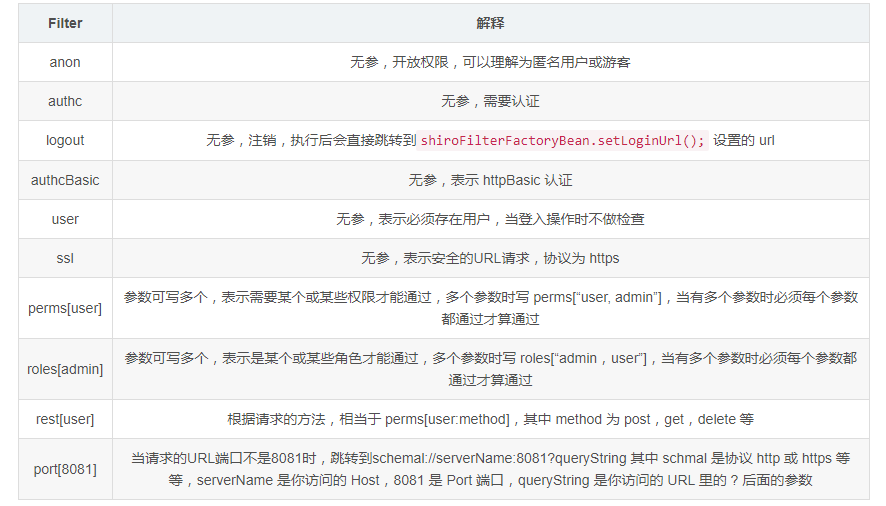
常用的主要就是 anon,authc,user,roles,perms 等
注意:anon, authc, authcBasic, user 是第一组认证过滤器,perms, port, rest, roles, ssl 是第二组授权过滤器,要通过授权过滤器,就先要完成登陆认证操作(即先要完成认证才能前去寻找授权) 才能走第二组授权器(例如访问需要 roles 权限的 url,如果还没有登陆的话,会直接跳转到 shiroFilterFactoryBean.setLoginUrl(); 设置的 url )
自定义 realm 类:
我们首先要继承 AuthorizingRealm 类来自定义我们自己的 realm 以进行我们自定义的身份,权限认证操作。
记得要 Override 重写 doGetAuthenticationInfo 和 doGetAuthorizationInfo 两个方法(两个方法名很相似,不要搞错)
public class CustomRealm extends AuthorizingRealm {
    private UserMapper userMapper;

    @Autowired
    private void setUserMapper(UserMapper userMapper) {
        this.userMapper = userMapper;
    }

    /**
     * 获取身份验证信息
     * Shiro中,最终是通过 Realm 来获取应用程序中的用户、角色及权限信息的。
     *
     * @param authenticationToken 用户身份信息 token
     * @return 返回封装了用户信息的 AuthenticationInfo 实例
     */
    @Override
    protected AuthenticationInfo doGetAuthenticationInfo(AuthenticationToken authenticationToken) throws AuthenticationException {
        System.out.println("————身份认证方法————");
        UsernamePasswordToken token = (UsernamePasswordToken) authenticationToken;
        // 从数据库获取对应用户名密码的用户
        String password = userMapper.getPassword(token.getUsername());
        if (null == password) {
            throw new AccountException("用户名不正确");
        } else if (!password.equals(new String((char[]) token.getCredentials()))) {
            throw new AccountException("密码不正确");
        }
        return new SimpleAuthenticationInfo(token.getPrincipal(), password, getName());
    }

    /**
     * 获取授权信息
     *
     * @param principalCollection
     * @return
     */
    @Override
    protected AuthorizationInfo doGetAuthorizationInfo(PrincipalCollection principalCollection) {
        System.out.println("————权限认证————");
        String username = (String) SecurityUtils.getSubject().getPrincipal();
        SimpleAuthorizationInfo info = new SimpleAuthorizationInfo();
        //获得该用户角色
        String role = userMapper.getRole(username);
        Set<String> set = new HashSet<>();
        //需要将 role 封装到 Set 作为 info.setRoles() 的参数
        set.add(role);
        //设置该用户拥有的角色
        info.setRoles(set);
        return info;
    }
}
重写的两个方法分别是实现身份认证以及权限认证,shiro 中有个作登陆操作的 Subject.login() 方法,当我们把封装了用户名,密码的 token 作为参数传入,便会跑进这两个方法里面(不一定两个方法都会进入)
其中 doGetAuthorizationInfo 方法只有在需要权限认证时才会进去,比如前面配置类中配置了 filterChainDefinitionMap.put("/admin/**", "roles[admin]"); 的管理员角色,这时进入 /admin 时就会进入 doGetAuthorizationInfo 方法来检查权限;而 doGetAuthenticationInfo 方法则是需要身份认证时(比如前面的 Subject.login() 方法)才会进入
再说下 UsernamePasswordToken 类,我们可以从该对象拿到登陆时的用户名和密码(登陆时会使用 new UsernamePasswordToken(username, password);),而 get 用户名或密码有以下几个方法
token.getUsername()  //获得用户名 String
token.getPrincipal() //获得用户名 Object
token.getPassword()  //获得密码 char[]
token.getCredentials() //获得密码 Object
注意:有很多人会发现,UserMapper 等类,接口无法通过 @Autowired 注入进来,跑程序的时候会报 NullPointerException,网上说了很多诸如是 Spring 加载顺序等原因,但其实有一个很重要的地方要大家注意,CustomRealm 这个类是在 shiro 配置类的 securityManager.setRealm() 方法中设置进去的,而很多人直接写securityManager.setRealm(new CustomRealm()); ,这样是不行的,必须要使用 @Bean 注入 MyRealm,不能直接 new 对象:
    @Bean
    public SecurityManager securityManager() {
        DefaultWebSecurityManager securityManager = new DefaultWebSecurityManager();
        // 设置realm.
        securityManager.setRealm(customRealm());
        return securityManager;
    }

    @Bean
    public CustomRealm customRealm() {
        return new CustomRealm();
    }
道理也很简单,和 Controller 中调用 Service 一样,都是 SpringBean,不能自己 new
当然,同样的道理也可以这样写:
    @Bean
    public SecurityManager securityManager(CustomRealm customRealm) {
        DefaultWebSecurityManager securityManager = new DefaultWebSecurityManager();
        // 设置realm.
        securityManager.setRealm(customRealm);
        return securityManager;
    }
然后只要在 CustomRealm 类加上个类似 @Component 的注解即可
功能实现
本文的功能全部以接口返回 json 数据的方式实现
根据 url 权限分配 controller
游客
@RestController
@RequestMapping("/guest")
public class GuestController{
    @Autowired
    private final ResultMap resultMap;

    @RequestMapping(value = "/enter", method = RequestMethod.GET)
    public ResultMap login() {
        return resultMap.success().message("欢迎进入,您的身份是游客");
    }

    @RequestMapping(value = "/getMessage", method = RequestMethod.GET)
    public ResultMap submitLogin() {
        return resultMap.success().message("您拥有获得该接口的信息的权限!");
    }
}
普通登陆用户
@RestController
@RequestMapping("/user")
public class UserController{
    @Autowired
    private final ResultMap resultMap;

    @RequestMapping(value = "/getMessage", method = RequestMethod.GET)
    public ResultMap getMessage() {
        return resultMap.success().message("您拥有用户权限,可以获得该接口的信息!");
    }
}
管理员
@RestController
@RequestMapping("/admin")
public class AdminController {
    @Autowired
    private final ResultMap resultMap;

    @RequestMapping(value = "/getMessage", method = RequestMethod.GET)
    public ResultMap getMessage() {
        return resultMap.success().message("您拥有管理员权限,可以获得该接口的信息!");
    }
}
突然注意到 CustomRealm 类那里抛出了 AccountException 异常,现在建个类进行异常捕获
@RestControllerAdvice
public class ExceptionController {
    private final ResultMap resultMap;

    @Autowired
    public ExceptionController(ResultMap resultMap) {
        this.resultMap = resultMap;
    }

    // 捕捉 CustomRealm 抛出的异常
    @ExceptionHandler(AccountException.class)
    public ResultMap handleShiroException(Exception ex) {
        return resultMap.fail().message(ex.getMessage());
    }
}
当然还有进行登陆等处理的 LoginController
@RestController
public class LoginController {
    @Autowired
    private ResultMap resultMap;
    private UserMapper userMapper;

    @RequestMapping(value = "/notLogin", method = RequestMethod.GET)
    public ResultMap notLogin() {
        return resultMap.success().message("您尚未登陆!");
    }

    @RequestMapping(value = "/notRole", method = RequestMethod.GET)
    public ResultMap notRole() {
        return resultMap.success().message("您没有权限!");
    }

    @RequestMapping(value = "/logout", method = RequestMethod.GET)
    public ResultMap logout() {
        Subject subject = SecurityUtils.getSubject();
        //注销
        subject.logout();
        return resultMap.success().message("成功注销!");
    }

    /**
     * 登陆
     *
     * @param username 用户名
     * @param password 密码
     */
    @RequestMapping(value = "/login", method = RequestMethod.POST)
    public ResultMap login(String username, String password) {
        // 从SecurityUtils里边创建一个 subject
        Subject subject = SecurityUtils.getSubject();
        // 在认证提交前准备 token(令牌)
        UsernamePasswordToken token = new UsernamePasswordToken(username, password);
        // 执行认证登陆
        subject.login(token);
        //根据权限,指定返回数据
        String role = userMapper.getRole(username);
        if ("user".equals(role)) {
            return resultMap.success().message("欢迎登陆");
        }
        if ("admin".equals(role)) {
            return resultMap.success().message("欢迎来到管理员页面");
        }
        return resultMap.fail().message("权限错误!");
    }
}
测试
springboot 整合shiro的更多相关文章
- 补习系列(6)- springboot 整合 shiro 一指禅
目标 了解ApacheShiro是什么,能做什么: 通过QuickStart 代码领会 Shiro的关键概念: 能基于SpringBoot 整合Shiro 实现URL安全访问: 掌握基于注解的方法,以 ...
- SpringBoot系列十二:SpringBoot整合 Shiro
声明:本文来源于MLDN培训视频的课堂笔记,写在这里只是为了方便查阅. 1.概念:SpringBoot 整合 Shiro 2.具体内容 Shiro 是现在最为流行的权限认证开发框架,与它起名的只有最初 ...
- SpringBoot整合Shiro实现基于角色的权限访问控制(RBAC)系统简单设计从零搭建
SpringBoot整合Shiro实现基于角色的权限访问控制(RBAC)系统简单设计从零搭建 技术栈 : SpringBoot + shiro + jpa + freemark ,因为篇幅原因,这里只 ...
- 转:30分钟了解Springboot整合Shiro
引自:30分钟了解Springboot整合Shiro 前言:06年7月的某日,不才创作了一篇题为<30分钟学会如何使用Shiro>的文章.不在意之间居然斩获了22万的阅读量,许多人因此加了 ...
- springboot整合Shiro功能案例
Shiro 核心功能案例讲解 基于SpringBoot 有源码 从实战中学习Shiro的用法.本章使用SpringBoot快速搭建项目.整合SiteMesh框架布局页面.整合Shiro框架实现用身份认 ...
- SpringBoot整合Shiro实现权限控制,验证码
本文介绍 SpringBoot 整合 shiro,相对于 Spring Security 而言,shiro 更加简单,没有那么复杂. 目前我的需求是一个博客系统,有用户和管理员两种角色.一个用户可能有 ...
- SpringBoot 整合Shiro 一指禅
目标 了解ApacheShiro是什么,能做什么: 通过QuickStart 代码领会 Shiro的关键概念: 能基于SpringBoot 整合Shiro 实现URL安全访问: 掌握基于注解的方法,以 ...
- SpringBoot整合Shiro+MD5+Salt+Redis实现认证和动态权限管理(上)----筑基中期
写在前面 通过前几篇文章的学习,我们从大体上了解了shiro关于认证和授权方面的应用.在接下来的文章当中,我将通过一个demo,带领大家搭建一个SpringBoot整合Shiro的一个项目开发脚手架, ...
- SpringBoot整合Shiro+MD5+Salt+Redis实现认证和动态权限管理|前后端分离(下)----筑基后期
写在前面 在上一篇文章<SpringBoot整合Shiro+MD5+Salt+Redis实现认证和动态权限管理(上)----筑基中期>当中,我们初步实现了SpringBoot整合Shiro ...
- SpringBoot整合Shiro权限框架实战
什么是ACL和RBAC ACL Access Control list:访问控制列表 优点:简单易用,开发便捷 缺点:用户和权限直接挂钩,导致在授予时的复杂性,比较分散,不便于管理 例子:常见的文件系 ...
随机推荐
- C#3.0新增功能09 LINQ 基础04 基本 LINQ 查询操作
连载目录 [已更新最新开发文章,点击查看详细] 本篇介绍 LINQ 查询表达式和一些在查询中执行的典型操作. 获取数据源 在 LINQ 查询中,第一步是指定数据源. 和大多数编程语言相同,在使用 ...
- Netty(DotNetty)原理解析
一.背景介绍 DotNetty是微软的Azure团队,使用C#实现的Netty的版本发布.不但使用了C#和.Net平台的技术特点,并且保留了Netty原来绝大部分的编程接口.让我们在使用时,完全可以依 ...
- 月薪12k的零基础自学前端必备手册
随着互联网的深入发展,前端开发工程师一跃成为市场上非常抢手的人才.很多同学,包括以前做UI的.Java的.或者对于IT完全零基础的同学都想学习前端.下图是网上流传甚广的一张前端学习思维导图,很多初学者 ...
- C# Socket服务器端如何判断客户端断开求解
Socket client //假如已经创建好了,连接到服务器端得Socket的客户端对象. 我们只要client.Poll(10,SelectMode.SelectRead)判断就行了.只要返回Tr ...
- C#写进程守护程序
最近写了好多次进程守护程序,今天在这里总结一下. 用到的知识点: 1.在程序中启动进程, 2.写Windows服务, 3.以及在Windows服务中启动带界面的程序 关于第三点的问题,我在我的上一篇博 ...
- 《VR入门系列教程》之8---GearVR
高端移动虚拟现实设备---三星GearVR Oculus Rift也许是虚拟现实头显的典范,但是它还是存在许多问题.首先,它需要基于一个具有强大图形计算能力的计算机,而使用一般的笔记本.苹果A ...
- PHP强制转换类型
PHP强制转换类型 获取数据类型 : 1.如果想查看某个表达式的值和类型,用var_dump(). 2.如果只是想得到一个易读懂的类型的表达方式用于调试,用 gettype().3.要查看某个类型 ...
- Python 学习笔记(1)Python容器:列表、元组、字典与集合
Python容器:列表.元组.字典与集合 列表: 1.列表 的创建 使用[ ] 或者 list()创建列表:empty_list = [ ] 或者 empty_list= list() 使用list( ...
- eval 与 exec, compile区别
exec 不是表达式: python 2. x, 中的一个语句和 python 3. x. 中的一个函数它编译并立即计算一个字符串中包含的语句或者语句集. 例如: exec('print(5)') # ...
- sql上传木马
第十周笔记—SQLmap和sql注入上传木马 目录 第十周笔记—SQLmap和sql注入上传木马 SQL注入 上传木马 SQLmap 六大模块 命令 参数 三种请求方式 取得系统shell sqlma ...