
.net core 中使用 openssl 公钥私钥进行加解密
这篇博文分享的是 C#中使用OpenSSL的公钥加密/私钥解密 一文中的解决方法在 .net core 中的改进。之前的博文针对的是 .NET Framework ,加解密用的是 RSACryptoServiceProvider 。虽然在 corefx(.NET Core Framework) 中也有 RSACryptoServiceProvider ,但它目前只支持 Windows ,不能跨平台。
之前的 new RSACryptoServiceProvider(); 代码在 mac 上运行,会报下面的错误:
System.PlatformNotSupportedException: Operation is not supported on this platform.

at System.Security.Cryptography.RSACryptoServiceProvider..ctor()
要解决这个问题,需要改用 System.Security.Cryptography.RSA.Create() 工厂方法,使用它之后,在 Windows 上创建的是 System.Security.Cryptography.RSACng 的实例,在 Mac 与 Linux 上创建的是 System.Security.Cryptography.RSAOpenSsl 的实例,它们都继承自 System.Security.Cryptography.RSA 抽象类。
使用了 RSA.Create() 之后,带来了一个问题,RSA 中没有 RSACryptoServiceProvider 中的以下2个签名的加解密方法。
public byte[] Encrypt(byte[] rgb, bool fOAEP);

public byte[] Decrypt(byte[] rgb, bool fOAEP);
只有
public abstract byte[] Encrypt(byte[] data, RSAEncryptionPadding padding);

public abstract byte[] Decrypt(byte[] data, RSAEncryptionPadding padding);
调用时它们时需要传递 RSAEncryptionPadding 类型的参数值:
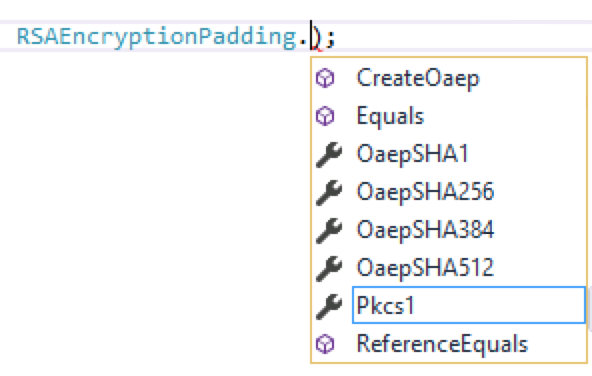
但对于 openssl 生成的公钥私钥不知道选择哪种 RSAEncryptionPadding ,只能采取笨方法 —— 一个一个试试,试出来的结果是 RSAEncryptionPadding.Pkcs1 。
openssl 的公钥与私钥是在 Mac 上通过下面的2个命令生成的:
openssl genrsa -out rsa_1024_priv.pem 102

openssl rsa -pubout -in rsa_1024_priv.pem -out rsa_1024_pub.pem
(注:一定要用 openssl 命令,用 ssh-keygen -t rsa 命令生成的公钥私钥是不行的)
修改这两个地方(RSA.Create 与 RSAEncryptionPadding.Pkcs1)之后,就可以在 .net core 上使用 openssl 的公钥私钥进行加解密了,以下是测试时所用的完整代码(.net core控制台程序)。经测试,在 Windows,macOS,Linux Ubuntu 上都能成功进行加解密。
Program.cs
using System;

using System.IO;

using System.Security.Cryptography;

using System.Text;

namespace TryRsa

{

    public class Program

    {

        //openssl genrsa -out rsa_1024_priv.pem 1024

        private static readonly string _privateKey = @"MIICXgIBAAKBgQC0xP5HcfThSQr43bAMoopbzcCyZWE0xfUeTA4Nx4PrXEfDvybJ

EIjbU/rgANAty1yp7g20J7+wVMPCusxftl/d0rPQiCLjeZ3HtlRKld+9htAZtHFZ

osV29h/hNE9JkxzGXstaSeXIUIWquMZQ8XyscIHhqoOmjXaCv58CSRAlAQIDAQAB

AoGBAJtDgCwZYv2FYVk0ABw6F6CWbuZLUVykks69AG0xasti7Xjh3AximUnZLefs

iuJqg2KpRzfv1CM+Cw5cp2GmIVvRqq0GlRZGxJ38AqH9oyUa2m3TojxWapY47zye

PYEjWwRTGlxUBkdujdcYj6/dojNkm4azsDXl9W5YaXiPfbgJAkEA4rlhSPXlohDk

FoyfX0v2OIdaTOcVpinv1jjbSzZ8KZACggjiNUVrSFV3Y4oWom93K5JLXf2mV0Sy

80mPR5jOdwJBAMwciAk8xyQKpMUGNhFX2jKboAYY1SJCfuUnyXHAPWeHp5xCL2UH

tjryJp/Vx8TgsFTGyWSyIE9R8hSup+32rkcCQBe+EAkC7yQ0np4Z5cql+sfarMMm

4+Z9t8b4N0a+EuyLTyfs5Dtt5JkzkggTeuFRyOoALPJP0K6M3CyMBHwb7WsCQQCi

TM2fCsUO06fRQu8bO1A1janhLz3K0DU24jw8RzCMckHE7pvhKhCtLn+n+MWwtzl/

L9JUT4+BgxeLepXtkolhAkEA2V7er7fnEuL0+kKIjmOm5F3kvMIDh9YC1JwLGSvu

1fnzxK34QwSdxgQRF1dfIKJw73lClQpHZfQxL/2XRG8IoA==".Replace("\n", "");

        //openssl rsa -pubout -in rsa_1024_priv.pem -out rsa_1024_pub.pem

        private static readonly string _publicKey = @"MIGfMA0GCSqGSIb3DQEBAQUAA4GNADCBiQKBgQC0xP5HcfThSQr43bAMoopbzcCy

ZWE0xfUeTA4Nx4PrXEfDvybJEIjbU/rgANAty1yp7g20J7+wVMPCusxftl/d0rPQ

iCLjeZ3HtlRKld+9htAZtHFZosV29h/hNE9JkxzGXstaSeXIUIWquMZQ8XyscIHh

qoOmjXaCv58CSRAlAQIDAQAB".Replace("\n", "");

        public static void Main(string[] args)

        {

            var plainText = "cnblogs.com";

            //Encrypt

            RSA rsa = CreateRsaFromPublicKey(_publicKey);

            var plainTextBytes = Encoding.UTF8.GetBytes(plainText);

            var cipherBytes = rsa.Encrypt(plainTextBytes, RSAEncryptionPadding.Pkcs1);

            var cipher = Convert.ToBase64String(cipherBytes);

            Console.WriteLine($"{nameof(cipher)}:{cipher}");

            //Decrypt

            rsa = CreateRsaFromPrivateKey(_privateKey);

            cipherBytes = System.Convert.FromBase64String(cipher);

            plainTextBytes = rsa.Decrypt(cipherBytes, RSAEncryptionPadding.Pkcs1);

            plainText = Encoding.UTF8.GetString(plainTextBytes);

            Console.WriteLine($"{nameof(plainText)}:{plainText}");

        }        private static RSA CreateRsaFromPrivateKey(string privateKey)

        {

            var privateKeyBits = System.Convert.FromBase64String(privateKey);

            var rsa = RSA.Create();

            var RSAparams = new RSAParameters();

            using (var binr = new BinaryReader(new MemoryStream(privateKeyBits)))

            {

                byte bt = ;

                ushort twobytes = ;

                twobytes = binr.ReadUInt16();

                if (twobytes == 0x8130)

                    binr.ReadByte();

                else if (twobytes == 0x8230)

                    binr.ReadInt16();

                else

                    throw new Exception("Unexpected value read binr.ReadUInt16()");

                twobytes = binr.ReadUInt16();

                if (twobytes != 0x0102)

                    throw new Exception("Unexpected version");

                bt = binr.ReadByte();

                if (bt != 0x00)

                    throw new Exception("Unexpected value read binr.ReadByte()");

                RSAparams.Modulus = binr.ReadBytes(GetIntegerSize(binr));

                RSAparams.Exponent = binr.ReadBytes(GetIntegerSize(binr));

                RSAparams.D = binr.ReadBytes(GetIntegerSize(binr));

                RSAparams.P = binr.ReadBytes(GetIntegerSize(binr));

                RSAparams.Q = binr.ReadBytes(GetIntegerSize(binr));

                RSAparams.DP = binr.ReadBytes(GetIntegerSize(binr));

                RSAparams.DQ = binr.ReadBytes(GetIntegerSize(binr));

                RSAparams.InverseQ = binr.ReadBytes(GetIntegerSize(binr));

            }

            rsa.ImportParameters(RSAparams);

            return rsa;

        }

        private static int GetIntegerSize(BinaryReader binr)

        {

            byte bt = ;

            byte lowbyte = 0x00;

            byte highbyte = 0x00;

            int count = ;

            bt = binr.ReadByte();

            if (bt != 0x02)

                return ;

            bt = binr.ReadByte();

            if (bt == 0x81)

                count = binr.ReadByte();

            else

                if (bt == 0x82)

            {

                highbyte = binr.ReadByte();

                lowbyte = binr.ReadByte();

                byte[] modint = { lowbyte, highbyte, 0x00, 0x00 };

                count = BitConverter.ToInt32(modint, );

            }

            else

            {

                count = bt;

            }

            while (binr.ReadByte() == 0x00)

            {

                count -= ;

            }

            binr.BaseStream.Seek(-, SeekOrigin.Current);

            return count;

        }

        private static RSA CreateRsaFromPublicKey(string publicKeyString)

        {

            byte[] SeqOID = { 0x30, 0x0D, 0x06, 0x09, 0x2A, 0x86, 0x48, 0x86, 0xF7, 0x0D, 0x01, 0x01, 0x01, 0x05, 0x00 };

            byte[] x509key;

            byte[] seq = new byte[];

            int x509size;

            x509key = Convert.FromBase64String(publicKeyString);

            x509size = x509key.Length;

            using (var mem = new MemoryStream(x509key))

            {

                using (var binr = new BinaryReader(mem))

                {

                    byte bt = ;

                    ushort twobytes = ;

                    twobytes = binr.ReadUInt16();

                    if (twobytes == 0x8130)

                        binr.ReadByte();

                    else if (twobytes == 0x8230)

                        binr.ReadInt16();

                    else

                        return null;

                    seq = binr.ReadBytes();

                    if (!CompareBytearrays(seq, SeqOID))

                        return null;

                    twobytes = binr.ReadUInt16();

                    if (twobytes == 0x8103)

                        binr.ReadByte();

                    else if (twobytes == 0x8203)

                        binr.ReadInt16();

                    else

                        return null;

                    bt = binr.ReadByte();

                    if (bt != 0x00)

                        return null;

                    twobytes = binr.ReadUInt16();

                    if (twobytes == 0x8130)

                        binr.ReadByte();

                    else if (twobytes == 0x8230)

                        binr.ReadInt16();

                    else

                        return null;

                    twobytes = binr.ReadUInt16();

                    byte lowbyte = 0x00;

                    byte highbyte = 0x00;

                    if (twobytes == 0x8102)

                        lowbyte = binr.ReadByte();

                    else if (twobytes == 0x8202)

                    {

                        highbyte = binr.ReadByte();

                        lowbyte = binr.ReadByte();

                    }

                    else

                        return null;

                    byte[] modint = { lowbyte, highbyte, 0x00, 0x00 };

                    int modsize = BitConverter.ToInt32(modint, );

                    int firstbyte = binr.PeekChar();

                    if (firstbyte == 0x00)

                    {

                        binr.ReadByte();

                        modsize -= ;

                    }

                    byte[] modulus = binr.ReadBytes(modsize);

                    if (binr.ReadByte() != 0x02)

                        return null;

                    int expbytes = (int)binr.ReadByte();

                    byte[] exponent = binr.ReadBytes(expbytes);

                    var rsa = RSA.Create();

                    var rsaKeyInfo = new RSAParameters

                    {

                        Modulus = modulus,

                        Exponent = exponent

                    };

                    rsa.ImportParameters(rsaKeyInfo);

                    return rsa;

                }

            }

        }

        private static bool CompareBytearrays(byte[] a, byte[] b)

        {

            if (a.Length != b.Length)

                return false;

            int i = ;

            foreach (byte c in a)

            {

                if (c != b[i])

                    return false;

                i++;

            }

            return true;

        }

    }

}
project.json
{

  "version": "1.0.0-*",

  "buildOptions": {

    "emitEntryPoint": true

  },

  "dependencies": {

    "Microsoft.NETCore.App": {

        "type": "platform",

        "version": "1.1.0-preview1-001100-00"

    },

    "System.Security.Cryptography.Algorithms": "4.3.0-preview1-24530-04"

  },

  "frameworks": {

    "netcoreapp1.1": {

      "imports": "dnxcore50"

    }

  }

}
相关链接
【更新】
如果遇到解密时遇到"Bad Data"的问题:
System.Security.Cryptography.CryptographicException: Bad Data.
可以使用下面的方法(同事实现的代码):
public string Decrypt(string cipher)

{

    return Encoding.UTF8.GetString(_rsa.Decrypt(Convert.FromBase64String(cipher), RSAEncryptionPadding.Pkcs1));

    var cipherLength = _rsa.KeySize / ;

    var cipherBytes = Convert.FromBase64String(cipher);

    if (cipherBytes.Length < cipherLength)

    {

        var delta = cipherLength - cipherBytes.Length;

        var newBytes = new byte[cipherLength];

        Array.Copy(cipherBytes, , newBytes, delta, cipherBytes.Length);

        cipherBytes = newBytes;

    }

    return Encoding.UTF8.GetString(_rsa.Decrypt(cipherBytes, RSAEncryptionPadding.Pkcs1));

}
.net core 中使用 openssl 公钥私钥进行加解密的更多相关文章
- .net core中使用openssl的公钥私钥进行加解密
这篇博文分享的是 C#中使用OpenSSL的公钥加密/私钥解密 一文中的解决方法在 .net core 中的改进.之前的博文针对的是 .NET Framework ,加解密用的是 RSACryptoS ...
- openssl生成公钥私钥对 加解密
在计算机软件开发世界中,编程语言种类极多,数据在各种语言的表现形式可能有所差异,但数据本身的处理可能,或者说本质上是完全一样的:比如数据在某个算法中的运算过程是一样的.在这里,我以加密与解密来作为例子 ...
- cer, pfx 创建,并且读取公钥/密钥,加解密 (C#程序实现)
PKI技术(public key infrastructure)里面,cer文件和pfx文件是很常见的.通常cer文件里面保存着公钥以及用户的一些信息,pfx里面则含有私钥和公钥. 用makecert ...
- cer, pfx 创建,而且读取公钥/密钥,加解密 (C#程序实现)
PKI技术(public key infrastructure)里面,cer文件和pfx文件是非经常见的.通常cer文件中面保存着公钥以及用户的一些信息,pfx里面则含有私钥和公钥. 用makecer ...
- RSA 加密 解密 公钥 私钥 签名 加签 验签
http://blog.csdn.net/21aspnet/article/details/7249401# http://www.ruanyifeng.com/blog/2013/06/rsa_al ...
- c# RSA 加密解密 java.net公钥私钥转换 要解密的模块大于128字节
有一个和接口对接的任务,对方使用的是java,我方使用的是c#,接口加密类型为RSA,公钥加密私钥解密. 然后就是解决各种问题. 1.转换对方的密钥字符串 由于c#里面需要使用的是xml各式的密钥字符 ...
- PHP 生成公钥私钥,加密解密,签名验签
test_encry.php <?php //创建私钥,公钥 //create_key(); //要加密内容 $str = "test_str"; //加密 $encrypt ...
- openssl:AES CBC PKCS5 加解密 (C/GOLANG)
#include <openssl/aes.h> /* AES_CBC_PKCS5_Encrypt * 入参: * src:明文 * srcLen:明文长度 * key:密钥 长度只能是1 ...
- .net core中加载lua脚本的类库: MoonSharp
前言 MoonSharp是一个支持C#调用lua脚本的类库,支持.net, .net core, mono, unity,因此在.net core中也能够使用,而且加载和调用lua也很方便简单: 官网 ...
随机推荐
- fiddler 进行Android/IOS代理配置抓包
1.准备:Android+IOS设备 下载:fiddler抓包工具,不是最新版的链接: 链接:https://pan.baidu.com/s/1BaBfu2H4xgpsh1wmkfC8aQ ...
- 项目如何部署在linux系统上
前面已经安装好centos的系统,网络配置,以及部署的环境已成功啦... 下面记录的是如何部署一个项目 四个步骤: (1)放war包 (2)执行数据库脚本 (3)修改数据库的配置文件 (4)重启tom ...
- 推荐几本高质量的Python书籍--附github下载路径
一 为什么要分享? 最近碰到了一些人和事,感触挺大的.就是发现很多类似自己的软件工程师,一旦工作三五年之后,工作中算是一个熟练工,但是进步的脚步突然慢了下来,虽然你在工作中仍旧很努力.到底是什么原因呢 ...
- angularjs link compile与controller的区别详解,了解angular生命周期
壹 ❀ 引 我在 angularjs 一篇文章看懂自定义指令directive 一文中简单提及了自定义指令中的link链接函数与compile编译函数,并说到两者具有互斥特性,即同时存在link与c ...
- Centos 7 下安装 Jenkins
Jenkins介绍 Jenkins是一个开源的支持自动化构建.部署等任务的平台.基本上可以说是持续集成(CI).持续发布(CD)不可或缺的工具. 安装Java环境 CentOS 7 安装 JAVA环境 ...
- SSM整合1(springMVC+mybatis)
整合目标:控制层采用springmvc.持久层使用mybatis实现 整合思路: Dao层: 1.SqlMapConfig.xml,空文件即可,但是需要文件头. 2.applicationContex ...
- C# - VS2019 DataGridView导出到Excel的三种方法
//原文出处:http://www.yongfa365.com/Item/DataGridViewToExcel.html 1 #region DataGridView数据显示到Excel /// & ...
- 理解并运用TP5.1-Facade
1.内容介绍 深入解析tp5.1与laravel 中Facade底层原理实现 1. 什么是Facade 2. 为什么需要有什么好处 3. Facade实现原理 4. 功能实现. 5. 容器注入 2. ...
- easyswoole对接支付宝,微信支付
在easyswoole中,已经开发好了相关的支付组件,只需要引入即可: composer require easyswoole/pay pay组件支持协程 支付宝 支付方法 支付宝支付目前支持 7 种 ...
- python爬虫-京东商品爬取
京东商品爬取 仅供学习 一.使用selenium from selenium import webdriver from selenium.webdriver.common.keys import K ...