
Spring Boot整合Mybatis配置详解
首先,你得有个Spring Boot项目。
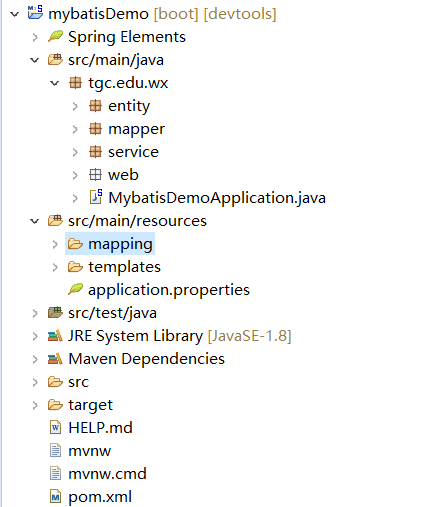
平时开发常用的repository包在mybatis里被替换成了mapper。
配置:
1.引入依赖:
<dependency>

  <groupId>org.mybatis.spring.boot</groupId>

   <artifactId>mybatis-spring-boot-starter</artifactId>

   <version>1.1.1</version>

</dependency>
2.编辑 application.properties
spring.datasource.url=jdbc:mysql://localhost:3306/test?useSSL=true&serverTimezone=GMT

spring.datasource.username=root

spring.datasource.password=root

spring.datasource.driver-class-name=com.mysql.jdbc.Driver

spring.servlet.multipart.max-request-size=2050MB

spring.servlet.multipart.max-file-size=2048MB

spring.jpa.hibernate.use-new-id-generator-mappings=false

server.port=8080

server.servlet.context-path=/mybatisDemo

spring.jmx.enabled=false

mybatis.type-aliases-package=tgc.edu.wx.entity

mybatis.mapperLocations=classpath:mapping/*.xml
这里要注意mybatis的两个相关配置,一是扫描的包,二是映射文件的地址。
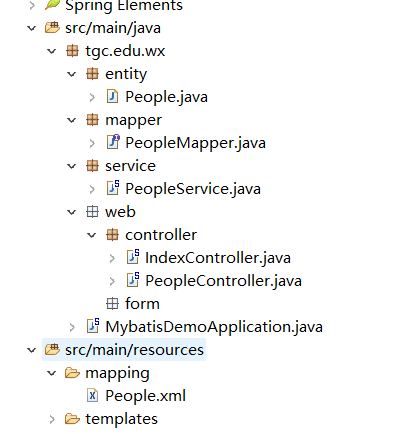
3.建立构建web项目所需的类,以及在数据库建立实体类对应的表,完成后如下图:
PeopleMapper.java
package tgc.edu.wx.mapper;

import java.util.List;

import org.apache.ibatis.annotations.Mapper;

import tgc.edu.wx.entity.People;

@Mapper

public interface PeopleMapper {

    public List<People> findAll();

}
此文件注解为@Mapper而不再是@Repository。
PeopleService.java
package tgc.edu.wx.service;

import java.util.List;

import org.springframework.beans.factory.annotation.Autowired;

import org.springframework.stereotype.Service;

import tgc.edu.wx.entity.People;

import tgc.edu.wx.mapper.PeopleMapper;

@Service

public class PeopleService {

    @Autowired

    private PeopleMapper peopleDAO;

    public List<People> findAll() {

     return    peopleDAO.findAll();

    }

}
PeopleController.java
package tgc.edu.wx.web.controller;

import java.util.List;

import org.springframework.beans.factory.annotation.Autowired;

import org.springframework.stereotype.Controller;

import org.springframework.ui.ModelMap;

import org.springframework.web.bind.annotation.RequestMapping;

import tgc.edu.wx.entity.People;

import tgc.edu.wx.service.PeopleService;

@Controller

@RequestMapping("/people")

public class PeopleController {

    @Autowired

    private PeopleService peopleService;

    @RequestMapping("/list")

    public String list(ModelMap map) {

         List<People> peoples = peopleService.findAll();

        map.put("peoples", peoples);

        return "peopleList";

    }

}
数据库:
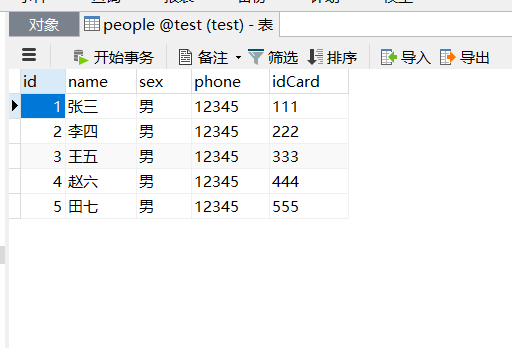
4.依照 application.properties 中编写的地址在对应目录下创建xml格式的mybatis映射文件。
<?xml version="1.0" encoding="UTF-8"?>

<!DOCTYPE mapper PUBLIC "-//mybatis.org//DTD Mapper 3.0//EN" "http://mybatis.org/dtd/mybatis-3-mapper.dtd">

<mapper namespace="tgc.edu.wx.mapper.PeopleMapper">

<select id="findAll" resultType="tgc.edu.wx.entity.People">

SELECT * FROM people

</select>

</mapper>
其中<select>标签内的 id 对应的是dao层内的方法名,resultType对应的是查询返回结果集的类型,select内填写对应方法的语句即可。
5.最后,在启动类里加上注解用于给出需要扫描的mapper文件路径
package tgc.edu.wx;

import org.mybatis.spring.annotation.MapperScan;

import org.springframework.boot.SpringApplication;

import org.springframework.boot.autoconfigure.SpringBootApplication;

@SpringBootApplication

@MapperScan("tgc.edu.wx.mapper")

public class MybatisDemoApplication {

    public static void main(String[] args) {

        SpringApplication.run(MybatisDemoApplication.class, args);

    }

}
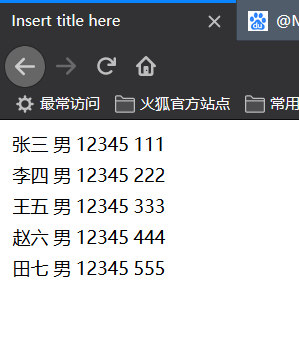
启动项目测试一下:
以上。

Spring Boot整合Mybatis配置详解的更多相关文章
- spring boot application properties配置详解
# =================================================================== # COMMON SPRING BOOT PROPERTIE ...
- (转)Spring boot——logback.xml 配置详解(四)<filter>
文章转载自:http://aub.iteye.com/blog/1101260,在此对作者的辛苦表示感谢! 1 filter的使用 <filter>: Logback的过滤器基于三值逻辑( ...
- (转)Spring boot——logback.xml 配置详解(二)
文章转载自:http://aub.iteye.com/blog/1101260,在此对作者的辛苦表示感谢! 1 根节点<configuration>包含的属性 scan: 当此属性设置为t ...
- Spring boot——logback.xml 配置详解(四)<filter>
阅读目录 1 filter的使用 2 常用的过滤器 文章转载自:http://aub.iteye.com/blog/1101260,在此对作者的辛苦表示感谢! 回到顶部 1 filter的使用 < ...
- Spring boot——logback.xml 配置详解(二)
阅读目录 1 根节点包含的属性 2 根节点的子节点 文章转载自:http://aub.iteye.com/blog/1101260,在此对作者的辛苦表示感谢! 回到顶部 1 根节点<config ...
- (转)Spring boot——logback.xml 配置详解(三)<appender>
文章转载自:http://aub.iteye.com/blog/1101260,在此对作者的辛苦表示感谢! 1 appender <appender>是<configuration& ...
- Spring boot——logback.xml 配置详解(三)<appender>
阅读目录 1 appender 2 encoder 文章转载自:http://aub.iteye.com/blog/1101260,在此对作者的辛苦表示感谢! 回到顶部 1 appender < ...
- 转载 Spring、Spring MVC、MyBatis整合文件配置详解
Spring.Spring MVC.MyBatis整合文件配置详解 使用SSM框架做了几个小项目了,感觉还不错是时候总结一下了.先总结一下SSM整合的文件配置.其实具体的用法最好还是看官方文档. ...
- Spring MVC、MyBatis整合文件配置详解
Spring:http://spring.io/docs MyBatis:http://mybatis.github.io/mybatis-3/ Building a RESTful Web Serv ...
随机推荐
- Java设计模式:Singleton(单例)模式
概念定义 Singleton(单例)模式是指在程序运行期间, 某些类只实例化一次,创建一个全局唯一对象.因此,单例类只能有一个实例,且必须自己创建自己的这个唯一实例,并对外提供访问该实例的方式. 单例 ...
- MySQL(11)---约束
MySQL(11)---约束 含义: 一种限制,用于限制表中的数据,为了保证表中的数据的准确和可靠性. 先把Mysql几种约束列出来: 主键约束 外键约束 唯一性约束 非空约束 默认值约束 自增约束 ...
- 从实例一步一步入门学习SpringCloud的Eureka、Ribbon、Feign、熔断器、Zuul的简单使用(附代码下载)
场景 SpringCloud -创建统一的依赖管理: https://blog.csdn.net/BADAO_LIUMANG_QIZHI/article/details/102530574 Sprin ...
- js个人笔记简记
正则表达式 创建正则表达式的两种方法: Var reg = new RegExp(‘’) Var reg = / a/ 后面三个参数g:全局匹配 i:不区分大小写 m:多行匹配 开头结尾有用 常见 ...
- Quest 公司的Shareplex 与 GoldenGate比较
Quest 公司的Shareplex 与 GoldenGate比较 2012-08-01 16:51:12 —————————————————————————————————————————— ...
- flask接收跨域请求
ajax发送数据类型为json即可 接受数据详见下文 https://www.cnblogs.com/anxminise/p/9814326.html
- 苹果手机Chrome浏览器显示input:disabled时字体颜色总是为浅灰色
今天被测试人员提了个bug:苹果手机浏览器(Chrome)打开h5,控件在input:disabled的样式始终是浅灰色,要求改成黑色.测试对比:1.在多个pc浏览器上浏览input:disabled ...
- Mysql 连接提示 Client does not support authentication protocol requested by server 客户端不支持服务器请求的身份验证协议;考虑升级MySQL客户端
由于查阅了很多百度文档发现很多方法比较复杂,所以写个备忘: 首先,进入MySQL 8.0Command Line Client -Unicode,输入密码,登录进去. 然后,在命令行输入:ALTER ...
- CUDA 与 OpenGL 的互操作
CUDA 与 OpenGL 的互操作一般是使用CUDA生成数据,然后在OpenGL中渲染数据对应的图形.这两者的结合有两种方式: 1.使用OpenGL中的PBO(像素缓冲区对象).CUDA生成像素数据 ...
- 初学JavaScript正则表达式(八)
JavaScript正则贪婪模式与非贪婪模式 贪婪模式: 例: \d{3,6} 匹配数字3到6次(正则表达式默认为贪婪模式,即匹配最多次,失败即停) '12345678'.replace(/\d{3, ...