
.NET同一个页面父容器与子容器通信方案
主界面:
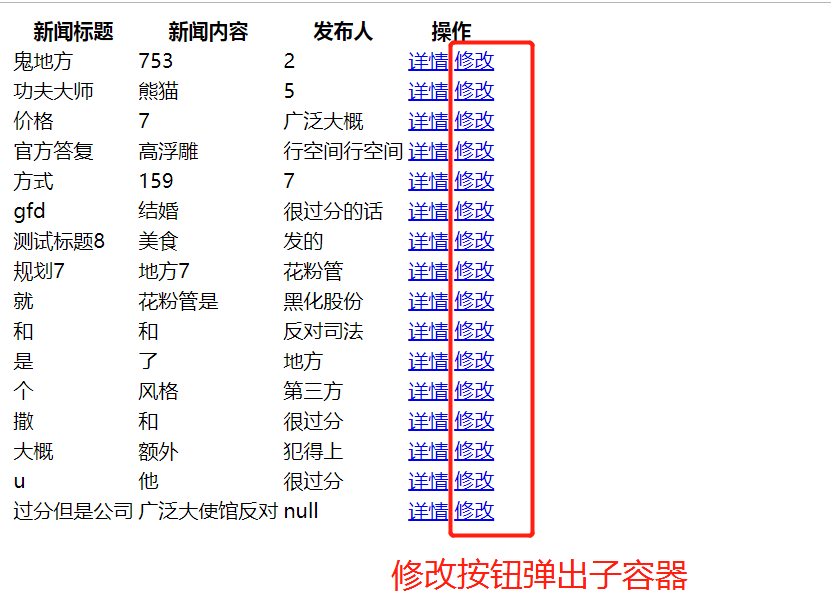
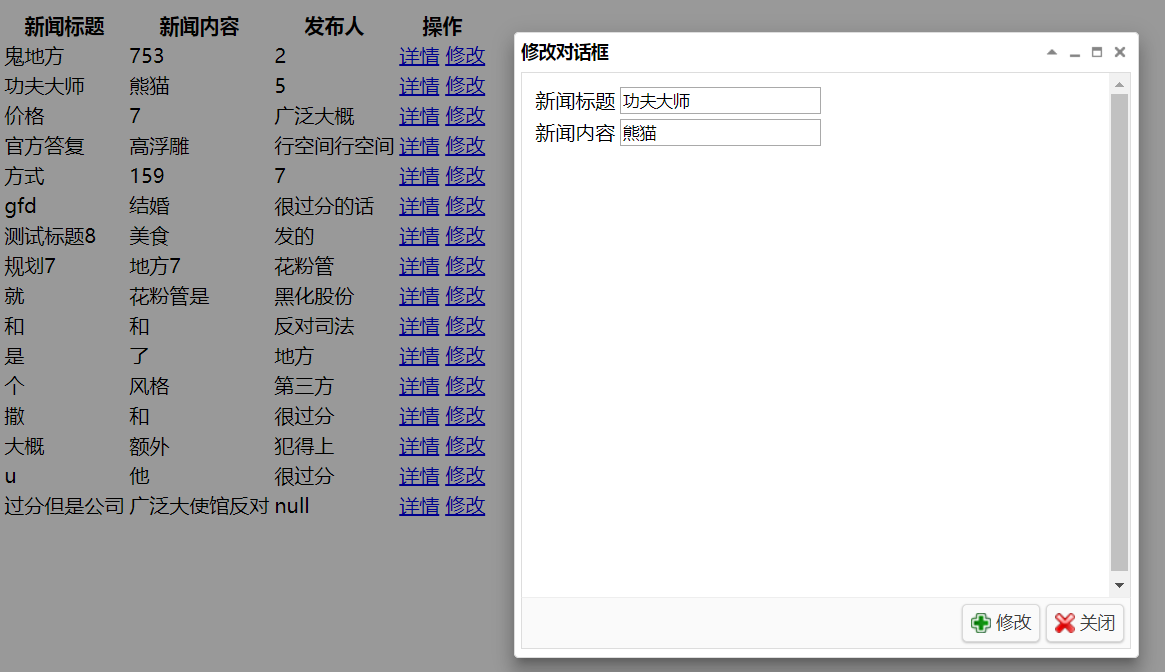
关键主页面代码:
    <div id="EditDiv">

        <iframe src="javascript:void(0)" id="editFrame" width="100%" height="100%" frameborder="0"></iframe>

    </div>

---------------以下js脚本(关键代码)-----------

        //绑定修改的超链接

        function bindEditLinkClickEvent() {

            $(".editLink").click(function () {

                var newsId = $(this).attr("newsId");

                //getNews2EditForm(newsId); //从后台加载数据然后把数据放到修改文本框上去

                //弹出对话框之前,把iframe标签的src属性设置成修改页面地址

                $("#editFrame").attr("src", "EditNews.aspx?id="+newsId);

                showEditDialog(); //弹出编辑div

            });

        };

        //弹出编辑div

        function showEditDialog() {

            $("#EditDiv").css("display", "block");

            $("#EditDiv").dialog({

                title: "修改对话框",

                width: 500,

                height: 500,

                modal: true,

                collapsible: true,

                minimizable: true,

                maximizable: true,

                resizable: true,

                buttons: [{

                    text: "修改",

                    iconCls: "icon-add",

                    handler: submitChildEditFrm

                }, {

                    text: "关闭",

                    iconCls: "icon-cancel",

                    handler: function () {

                        $("#EditDiv").dialog("close");

                    }

                }]

            });

        }

        //异步提交子页面的表单

        function submitChildEditFrm() {

            //先拿到子容器的windows对象,并调用子容器的js函数

            var domFrame = $("#editFrame")[0];

            domFrame.contentWindow.submitFrm();

        };
子容器代码:
    <form id="form1" runat="server">

    <div>

        <input type="hidden" name="id" value="<%=News.id %>" id="id" />

        <table>

            <tr>

                <td>新闻标题</td>

                <td><input type="text" name="title" id="txtTitle" value="<%=News.title %>" /></td>

            </tr>

            <tr>

                <td>新闻内容</td>

                <td><input type="text" name="contents" id="txtContent" value="<%=News.contents %>" /></td>

            </tr>

        </table>

    </div>

    </form>

//-----以下JS脚本-------

    <script src="../Script/jquery-3.4.1.js"></script>

    <script type="text/javascript">

        function submitFrm() {

            //让表单整体异步的提交后台。

            var postData = $("#form1").serializeArray();

            $.ajax({

                url: "EditNews.aspx",

                type: "post",

                dataType: "json",

                data: postData,

                success: function (data) {

                    if (data.success == "ok") {

                        alert("修改成功!");

                        //关闭父容器的对话框,刷新父容器的表格

                        window.parent.window.afterEditSuccess();

                    } else {

                        alert("修改失败!")

                    }

                },

                error: function (err)

                {

                    alert(err);

                }

            });

        }

    </script>
搞定~~
.NET同一个页面父容器与子容器通信方案的更多相关文章
- 父容器根据子容器高度自适应:设置父容器 height:100%;overflow:hidden;
父容器根据子容器高度自适应:设置父容器 height:100%;overflow:hidden;
- 查看Spring MVC 父容器和子容器的对象的实例
话不多说,直接上案例 package com.oukele.web; import org.springframework.beans.factory.annotation.Autowired; im ...
- 结合源码浅谈Spring容器与其子容器Spring MVC 冲突问题
容器是整个Spring 框架的核心思想,用来管理Bean的整个生命周期. 一个项目中引入Spring和SpringMVC这两个框架,Spring是父容器,SpringMVC是其子容器,子容器可以看见父 ...
- Spring MVC 根容器和子容器
整合 spring mvc 根容器和子容器 public class TestWebInitializer extends AbstractAnnotationConfigDispatcherServ ...
- Spring父容器与子容器
在使用spring+springMVC的web工程中,我们一般会在web.xml中做如下配置: <context-param> <param-name>contextConfi ...
- Spring - 父容器与子容器
一.Spring容器(父容器) 1.Mapper代理对象 2.Service对象 二.Springmvc(前端控制器)(子容器) Controller对象 1.标准的配置是这样的:Con ...
- 【CSS】div父容器根据子容器大小自适应
Div即父容器不根据内容自动调节高度,我们看下面的代码: <div id="main"> <div id="content"></ ...
- html 父容器和子容器通信
通过拿到document对象下的window对象后执行对应的方法.
- SpringMVC——DispatcherServlet的IoC容器(Web应用的IoC容器的子容器)创建过程
在上一篇<Spring--Web应用中的IoC容器创建(WebApplicationContext根应用上下文的创建过程)>中说到了Web应用中的IoC容器创建过程.这一篇主要讲Sprin ...
随机推荐
- fiddler---Fiddler工具详细介绍
在做测试的过程中,遇到一些问题都会去进行抓包,抓包可以帮助我们解决很多问题,抓包工具有很多比如fiddler,浏览器调试工具(F12),charles等,抓包工具是我们测试人员必不可少的一项技能. 什 ...
- 关于 'chromedriver' executable needs to be in PATH 的解决办法
用 chrome 浏览器跑 selenium,执行以下脚本: from selenium import webdriverdr=webdriver.Chrome()dr.maximize_window ...
- 用curl通过相同IP请求不同域名的URL
tomcat可以从一个IP响应不同的域名. $ curl -I http://127.0.0.1:8080 -H "Host:w.example.com" 可以影响http的ho ...
- 【tf.keras】tf.keras模型复现
keras 构建模型很简单,上手很方便,同时又是 tensorflow 的高级 API,所以学学也挺好. 模型复现在我们的实验中也挺重要的,跑出了一个模型,虽然我们可以将模型的 checkpoint ...
- Node.js连接数据库取值,简单接口的实现
第一步:先安装Node.js,这里不做介绍 第二步:新建一个文件夹,打开cmd,进入该文件夹 执行npm init命令生成page.json文件 第三步:安装如下模块,打开cmd,进入第二步的文件夹, ...
- pytorch 创建tensor的几种方法
tensor默认是不求梯度的,对应的requires_grad是False. 1.指定数值初始化 import torch #创建一个tensor,其中shape为[2] tensor=torch.T ...
- 不获取元素,直接使用id操作dom元素
今天无意中发现个让我很吃惊的问题. 不使用getElementById方法,也可以用id直接操作有id的元素. 继续搜索后,发现name也可以直接操作... 这让我大感意外,了解以后,忍不住写点东西记 ...
- 浅谈C++ STL deque 容器
浅谈C++ STL deque 容器 本篇随笔简单介绍一下\(C++STL\)中\(deque\)容器的使用方法及常见使用技巧. deque容器的概念 \(deque\)的意义是:双端队列.队列是我们 ...
- 杂记(C语言中的不知怎么归类的细小点。)
1.int a; printf("%d",2a); 从数学上讲,没有丝毫问题,但是在计算机上,就无法识别! 纠正:应写成2*a. 2.关于输出结果保留一位小数的:不应 ...
- 腾讯云短信服务+Node.js给手机发送验证码
最近公司需要些一个登陆验证和修改密码验证,需要用到验证码,我用Node.js写了一个给手机发验证码的代码,下面实现的功能有:生产验证码,(计时器)验证码失效时间,给手机发送短信. 首先看官方文档,在给 ...