
【Spring Cloud学习之五】配置中心
环境
eclipse 4.7
jdk 1.8
Spring Boot 1.5.2
Spring Cloud 1.2
一、什么是配置中心
在分布式系统中,由于服务数量巨多,为了方便服务配置文件统一管理,实时更新,所以需要分布式配置中心组件。在Spring Cloud中,有分布式配置中心组件spring cloud config ,它支持配置服务放在配置服务的内存中(即本地),也支持放在远程Git仓库(或者SVN仓库)中。在spring cloud config 组件中,分两个角色,一是config server,二是config client。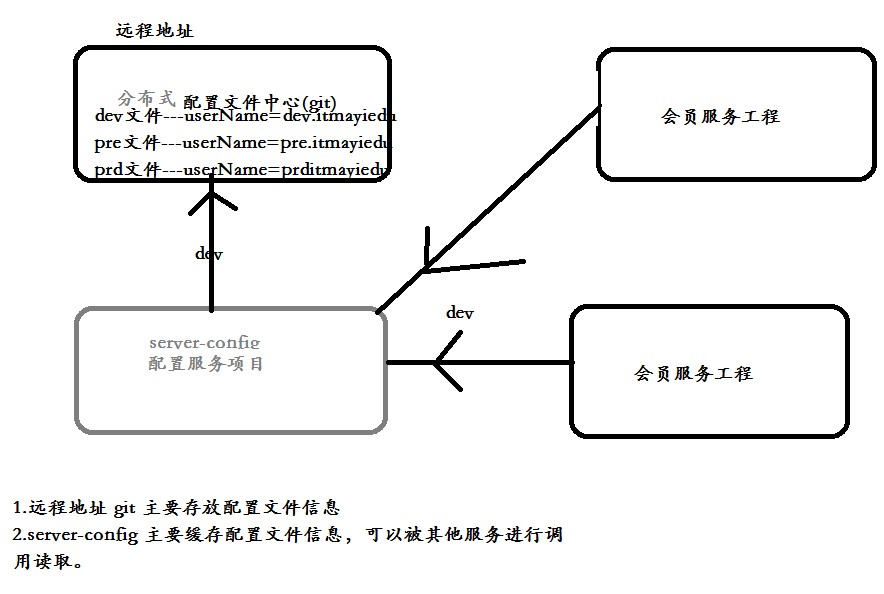
二、远程配置仓库
配置文件可以选择Git、Svn、本地目录,GitHub、GitLab、gitee都是基于web的Git仓库,Spring Cloud默认使用Git,如果使用Svn需要引入额外依赖org.tmatesoft.svnkit。
这里使用GitHub:
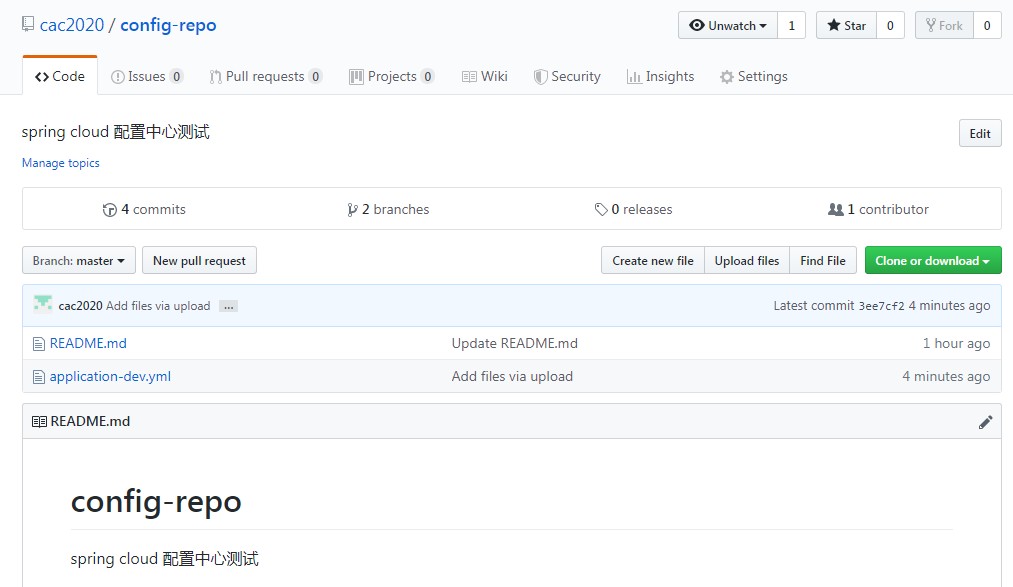
新建仓库:config-repo
上传配置文件:application-dev.yml 内容:version:0.0.1-SNAPSHOT
三、搭建config-server
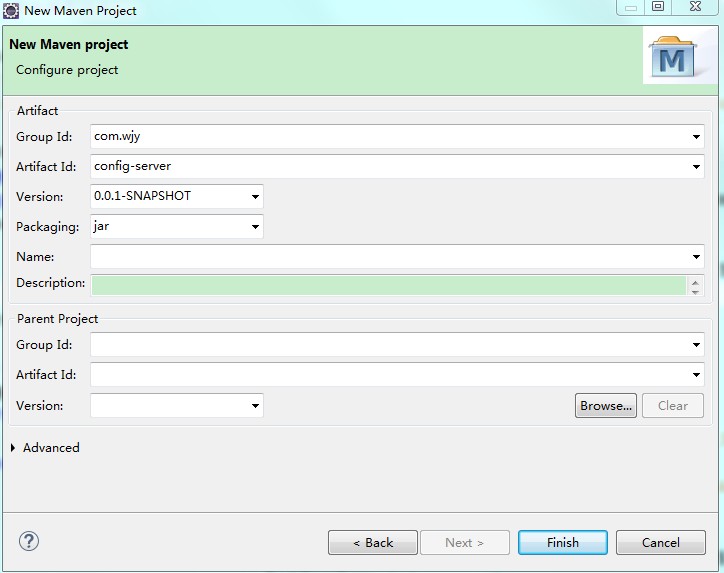
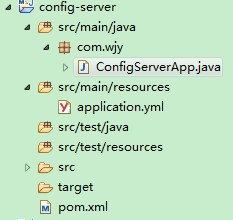
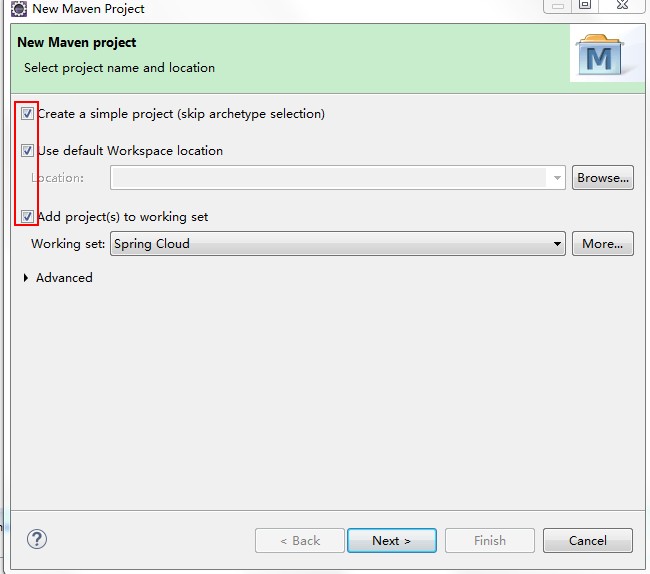
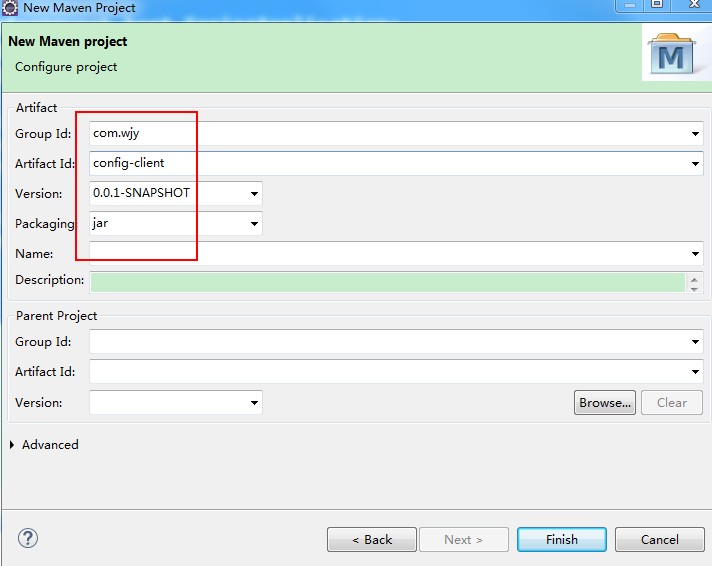
1、新建maven工程

2、pom.xml
<project xmlns="http://maven.apache.org/POM/4.0.0"

    xmlns:xsi="http://www.w3.org/2001/XMLSchema-instance"

    xsi:schemaLocation="http://maven.apache.org/POM/4.0.0 http://maven.apache.org/xsd/maven-4.0.0.xsd">

    <modelVersion>4.0.0</modelVersion>

    <groupId>com.wjy</groupId>

    <artifactId>config-server</artifactId>

    <version>0.0.1-SNAPSHOT</version>

    <parent>

        <groupId>org.springframework.boot</groupId>

        <artifactId>spring-boot-starter-parent</artifactId>

        <version>1.5.2.RELEASE</version>

        <relativePath /> <!-- lookup parent from repository -->

    </parent>

    <properties>

        <project.build.sourceEncoding>UTF-8</project.build.sourceEncoding>

        <project.reporting.outputEncoding>UTF-8</project.reporting.outputEncoding>

        <java.version>1.8</java.version>

    </properties>

    <dependencies>

        <dependency>

            <groupId>org.springframework.cloud</groupId>

            <artifactId>spring-cloud-config-server</artifactId>

        </dependency>

        <dependency>

            <groupId>org.springframework.boot</groupId>

            <artifactId>spring-boot-starter-test</artifactId>

            <scope>test</scope>

        </dependency>

        <dependency>

            <groupId>org.springframework.cloud</groupId>

            <artifactId>spring-cloud-starter-eureka</artifactId>

        </dependency>

    </dependencies>

    <dependencyManagement>

        <dependencies>

            <dependency>

                <groupId>org.springframework.cloud</groupId>

                <artifactId>spring-cloud-dependencies</artifactId>

                <version>Camden.SR6</version>

                <type>pom</type>

                <scope>import</scope>

            </dependency>

        </dependencies>

    </dependencyManagement>

    <build>

        <plugins>

            <plugin>

                <groupId>org.springframework.boot</groupId>

                <artifactId>spring-boot-maven-plugin</artifactId>

            </plugin>

        </plugins>

    </build>

    <repositories>

        <repository>

            <id>spring-milestones</id>

            <name>Spring Milestones</name>

            <url>https://repo.spring.io/milestone</url>

            <snapshots>

                <enabled>false</enabled>

            </snapshots>

        </repository>

    </repositories>

</project>
3、application.yml
server:

    port: 8889

spring:

    application:

        name: config-server

    cloud:

        config:

            label: master

            server:

                git:

                    password:

                    searchPaths: config-repo

                    uri: https://github.com/cac2020/config-repo.git

                    username:
4、启动类
package com.wjy;

import org.springframework.boot.SpringApplication;

import org.springframework.boot.autoconfigure.SpringBootApplication;

import org.springframework.cloud.config.server.EnableConfigServer;

@SpringBootApplication

@EnableConfigServer

public class ConfigServerApp {

    public static void main(String[] args) {

        SpringApplication.run(ConfigServerApp.class, args);

    }

}
5、测试验证
查询配置中心:http://localhost:8889/config-repo/dev

查询配置文件:http://localhost:8889/application-dev.yml

四、搭建config-client
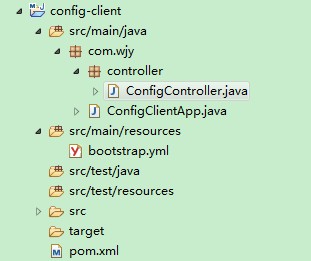
1、新建maven工程
2、pom.xml
<project xmlns="http://maven.apache.org/POM/4.0.0"

    xmlns:xsi="http://www.w3.org/2001/XMLSchema-instance"

    xsi:schemaLocation="http://maven.apache.org/POM/4.0.0 http://maven.apache.org/xsd/maven-4.0.0.xsd">

    <modelVersion>4.0.0</modelVersion>

    <groupId>com.wjy</groupId>

    <artifactId>config-client</artifactId>

    <version>0.0.1-SNAPSHOT</version>

    <parent>

        <groupId>org.springframework.boot</groupId>

        <artifactId>spring-boot-starter-parent</artifactId>

        <version>1.5.2.RELEASE</version>

        <relativePath /> <!-- lookup parent from repository -->

    </parent>

    <properties>

        <project.build.sourceEncoding>UTF-8</project.build.sourceEncoding>

        <project.reporting.outputEncoding>UTF-8</project.reporting.outputEncoding>

        <java.version>1.8</java.version>

    </properties>

    <dependencies>

        <dependency>

            <groupId>org.springframework.cloud</groupId>

            <artifactId>spring-cloud-starter-config</artifactId>

        </dependency>

        <dependency>

            <groupId>org.springframework.boot</groupId>

            <artifactId>spring-boot-starter-web</artifactId>

        </dependency>

        <dependency>

            <groupId>org.springframework.boot</groupId>

            <artifactId>spring-boot-starter-test</artifactId>

            <scope>test</scope>

        </dependency>

    </dependencies>

    <dependencyManagement>

        <dependencies>

            <dependency>

                <groupId>org.springframework.cloud</groupId>

                <artifactId>spring-cloud-dependencies</artifactId>

                <version>Dalston.RC1</version>

                <type>pom</type>

                <scope>import</scope>

            </dependency>

        </dependencies>

    </dependencyManagement>

    <build>

        <plugins>

            <plugin>

                <groupId>org.springframework.boot</groupId>

                <artifactId>spring-boot-maven-plugin</artifactId>

            </plugin>

        </plugins>

    </build>

    <repositories>

        <repository>

            <id>spring-milestones</id>

            <name>Spring Milestones</name>

            <url>https://repo.spring.io/milestone</url>

            <snapshots>

                <enabled>false</enabled>

            </snapshots>

        </repository>

    </repositories>

</project>
3、bootstrap.yml
应用启动先读取bootstrap.yml ,然后读取远程配置中心配置,然后再读取application.yml配置。
server:

    port: 8881

#spring.cloud.config.label 指明远程仓库的分支

#spring.cloud.config.profile指明配置文件类型  dev-开发环境  test-测试环境 pro-正式环境

#spring.cloud.config.uri 指明配置服务中心的网址

spring:

    application:

        name: config-client

    cloud:

        config:

            label: master

            profile: dev

            uri: http://134.32.80.196:8889/
注意点:yml配置文件冒号后面要跟一个空格。
4、controller
package com.wjy.controller;

import org.springframework.beans.factory.annotation.Value;

import org.springframework.web.bind.annotation.RequestMapping;

import org.springframework.web.bind.annotation.RestController;

@RestController

public class ConfigController {

    @Value("${version}")

    String versionstr;

    @RequestMapping(value = "/getVersion")

    public String getVersion () {

        return versionstr;

    }

}
启动类
package com.wjy;

import org.springframework.boot.SpringApplication;

import org.springframework.boot.autoconfigure.SpringBootApplication;

@SpringBootApplication

public class ConfigClientApp {

    public static void main(String[] args) {

        SpringApplication.run(ConfigClientApp.class, args);

    }

}
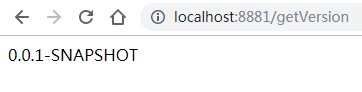
5、测试验证
http://localhost:8881/getVersion
五、配置免重启自动刷新
1、使用spring-boot-starter-actuator的refresh
2、与github的webhook、svn的hook进行配合刷新;
六、配置中心高可用
将config-server、config-client都可以注册到注册中心作为微服务管理。
参考:
Config 配置中心与客户端的使用与详细
Spring Cloud 配置中心的基本用法
配置自动更新
【Spring Cloud学习之五】配置中心的更多相关文章
- spring cloud学习(六) 配置中心-自动更新
上一篇学习了spring cloud config的基本使用,但发现有个问题,就是每次更改配置后,都需要重启服务才能更新配置,这样肯定是不行的.在上网查资料了解后,spring cloud支持通过AM ...
- spring cloud学习(五) 配置中心
Spring Cloud Config为服务端和客户端提供了分布式系统的外部化配置支持.配置服务中心采用Git的方式存储配置文件,因此我们很容易部署修改,有助于对环境配置进行版本管理. 一.配置中心 ...
- Spring Cloud Config的配置中心获取不到最新配置信息的问题
Spring Cloud Config的配置中心获取不到最新配置信息的问题 http://blog.didispace.com/spring-cloud-tips-config-tmp-clear/
- 跟我学SpringCloud | 第六篇:Spring Cloud Config Github配置中心
SpringCloud系列教程 | 第六篇:Spring Cloud Config Github配置中心 Springboot: 2.1.6.RELEASE SpringCloud: Greenwic ...
- Spring Cloud Config 实现配置中心,看这一篇就够了
Spring Cloud Config 是 Spring Cloud 家族中最早的配置中心,虽然后来又发布了 Consul 可以代替配置中心功能,但是 Config 依然适用于 Spring Clou ...
- Spring Cloud Config(配置中心)
每天学习一点点 编程PDF电子书.视频教程免费下载:http://www.shitanlife.com/code 一.简介 Spring Cloud Config为分布式系统中的外部配置提供服务器和客 ...
- Spring Cloud Config 分布式配置中心使用教程
一.简介 在分布式系统中,由于服务数量巨多,为了方便服务配置文件统一管理,实时更新,所以需要分布式配置中心组件.在Spring Cloud中,有分布式配置中心组件spring cloud config ...
- Spring Cloud 2-Config 分布式配置中心(七)
Spring Cloud Config 1.github配置 2.服务端配置 pom.xml application.xml Application.java 3.配置和命名 1. 配置加载顺序 ...
- Spring Cloud Config 分布式配置中心【Finchley 版】
一. 介绍 1,为什么需要配置中心? 当服务部署的越来越多,规模越来越大,对应的机器数量也越来越庞大,靠人工来管理和维护服务的配置信息,变得困难,容易出错. 因此,需要一个能够动态注册和获取服务信息的 ...
随机推荐
- G6 知识点
Viser 一个基于 G2 实现的,为数据可视化工程师量身定制的工具. Viser-Graph 一个基于 G6 实现的,为呈现关系型数据的定制化工具. Mode 是 G6 提供的图上事件的管理机制. ...
- 非阻塞IO的实现方式
1.状态轮询: 2.状态订阅: 3.完成回掉:
- iOS的事件派发
dispatchPreprocessedEventFromEventQueue 先定位:hittest * thread #1, queue = 'com.apple.main-thread', st ...
- 关于“Error: listen EADDRINUSE: address already in use 127.0.0.1:3000”
运行vue项目的时候报 Error: listen EADDRINUSE: address already 这个错,表示3000端口号被占用. 解决方法: 1.打开cmd,执行 netstat -n ...
- 比较两个CSV的方法的探索
1.开始时,我用ultraEdit来简单比较,需要排序,而且比较的结果也有限 2.Excel也有这样的功能,可是好复杂 3.而后,发现dbeaver这个tools,利用JDBC Driver(csvj ...
- [RN] React Native 解决 使用 阿里巴巴 矢量图标库 iconfont 图标不垂直居中问题
React Native 解决 使用 阿里巴巴 矢量图标库 iconfont 图标不垂直居中问题 解决方法: 添加 size, line-height ,值为和 height 一样的高度. 例如: ...
- Linux OOM一二三
Linux开发一般会遇到“/proc/sys/vm/overcommit_memory”,即文件/etc/sysctl.conf中的vm.overcommit_memory,Overcommit的意思 ...
- 修改 oracle xe 默认中文字符集成为:SIMPLIFIED CHINESE_CHINA.ZHS16GBK
修改 oracle xe 默认中文字符集成为:SIMPLIFIED CHINESE_CHINA.ZHS16GBK Oracle XE 执行安装程序后,很简单的默认为 SIMPLIFIED CHINE ...
- OpenFOAM——不对称突变管道中的低雷诺数流动
本算例来自<ANSYS Fluid Dynamics Verification Manual>中的VMFL064: Low Reynolds Number Flow in a Channe ...
- 数位dp技巧
一个奇怪的东西 正反都能dp!: 正常我们数位dp都是从高到低,以这样的方式保证其小于给定数-> ll n; int num[N],l; ll dp[]; ll dfs(int p,int li ...