
013 mint-ui
一:概述
1.中文文档
https://mint-ui.github.io/#!/en
2.安装包

二:mt-button的使用
主要是介绍css-component
1.程序
在App.vue下面写
<template>

  <div>

    <h1>这是 App 组件</h1>

    <router-link to="/account">Account list</router-link>

    <router-link to="/goodlist">Goodslist list</router-link>

    <router-view></router-view>

    <br>

    <mt-button type="primary">primary</mt-button>

    <mt-button type="default">default</mt-button>

    <mt-button type="danger">danger</mt-button>

    <br>

    <mt-button size="small" type="primary">small</mt-button>

    <mt-button size="large" type="danger">large</mt-button>

    <mt-button size="normal" type="primary">normal</mt-button>

    <br>

    <mt-button disabled>disabled</mt-button>

    <br>

    <mt-button plain>plain</mt-button>

    <br>

    <mt-button icon="back">back</mt-button>

    <mt-button icon="more">更多</mt-button>

  </div>

</template>

<script>

</script>

<style>

</style>
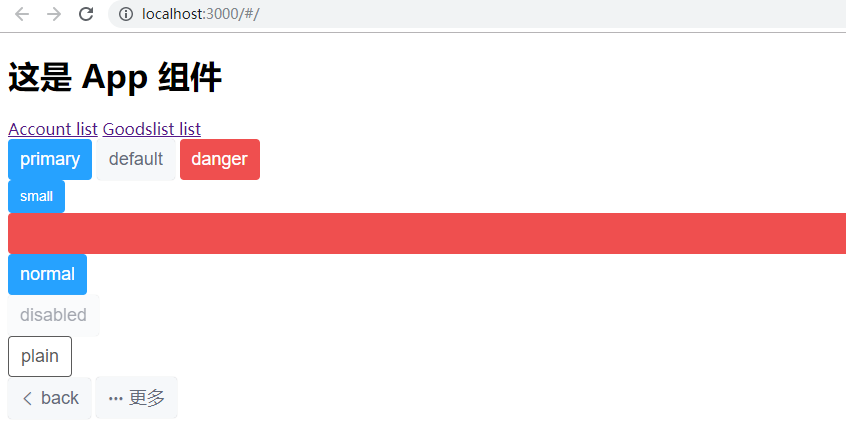
2.效果
三:toast的使用
主要是介绍js component
1.需求说明一下
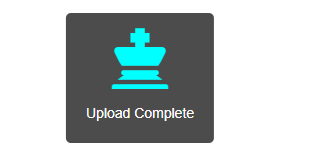
刷新进页面弹出提示框,然后等页面数据刷新结束之后,就自动关闭弹框
包括弹框图标,以及变色
2.新建一个app.css
用于图标变色
.mytoast i{

    color: aqua !important;

}
3.使用bootstrap的图标
所以,需要引用包。同时,将新建的css引入
修改main.js如下:
// js的主要入口

console.log("ok")

import Vue from 'vue'

//引用vue-router,然后和vue产生关系

import VueRouter from 'vue-router'

Vue.use(VueRouter)

//MintUI

import MintUI from 'mint-ui'

import 'mint-ui/lib/style.css'

Vue.use(MintUI)

//bootstrap的样式

import 'bootstrap/dist/css/bootstrap.css'

import './css/app.css'

import app from './App.vue'

import router from './router.js'

var vm = new Vue({

    el:'#app',

    render:c=>c(app),

    router

})
4.App.vue代码如下
<template>

  <div>

    <h1>这是 App 组件</h1>

    <router-link to="/account">Account list</router-link>

    <router-link to="/goodlist">Goodslist list</router-link>

    <router-view></router-view>

    <br>

    <mt-button type="primary" @click="show">primary</mt-button>

    <mt-button type="default">default</mt-button>

    <mt-button type="danger">danger</mt-button>

    <br>

    <mt-button size="small" type="primary">small</mt-button>

    <mt-button size="large" type="danger">large</mt-button>

    <mt-button size="normal" type="primary">normal</mt-button>

    <br>

    <mt-button disabled>disabled</mt-button>

    <br>

    <mt-button plain>plain</mt-button>

    <br>

    <mt-button icon="back">back</mt-button>

    <mt-button icon="more">更多</mt-button>

  </div>

</template>

<script>

  import {Toast} from 'mint-ui';

  export default {

    data(){

      return {

        toastTnstance:null

      };

    },

    created(){

        this.getList();

      },

    methods:{

      //模拟获取样表的方法

      getList(){

        this.show();

        setTimeout(() => {

          this.toastTnstance.close();

        }, 2000);

      },

      show(){

        this.toastTnstance=Toast({

          message: 'Upload Complete',

          position: 'bottom',

          duration: -1,

          iconClass: 'glyphicon glyphicon-king',    //图标

          className:'mytoast'   //自定义toast样式

        });

      }

    }

  }

</script>

<style>

</style>
5.效果
四:按需导入
1.导包

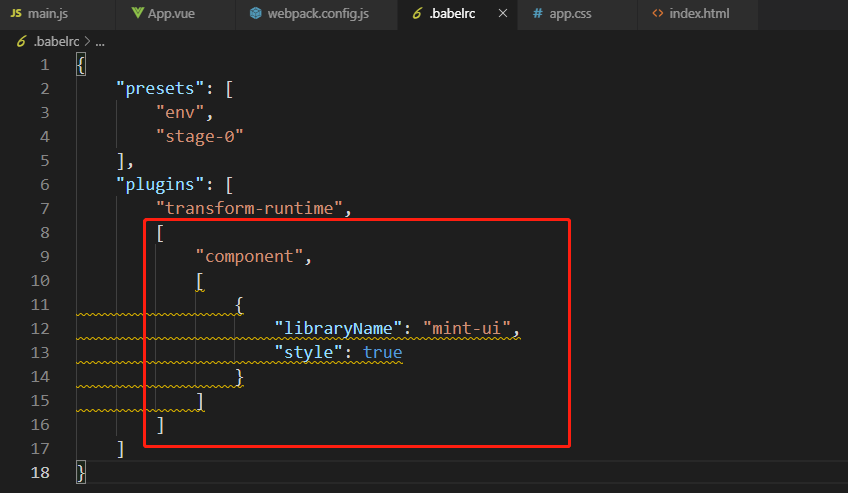
2.在.babelrc中修改
3.引入需要的组件
main.js
// js的主要入口

console.log("ok")

import Vue from 'vue'

//引用vue-router,然后和vue产生关系

import VueRouter from 'vue-router'

Vue.use(VueRouter)

//MintUI,这种是全部导入

// import MintUI from 'mint-ui'

// import 'mint-ui/lib/style.css'

// Vue.use(MintUI)

//按需导入

import {Button} from 'mint-ui'

Vue.component(Button.name,Button)

//bootstrap的样式

import 'bootstrap/dist/css/bootstrap.css'

import './css/app.css'

import app from './App.vue'

import router from './router.js'

var vm = new Vue({

    el:'#app',

    render:c=>c(app),

    router

})
013 mint-ui的更多相关文章
- vue mint UI
vue 与mint UI 结合开发手机app html5页面 api 文档 http://mint-ui.github.io/#!/zh-cn
- 基于VUE.JS的移动端框架Mint UI
Mint UI GitHub:github.com/ElemeFE/mint 项目主页:mint-ui.github.io/# Demo:elemefe.github.io/mint- 文档:mint ...
- vue mint ui 手册文档对于墙的恐惧
http://www.cnblogs.com/smallteeth/p/6901610.html npm 安装 推荐使用 npm 的方式安装,它能更好地和 webpack 打包工具配合使用. npm ...
- Mint UI文档
Mint UI文档:http://elemefe.github.io/mint-ui/#/ 一.Mint UI的安装和基本用法. 1.NPM :npm i mint-ui -S 建议使用npm进行安装 ...
- 新建一个基于vue.js+Mint UI的项目
上篇文章里面讲到如何新建一个基于vue,js的项目(详细文章请戳用Vue创建一个新的项目). 该项目如果需要组件等都需要自己去写,今天就学习一下如何新建一个基于vue.js+Mint UI的项目,直接 ...
- iView webapp / Mint UI / MUI [前端UI]
前端UI iView webapp一套高质量的 微信小程序 UI 组件库 https://weapp.iviewui.com/?from=iview Mint UI 基于 Vue.js 的移动端组件库 ...
- Mint UI 使用指南
上来直接在webpack里将Mint UI引入项目,发现各种问题.饿了么组件库文档太坑了,好多地方写错,有些该说明的地方没说,比如例子里单文件.vue组件里用的类post-css处理器,我一直使用SA ...
- Mint UI Example的运行
Mint -UI是新推出的移动端UI框架 官网 不过官网上的文档例子不是很全面. 建议下载他们提供的example来学习. 1.examplle源码下载地址 2.打开项目,我这里使用webstorm, ...
- vuetify,vux,Mint UI 等框架的选择
vuetify: https://vuetifyjs.com/zh-Hans/getting-started/quick-start NutUI:https://github.com/jdf2e/nu ...
- Vue移动组件库Mint UI的安装与使用
一.什么是 Mint UI 1.Mint UI 包含丰富的 CSS 和 JS 组件,可以提升移动端开发效率 2.Mint UI 按需加载组件 3.Mint UI 轻量化 二.Mint UI 的安装 1 ...
随机推荐
- 怎么解决前端线上Bug
有一种八阿哥(Bug),叫"在我电脑上是好的呀". 有一种解决方式,叫"你去好好排查一下你自己的代码". 有一种控诉,叫"这绝不是后端的问题" ...
- win10 LTSC系统 安装应用商店和纸牌合集,解决从应用商店安装Solitaire Collection纸牌打开空白的问题
家里台式机换了win10系统,想给老妈玩那个纸牌游戏(我也超喜欢的!. 发现这个系统没有自带纸牌游戏Microsoft Solitaire Collection, 过分的是,连应用商店都没有...呵呵 ...
- 假设检验、T检验
假设检验初步: https://cosx.org/2010/11/hypotheses-testing t检验:https://mangowu97.github.io/%E5%82%BB%E7%93% ...
- PAT甲级1015题解——令人迷茫的翻译
题目分析: 本题计算过程简单,但翻译令我迷茫:题意读清楚很重要(反正我是懵逼了)对于一个10进制的数,如果它是一个素数,把它转换成d进制,再将这个序列逆序排,这个逆序的d进制数的10进制表示如果也是素 ...
- 26、pathlib文件系统模块(了解)
一.pathlib库官方定义 pathlib 是Python内置库,Python 文档给它的定义是 Object-oriented filesystem paths(面向对象的文件系统路径).path ...
- 16、Python面向对象进阶
一.对象的继承 Python中支持一个类同时继承多个父类 class Parent1: pass class Parent2: pass class Sub1(Parent1, Parent2): p ...
- nginx 获取源IP 获取经过N层Nginx转发的访问来源真实IP
1. nginx 配置文件中获取源IP的配置项 proxy_set_header Host $host; proxy_set_header X-Real-IP $remote_addr; #一般的we ...
- 没有内置小鹤双拼的rime输入法就是差劲
没有内置小鹤双拼的rime输入法就是差劲,还特立独行,搞什么繁体~ 没有内置小鹤双拼的rime输入法就是差劲,还特立独行,搞什么繁体~ 没有内置小鹤双拼的rime输入法就是差劲,还特立独行,搞什么繁体 ...
- React于React native的渲染机制
面向virtual DOM编程 vs 面向native componet编程: 状态编程引起的UI变化会全部提交到native compnent然后走平台原来的渲染流程. The DOM is jus ...
- 硬币游戏1——打表&&记忆化搜索
题目 Alice和Bo在玩这样一个游戏,给定 $k$ 个数字 $a_1, a_2,..,a_k$.一开始有 $x$ 枚硬币,Alice和Bob轮流取硬币.每次所取的硬币的枚数一定要在 $k$ 个数当中 ...