
013 mint-ui
一:概述
1.中文文档
https://mint-ui.github.io/#!/en
2.安装包

二:mt-button的使用
主要是介绍css-component
1.程序
在App.vue下面写
<template>

  <div>

    <h1>这是 App 组件</h1>

    <router-link to="/account">Account list</router-link>

    <router-link to="/goodlist">Goodslist list</router-link>

    <router-view></router-view>

    <br>

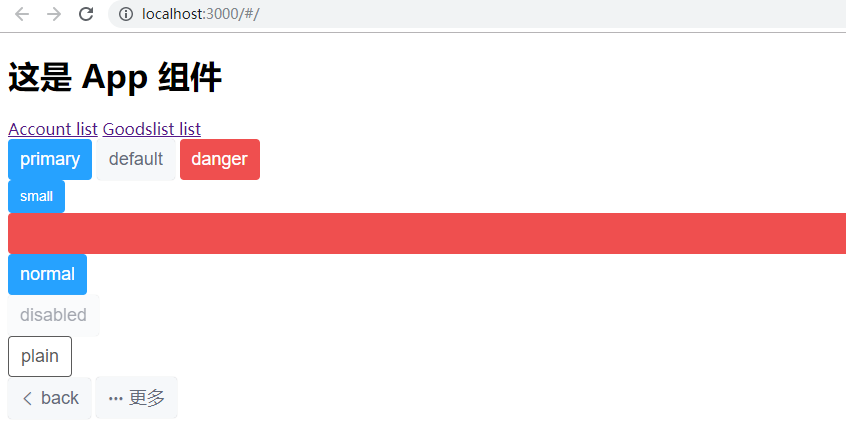
    <mt-button type="primary">primary</mt-button>

    <mt-button type="default">default</mt-button>

    <mt-button type="danger">danger</mt-button>

    <br>

    <mt-button size="small" type="primary">small</mt-button>

    <mt-button size="large" type="danger">large</mt-button>

    <mt-button size="normal" type="primary">normal</mt-button>

    <br>

    <mt-button disabled>disabled</mt-button>

    <br>

    <mt-button plain>plain</mt-button>

    <br>

    <mt-button icon="back">back</mt-button>

    <mt-button icon="more">更多</mt-button>

  </div>

</template>

<script>

</script>

<style>

</style>
2.效果
三:toast的使用
主要是介绍js component
1.需求说明一下
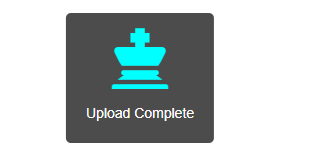
刷新进页面弹出提示框,然后等页面数据刷新结束之后,就自动关闭弹框
包括弹框图标,以及变色
2.新建一个app.css
用于图标变色
.mytoast i{

    color: aqua !important;

}
3.使用bootstrap的图标
所以,需要引用包。同时,将新建的css引入
修改main.js如下:
// js的主要入口

console.log("ok")

import Vue from 'vue'

//引用vue-router,然后和vue产生关系

import VueRouter from 'vue-router'

Vue.use(VueRouter)

//MintUI

import MintUI from 'mint-ui'

import 'mint-ui/lib/style.css'

Vue.use(MintUI)

//bootstrap的样式

import 'bootstrap/dist/css/bootstrap.css'

import './css/app.css'

import app from './App.vue'

import router from './router.js'

var vm = new Vue({

    el:'#app',

    render:c=>c(app),

    router

})
4.App.vue代码如下
<template>

  <div>

    <h1>这是 App 组件</h1>

    <router-link to="/account">Account list</router-link>

    <router-link to="/goodlist">Goodslist list</router-link>

    <router-view></router-view>

    <br>

    <mt-button type="primary" @click="show">primary</mt-button>

    <mt-button type="default">default</mt-button>

    <mt-button type="danger">danger</mt-button>

    <br>

    <mt-button size="small" type="primary">small</mt-button>

    <mt-button size="large" type="danger">large</mt-button>

    <mt-button size="normal" type="primary">normal</mt-button>

    <br>

    <mt-button disabled>disabled</mt-button>

    <br>

    <mt-button plain>plain</mt-button>

    <br>

    <mt-button icon="back">back</mt-button>

    <mt-button icon="more">更多</mt-button>

  </div>

</template>

<script>

  import {Toast} from 'mint-ui';

  export default {

    data(){

      return {

        toastTnstance:null

      };

    },

    created(){

        this.getList();

      },

    methods:{

      //模拟获取样表的方法

      getList(){

        this.show();

        setTimeout(() => {

          this.toastTnstance.close();

        }, 2000);

      },

      show(){

        this.toastTnstance=Toast({

          message: 'Upload Complete',

          position: 'bottom',

          duration: -1,

          iconClass: 'glyphicon glyphicon-king',    //图标

          className:'mytoast'   //自定义toast样式

        });

      }

    }

  }

</script>

<style>

</style>
5.效果
四:按需导入
1.导包

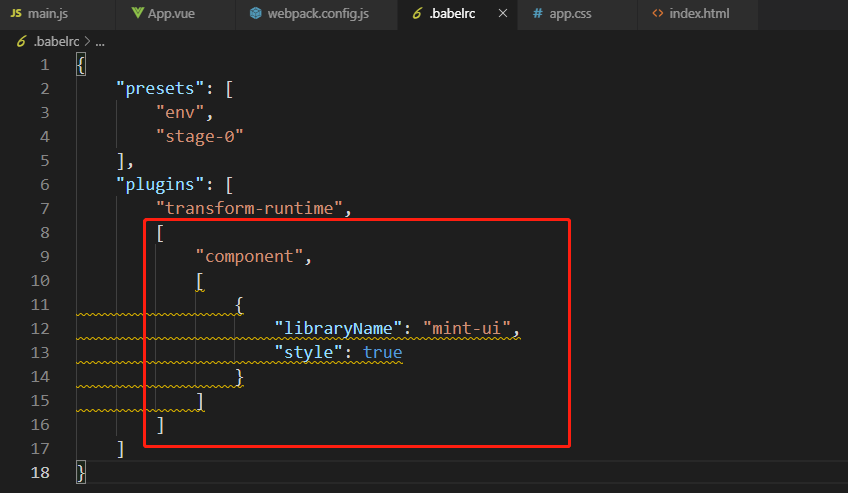
2.在.babelrc中修改
3.引入需要的组件
main.js
// js的主要入口

console.log("ok")

import Vue from 'vue'

//引用vue-router,然后和vue产生关系

import VueRouter from 'vue-router'

Vue.use(VueRouter)

//MintUI,这种是全部导入

// import MintUI from 'mint-ui'

// import 'mint-ui/lib/style.css'

// Vue.use(MintUI)

//按需导入

import {Button} from 'mint-ui'

Vue.component(Button.name,Button)

//bootstrap的样式

import 'bootstrap/dist/css/bootstrap.css'

import './css/app.css'

import app from './App.vue'

import router from './router.js'

var vm = new Vue({

    el:'#app',

    render:c=>c(app),

    router

})
013 mint-ui的更多相关文章
- vue mint UI
vue 与mint UI 结合开发手机app html5页面 api 文档 http://mint-ui.github.io/#!/zh-cn
- 基于VUE.JS的移动端框架Mint UI
Mint UI GitHub:github.com/ElemeFE/mint 项目主页:mint-ui.github.io/# Demo:elemefe.github.io/mint- 文档:mint ...
- vue mint ui 手册文档对于墙的恐惧
http://www.cnblogs.com/smallteeth/p/6901610.html npm 安装 推荐使用 npm 的方式安装,它能更好地和 webpack 打包工具配合使用. npm ...
- Mint UI文档
Mint UI文档:http://elemefe.github.io/mint-ui/#/ 一.Mint UI的安装和基本用法. 1.NPM :npm i mint-ui -S 建议使用npm进行安装 ...
- 新建一个基于vue.js+Mint UI的项目
上篇文章里面讲到如何新建一个基于vue,js的项目(详细文章请戳用Vue创建一个新的项目). 该项目如果需要组件等都需要自己去写,今天就学习一下如何新建一个基于vue.js+Mint UI的项目,直接 ...
- iView webapp / Mint UI / MUI [前端UI]
前端UI iView webapp一套高质量的 微信小程序 UI 组件库 https://weapp.iviewui.com/?from=iview Mint UI 基于 Vue.js 的移动端组件库 ...
- Mint UI 使用指南
上来直接在webpack里将Mint UI引入项目,发现各种问题.饿了么组件库文档太坑了,好多地方写错,有些该说明的地方没说,比如例子里单文件.vue组件里用的类post-css处理器,我一直使用SA ...
- Mint UI Example的运行
Mint -UI是新推出的移动端UI框架 官网 不过官网上的文档例子不是很全面. 建议下载他们提供的example来学习. 1.examplle源码下载地址 2.打开项目,我这里使用webstorm, ...
- vuetify,vux,Mint UI 等框架的选择
vuetify: https://vuetifyjs.com/zh-Hans/getting-started/quick-start NutUI:https://github.com/jdf2e/nu ...
- Vue移动组件库Mint UI的安装与使用
一.什么是 Mint UI 1.Mint UI 包含丰富的 CSS 和 JS 组件,可以提升移动端开发效率 2.Mint UI 按需加载组件 3.Mint UI 轻量化 二.Mint UI 的安装 1 ...
随机推荐
- RabbitMQ基本概念(二)-RabbitMQ消息队列架构与基本概念
没错我还是没有讲怎么安装和写一个HelloWord,不过快了,这一章我们先了解下RabbitMQ的基本概念. RabbitMQ架构 说是架构其实更像是应用场景下的架构(自己画的有点丑,勿嫌弃) 从图中 ...
- 面试常问的join
少壮不努力,老大徒伤悲 工作大半辈子了,来到个陌生的过度,从零开始,像个应届毕业生一样投入茫茫人才市场,碰的满头包. 凡是涉及到sql server的都会问,join的问题,不烦记录下: SQL的jo ...
- SpringBoot解决跨域请求拦截
前言 同源策略:判断是否是同源的,主要看这三点,协议,ip,端口. 同源策略就是浏览器出于网站安全性的考虑,限制不同源之间的资源相互访问的一种政策. 比如在域名https://www.baidu.co ...
- SpringBoot + Nginx 配置HTTPS的一次经历
最近公司开发了一款小程序的应用,但是小程序为了保证数据安全,强制要求使用HTTPS,然后就不得不去配置了一下. 之前在php开发的项目上配置过一次,使用的是wdcp的控制台程序,配置起来很简单,不需要 ...
- C++编写动态库(.DLL)给C#调用方法
1.在头文件中按照如下格式编写函数申明 extern "C" __declspec(dllexport) double __stdcall Add(double a, double ...
- Centos 7 kubernetes集群搭建
一.环境准备 Kubernetes支持在物理服务器或虚拟机中运行,本次使用虚拟机准备测试环境,硬件配置信息如表所示: IP地址 节点角色 CPU Memory Hostname 磁盘 192.168. ...
- [加密]非对称加密STM32实现
转自:https://blog.csdn.net/kangerdong/article/details/82432701 把所有的准备工作都做完了以后,可以将加密算法移植到我们具体的项目中去了,在ST ...
- commix 命令注入工具
关于系统命令注入,可以参考这篇文章:命令攻击介绍 系统命令注入场景 在对企业进行安全测试时候,很少会发现系统注入漏洞.这是因为大部分情况下代码业务主要是数据操作.文件操作.逻辑处理和api接口调用等, ...
- loadrunner中web_submit_data与web_submit_form区别
以loadrunner自带的订票系统为例 当选择红框选中的模式时,所录脚本如下:回放时可以正常回放,登录成功 选另一种所录脚本如下:回放时登录不成功,session失效, 其中web_submit_f ...
- 摘:Selenium api学习
selenium: selenium2(WebDriver) API1.1 下载selenium2.0的包 官方download包地址:http://code.google.com/p/seleniu ...