
spring boot 之注册
注册数据库 使用spring boot 之登录笔记 的数据库
在server 层
User create(String username, String password, String email);
去serverimpl 实现
@Override

    @Transactional

    public User create(String username, String password, String email) {

        User user = userRepository.findByUsername(username);

        if (user == null) {

            User newuser = new User();

            newuser.setUsername(username);

            newuser.setEmail(email);

            String md5password;

            String tokenmd5;

            try {

                md5password = MD5Until.md5(password);

                tokenmd5 = MD5Until.md5(username + password);

            } catch (Exception e) {

                md5password = password;

                tokenmd5 = username;

            }

            newuser.setPassword(md5password);

            newuser.setToken(tokenmd5);

            userRepository.save(newuser);

            redisTemplate.delete("Plan_user");

            return newuser;

        }

        throw new PanExection(ResultEmus.USER_EXIT);

    }
去开发对于的controller层
@GetMapping("/reg")
public ModelAndView reg(ModelAndView model) {
    return new ModelAndView("register");
}
@PostMapping("/reg")
public ModelAndView regs(ModelAndView model, @Valid UserForm userVo, BindingResult bindingResult) {
    if (bindingResult.hasErrors()) {
        model.addObject("error", bindingResult.getFieldError().getDefaultMessage());
        model.setViewName("register");
        return model;
    }
    try {
        User user = userSerice.create(userVo.getUsername(), userVo.getPassword(), userVo.getEmail());
        return new ModelAndView("redirect:/plan/logins");
    } catch (PanExection e) {
        model.addObject("error", e.getMessage());
        model.setViewName("register");
        return model;
    }

}
PanExection.java

@Getter

public class PanExection extends RuntimeException {

    private Integer code;

    public PanExection(ResultEmus resultEmuns) {

        super(resultEmuns.getMessage());

        this.code = resultEmuns.getCode();

    }

    public PanExection(CaseResultEmus resultEmuns) {

        super(resultEmuns.getMessage());

        this.code = resultEmuns.getCode();

    }

    public PanExection(Integer code, String message) {

        super(message);

        this.code = code;

    }

}
userForm
@Data

public class UserForm {

    @NotEmpty(message = "用户名不能为空")

    private String username;

    @NotEmpty(message = "密码不能为空")

    private String password;

    @Email(message = "邮箱格式错误")

    private String email;

}
开发对应的register.html代码
<!DOCTYPE html>
<html xmlns:th="http://www.thymeleaf.org"> <head>
<!-- Required meta tags -->
<meta charset="utf-8">
<meta name="viewport" content="width=device-width, initial-scale=1, shrink-to-fit=no">
<title>AutoTestPlatform</title>
<!-- plugins:css -->
<link rel="stylesheet" href="../../node_modules/mdi/css/materialdesignicons.min.css">
<!-- endinject -->
<!-- plugin css for this page -->
<!-- End plugin css for this page -->
<!-- inject:css -->
<link rel="stylesheet" href="../../css/style.css">
<!-- endinject -->
</head> <body>
<div class="body-wrapper">
<div class="page-wrapper">
<main class="content-wrapper auth-screen">
<div class="mdc-layout-grid">
<div class="mdc-layout-grid__inner">
<div class="mdc-layout-grid__cell stretch-card mdc-layout-grid__cell--span-4">
</div>
<div class="mdc-layout-grid__cell stretch-card mdc-layout-grid__cell--span-4">
<div class="mdc-card">
<section class="mdc-card__primary bg-white">
<form th:action="@{/reg}" method="post">
<div>
<!--/*@thymesVar id="error" type=""*/-->
<span id="basic-addon0"> </span>
<span style="font-size: 12px;color: red" th:text="${error}" aria-describedby="basic-addon0"></span>
<br />
</div>
<div class="mdc-layout-grid">
<div class="mdc-layout-grid__inner"> <div class="mdc-layout-grid__cell stretch-card mdc-layout-grid__cell--span-12">
<label class="mdc-text-field w-100">
<input type="text" class="mdc-text-field__input" name="username">
<span class="mdc-text-field__label">用户名</span>
<div class="mdc-text-field__bottom-line"></div>
</label>
</div>
<div class="mdc-layout-grid__cell stretch-card mdc-layout-grid__cell--span-12">
<label class="mdc-text-field w-100">
<input type="password" class="mdc-text-field__input" name="password">
<span class="mdc-text-field__label">密码</span>
<div class="mdc-text-field__bottom-line"></div>
</label>
</div>
<div class="mdc-layout-grid__cell stretch-card mdc-layout-grid__cell--span-12">
<label class="mdc-text-field w-100">邮箱
<input type="text" class="mdc-text-field__input" name="email">
<div class="mdc-text-field__bottom-line"></div>
</label>
</div> <div class="mdc-layout-grid__cell stretch-card mdc-layout-grid__cell--span-12">
<button class="mdc-button mdc-button--raised w-100" data-mdc-auto-init="MDCRipple">
注册
</button>
</div>
</div>
</div>
</form>
</section>
</div>
</div>
<div class="mdc-layout-grid__cell stretch-card mdc-layout-grid__cell--span-4">
</div>
</div>
</div>
</main>
</div>
</div>
<!-- body wrapper -->
<!-- plugins:js -->
<script src="../../node_modules/material-components-web/dist/material-components-web.min.js"></script>
<script src="../../node_modules/jquery/dist/jquery.min.js"></script>
<!-- endinject -->
<!-- Plugin js for this page-->
<!-- End plugin js for this page-->
<!-- inject:js -->
<script src="../../js/misc.js"></script>
<script src="../../js/material.js"></script>
<!-- endinject -->
<!-- Custom js for this page-->
<!-- End custom js for this page-->
</body> </html>
这也我们的关于注册界面代码书写完毕,启动调试
验证:
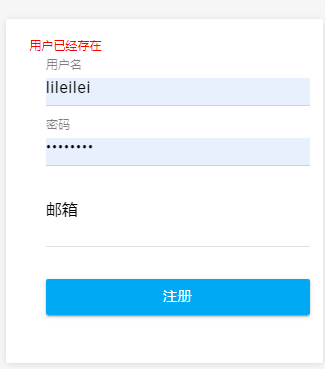
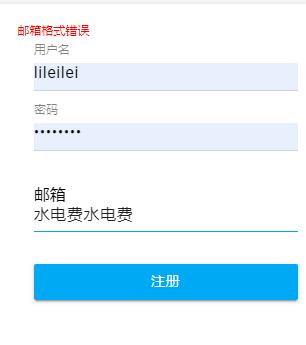
到此我们的注册界面开发完毕
spring boot 之注册的更多相关文章
- Spring boot 梳理 - Spring boot自动注册DispatcherServlet
spring boot提供的DispatcherServlet的name就是“dispatcherServlet”. 源码 public ServletRegistrationBean dispatc ...
- Spring boot中注册Servlet
Spring boot中注册Servlet 如何在spring boot项目中注册Servlet呢? 如何在spring boot项目中注册Servlet呢? 由于没有web.xml,无法直接在xml ...
- .net core + eureka + spring boot 服务注册与调用
.net core + eureka + spring boot 服务注册与简单的调用 假期小长假遇上疫情只能去家里蹲了,刚好有时间总结一下. 概述 微服务架构是当前比较火的分布式架构,本篇基于.ne ...
- spring boot 登录注册 demo (四) -- 体验小结
之前没有折腾过Spring,直接上来怼Spring Boot异常痛苦,参考着官网的guide(https://spring.io/guides)写了几个demo: spring boot 跑起来确是方 ...
- spring boot 登录注册 demo (二) -- 数据库访问
通过data-jpa来访问数据库 <dependency> <groupId>org.springframework.boot</groupId> <arti ...
- Spring Boot 自定义注册 Servlet、Filter、Listener
前言 在 Spring Boot 中已经移除了 web.xml 文件,如果需要注册添加 Servlet.Filter.Listener 为 Spring Bean,在 Spring Boot 中有两种 ...
- spring boot中注册拦截器
拦截器是动态拦截Action调用的对象.它提供了一种机制可以使开发者可以定义在一个action执行的前后执行的代码,也可以在一个action执行前阻止其执行,同时也提供了一种可以提取action中可重 ...
- Spring Boot之注册servlet三大组件
由于Spring Boot默认是以jar包的形式启动嵌入式的Servlet容器来启动Spring Boot的web应用是,没有web.xml配置文件 注册三大组件用以下方式 ServletRegist ...
- spring boot 登录注册 demo (一)
Welcome to Spring Boot 代码结构 src/main/java 下 controller层,路由功能dao层,数据库的访问domain,bean的存放service,业务层appl ...
随机推荐
- JavaScript HTML DOM元素节点常用操作接口
在文档对象模型 (DOM) 中,每个节点都是一个对象.DOM 节点有三个重要的属性 : 1. nodeName : 节点的名称 2. nodeValue :节点的值 3. nodeType :节点的类 ...
- SIM800A 建立网络
SIM800A是一款两频GSM/GPRS模块,为SMT封装.其性能稳定,外观小巧,性价比高 可以低功耗实现语音.SMS和数据信息的传输 数据传输 GPRS class 12:最大85.6 kbps(下 ...
- SAP ABAP的CI/CD解决方案
如今国外很多partners已经在尝试Jenkins + abapGit + 公有云搭建ABAP CI/CD环境了.ABAP系统的改动通过abapGit提交,触发Jenkins上部署的命令行脚本,脚本 ...
- Flask之flask-sqlalchemy
接下来基于这个Flask项目,我们要加入Flask-SQLAlchemy让项目变得生动起来 1.加入Flask-SQLAlchemy第三方组件 from flask import Flask # 导入 ...
- web服务版智能语音对话
在前几篇的基础上,我们有了语音识别,语音合成,智能机器人,那么我们是不是可以创建一个可以实时对象的机器人了? 当然可以! 一,web版智能对话 前提:你得会flask和websocket 1 ,创建f ...
- mysql 压力测试工具sysbench
2.1 只读示例 ./bin/sysbench --test=/usr/share/sysbench/tests/include/oltp_legacy/oltp.lua --mysql-host=1 ...
- Ubuntu 18.04 使用apt-get 华为源支持 arm64 鲲鹏处理器
网上搜的源,什么阿里云163等等的,都不支持arm64 执行以下代码,使用华为源 wget -O /etc/apt/sources.list https://repo.huaweicloud.com/ ...
- linux系统编程之进程(三)
今天继续学习进程相关的东东,继上节最后简单介绍了用exec函数替换进程映像的用法,今天将来深入学习exec及它关联的函数,话不多说,正式进入正题: exec替换进程映象: 对于fork()函数,它 ...
- LOJ#2764. 「JOI 2013 Final」JOIOI 塔
题目地址 https://loj.ac/problem/2764 题解 真的想不到二分...不看tag的话... 考虑二分答案转化为判定问题,那么问题就变成了能不能组合出x个JOI/IOI,考虑贪心判 ...
- PHP Web 木马扫描器
直接放在网站根目录运行即可 <?php /**************PHP Web木马扫描器************************/ /* [+] 版本: v1.0 */ /* [+ ...